The Google Chrome Dinosaur Game, In Real Life

[Ryan] wanted to hack the Google Chrome Dinosaur Game so he could control the dinosaur with his own movements. The game only requires two keyboard presses (up and down arrow keys), so controlling the game with the Arduino Keyboard library only requires a few simple function calls.

He uses the Arduino MKR board in his build, but notes any number of other boards would work as well. A force sensor detects his jumps and a stretch sensor detects him ducking. Both the stretch and force sensors are resistive transducers, so two simple voltage divider circuits (one for each sensor) are needed to convert changes in force to a voltage. You may need to adjust the sensor threshold to ensure the code responds to your movements, but [Ryan] makes that pretty easy to do in software as both thresholds are stored as global variables.

It’s a pretty simple hack, but could make for some good socially-distanced fun. What other hackable Google Chrome extensions do you like?

Continue reading “The Google Chrome Dinosaur Game, In Real Life”

Ewon Is An Expressive Robot With Google Assistant

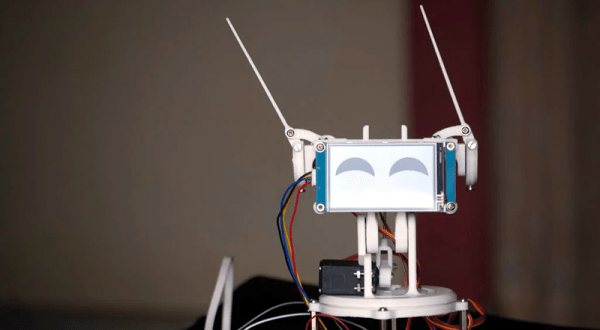
Had too much self-quarantine? [Sharathnaik] had, so he decided to build a robot companion named Ewon. Using a Raspberry Pi, Ewon isn’t a robot that moves around, but rather an expressive Google assistant. Using some servo-driven ears and a display, Ewon reacts to you based on keywords you use in your queries. For example, it might perk up and smile at the mention of ice cream. Or look unhappy if you mention sadness.

The project is simple because of the Google Assistant API. However, we liked the 3D printed body and some of the additional features the robot adds.

Continue reading “Ewon Is An Expressive Robot With Google Assistant”

Offline Dinosaur-Jumping Becomes A Real Workout

It’s great to see people are out there trying to find fun ways to exercise amid the current crisis. Although jumping up and down isn’t great for the knees, it does give decent cardio. But if you don’t have a rope or a puddle, we admit that jumping can lose its bounce pretty fast.

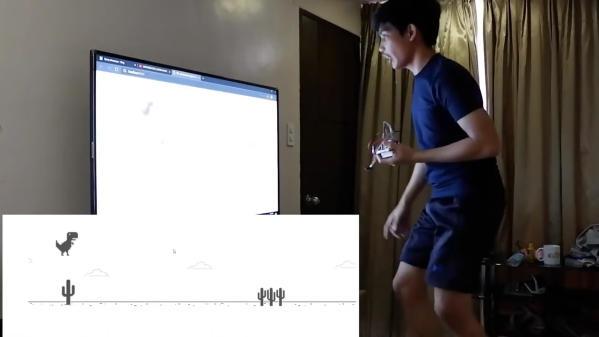
Quarantine has been a game-filled time for [fridaay]. Somewhere between a handful of FPS games, he decided to try to play Google’s offline dinosaur-based side scroller game by making the dinosaur spring over the saguaros whenever he physically jumps in the air. (Video, embedded below.)

Here’s how it works: [fridaay] holds a transmit circuit that consists of an Arduino UNO, an accelerometer module, and an nRF24L01 transceiver, all running on a 9 V battery. Whenever [fridaay] jumps, the accelerometer reads the change in Z and sends it to the receiving circuit, which is just another UNO and nRF. The receiving UNO is connected to a laptop and configured to press the space bar so the dinosaur canters over the cacti.

We’ve never been able to stay alive long enough in the game to see this happen, but apparently you need to crouch at some point in the game. [fridaay] has yet to implement a control for that, but we’re sure he’ll think of something. Jump past the break to see the video, and hit him up if you need the code.

If you have a lot of parts at your disposal, why not make a physical version?

Continue reading “Offline Dinosaur-Jumping Becomes A Real Workout”

A Farewell To YouTube Sub Counters Set To Break With API Change

Of all the things you never would have guessed you’d need just ten years ago, a YouTube subscriber counter would probably rank highly. You would have guessed that the little hits of dopamine accompanying each tick upward of a number would be so addictive?

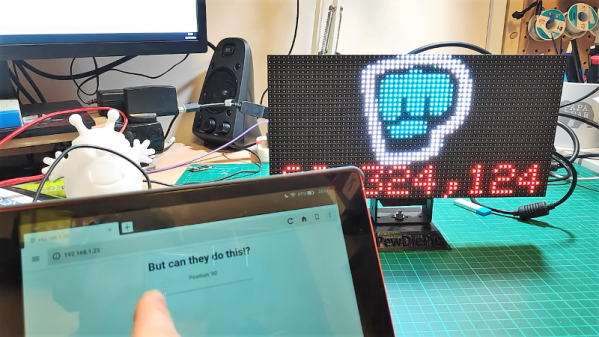
As it turns out, lots of people wanted to keep a running total of their online fans, and a bewilderingly varied ecosystem of subscriber counters has cropped up. All of them rely on the API that YouTube exposes for such purposes, which as [Brian Lough] points out is about to change and break every subscription counter ever made. In the YouTube sub counter space, [Brian] is both an enabler – he built an Arduino wrapper to fetch YT sub counts easily – and a serial builder of displays for other YouTubers. The video below shows a collection of his work, many based on RGB LED matrix display, like the one used in his Tetris-themed sub counter. They’re all well-built, nice to look at, and sadly, destined for obsolescence sometime in August when the API changes.

The details of the API changes were made public in April, and for the subs count it amounts to rounding the count and displaying large counts as, for instance, 510k as opposed to 510,023. We’re confident that [Brian] and other display builders will be able to salvage some of their counters with code changes, but others will probably require hardware changes. Thanks, YouTube.

Continue reading “A Farewell To YouTube Sub Counters Set To Break With API Change”

Microcontroller And IMU Team Up For Simple Flight Sim Controls

Classes are over at Cornell, and that means one thing: the students in [Bruce Land]’s microcontroller design course have submitted their final projects, many of which, like this flight control system for Google Earth’s flight simulator, find their way to the Hackaday tips line.

We actually got this tip several days ago, but since it revealed to us the previously unknown fact that Google Earth has a flight simulator mode, we’ve been somewhat distracted. Normally controlled by mouse and keyboard, [Sheila Balu] decided to give the sim a full set of flight controls to make it more realistic. The controls consist of a joystick with throttle, rudder pedals, and a small control panel with random switches. The whole thing is built of cardboard to keep costs down and to make the system easy to replicate. Interestingly, the joystick does not have the usual gimbals-mounted potentiometers to detect pitch and roll; rather, an IMU mounted on the top of the stick provides data on the stick position. All the controls talk to a PIC32, which sends the inputs over a serial cable to a Python script on the PC running Google Earth; the script simulates the mouse and keyboard commands needed to fly the sim. The video below shows [Sheila] taking an F-16 out for a spin, but despite being a pilot herself since age 16, she was curiously unable to land the fighter jet safely in a suburban neighborhood.

[Bruce]’s course looks like a blast, and [Sheila] clearly enjoyed it. We’re looking forward to the project dump, which last year included this billy-goat balancing Stewart platform, and a robotic ice cream topping applicator.

Continue reading “Microcontroller And IMU Team Up For Simple Flight Sim Controls”

Google Discovers Google+ Servers Are Still Running

Google is pulling the plug on their social network, Google+. Users still have the better part of a year to say their goodbyes, but if the fledgling social network was a ghost town before, news of its imminent shutdown isn’t likely to liven the place up. A quick check of the site as of this writing reveals many users are already posting their farewell messages, and while there’s some rallying behind petitions to keep the lights on, the majority realize that once Google has fallen out of love with a project there’s little chance of a reprieve.

To say that this is a surprise would be disingenuous. We’d wager a lot of you already thought it was gone, honestly. It’s no secret that Google’s attempt at a “Facebook Killer” was anything but, and while there was a group of dedicated users to be sure, it never attained anywhere near the success of its competition.

According to a blog post from Google, the network’s anemic user base isn’t the only reason they’ve decided to wind down the service. A previously undisclosed security vulnerability also hastened its demise, a revelation which will particularly sting those who joined for the privacy-first design Google touted. While this fairly transparent postmortem allows us to answer what ended Google’s grand experiment in social networking, there’s still one questions left unanswered. Where are the soon to be orphaned Google+ users supposed to go?

Continue reading “Google Discovers Google+ Servers Are Still Running”

Don’t Look Now, But Your Necklace Is Listening

There was a time when the average person was worried about the government or big corporations listening in on their every word. It was a quaint era, full of whimsy and superstition. Today, a good deal of us are paying for the privilege to have constantly listening microphones in multiple rooms of our house, largely so we can avoid having to use our hands to turn the lights on and off. Amazing what a couple years and a strong advertising push can do.

So if we’re going to be funneling everything we say to one or more of our corporate overlords anyway, why not make it fun? For example, check out this speech-to-image necklace developed by [Stephanie Nemeth]. As you speak, the necklace listens in and finds (usually) relevant images to display. Conceptually this could be used as an assistive communication technology, but we’re cool with it being a meme display device for now.

Hardware wise, the necklace is just a Raspberry Pi 3, a USB microphone, and a HyperPixel 4.0 touch screen. The Pi Zero would arguably be the better choice for hanging around your neck, but [Stephanie] notes that there’s some compatibility issues with Node.js on the Zero’s ARM6 processor. She details a workaround, but says there’s no guarantee it will work with her code.

The JavaScript software records audio from the microphone with SoX, and then runs that through the Google Cloud Speech-to-Text service to figure out what the wearer is saying. Finally it does a Google image search on the captured words using the custom search JSON API to find pictures to show on the display. There’s a user-supplied list of words to ignore so it doesn’t try looking up images for function words (such as “and” or “however”), though presumably it can also be used to blacklist certain imagery you might not want popping up on your chest in mixed company.

We’d be interested in seeing somebody implement this software on a Raspberry Pi powered digital frame to display artwork that changes based on what the people in the room are talking about. Like in Antitrust, but without Tim Robbins offing anyone.