Fail Of The Week: Don’t Tie Those Serial Lines High

Fail Of The Week is a long-running series here at Hackaday. Over the years we’ve been treated to a succession of entertaining, edifying, and sometimes downright sad cock-ups from many corners of the technological and maker world.

You might think that we Hackaday writers merely document the Fails of others, laughing at others’ misfortunes like that annoying kid at school. But no, we’re just as prone to failure as anyone else, and it is only fair that we eat our own dog food and tell the world about our ignominious disasters when they happen.

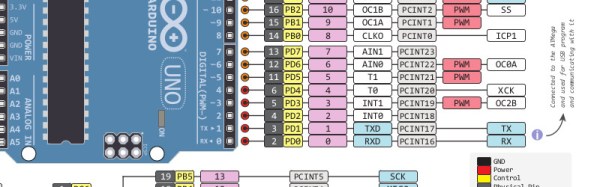
And so we come to my week. I had a test process to automate for my contract customer. A few outputs to drive some relays, a few inputs from buttons and microswitches. Reach for an Arduino Uno and a prototyping shield, divide the 14 digital I/O lines on the right into 7 outputs and 7 inputs. Route 7 to 13 into a ULN2003 to drive my relays, tie 0 to 6 high with a SIL resistor pack so I can trigger them with switches to ground. Job done, and indeed this is substantially the hardware the test rig ended up using.

So off to the Arduino IDE to write my sketch. No rocket science involved, a fairly simple set of inputs, outputs, and timers. Upload it to the Arduino, and the LED on pin 13 flashes as expected. Go for a well-deserved lunch as a successful and competent engineer who can whip up a test rig in no time.

Back at the bench refreshed by the finest British pub grub, I started up the PC, plugged the shield into the Arduino, and applied the power. My sketch worked. But wait! There’s a slight bug! Back to the IDE, change a line or two and upload the sketch.

And here comes my fail. The sketch wouldn’t upload, the IDE reported a COM port error. “Damn’ Windows 10 handling of USB serial ports”, I thought, as I’m not a habitual Windows user on my own machines. Then followed something I’ve not done for quite a while; diving into the Windows control panel to chase the problem. Because it had to be a Windows problem, right?
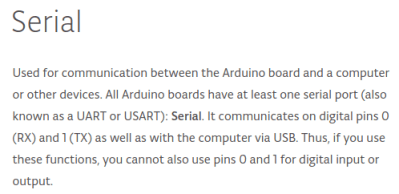
arduino-serial-pinsThe seasoned Arduinisti among you probably spotted my fail four paragraphs ago. We all know that pins 0 and 1 on an Arduino are shared with the serial port, but who gives it a second thought? I guess I’d always had the good fortune to drive those pins from lines which didn’t enforce a logic state, and had never ended up tying them high. Hold them to a logic 1, and the Arduino can’t do its serial thing so sketches stay firmly in the IDE.

I could have popped the shield off every time I wanted to upload a new sketch, but since in the event I didn’t need all those inputs I just lifted the links tying those pins high and shifted the other inputs up the line. And went home that evening a slightly less competent engineer whose ability to whip up a test rig in no time was a bit tarnished. Ho hum, at least the revised sketch worked and the test rig did its job exactly as it should.

So that’s my Fail Of The Week. What’s yours?

Header image: pighixxx.com, CC-BY-ND via MarkusJenkins


2013-09-05-Hackaday-Fail-tips-tileFail of the Week is a Hackaday column which celebrates failure as a learning tool. Help keep the fun rolling by writing about your own failures and sending us a link to the story — or sending in links to fail write ups you find in your Internet travels.

Hackaday Links: April 24, 2016

TruckThe Internet Archive has a truck. Why? Because you should never underestimate the bandwidth of a truck filled with old manuals, books, audio recordings, films, and everything else the Internet Archive digitizes and hosts online. This truck also looks really, really badass. A good thing, too, because it was recently stolen. [Jason Scott] got the word out on Twitter and eagle-eyed spotters saw it driving to Bakersfield. The truck of awesome was recovered, and all is right with the world. The lesson we learned from all of this? Steal normal cars. Wait. Don’t steal cars, but if you do, steal normal cars.

In a completely unrelated note, does anyone know where to get a 99-01 Chevy Astro / GMC Safari cargo van with AWD, preferably with minimal rust?

[Star Simpson] is almost famous around these parts. She’s responsible for the TacoCopter among other such interesting endeavours. Now she’s working on a classic. [Forrest Mims]’ circuits, making the notebook version real. These Circuit Classics take the circuits found in [Forrest Mims]’ series of notebook workbooks, print them on FR4, and add a real, solderable implementation alongside.

Everyone needs more cheap Linux ARM boards, so here’s the Robin Core. It’s $15, has WiFi, and does 720p encoding. Weird, huh? It’s the same chip from an IP webcam. Oooohhhh. Now it makes sense.

Adafruit has some mechanical keyboard dorks on staff. [ladyada] famously uses a Dell AT101 with Alps Bigfoot switches, but she and [Collin Cunningham] spent three-quarters of an hour dorking out on mechanical keyboards. A music video was the result. Included in the video: vintage Alps on a NeXT keyboard and an Optimus Mini Three OLED keyboard.

A new Raspberry Pi! Get overenthusiastic hype! The Raspberry Pi Model A+ got an upgrade recently. It now has 512MB of RAM

We saw this delta 3D printer a month ago at the Midwest RepRap festival in Indiana. Now it’s a Kickstarter. Very big, and fairly cheap.

The Rigol DS1054Zed is one of the best oscilloscopes you can buy for the price. It’s also sort of loud. Here’s how you replace the fan to make it quieter.

Here’s some Crowdfunding drama for you. This project aims to bring the Commodore 64 back, in both a ‘home computer’ format and a portable gaming console. It’s not an FPGA implementation – it’s an ARM single board computer that also has support for, “multiple SIDs for stereo sound (6581 or 8580).” God only knows where they’re sourcing them from. Some tech journos complained that it’s, “just a Raspberry Pi running an emulator,” which it is not – apparently it’s a custom ARM board with a few sockets for SIDs, carts, and disk drives. I’ll be watching this one with interest.

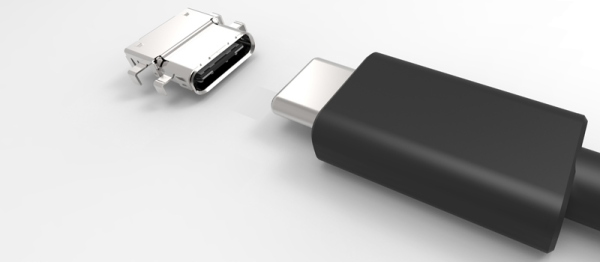
Hackaday Dictionary: USB Type C

USB cables? What a pain. You can never find the right type of connector when you need one, or you can’t figure out which way is up when you plug the cable in. These problems could be a thing of the past, though, with the latest version of the venerable USB connection: USB Type C. This new standard uses a single style of plug for both ends, so you can use cables either way around. The plugs also work both ways up, so you can plug it in with your eyes closed. Let’s take a look at what the USB type C connector means.

Continue reading “Hackaday Dictionary: USB Type C”

Embed With Elliot: Keeping It Integral

If there’s one thing that a lot of small microcontrollers hate (and that includes the AVR-based Arduini), it’s floating-point numbers. And if there’s another thing they hate it’s division. For instance, dividing 72.3 by 12.9 on an Arduino UNO takes around 32 microseconds and 500 bytes, while dividing 72 by 13 takes 14 microseconds and 86 bytes. Multiplying 72 by 12 takes a bit under 2.2 microseconds. So roughly speaking, dividing floats is twice as slow as dividing (16-bit) integers, and dividing at all is five to seven times slower than multiplying.

There’s a whole lot of the time that you just don’t care about speed. For instance, if you’re doing a calculation that only runs infrequently, it doesn’t matter if you’re using floats or slow division routines. But if you ever find yourself in a tight loop that’s using floating-point math and/or doing division, and you need to get a bit more speed, I’ve got some tips for you.

Some of these tips (in particular the integer division tricks at the end) are arcane wizardry — only to be used when the situation really calls for it. But if you’re doing the same calculations repeatedly, you can often gain a lot just by giving the microcontroller numbers in the format it natively understands. Have a little sympathy for the poor little silicon beasties trapped inside!

Continue reading “Embed With Elliot: Keeping It Integral”

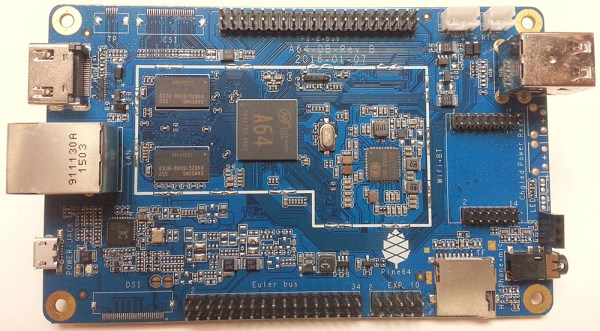
Pine64: The Un-Review

Even before the announcement and introduction of the Raspberry Pi 3, word of a few very powerful single board ARM Linux computers was flowing out of China. The hardware was there – powerful 64-bit ARM chips were available, all that was needed was a few engineers to put these chips on a board, a few marketing people, and a contract manufacturer.

One of the first of these 64-bit boards is the Pine64. Introduced to the world through a Kickstarter that netted $1.7 Million USD from 36,000 backers, the Pine64 is already extremely popular. The boards are beginning to land on the doorsteps and mailboxes of backers, and the initial impressions are showing up in the official forums and Kickstarter campaign comments.

I pledged $15 USD to the Pine64 Kickstarter, and received a board with 512MB of RAM, 4K HDMI, 10/100 Ethernet and a 1.2 GHz ARM Cortex A53 CPU in return. This post is not a review, as I can’t fully document the Pine64 experience. My initial impression? This is bad. This is pretty bad.

Continue reading “Pine64: The Un-Review”

Hackaday Reviews: Flir One Android

The Flir One thermal camera caused quite a stir when it was launched back in 2014. Both the Flir One and its prime competitor Seek Thermal represented the first “cheap” thermal cameras available to the public. At the heart of the Flir One was the Lepton module, which could be purchased directly from Flir Systems, but only in quantity. [Mike Harrison] jumped on board early, cutting into his Flir One and reverse engineering the Lepton module within, including the SPI data required to talk to it. He even managed to create the world’s smallest thermal imager using a the TFT screen from an Ipod Nano.

flircamA few things have changed since then. You can buy Lepton modules in single quantity at DigiKey now. Flir also introduced a second generation of the Flir One. This device contains an updated version of the Lepton. The new version has a resolution of 160 x 120 pixels, doubled from the original module. There are two flavors: The iOS version with a lightning port, and an Android version with a micro USB connector. I’m an Android user myself, so this review focuses on the Android edition.

The module itself is smaller than I expected. It comes with a snap-on case and a lanyard. While you’ll look a bit like a dork wearing the lanyard, it does come in handy to keep the imager from getting lost or dropped. The Flir One has an internal battery, which of course needs to be topped off before it can be used. Mine charged up in about half an hour.

Continue reading “Hackaday Reviews: Flir One Android”

Mike Harrison Exposes Hot Oil And High Voltage Of Ancient Live Projector

It’s amazing how quickly a technological pivot will erase the existence of what was previously a modern marvel. A great example of this is the live video projection technology known as the Eidophor. In the beginning there was film, and if you shined a light through it followed by a set of lenses you could project an image for all to enjoy. But what if you didn’t want to wait for film to be developed? What if you wanted to project live video, or real-time data for a room full of people who could not be served by even the biggest of the cathode-ray tubes of the time? This question led to the development of the Eidophor whose story has been all but lost.

Mike Harrison is trying to revive the details of this amazing engineering feat and presented his findings during his talk at the Hackaday | Belgrade conference. Mike is interested in technology that is “impractical, ridiculous, absurd, or stupidly expensive” and the Eidophor certainly ticks all of those boxes. Check it out below and join us after the break where we’ll touch on the myriad challenges of developing projection technology based on hot oil and high voltage.

Continue reading “Mike Harrison Exposes Hot Oil And High Voltage Of Ancient Live Projector”