GuardBunny Active RFID Protection Going Open Hardware

There are two sides to every coin. Instead of swiping or using a chip reader with your credit card, some companies offer wireless cards that you hold up to a reader for just an instant. How convenient for you and for anyone who might what to read that data for their own use. The same goes for RFID enabled passports, and the now ubiquitous keycards used for door access at businesses and hotels. I’m sure you can opt-out of one of these credit cards, but Gerald in human resources isn’t going to issue you a metal key — you’re stuck hauling around that RFID card.

It is unlikely that someone surreptitiously reading your card will unlock your secrets. The contactless credit cards and the keylock cards are actually calculating a response based on a stored key pair. But you absolutely could be tracked by the unique IDs in your cards. Are you being logged when passing by an open reader? And other devices, like public transit cards, may have more information stored on them that could be harvested. It’s not entirely paranoid to want to silence these signals when you’re not using them.

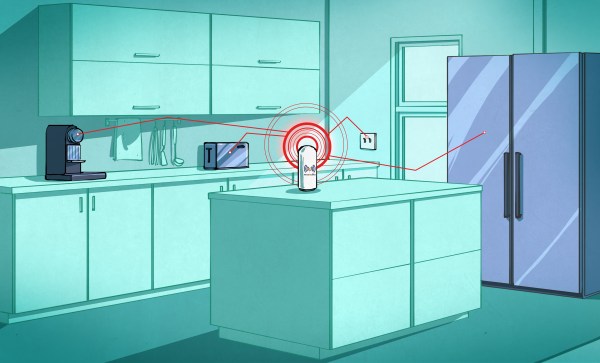
One solution is to all of this is to protect your wallet from would-be RFID pirates. At this point all I’m sure everyone is thinking of a tin-foil card case. Sure, that might work unless the malicious reader is very powerful. But there’s a much more interesting way to protect against this: active RFID scrambling with a project called GuardBunny. It’s a card that you place next to whatever you want to protect. It’s not really RFID — I’ll get that in a moment — but is activated the same way and spews erroneous bits back at any card reader. Kristin Paget has been working on GuardBunny for several years now. As of late she’s had less time for active development, but is doing a great thing by letting version 1 out into the world for others to hack on. In her talk at Shmoocon 2016 she walked through the design, demonstrated its functionality, and shared some suggestions for further improvement.

Continue reading “GuardBunny Active RFID Protection Going Open Hardware”

FAXing In 1843

By 2016, it is evident the FAX machine has peaked. Sure, you still see a few. There are even services that will let you send and receive FAXes via Internet–which could mean no FAX machine was involved at all. But looking back, you have to wonder where it all started. Most people had never seen a FAX machine until the late 1960s or early 1970s. It was 1980 before there was a standard. Some, like hams and weather service employees, were using them even earlier. But would it surprise you to know that the first experimental FAX machine appeared in 1843?

Wait a minute. Bell didn’t even build a telephone until 1875 (the patent issued in 1876). Turns out the first FAX machines didn’t work with a phone. They worked over a telegraph wire.

Continue reading “FAXing In 1843”

It’s Alive! — Badge For Hackaday Belgrade

Hackaday Belgrade — our first ever conference in Europe — is coming up fast. One of the really exciting things for me is the hardware badge which [Voja Antonic] designed for the conference. He’s done a great job with hardware choices and I think we’ve hit the sweet spot for badge hacking. Let’s jump into the hardware and firmware details after the break.

Get your ticket now for ten hours of talks and workshops, evening concerts, and of course badge hacking the entire time. Earlybird sales close Monday. We’re still in the process of going through talk proposals but we’ll publish a post next week announcing all of the speakers.

Continue reading “It’s Alive! — Badge For Hackaday Belgrade”

Do You Know Rufus Turner?

It is hard to be remembered in the electronics business. Edison gets a lot of credit, as does Westinghouse and Tesla. In the radio era, many people know Marconi and de Forest (although fewer remember them every year), but less know about Armstrong or Maxwell. In the solid-state age, we tend to remember people like Shockley (even though there were others) and maybe Esaki.

If you knew most or all of those names without looking them up, you are up on your electronics history. But do you know the name Rufus Turner?
Continue reading “Do You Know Rufus Turner?”

Hackaday Links: Valentine’s Day, 2016

A few months ago, we posted all the videos from the 2015 Hackaday SuperConference. Putting all of these videos up on YouTube isn’t the greatest idea, and thanks to [Jason Scott] of the Internet Archive and a little bit of sneakernetting, all the talks are also available on archive.org.

As an aside, the SuperCon was filmed on two Blackmagic URSA cameras. The resulting files for the talks on both cameras came in at a little over one Terabyte. These were edited down into the finished videos for YouTube, at around 20 Gigs per video. Once those hit the YouTube servers, they were converted once again (trust me, this made the most sense), and I was able to download the YouTube files and sneakernet all the talks to [Jason] on an 8GB thumb drive. The next time we do this, we’ll build a Xeon-based SLI Titan rig for video editing.

The German TV show NEO MAGAZIN Royale asked their viewers to send in old hardware. These old floppy drives, scanners, typewriters, hard drives, modems, and speakers would be turned into instruments. The German hip hop group, Fettes Brot performed Die da on these instruments with sufficiently electronic results.

You know we’re having a con in Belgrade on April 9, right? Wait, I’m sorry. 9 April. The call for proposals ends very, very soon. If you have something cool to talk about, fill out the form.

Montreal has a lot of great architecture, all of which is coincidently held together by Robertson screws. Now one of those famous old buildings, the Saint-Sulpice Library is turning into a hackerspace or tech incubator sort of thing thanks to a $17 Million Canadian Peso investment from the city and province.

Just a reminder that the NL6621 WiFi SoC exists. It’s been called the ESP8266 killer, but some of the most recent posts on the English language development forum are for buying phentermine – an appetite suppressant – without a prescription. The people demand information, so if you have some, put it in the comments below.

Did you know Hackaday has an email newsletter? It’s true! Sign up here!

Valentines

Hacklet 95 – More Pi Zero Contest Entries

We’re well into the second week of the Hackaday and Adafruit ultimate team-up: The Raspberry Pi Zero Contest. The entries have been flying in! As of Thursday evening, we have 70 projects vying for one of 10 Raspberry Pi Zeros, and one of three $100 gift certificates to The Hackaday Store. This week on The Hacklet, we’re going to take a look at a few more contest entries.

blueberryWe start with [Sean Hodgins] and Blueberry Zero – Keep your Pi in your Pocket. [Sean] can’t leave home without his Raspberry Pi Zero. Carrying all the cables, adapters, and accessories required to power up a tiny Linux computer can be a chore though. He’s created a solution to simplify all that with Blueberry Zero. This custom PCB hat contains an HC-05 style Bluetooth module connected to the Pi’s console port. Serial alone doesn’t make for a standalone Pi, so [Sean] added a LiPo battery and charger chip. A switching power supply boosts the 4.2 V LiPo output up to the 5 V required for the Pi. Now when [Sean] just has to hack out some python code, all he needs to do is open a Bluetooth connection from a cell phone, tablet, or computer.

pcpower[Doihaveto] is using his Pi Zero to manage a desktop PC. PC Power allows him to not only turn his computer on or off, but to disconnect the mains power completely. [Doihaveto’s] PC does have Wake On Lan, but he’s run into problems when the system has failed. His Pi provides an extra layer of protection in case things don’t wake up as expected. The board contains two optoisolated connections to a host PC. One is the power switch output, the other is the power LED input. If all else fails, PC Power also can control a solid state relay to completely isolate the computer from mains power. PC Power uses a web interface created with Python using the flask web framework.

pifoldNext up is [tomwsmf] with PiFold. Like [Sean] up above, [tomwsmf] can’t leave home without his Pi Zero. Rather than hacking code though, [tomwsmf] is serving up media. PiFold is a wallet containing a Pi Zero powered server. The Anyfesto software package runs on the Pi, serving up songs and files via WiFi. Audio is also transmitted on 88.1 MHz FM via PiFM. A 2500 mAh battery pack coupled with a boost converter keeps PiFold humming away. When the battery needs a charge, [tomwsmf] can use a small solar panel to top up the battery while staying green.


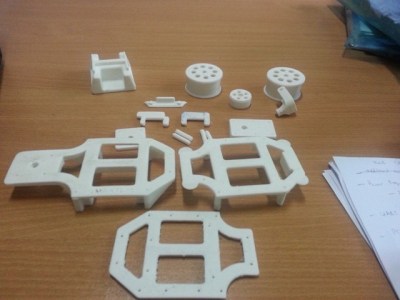
retrorobotFinally, we have [Fredrik J] with Retrofit Robot. The 1980’s were a golden age of toy robots from Japan. Tomy, Nikko, and a few other companies created devices like Omnibot, which were ahead of their time. [Fredrick] still has his vintage Nikko RC-ROBOT, but it has long since ceased to function. The Pi Zero presents a perfect opportunity to give the little guy a new lease on life. [Fredrik’s] goal is to keep the RC-ROBOT’s original look while giving him new functions. The old DC motors are being replaced with closed loop servos. The servos will be controlled by an Adafruit 16 channel servo driver board. The next step for Retrofit Robot is a big 6000 mAh battery. We can’t wait to see how this one turns out!

If you want to see more entrants to Hackaday and Adafruit’s Pi Zero contest, check out the submissions list! If you don’t see your project on that list, you don’t have to contact me, just submit it to the Pi Zero Contest! That’s it for this week’s Hacklet. As always, see you next week. Same hack time, same hack channel, bringing you the best of Hackaday.io!

Embed With Elliot: Audio Playback With Direct Digital Synthesis

Direct-digital synthesis (DDS) is a sample-playback technique that is useful for adding a little bit of audio to your projects without additional hardware. Want your robot to say ouch when it bumps into a wall? Or to play a flute solo? Of course, you could just buy a cheap WAV playback shield or module and write all of the samples to an SD card. Then you wouldn’t have to know anything about how microcontrollers can produce pitched audio, and could just skip the rest of this column and get on with your life.

Harmonic distortion down ~45db on an Arduino
~45db signal to noise ratio from an Arduino

But that’s not the way we roll. We’re going to embed the audio data in the code, and play it back with absolutely minimal additional hardware. And we’ll also gain control of the process. If you want to play your samples faster or slower, or add a tremolo effect, you’re going to want to take things into your own hands. We’re going to show you how to take a single sample of data and play it back at any pitch you’d like. DDS, oversimplified, is a way to make these modifications in pitch possible even though you’re using a fixed-frequency clock.

The same techniques used here can turn your microcontroller into a cheap and cheerful function generator that’s good for under a hundred kilohertz using PWM, and much faster with a better analog output. Hackaday’s own [Bil Herd] has a nice video post about the hardware side of digital signal generation that makes a great companion to this one if you’d like to go that route. But we’ll be focusing here on audio, because it’s easier, hands-on, and fun.

Continue reading “Embed With Elliot: Audio Playback With Direct Digital Synthesis”