A Miniature Laptop You Can Build Yourself

Over the last couple of years, we’ve seen more and more hackers building their own custom computers. We’re not just talking casemods here; enabled by advancements in desktop 3D printing and increasingly powerful boards such as the Raspberry Pi 4, these are machines designed and built from the ground up to meet the creator’s particular set of needs and desires.

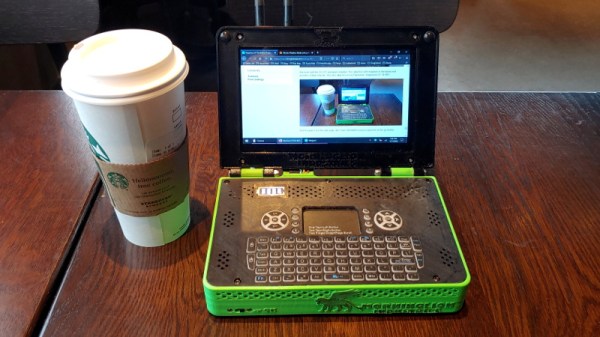
A perfect example of this trend is the Rasptop 2.0, a remarkably practical design for a 3D printed miniature laptop. Despite the name, you don’t even need to use the Raspberry Pi if you don’t want to. Creator [Morgan Lowe] has designed the Rasptop to take other single board computers (SBCs) such as the Asus Tinker Board or even the Intel Atom powered Up Board. So whether you want an energy efficient ARM machine running Linux for development, or a mobile Windows box for on the go gaming, you can use the same printed parts.
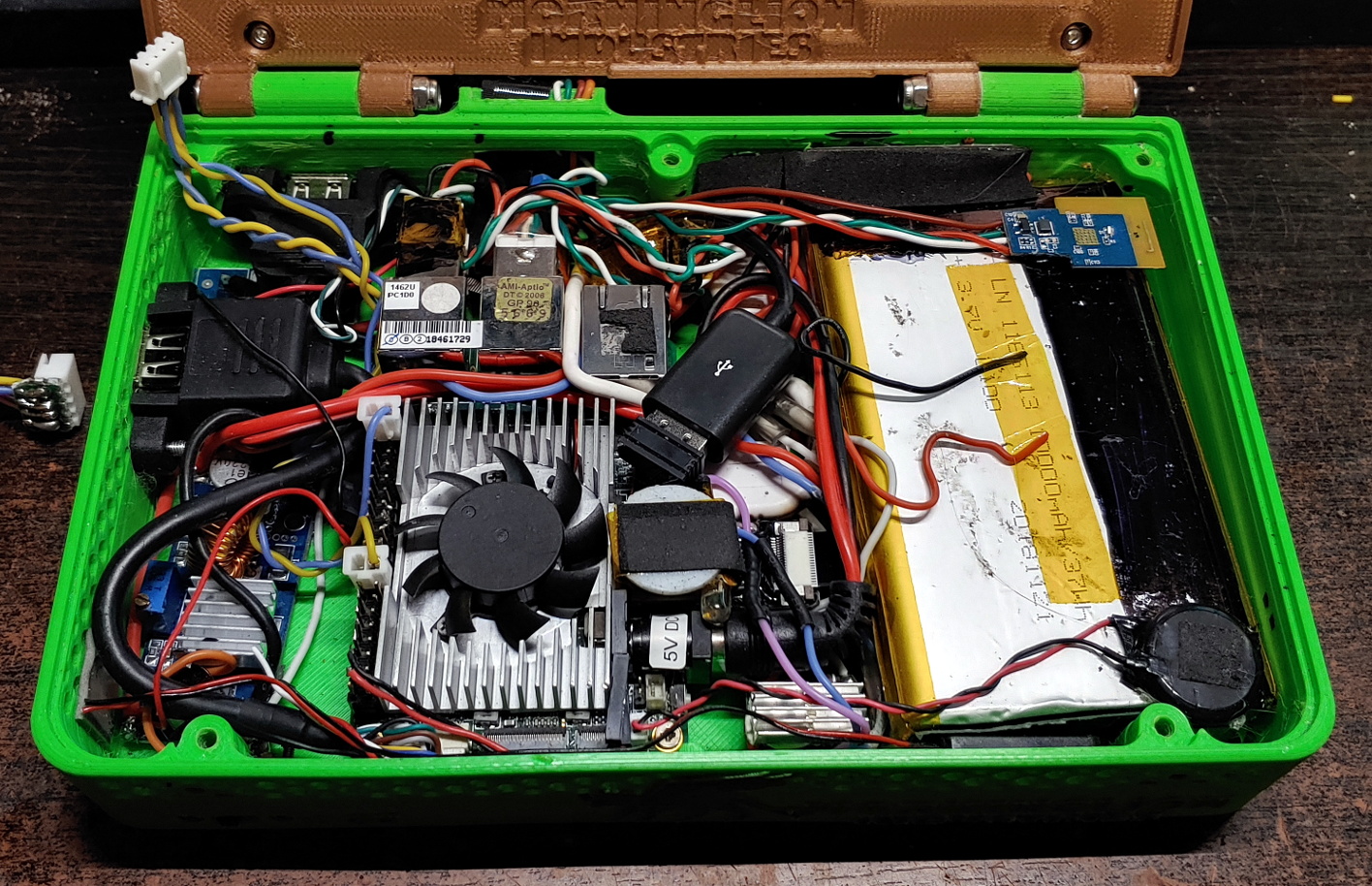
At the most basic level, the Rasptop 2.0 is just a hollow box with a hinged compartment for a screen mounted on top. You’re free to equip it with whatever hardware you chose. If you’re after maximum runtime you could fill all the free space with batteries, or maybe install multiple hard drives if you’re a data horder in need of a mobile terminal. Even the various SBCs that [Morgan] has tested are really just suggestions. The choice is yours.

Perhaps also our favorite feature of the Rasptop is how he worked a keyboard into the design. Rather than just leaving a big rectangle in the STL for you to shove a mobile keyboard into, the top surface is designed to mount the PCB and membrane keypad of one of those mini wireless keyboards you see on all the import sites. Aside from the fact it’s a good deal chunkier than what we expect from modern mobile devices, it has a very finished and professional overall look.

Of course if you’d rather use all these powerful tools to build a computer that’s somewhat farther off the beaten track, your design could abandon the traditional computer form factors altogether.
How Low Can An ESP32 Go?

Many of us have experimented with the ESP32 microcontroller, attracted by its combination of WiFi and a powerful processor core, but how many of us will have explored all of its many on-board features? One of the more interesting capabilities of this chip comes in the form of its ultra-low-power (ULP) co-processor, an extra core that allows an ESP32 to function while sipping tiny quantities of power with the ever-hungry main cores turned off.

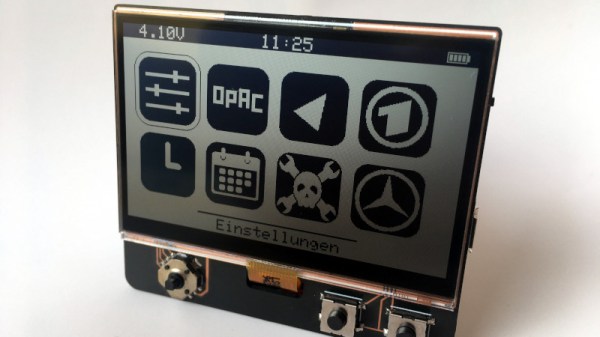
It’s a feature that [Max Kern] has used to great effect in his low power ESP32 handheld computer, where he’s paired the chip with a low-power Sharp Memory LCD and used the ESP32’s ULP core to keep the display alive while the ESP cores are sleeping. Software wise the device sports basic PDA and clock functionality including an RSS parser, all of which can be seen in the video below the break. Its inspiration came from Panic’s crank-equipped Playdate console, with which it shares the Sharp display.

Seeing this device reminds us of some of the badges featuring ESP32 power that we’ve seen over the last few years. An event badge creator has a constant battle to give the device enough battery life to last the distance. It’s a problem the designers of the SHA 2017 badge solved with an e-ink unit, but perhaps the Sharp display could offer a cost-effective alternative for new designs.

Continue reading “How Low Can An ESP32 Go?”

A Pocket-Sized Terminal For Mobile Python Hacking

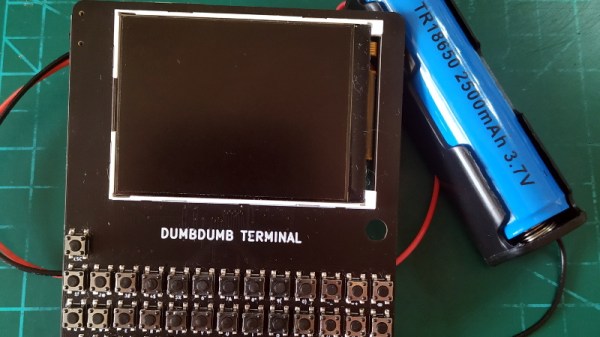
Inspired by the good old days when your computer would boot directly into BASIC, [Le Roux Bodenstein] has created a handheld device he calls “DumbDumb” that can drop you into a MicroPython environment at a moment’s notice. If that doesn’t interest you, think of it this way: it’s a (relatively) VT100 compatible serial terminal with a physical keyboard that can fit in your pocket.

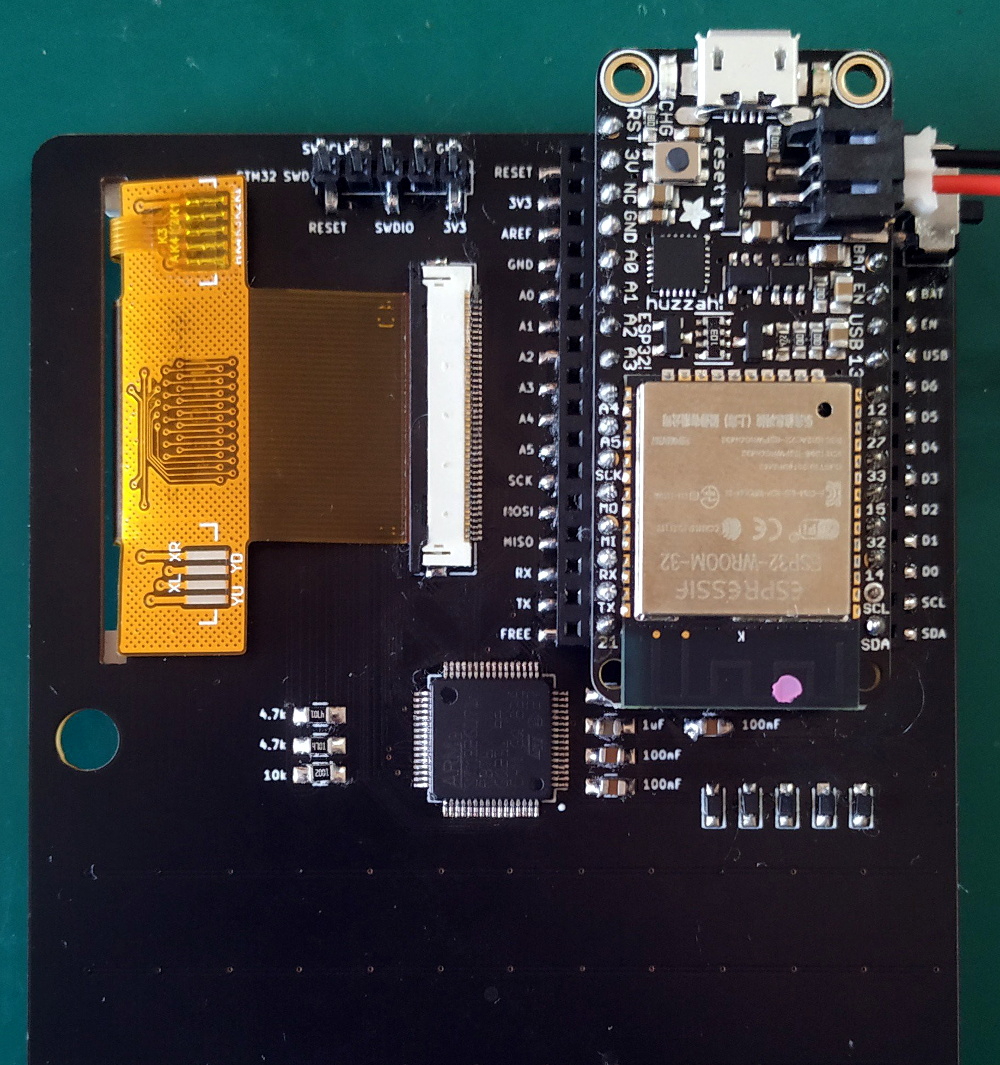
Being essentially just a dumb terminal (hence the name), there’s actually not a lot of hardware on the board. Beyond the 320×240 NewHaven 2.4 inch LCD, there’s just an STM32G071R8 microcontroller and a handful of passives. Plus the 57 tactile buttons that make up the keyboard, of course.

The MicroPython part comes in thanks to the spot on the back of the board that accepts an Adafruit Feather Wing. In this case, it’s the HUZZAH32 with an ESP32 on board, but it could work with other variants as well. With the wide array of Feather boards available, this terminal could actually be used for an array of applications.

So even if fiddling around with MicroPython isn’t your idea of a good time, there’s almost certainly some interesting software you could come up with for a tiny network-attached terminal like this. For example, it might be just what you need to start working on that LoRa pager system.

An Epic Quest To Build The Perfect Retro Handheld

It’s a good time to be a fan of classic video games. Most of us carry around a smartphone that’s more than capable of emulating pretty much everything from the 32-bit era on down, and if you want something a little more official, the big players like Sony and Nintendo have started putting out “retro” versions of their consoles. But even still, [Mangy_Dog] wasn’t satisfied. To get the portable emulation system of his dreams, he realized he’d have to design and build it himself.

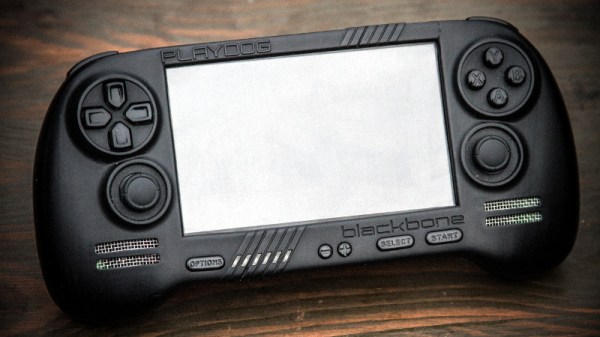
The resulting system, which he calls the “Playdog Blackbone”, is without a doubt one of the most impressive DIY builds we’ve ever seen. While there are still some issues that he’s planning on addressing in a later version of the hardware, it wouldn’t be an exaggeration to say that there’s commercially available game systems that didn’t have half as much thought put into them as the Blackbone.

Which is, incidentally, how this whole thing got started. The original plan was to buy one of those cheap emulation handhelds, which invariably seem to come in the form of a PSP clone, and fit it with a Raspberry Pi. But [Mangy_Dog] quickly realized that not only were they too small to get everything he wanted inside, but they also felt terrible in the hand. Since he wanted the final product to be comfortable to play, his first step was to design the case and get feedback on it from other retro game enthusiasts.

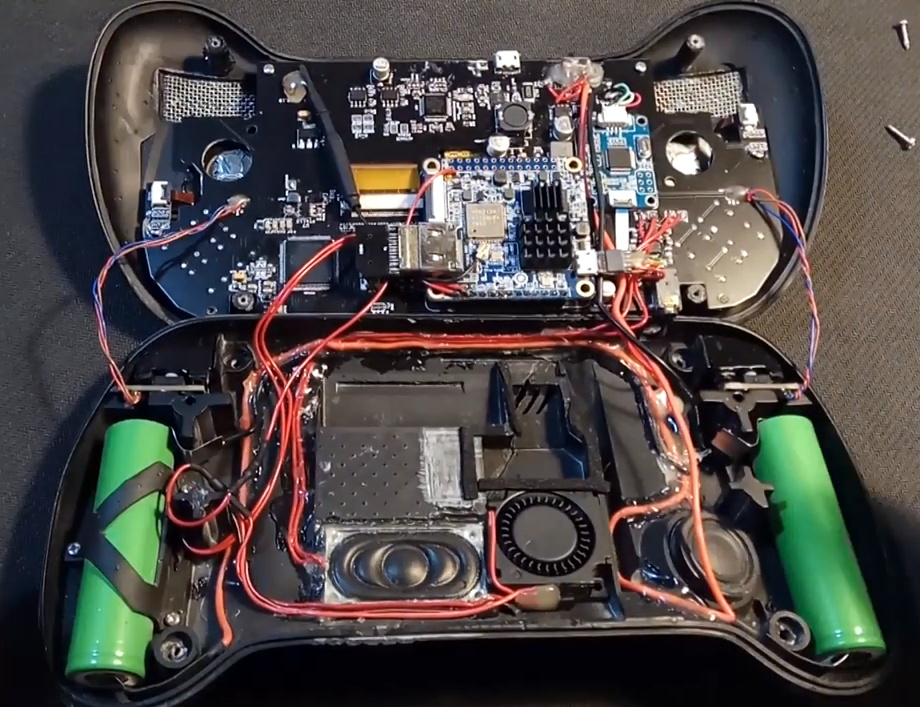
After a few iterations, he arrived at the design we see today. Once he printed the case out on his SLA printer, he could move on with fitting all of his electronics inside. This takes the form of a custom PCB “motherboard” which an Orange Pi Zero Plus2 (sorry Raspberry fans) connects to. There’s actually a surprising amount of room inside the case, enough for niceties like dual speakers and a fan complete with ducting to keep the board cool.

Unsurprisingly, [Mangy_Dog] says a lot of people have been asking him if they can buy their own version of the Blackbone, and have suggested he do a crowdfunding campaign to kick off mass production. While he’s looking at the possibility of resin or injection molding the case so he can produce a few more copies, on the whole, his attention has moved on to new projects. Which frankly, we can’t wait to see.

If you’re interested in slightly more modern games, we’ve seen a number of handhelds based on “trimmed” Nintendo Wii’s which you might be interested in. While they might not have the sleek external lines of the Blackbone, the work that goes into the electronics is nothing short of inspirational.

Continue reading “An Epic Quest To Build The Perfect Retro Handheld”

Building An Open Hardware EBook Reader

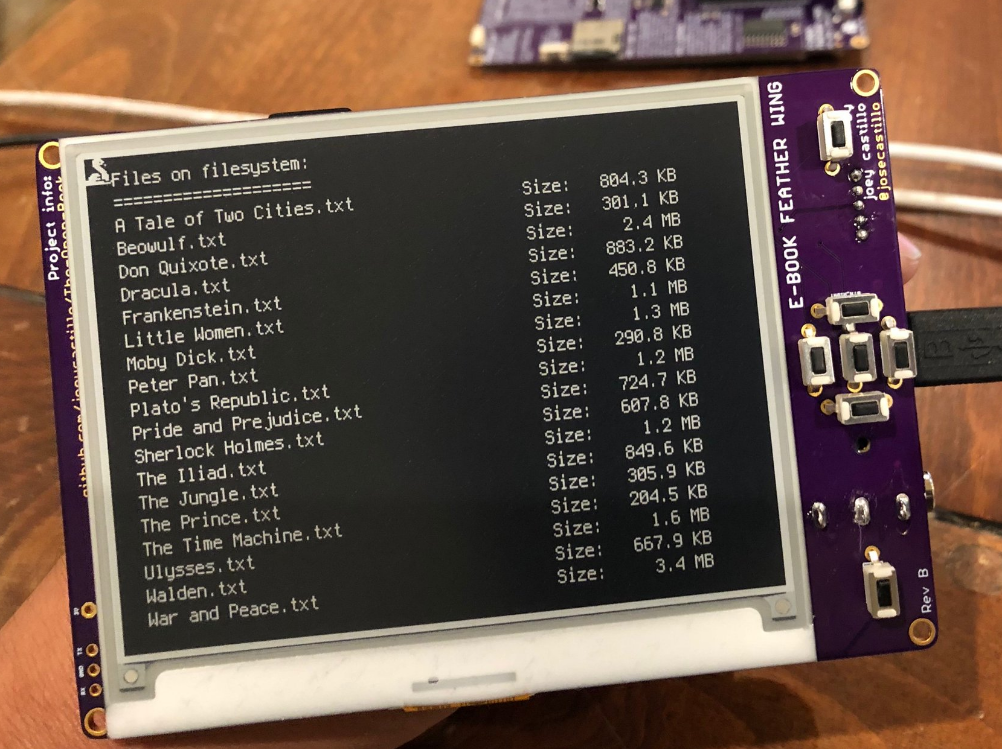
On the whole, hackers aren’t overly fond of other people telling them what they can and cannot do with the hardware or software they’ve purchased. Unfortunately, it’s becoming more and more difficult to avoid DRM and other Draconian rules and limitations as time goes on. Digital “eBooks” and the devices that are used to view them are often the subject of such scrutiny, which is why [Joey Castillo] has made it his mission to develop a open hardware eReader that truly belongs to the user.

[Joey] has been working on what he calls the “The Open Book Project” for a few months now, and he’s just recently announced that the first reader has been successfully assembled and powered up. As is usually the case, a few hardware issues were identified with this initial prototype. But it sounds like the device was largely functional, and only a few relatively minor tweaks to the board layout and components should be necessary before the hardware is ready for the masses.

An earlier prototype, using the Adafruit Feather

If you’re feeling a bit of déjà vu seeing this, don’t worry. The Open Book Project has taken a somewhat circuitous path to get to this first prototype, and [Joey] had previously developed and built the “eBook Feather Wing”. While they look very similar, that earlier incarnation required an Adafruit Feather to operate and was used to help refine the firmware and design concepts that would go into the final hardware.

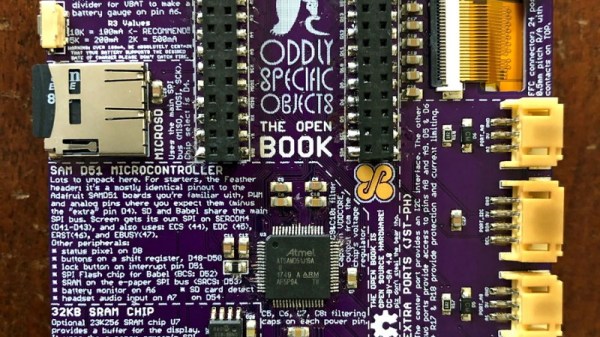
The Open Book is powered by a ATSAMD51N19A processor with a GD25Q16 2MB flash chip to hold the CircuitPython code, and a microSD slot to store the actual book files. It also features support for audio output via a standard 3.5 mm headset jack, an RGB status LED, and expansion ports that tap into the I2C interface for adding whatever other hardware you can dream up.

One of the most interesting aspects of this Creative Commons licensed reader is the extensive self documentation [Joey] has included on the silkscreen. Every major component on the back of the PCB has a small description of its purpose and in some cases even a breakdown of the pin assignments. The idea being that it not only makes the device easier to assemble and debug, but that it can also explain to the curious user what everything on the board does and why it’s necessary. It’s a concept that makes perfect sense given the goals of the Open Book Project, and something that we frankly would love to see more of.

[Marc Juul] presented his work on a FOSS operating system for older-model Kindles at HOPE XII as a way to avoid Orwellian monitoring of the user’s reading habits, so it’s interesting to see somebody take this idea to the next level with completely libre reader hardware. Unfortunately none of this addresses the limited availability of DRM-free eBooks, but one step at a time.

The Cutest Oscilloscope Ever Made

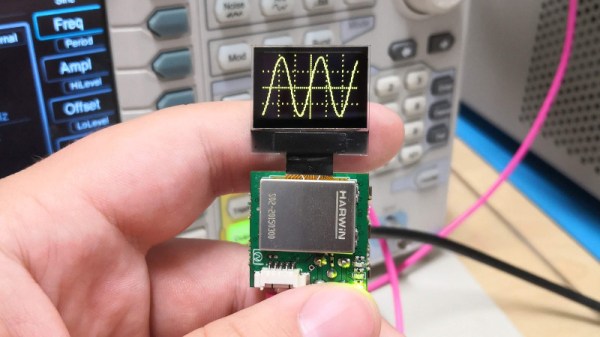
If you thought your handheld digital oscilloscope was the most transportable of your signal analyzing tools, then you’re in for a surprise. This oscilloscope made by [Mark Omo] measures only one square inch, with the majority of the space taken up by the OLED screen.

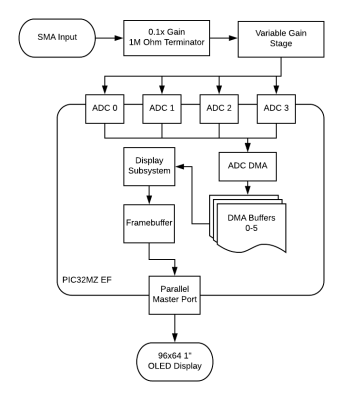
It folds out into an easier instrument to hold, and admittedly does require external inputs, so it’s not exactly a standalone tool. The oscilloscope runs on a PIC32MZ EF processor, achieving 20Msps and 1MHz of bandwidth. The former interleaves the processor’s internal ADCs in order to achieve its speed.

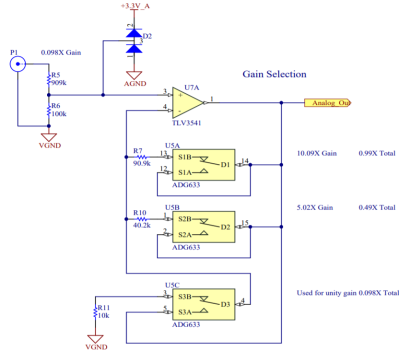
For the analog front-end the signals first enter a 1M ohm terminator that divide the signals by 10x in order to measure them outside the rails. They then get passed through a pair of diodes connected to the rails, clamping the voltage to prevent damage. The divider centers the incoming AC signal around 1.65V, halfway between AGND and +3.3V. As a further safety feature, a larger 909k Ohm resistor sits between the signals and the diodes in order to prevent a large current from passing through the diode in the event of a large voltage entering the system.

The next component is a variable gain stage, providing either 10x, 5x, or 1x gain corresponding to 1x, 0.5x, and 0.1x system gains. For the subsystem, a TLV3541 op-amp and ADG633 tripe SPDT analog switch are used to provide a power bandwidth around the system response due to driving concerns. Notably, the resistance of the switch is non-negligible, potentially varying with voltage. Luckily, the screen used in the oscilloscope needs 12V, so supplying 12V to the mux results in a lower voltage and thus a flatter response.

The ADC module, PIC32MZ1024EFH064, is a 12-bit successive approximation ADC. One advantage of his particular ADC is that extra bits of resolution only take constant time, so speed and accuracy can be traded off. The conversion starts with a sample and hold sequence, using stored voltage on the capacitor to calculate the voltage.

Several ADCs are used in parallel to sample at the same time, resulting in the interleaving improving the sample rate. Since there are 120 Megabits per second of data coming from the ADC module, the Direct Memory Access (DMA) peripheral on the PIC32MZ allows for the writing of the data directly onto the memory of the microcontroller without involving the processor.

The firmware is currently available on GitHub and the schematics are published on the project page.

Continue reading “The Cutest Oscilloscope Ever Made”

A Retro Gaming Console For The New Generation

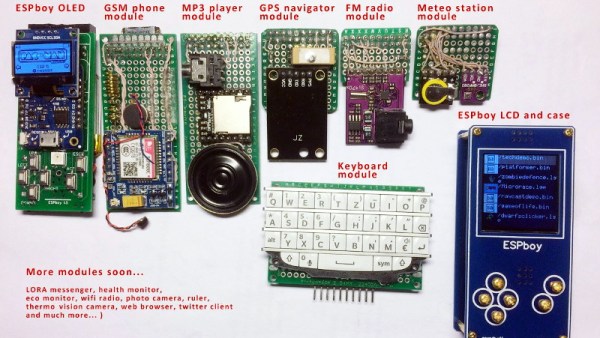
Ostensibly the ESPboy is an open-source hackable game engine built as an IoT platform for STEM education and play, but there’s no way [RomanS] could have been inspired by anything other than retro gaming consoles from the near past. For anyone who grew up playing with Tamagotchi pets or Palm Pilots, this project is going to be a major throwback.

The Saint Petersburg-based microcontroller hobbyist utilizes a ESP8266 microcontroller to build a series of modules for different game play modes, including a TFT display, GSM phone, MP3 player, GPS navigator, FM radio, and keyboard module. He has plans to build even more modules, including a LoRa messenger and thermal camera, to really expand the system’s capabilities.

Since the board has built-in WiFi, firmware can be uploaded to the device without a wired connection and compiler. The nature of the project makes the board compatible with the Arduino IDE and Micropython, which makes hacking the software even easier.

A TP4056 battery charging module charges the LiPo, although depending on the battery capacity, the charging current (set by the R3 resistor on the controller) does require some change. A MCP4725 I2C DAC is used for smooth driving the LCD’s backlight. In order to extend the battery life, the battery controller uses sleep mode to periodically wake up to measure and send data, which allows it to extend its battery life without external power. There’s also transistor driven buzzers that provide a little extra feedback to the user when playing games, complete with a variable resistor to adjust the sound volume.

A number of free pins run along the periphery for connecting to other modules, including pins for GPIO extension, sensor adapters, connectors to addressable LEDs, and an extension slot for actuators. For anyone interested in making their own version of the ESPboy, the PCB schematics are accessible online.

Projects like the Arduboy have shown that a small microcontroller-based game system can be equal parts fun and educational, so we’ve been excited to see more of these types of projects popping up during the course of the 2019 Hackaday Prize.

Continue reading “A Retro Gaming Console For The New Generation”