Quick And Dirty Blimp Mount For A Shotgun Mike

Sometimes you don’t have the hardware you need, and you can either do without or let the project’s needs inspire you to create an alternative. That’s pretty sweet, and it’s even sweeter when you find a solution that’s dirt cheap.

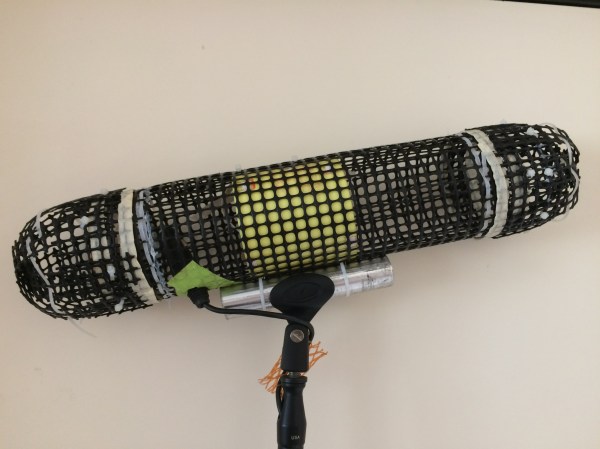
[Chu_st] created a sub-$10 blimp mount for his shotgun mike. It consists of a PVC pipe which attaches to the microphone’s shock mount. Plastic gardening grid is used for the shell, shaped by hand into the desired blimp shape and secured with zip ties and gaffer tape. [Chu_st] suggests using nylon stocking as a wind screen. The microphone itself attaches to a length of bicycle seat tube using a standard mic clamp.

For DIY microphone projects, we got you covered, with everything from a low noise floor microphone to one built out of a hard drive published previously.

Building This TARDIS Is Anything But A Snap

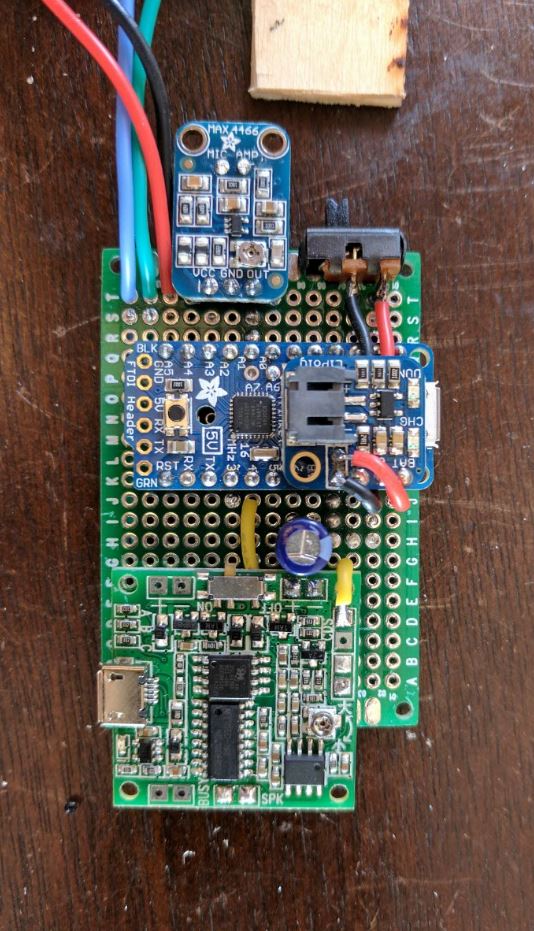
As an avid fan of the show Dr Who, [Adam Sifounakis] saw a model for a laser-cut TARDIS that piqued his curiosity that eventually grew into a multi-week project involving multiple setbacks, missteps, revamps and — finally — gratification. Behold, his sound activated TARDIS.

First and foremost, assembling and painting the model was a fun puzzle — despite a few trips to the store — with a little backtracking on the painting due to impatience. Next, the creation of a pulsing soft white LED circuit timed with an audio clip to really sell the image of a mini-TARDIS proved to be a tedious ordeal, paying off in the end with a satisfying glow through the vellum-diffused windows on the model.

How to trigger the lights? [Sifounakis] initially wanted a capacitive sensor to trigger the sound effects, but that way lay dragons — and madness — so he went with snap-activated effect to activate the TARDIS like the Doctor himself. After struggling with building his own microphone setup, he switched to an electret mic with adjustable gain which worked like a charm. Setting up this TARDIS’ Adafruit Pro Trinket brain involved a snag or two, and after that it was smooth sailing!

Until he hit another hitch with the power circuit too, that is. Luckily enough, adding a capacitor to give the circuit a bit more juice on boot solved the issue. All that was left to do was dismantle and rebuild his circuit after all this troubleshooting and substitutions, and — finally — install it in his model.

With much satisfaction and a final rework of the LED pulsing effect, it was done. Check it out!

Continue reading “Building This TARDIS Is Anything But A Snap”

Scooter Wheels Keep DIY Barn Doors On Track

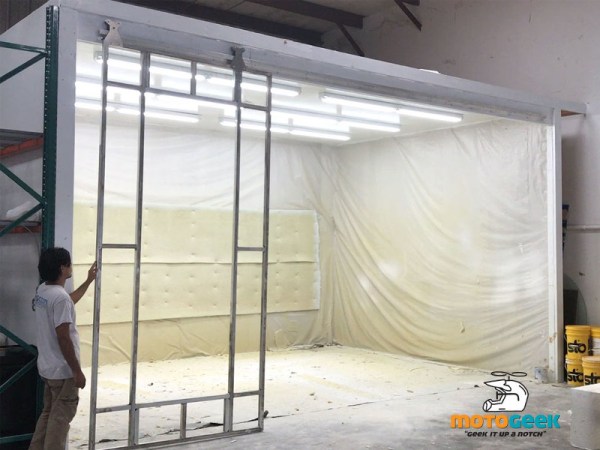
[MotoGeeking] built a giant spray booth and is in the process of making customized, air-filtering barn doors for it. When it came to buy hardware to move the doors, though, he found all the ready-made options to be prohibitively expensive. You know what comes next: he designed barn door hardware from the ground up, and did it as cheaply as possible.

After intensely studying many images of barn doors and hardware, [MotoGeeking] decided on the right wheels and went from there. Kick scooter wheels fit the bill nicely, since they are designed to support a lot of weight and come with their own bearings and spacers. And they’re cheap, too — just $9 for a pair.

[MotoGeeking] found some C channel extruded aluminium that seemed to be a perfect match for the wheels, but the wheel was quick to bind whenever it touched the sides. He solved that one by epoxying a length of round bar into the bottom corners. This allows the wheel to move freely while forcing it to stay centered in the track.

In designing the 1/4″ aluminium brackets, [MotoGeeking] took a measure thrice, order once approach to selecting the fasteners. You probably know by now that McMaster-Carr has free CAD drawings for every little thing. [MotoGeeking] imported the ones he liked into Illustrator and built around them. This helped him get it right the first time and kept the headaches and hair-tearing away. Watch the giant door skeleton glide effortlessly on its track after the break.

Continue reading “Scooter Wheels Keep DIY Barn Doors On Track”

Knitting ALUs (and Flipdots)

[Irene Posch] is big into knitted fabric circuits. And while most of the textile circuits that we’ve seen are content with simply conducting enough juice to light an LED, [Irene]’s sights are set on knittable crafted arithmetic logic units (ALUs). While we usually think of transistors as the fundamental building-blocks of logic circuits, [Irene] has developed what is essentially a knit crochet relay. Be sure to watch the video after the break to see it in construction and in action.

The basic construction is a coil of conductive thread that forms an electromagnet, and a magnetic bead suspended on an axle so that it can turn in response to the field. To create a relay, a flap of knit conductive thread is attached to the bead, which serves as the pole for what’s essentially a fabric-based SPDT switch. If you’ve been following any of our relay-logic posts, you’ll know that once you’ve got a relay, the next step to a functioning computer is a lot of repetition.

How does [Irene] plan to display the results of a computation? On knit-and-bead flipdot displays, naturally. Combining the same electromagnet and bead arrangement with beads that are painted white on one side and black on the other yields a human-readable one-bit display. We have an unnatural affinity for flipdot displays, and making the whole thing out of fabric-store components definitely flips our bits.

Anyway, [Irene Posch] is a textile-tech artist who you should definitely be following if you have any interest in knittable computers. Have you seen anything else like this? Thanks [Melissa] for the awesome tip!

Continue reading “Knitting ALUs (and Flipdots)”

Single Board Relay Computer

We all know you can build a computer out of relays, and if you’re a regular reader of Hackaday, you’ve probably seen a few. Actually designing and fabricating a computer built around relays is another thing entirely, and an accomplishment that will put you right up there with the hardware greats.

The newest inductee of the DIY microcomputer hall of fame is [Jhallen]. He’s built a microcomputer ‘trainer’ out of relays. It’s got more click and clack than the Tappet family, and is a work of art rendered in DPDT relays.

The biggest consideration in designing a relay computer is the memory. You can implement a CPU in a few dozen relays, but even a small amount of memory is still hundreds of additional components. In this computer, [Jhallen] is sort of cheating. The memory is implemented as 256 32-bit words on a microcontroller alongside a controller for the front panel. The CPU is still all relays, with support for self-modifying code, a bunch of instructions for conditional jumps, and an ‘increment and jump if not equal to zero’ instruction.

Below, you can check out a very in-depth video of the relay computer in action, starting off with some satisfying click and clack of Euclid’s algorithm and a demonstration of the variable clock rate. The video goes on to demonstrate the assembly language of the relay computer itself and a bit of the overall architecture. This is really one of the most educational demo videos for vintage computing we’ve ever seen.

[Jhallen] assembled a few of these boards and he’s selling some of the extras. If you have $600, you can pick one up over on Tindie (standard Hackaday / Tindie disclosure statement). Considering the amount of soldering required to assemble this board, we’re going to guess that’s a very fair price.
Continue reading “Single Board Relay Computer”

Breadboarding With E-Paper

[David Watts] picked up an inexpensive Waveshare e-Paper display. He made a video about using it with a breadboard, and you can see it below.

The E-Paper or E-Ink displays have several advantages. They are low power, they retain their display even without power, and they are very visible in direct light. The downside is they don’t update as fast as some other display technologies.

Continue reading “Breadboarding With E-Paper”

A Noob’s Guide To McMaster-Carr

For the penny-pinching basement hacker, McMaster-Carr seems like a weird go-to resource for hardware. For one, they’re primarily a B2B company; and, for two, their prices aren’t cheap. Yet their name is ubiquitous among the hacker community. Why? Despite the price, something makes them too useful to ignore by everyday DIY enthusiasts. Those of us who’ve already been enlightened by the McMaster-Carr can design wonders with a vocabulary of parts just one day away at the click of a button.

Today, this article is for those of us who have yet to receive that enlightenment. When used wisely, this source of mechanical everything brings us a world of fast parts at our fingertips. When used poorly, we find nothing but overpriced stock components in oversized shipping boxes.

Since we, the McMaster-Carr sages, are forever doomed to stuff our desk drawers with those characteristic yellow baggies till the end of time, we thought we’d give an intro to the noobs that are just beginning to flex their muscles with this almighty resource. Grab another cup of coffee as we take you on a tour of the good and good-grievances of McMaster-Carr.

Continue reading “A Noob’s Guide To McMaster-Carr”