Taking Apart A Vintage Oscilloscope

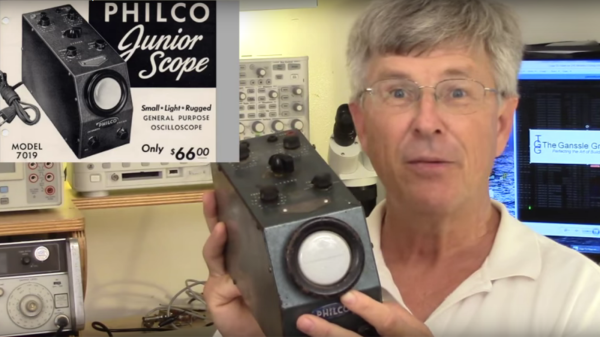
After getting a power supply and a multimeter, the next piece of gear a hacker would want to add to their bench is the oscilloscope. Nowadays, even the cheapest ones cost a few hundred dollars yet pack in the features. At the other end of the scale, if you can pony up close to a  million dollars, you can help yourself to an oscilloscope capable of 100 GHz bandwidth and 240 GS/s sampling rate. With that perspective, it becomes interesting to take a look at this video (embedded below), where [Jack Ganssle] shows us the Philco 7019 Junior Scope which was introduced way back in 1946. It seems the Philco 7019 model was an identical re-badged version of the Waterman Model S-10-A PocketScope.

[Jack] is familiar to all of us as an embedded systems engineer, but in this video he does a teardown of this vintage analog model. He starts off by walking us through the various controls, of which there are not a lot, in this “portable” instrument. At around the 3:40 mark in the video, he’ll make you wince as he uses a screwdriver and hammer combo to smash another ’40’s vintage CRT just so he can show us it’s innards — the electron beam source and the horizontal and vertical deflection plates. The circuit is about as bare-bones as it can get. Besides the CRT, there are just three vacuum tubes. One is the rectifier for the power supply, a second one is used for the vertical amplifier while the third one is the free running horizontal sweep oscillator. There is no triggering option — you just adjust the sweep frequency via a potentiometer as best you can. It does have internal, external and line frequency function selection, but it still requires manual adjustment of the sweep oscillator. There’s no blanking signal either, so the return sweep is always clearly visible. This is evident from the horizontal burn mark on the phosphor of the CRT after decades of use. It’s amusing to see that the vertical position could be adjusted by moving a magnet attached to the side cover.

The Oscilloscope Museum website hosts the Instruction Manual for this model, as well as a sales brochure which makes for very interesting reading after viewing [Jack]’s video.

Thanks, [Itay], for the tip.

Continue reading “Taking Apart A Vintage Oscilloscope”

Vintage Laptop Keyboard Types Again Through USB

Have you ever had a laptop you just wish you didn’t have to retire when its specification becomes to aged for your needs? Wouldn’t it be great if you could upgrade it and keep using the physical hardware!

[Alpinedelta] has a vintage Toshiba T1000 laptop, roughly a PC-XT clone from the late 1980s. Its 80C88 processor, CGA display, and 512k of memory make it a museum-piece, but he has plans to modernise it using a LattePanda Intel Atom based single board computer.

To make that happen, he has to ensure all the Toshiba’s peripherals will talk to a modern host. Unfortunately back in the 1980s many PC clones were clones in a rather loose sense, and especially so in the laptop arena. Thus there are no handy standard PC interfaces and since USB was several years away at the time, nothing the LattePanda can talk to directly. His solution for the keyboard is to wire its matrix directly to a Teensy microcontroller that then provides a USB interface, and he’s put up a useful step-by-step Instructables guide.

There is no standard for a laptop keyboard matrix, so the first and most tedious task is to unpick its layout.This he did by identifying each trace and assigning a different rainbow colour to it, before noting down which keys appeared on it and collating the results in a spreadsheet. The different colours of wire could then be assigned to the colours of a piece of rainbow ribbon cable, and wired in sequence to the Teensy’s I/O pins. There then follows a step in the software in which he assigns the pin mappings to the lines in his spreadsheet, then the sketch can be compiled and uploaded to the Teensy. Result: a vintage keyboard now talking USB.

Using a Teensy to present a USB keyboard to the world is a well-worn path, we’ve seen it with both newer keyboards and other relics like this one from a DEC VT100.

Thanks [Brent] for the tip.

Dummies Guide To Reverse Engineering

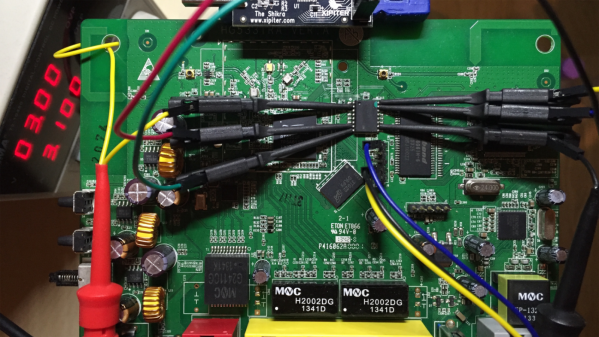
[Juan Carlos Jiménez] has reverse engineered a router — specifically, a Huawei HG533. While that in itself may not sound substantial, what he has done is write a series of blog posts which can act as a great tutorial for anyone wanting to get started with sniffing hardware. Over the five part series, he walks through the details of identifying the hardware serial ports which open up the doors to the firmware and looking at what’s going on under the hood.

The first part deals with finding the one or several debug ports on the hardware and identifying the three important pins – Rx, Tx and GND. That’s when he shows novices his first trick – shining a flashlight from under the PCB to find the pins that have trace connections (most likely Rx and Tx), those that don’t have any connections (most likely CTS and DTR) and those that have connections to the copper pour planes (most likely VCC and GND). The Tx signal will be pulled up and transmitting data when the device is powered up, while the Rx signal will be floating, making it easy to identify them. Finding the Baud rate, though, will require either a logic analyser, or you’ll have to play a bit of a guessing game.

Once you have access to the serial port and know its baud rate, it’s time to hook it up to your computer and use any one of the several ways of looking at what’s coming out of there — minicom, PuTTY or TeraTerm, for example. With access to the devices CLI, and some luck with finding credentials to log in if required, things start getting interesting.

Over the next part, he discusses how to follow the data paths, in this case, looking at the SPI signals between the main processor and the flash memory, and explaining how to use the logic analyser effectively and decode the information it captures. Moving further, he shows how you can hook up a USB to SPI bridge, connect it to the flash memory, take a memory dump of the firmware and read the extracted data. He wraps it up by digging in to the firmware and trying to glean some useful information.

It’s a great series and the detailed analysis he does of this particular piece of hardware, along with providing a lot of general tips, makes it a perfect starting point for those who need some help when getting started on debugging hardware.

Thanks, [gnif] for posting this tip.

Continue reading “Dummies Guide To Reverse Engineering”

Ikea Standing Desk Goes Dumb To Smart On LIN Bus

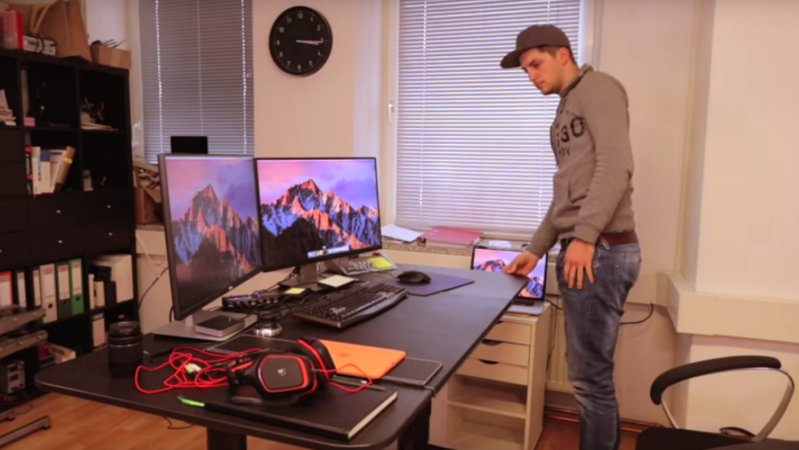
IKEA’s products are known for their clean, Scandinavian design and low cost, but it is their DIY or “assemble it yourself” feature that probably makes them so popular with hackers. We seem to receive tips about IKEA hacks with a consistent regularity. [Robin Reiter] has a Bekant Sit/Stand motorized table with buttons to raise and lower the surface, but it doesn’t have any memory presets. That’s a shame because it requires a lot of fiddling with the up/down buttons to get it right every time. It would be nice to press a button, go grab a Coffee, and come back to find it adjusted at the desired height. With a little bit of hacking, he was able to not only add memory preset buttons, but also a USB interface for future computer control.

The existing hardware consists of a PIC16LF1938 micro-controller with two buttons for movement control and a LIN bus  protocol which communicates with the automotive grade motors with integrated encoders that report position values. After a bit of sniffing around with his oscilloscope and analyzer, he was able to figure out the control codes for the motor movements. For some strange reason, however, the LIN signals were inverted, so he had to introduce a transistor signal inverter between the PIC master and the Arduino Nano that would act as a slave LIN node. Software was made much easier thanks to an Arduino library developed by [Zapta] for the LIN Bus signal Injector, The controls now have four buttons — two to replicate the original up/down movements, and the other two to act as memory presets.

The code, schematic and a simple wiring layout are posted on Github, in case there are others out there who’d like to replicate this hack. Check out the video after the break where he gives a walk through the code.

Continue reading “Ikea Standing Desk Goes Dumb To Smart On LIN Bus”

Modular Portable Conveyor Belt

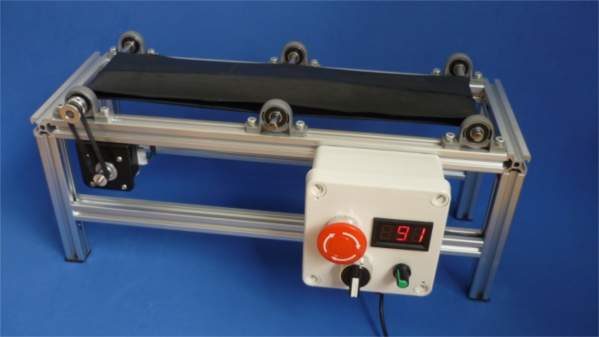
When teaching Industrial Automation to students, you need to give them access to the things they will encounter in industry. Most subjects can be taught using computer programs or simulators — for example topics covering PLC, DCS, SCADA or HMI. But to teach many other concepts, you  need to have the actual hardware on hand to be able to understand the basics. For example, machine vision, conveyor belts, motor speed control, safety and interlock systems, sensors and peripherals all interface with the mentioned control systems and can be better understood by having hardware to play with. The team at [Absolutelyautomation] have published several projects that aim to help with this. One of these is the DIY conveyor belt with a motor speed control and display.

This is more of an initial, proof of concept project, and there is a lot of room for improvement. The build itself is straightforward. All the parts are standard, off the shelf items — stuff you can find in any store selling 3D printer parts. A few simple tools is all that’s required to put it together. The only tricky part of the build would likely be the conveyor belt itself. [Absolutelyautomation] offers a few suggestions, mentioning old car or truck tyres and elastic resistance bands used for therapy / exercise as options.

If you plan to replicate this, a few changes would be recommended. The 8 mm rollers could do with larger “drums” over them — about an inch or two in diameter. That helps prevent belt slippage and improves tension adjustment. It ought to be easy to 3D print the add-on drums. The belt might also need support plates between the rollers to prevent sag. The speed display needs to be in linear units — feet per minute or meters per minute, rather than motor rpm. And while the electronics includes a RS-485 interface, it would help to add RS-232, RS-422 and Ethernet in the mix.

While this is a simple build, it can form the basis for a series of add-ons and extensions to help students learn more about automation and control systems. Or maybe you want a conveyor belt in your basement, for some reason.

Continue reading “Modular Portable Conveyor Belt”

Laser Scanning Microscope

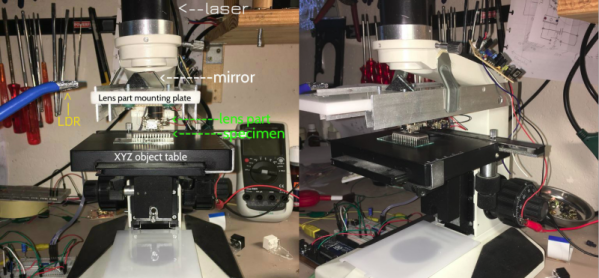
Remember that feeling when you first looked down on a microscope? Now you can re-live it but in slightly different way. [Venkes] came up with a way to make a Laser Scanning Microscope (LSM) with mostly off the shelf components that you probably have sitting around, collecting dust in your garage. He did it using some modified DVD pick-ups, an Arduino Uno, a laser and a LDR.

fuyati3iy4qiced-large
EPROM die shot

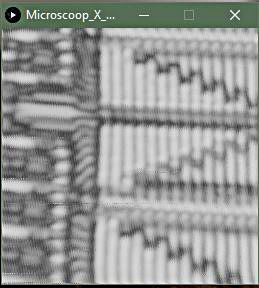
To be honest, there’s some more stuff involved in the making of the LSM but [Venkes] did a detailed Instructable explaining how everything fits together. You will need a fair dose of patience, it’s not very easy to get the focus right and it’s quite slow, an image takes about half an hour to complete, but it can do 1300x amplification at 65k pixels (256×256). From reading the instructions it seems that you will need a steady hand to assemble it together, some steps look kind of tricky. On the software side, the LSM uses Arduino and Processing. The Arduino part is responsible for the steering of the lens and taking the LDR readings. This information is then sent to Processing which takes care of interpreting the data and translate it to an image.

The build difficulty level should be between the DIY Smartphone Microscope and the Laser Sequencer Super Microscope. In the end, if everything goes right, you will end up with some cool images:

Continue reading “Laser Scanning Microscope”

How Commercial Printed Circuit Boards Are Made

Most of us who have dabbled a little in electronics will have made our own printed circuit boards at some point. We’ll have rubbed on sticky transfers, laser-printed onto acetate, covered our clothing with ferric chloride stains, and applied ourselves to the many complex and tricky processes involved. And after all that, there’s a chance we’ll have ended up with boards that were over or under-etched, and had faults. For many the arrival of affordable online small-run professional PCB production from those mostly-overseas suppliers has been a step-change to our electronic construction abilities.

[Fran Blanche] used to make her own boards for her Frantone effects pedals, but as she admits it was a process that could at times be tedious. With increased production she had to move to using a board house, and for her that means a very high-quality local operation rather than one on the other side of the world. In the video below the break she takes us through each step of the PCB production process as it’s done by the professionals with a human input rather than by robots or ferric-stained dilettantes.

Though it’s twenty minutes or so long it’s an extremely interesting watch, as while we’re all used to casually specifying the parameters of the different layers and holes in our CAD packages we may not have seen how they translate to the real-world processes that deliver our finished boards. Some operations are very different from those you’d do at home, for example the holes are drilled as a first step rather than at the end because as you might imagine the through-plating process needs a hole to plate. The etching is a negative process rather than a positive one, because it serves to expose the tracks for the plating process before etching, and the plating becomes the etch resist.

If you’re used to packages from far afield containing your prototype PCBs landing on your doorstep as if by magic, take a look. It’s as well to know a little more detail about how they were made.

Continue reading “How Commercial Printed Circuit Boards Are Made”