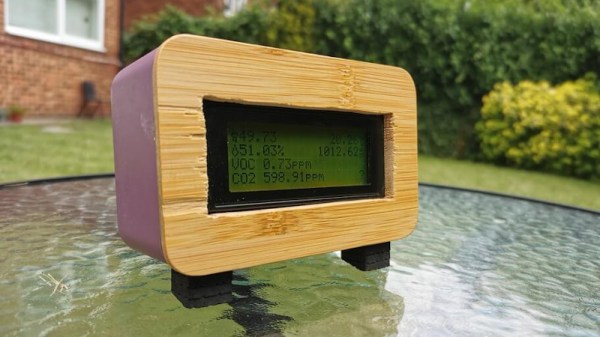
A Portable Home Air Quality Meter With The ESP32

Around the world, rolling pandemic lockdowns have left many working from home. [kn100] is in just such a predicament, and while spending nearly 24 hour a day in a residential flat, got wondering about air quality. Thus, it was time to build some gear to keep an eye on things!
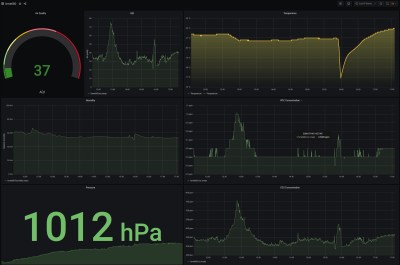
Grafana may require a database and some work to set up, but the results are to die for.

The build consists of an ESP32 hooked up to a Bosch BME680 air quality sensor. It measures pressure, temperature, humidity and gas resistance, and then with a closed source library, uses this to calculate an “Air Quality Index” as well as estimate CO2 and VOC levels in the air. Data is passed from the ESP32 over MQTT to a Raspberry Pi. This runs Mosquitto for handling the MQTT queries, saving the data in an Influxdb instance. Grafana is then used to query this database and produce attractive graphs of the data.

It’s a build that not only helps keep an eye on things in the flat, but is great practice for building solid Internet of Things devices with top-notch data visualisation. We’ve talked about how to do this before, too – so if you need this capability in your life, there’s no excuse not to get hacking!
Home Monitoring, Without All The Sensors

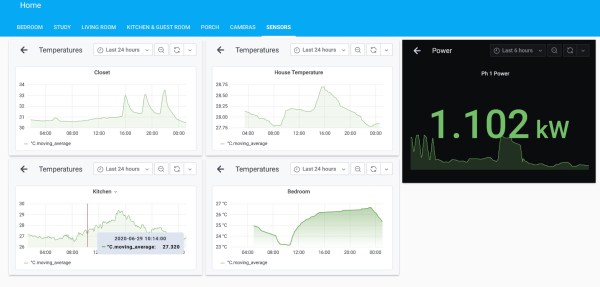
Smart homes come with a lot of perks, not least among which is the ability to monitor the goings-on in your home, track them, and make trends. Each piece of monitoring equipment, such as sensors or cameras, is another set of wires that needs to be run and another “thing” that needs to be maintained on your system. There are sometimes clever ways of avoiding sensors, though, while still retaining the usefulness of having them.

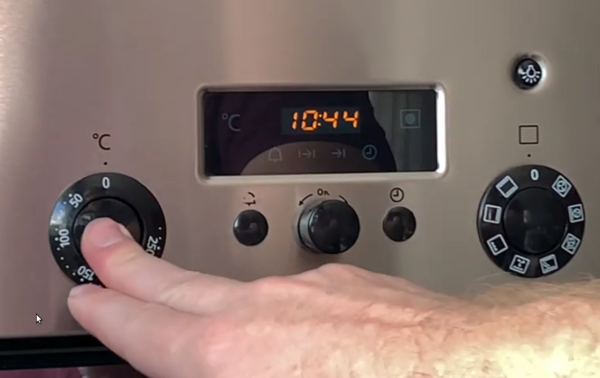
In this build, [squix] uses existing sensors for electricity metering that he already had in order to alert him when his oven is pre-heated. The sensor is a Shelly 3EM, and the way that it interfaces with his home automation is by realizing that his electric oven will stop delivering electricity to the heating elements once it has reached the desired temperature. He is able to monitor the sudden dramatic decrease in electricity demand at his house with the home controller, and use that decrease to alert him to the fact that his oven is ready without having to install something extra like a temperature sensor.

While this particular sensor may only be available in some parts of Europe, we presume the idea would hold out across many different sensors and even other devices. Even a small machine learning device should be able to tell what loads are coming on at what times, and then be programmed to perform functions based on that data.

Continue reading “Home Monitoring, Without All The Sensors”

Home Automation Covers Everything

When starting out on a project, it’s accepted best practice to try to avoid feature creep. Of course, we can’t all say that we follow this guideline completely every time. In fact, sometimes it can get away from us, and in rare situations it might actually turn out pretty well. That appears to be what happened with [superczar]’s home automation project which now covers basically everything possible in home automation.

The build started in 2013, so we assume that features have been added periodically and that the system wasn’t designed and built all in one furious weekend. Either way, though, it covers a lot: lights, switches, media players in several rooms, includes sensors and logging for temperature, smoke, fire, and power, supports a number of cameras, the doorbell, and the locks. It also includes voice control for most of the systems.

That’s an impressive list, but what really drew our attention to this project is that it used to be based on domoticz, but that community has waned over the years and [superczar] had kept his system patched together with self-built scripts. An accidental upgrade recently broke the entire setup, so rather than rebuild everything a migration was made to home-assistant, an open-source platform that has a more active community. We’ve seen plenty of projects around here that use it as a platform, for ceiling fans, custom remotes, and doorbells.

Thanks to [pradeepmur] for the tip!

Heater Joins The Internet Of Things With ESP32 Board

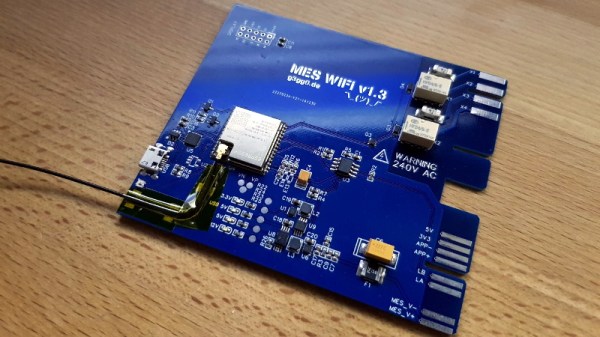
The wood-burning heater [g3gg0] has at home works perfectly, except for one flaw: the pellet reservoir needs to be manually refilled every few days. Humans being notoriously unreliable creatures, this critical task is sometimes overlooked, which naturally leads to literally chilling results.

With automatic fill systems expensive and difficult to install, [g3gg0] wanted to find some kind of way for the heater to notify its caretakers about any potential fault conditions. Not just the fact that it was out of fuel (though that would naturally be the most common alert), but any other issue which would potentially keep the heater from doing it’s job. In short, the heater was going to get a one-way ticket to the Internet of Things.

As it turns out, this task was not quite as difficult as you might expect. The Windhager heater already had upgrade bays where the user could insert additional modules and sensors, as well as a rudimentary data bus over RS-485. All [g3gg0] had to do was tap into this bus, decode what the packets contained, and use the information to generate alerts over the network. The ESP32 was more than up to the task, it just needed a custom PCB and 3D printed enclosure that would allow it to slot into the heater like an official expansion module.

When an interesting message flashes across the bus, the ESP32 captures it and relays the appropriate message to an MQTT broker. From there, the automation possibilities are nearly endless. In this case, the heater’s status information is being visualized with tools like Grafana, and important alerts are sent out to mobile devices with PushingBox. With a setup like this, the Windhager will never go hungry again.

Continue reading “Heater Joins The Internet Of Things With ESP32 Board”

Pop Open Your Neighbor’s Front Door With 12 Volts

Many in the community are skeptical about the security of commercial smart home devices, and for good reason. It’s not like you have to look far to find examples of poorly implemented systems, or products that are abandoned by their manufacturers and left without critical security updates. But the design flaw in this video doorbell really drives home how little thought some companies give to their customer’s security.

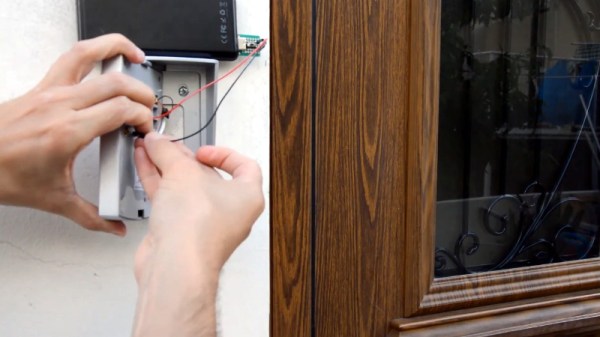
As explained by [Savvas], and demonstrated in the video after the break, all you need to do if you want to get into a home equipped with one of these vulnerable door bells is pop the unit off the wall and hit it with 12 volts DC.

Incredibly, the terminals that connect to the electronic lock inside the house are completely accessible on the back of the unit. They even labeled them, on the off-chance the robber forgets which wire is which. It’s not even as though the thing is held on with some kind of weird security screws, it’s just a garden variety Phillips.

In the video, [Savvas] even shows he used a little gadget attached to a QuickCharge USB battery bank to get a portable 12 VDC source suitable for tripping these locks. Which, interestingly enough, is based on a trick he read about in the Hackaday comments. Something to consider while penning your next comment on these storied pages.

[Savvas] says he’s reached out to the company to get their side of the story, but so far, hasn’t received a response. We aren’t surprised, this is a fundamental flaw in the product’s execution. Clearly they wanted to make an easy to install device that doesn’t require any additional electronics in the house, and this is the inevitable end result of that oversimplification. All the more reason to roll your own smart doorbell.

Continue reading “Pop Open Your Neighbor’s Front Door With 12 Volts”

433 On A Stick

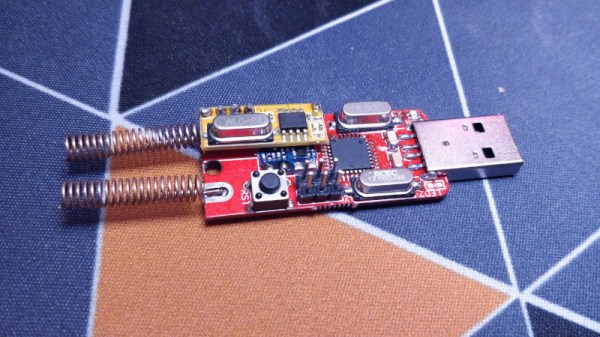
Cheap 433 MHz wireless switches are a tempting way to enter the world of home automation, but without dedicated hardware, they can be less easy to control from a PC. That’s the position [TheStaticTurtle] was in, so the solution was obvious. Build a USB 433 MHz transceiver.

At the computer end is a CH340 USB-to-serial chip and the familiar ATmega328 making this a compact copy of the Arduino. At the RF end are a pair of modules for transmit and receive, unexpectedly with separate antennas. This device is a second revision, after initial experiments with a single antenna connector and an RF switch proved not to work. On the software side the Arduino uses the rc-switch library, while on the PC side there’s a Python library to make sense of it all. The code and hardware files are all on GitHub, should you wish to experiment.

The problem of making a single antenna transceiver is not for the faint-hearted RF engineer, as while diode switches seem on paper to deliver the goods, they can be extremely difficult to get right and preserve linearity. We’re curious that a transceiver module wasn’t used instead, but we’re guessing that cost played a significant part in the equation.

Over the years we’ve featured quite a few fascinating 433 MHz projects, like this TP-Link router conversion.

Smart Toilet Paper Holder Keeps Track Of White Gold

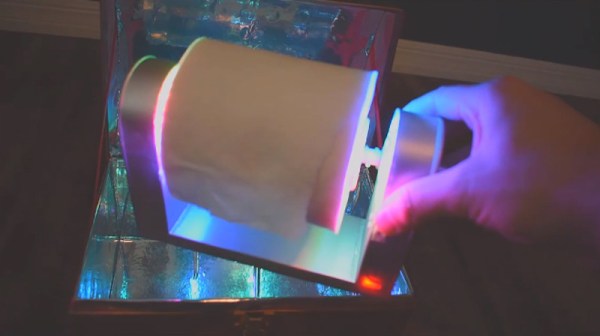
As we all woke up in 2020 on New Year’s Day, few of us would have predicted how terrible everything would get in just a few short months. Worldwide shortages of toilet paper were just the tip of the iceberg, making everyone more keenly aware of their stocks at home. This was something [thepenguinmaster] decided to take a stab at managing in the cloud. Enter the Smart Toilet Paper Roll.

The device consists of a 3D printed toilet roll holder, outfitted with sensors to track usage of the precious material. A magnetic rotary encoder is used to monitor rotation of the roll, with a LIDAR device used to sense when a user’s hand is in close proximity. Data is trucked to the cloud by an Avnet Azure Sphere MT3620. The link with Azure allows for the automatic generation of graphs and access from anywhere over the Internet.

The project goes to show that just about anything around the house can be monitored over the Internet. We’d love to see the tracker go even further, measuring usage on a per-sheet basis and automatically ordering more when supplies get low. We’ve seen similar work before, too.