Learning Electronics Concepts Step By Step

arduino

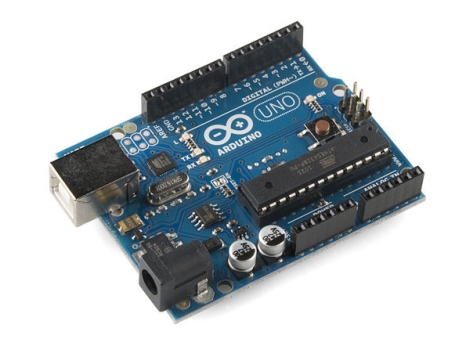
We realize that not everyone out there holds a degree in electrical engineering or has the ability to tell NPN transistors apart from PNP transistors by taste alone, so we occasionally like to mention things that appeal to the beginners in the crowd. While there is a clear division between Arduino supporters and detractors, it is hard to deny that the devices have their place, and can be quite useful when exploring certain electronics concepts.

For the supporters out there, [John Boxall] has put together a site jam-packed with Arduino tutorials covering a wide array of concepts and techniques. We have covered his work before in relation to specific topics, but we felt that his site deserved mention as a whole. His tutorials cover some of the most basic concepts such as lighting LEDs with the Arduino, and work their way to more advanced subjects, lesson by lesson.

He is not satisfied with simply introducing a concept and handing out a sketch that does the work. He takes the time to expand on the concepts, giving the reader enough detail to use their new-found knowledge in later projects. If you were to follow his tutorials from beginning to end, you would be exposed to LCD screen control, shift registers, real-time clocks, I2C bus communications, and more. These skills and concepts can be carried on to future projects as well as other micro controllers, making his tutorials a very valuable learning tool worth checking out.

Build A Real-life Escher’s Waterfall

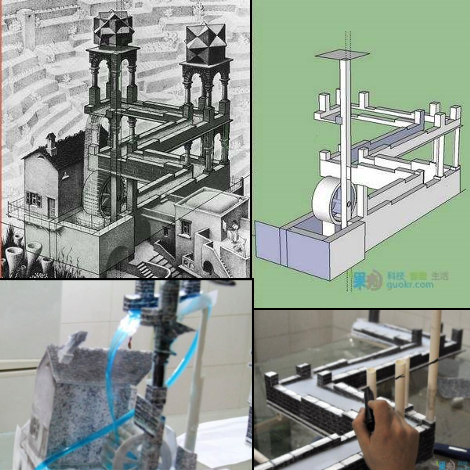
Instructables user [GuokrDIY] has provided a translation of a detailed guide on making one of our favorite Escher inspired illusions. Unlike the previous speculated solutions to Escher’s waterfall this one manages to keep the water path coherent up until the top level. The trick of the whole setup is very carefully controlling perspective to overlap the water source and outlet.  We say water but for some reason the builder is actually using “toilet detergents” as the liquid… At any rate, the liquid is allowed to flow downhill until it reaches the fourth corner, which does not exist. The liquid actually falls off the end of the table (out of sight) and into a basin. A carefully timed pump in the basin pushes liquid up to the top of the waterfall through one of the model’s pillars, where it then cascades over the wheel.

Using sketchup to model the various structural components of the waterfall the design is fashioned out of PVC and ABS plastic, then skinned with mapped textures to ensure that everything looks coherent. The visual details are fine tuned by viewing the whole setup through a camcorder.  The hardest part of the illusion seems to be modulating power to the pump in order to time it with the liquid’s flow.

We just hope that thing about toilet detergent was a mistranslation or some kind of sarcasm from the original Chinese article.  Check out the model in action after the jump!

Continue reading “Build A Real-life Escher’s Waterfall” →

Motion Controlled Reddit Vote Sign.


A little while back I attended the largest east coast gathering of folks from the ever popular social news site, Reddit.com. Those of you familiar with Reddit already know that it is all about link aggregation. Users post links to interesting websites and material, and can then vote up or vote down content based on interest or relevance. Through the magical site algorithms original and interesting content is, as implied, aggregated up to the front page.  The whimsical nature of this big DC event lead many people to furnish signs of all types based on the culture of the site, internet memes, etc… The signs that really caught my attention were based primarily on the stylistic site layout, blowing up mail icons and other Reddit specific graphics.

The concept of using site graphics gave me the idea of being able to personally vote up or down other peoples’ signs. It was far too easy to just make a cardboard arrow, and I don’t have a color printer. I happened to have a shelved coffee table project involving orange and blue LEDs. Same colors as the arrows! Sweet. To make this project work I would have to work entirely from my project pile, there simply was no time to order anything from the internet. I managed to crank out a functional up/down voting sign in 3 days leading up to the gathering (and the morning of), here is what I did:

Continue reading “Motion Controlled Reddit Vote Sign.” →

Apple II Weather Display (part 1)

Due to computer issues I had to rob some parts from my “electronics” computer, which wasn’t bad, since I was not working on anything at the time and I felt a software project itch. I also wanted to do something with my Apple //c, which resides on my computer desk, so this ghetto brute force “solution” to use the 25 year old computer as a weather display came about.

In a nutshell there is the Apple II, a serial cable, and a PC running linux mint 10 and a handful of command line utilities. My specific Apple is the fist revision of the //c which means its got a buggy rom and the serial port(s) can be troublesome, the best speed I was able to get was 600 baud with just basic, though every other model could probably go a little faster.

On the linux side, wget downloads html and the radar image from Weather Underground’s mobile site, which is not a perfect source, but its easy. A lua script phrases text and graphics into string patterns that the Apple II can handle as keyboard input, and its sent down a serial cable where it is drawn on screen in basic.

Yea its pretty darn slow … it typically takes about eight to twelve minutes to redraw the screen, which is not all that horrid (imo) considering what is going on, but anyone with a more serious take on this could find numerous ways to optimize it, I just wanted to see what it would look like.

Join us after the break for a short video and to read all the details about how this all works!

Continue reading “Apple II Weather Display (part 1)” →

Atmega Analog Two Pack

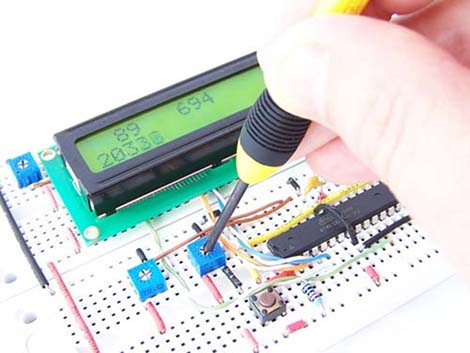
Back in February, [ProtoStack] posted a pretty good tutorial on how to do Analogue to Digital Conversion on an Atmega168. Based on a bread board, the tutorial also shows the often forgotten low pass filter on the AVCC lines to ensure an extra stable reference and an analog input connection to a simple voltage divider as a study point.

Moving on into the micro controller, the registers you’re going to need to twiddle are laid out and explained in detail. Finally you’re shown how to put it all together in a software project that outputs the analog reading onto a standard character LCD.

But hold on! There is more. Just released is a follow up to that tutorial which adds on Analogue to Digital Conversion Interrupts on an Atmega168A. So if you’re sitting there looking at an Arduino and want to know more about what’s going on under the hood, these are a good place to start.

Paper Mechanical Iris

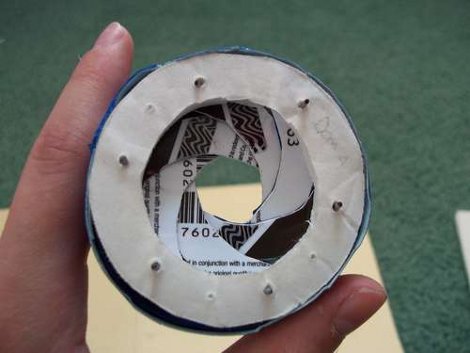
This functioning mechanical irs is made from paper templates, foam core poster board, old credit / gift / etc cards, paper clips and masking tape. First, patterns are designed and multiples are printed and laid out to make the 10 parts needed. Two rings are cut out of foam board and a third ring is cut into wedges to form a cam mechanism on top of one of the other two rings.

Twelve shutters are then cut from the credit cards, and small pieces of paper clip are glued to each end and both sides. One side rides the cam mechanism the other side is punched through the final ring.

We found it to be an interesting project that should be pretty easy for just about anyone to replicate (now that its all figured out for us), and besides, you never know when you might stumble across a small box of hotel key’s with a defunct pizza parlor’s advertisement on the back.

Beginner Concepts In Electronics And Arduino

arduino_tutorial_series

[Jeremy] is all about the Arduino, but also into helping people get started working with electronics. He has put together a series of videos on his web site which discuss the basics of using an Arduino. Having just published his tenth tutorial, he dropped us a line to let us know. His videos cover a wide range of topics and include source code, schematics, and a full parts list to help you follow along with him.

While the core of his lessons focus specifically on how to use the Arduino to perform particular tasks, he does introduce the viewer to many different concepts along the way. He covers PWM, button debouncing, interrupts, SPI communications, analog inputs, and more – all of which are must-know topics that extend beyond the realm of experimenting with Arduinos.

The videos run anywhere from 6 to 20 minutes in length, so you will want to set a block of time aside if you plan on checking them out.

If Arduino-specific videos aren’t your thing, he also has a series of general tech-related videos on his site as well which may be of interest. Otherwise, stick around to see the latest in his series of tutorials.

Continue reading “Beginner Concepts In Electronics And Arduino” →