BB313 Breadboard Platform Makes ATtiny Prototyping Painless

Johngineer's BB313

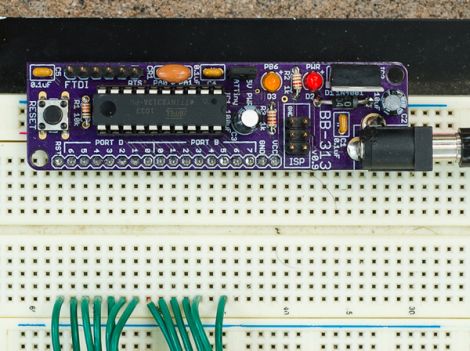
[John De Cristofaro aka Johngineer] uses various ATmega microcontrollers in his electronics projects, but he finds himself reaching for an ATtiny2313 or ATtiny4313 more often than not. He got tired of having to wire up pin headers, capacitors, and the like each time he started a project, so he spent some time designing an easy to use breadboard platform around the chips.

Inspired by LadyAda’s Boarduino, his BB313 board features FTDI pin headers, an ISP programming header, a reset button, along with breakout pins that plug directly into any breadboard. Aside from sharing a similar layout, [John] says that the similarities end there. His board is designed for designers who program in C or C++, so Arduino code won’t run without some substantial modification.

The board looks like a pretty handy benchtop tool, and we’re pretty sure it would be a big time saver for anyone who uses these chips with any frequency. [John] says that the board cost about $6.50 to make when he put it together, but that prices might vary slightly depending on where you have your PCBs made.

Be sure to swing by his site if the design looks like it might be helpful. He has made the schematics, a bill of materials, and all the rest available for the taking.

[via Adafruit blog]
WAV Playback With An ATmega32

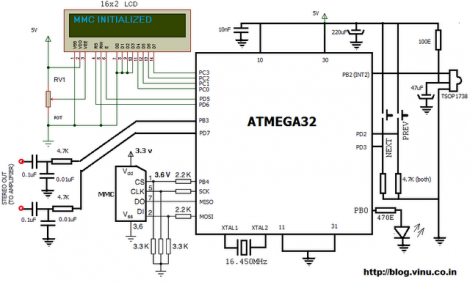
[Vinod Stanur] just finished another hobby project by building a WAV audio player using a microcontroller. He had started development a while back using a PIC microcontroller. But the chip he was using didn’t have enough SRAM to allocate as a playback buffer. When he got his hands on an ATmega32 his mind turned back to the project and he saw it through to the end.

He takes advantage of what he learned on several earlier builds. He’s using a TV remote as input, just like his Snake game did. Storage is provided by an MMC card, a trick he perfected with this voice recorder project. Instead of using a FAT library, he uses his own code to read the linked-list (File Allocation Table) for sector addresses, then he parses the WAV header and processes the file accordingly.

Playback uses two 512 byte buffers. One is feeding the output while the other is being populated from the memory card. When the output buffer is exhausted the two are swapped and the process continues. You’ll find [Vinod’s] demo of the project after the break.

Continue reading “WAV Playback With An ATmega32”

DIY Intervalometer Uses A Great Looking Enclosure

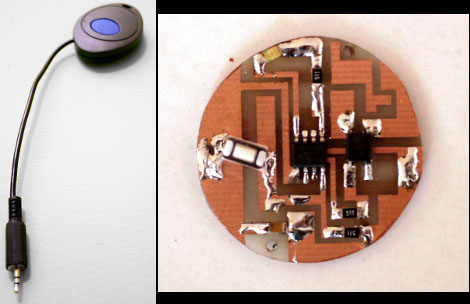
That finished look for your project is all about the enclosure you find to host it. We think [Punge] really did a great job with the case for this DIY intervalometer. The build section of the project page links to the company that makes the enclosures. They’re meant to host round PCBs with several options for button configuration. Combine this with enough space for a coin cell and you’ve got a great looking custom device.

The intervalometer itself is much like others we’ve seen. It uses an audio-jack connector to control the camera. You have the option of using a three or four contact version depending on what your camera supports. The PIC 12F683 uses an optocoupler with a built-in transistor to do the switching. A single button seen at nine o’clock on the board above is all it takes to start the device off. Press and hold once to wake it up, then wait for your desired interval and press the button again to start the timed shots.

You’ll notice that there is no programming head in this design. A separate board was etched to attach the PicKit, with the surface mount chip just held in place during programming.

Investigating Parking Assist Sensors

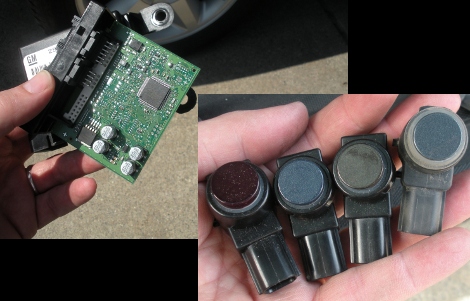
While his wife was out-of-town [James] jumped at the opportunity to do some snooping around with her Chevy Tahoe’s parking assist sensors. We can understand how pulling parts out of someone’s car would make them none too happy. But we find it hilarious that it’s a leased company car he’s tinkering around with. But we’re glad he did, the ten-page write-up he published about the project is a fascinating read.

You can see the control board above which is housed beneath the passenger seat. It uses a Freescale microcontroller to read from the four bumper-mounted ultrasonic sensors. But just looking at what parts are used obviously isn’t enough to satisfy a hacker’s appetite for knowledge. [James] busted out a CAN bus tool to sniff the data packets. These sensors use a custom chip designed by GM, utilizing a single wire communications system. He figures out the communication scheme and builds an mbed based test rig to read them directly.

[via Dangerous Prototypes]

A TV-B-Gone With A PIC Twist

pic-tvbgone

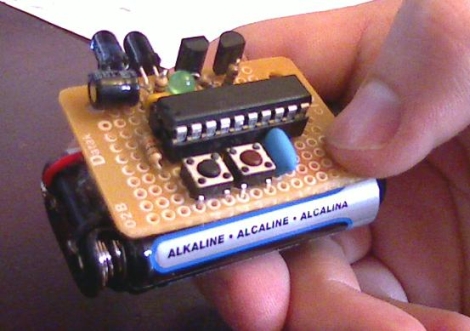
[Kayvon] thought that the TV-B-Gone was a fun little device and wanted to build one, but he didn’t have an AVR programmer handy. Rather than picking up some AVR kit and simply building a replica, he decided to give his PIC skills a workout and build a Microchip derivative of his own.

The PIC-based TV-B-Gone is pretty similar to its AVR-borne brethren, featuring a PIC24F08KA101 at the helm instead of an ATTiny. His version of the TV-B-Gone can be left on indefinitely, allowing him to situate the device in a convenient hiding place to wreak havoc for as long as he likes.

[Kayvon’s] TV-B-Gone does everything the original can at just under $7, which is quite a bit cheaper than the Adafruit kit. If you’re not averse to perfboard construction, be sure to check out the build thread over in the Adafruit forums. [Kayvon] has done most of the heavy lifting for you – all you need to do is build it.

Up Your FPGA Game By Learning From This LCD Control Prototype

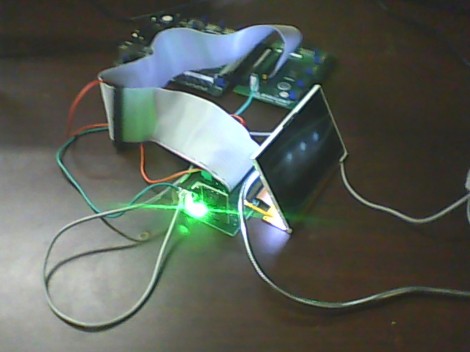
[Cesar] recently got a PSP display up and running with his FPGA development board. That’s a nice project, but what we really like is that he set aside a lot of time to show how it’s done every step of the way. This isn’t just a tutorial on that particular screen, but an overview of the skill set needed to get any piece of hardware working.

The screen itself is a Sharp LQ043T3DX02; a 480×272 TFT display with 16 million colors. Not bad for your project but when you start looking into the control scheme this isn’t going to be like using a Nokia screen with an Arduino. It takes twenty pins to control it; Red, green, and blue take sixteen pins, four pins are used for control, the rest are CK, DISP, Hsync, Vsync.

Wisely, [Cesar] designs his own interface board which includes the connector for the ribbon cable. It also has drivers for the screen’s backlight and supplies power to the device. With hardware setup complete he digs into the datasheets. We just love it that he details how to get the information you’re looking for out of this document, and shows his method of turning that first into a flow chart and then into code for the FPGA.

Get Neck-deep Into ZigBee

Here’s a bulky tutorial that will round-out your understanding of ZigBee wireless communications (translated). The protocol is great for hobby electronics projects because it uses low-power short range wireless devices to build a mesh network. The guide covers both hardware and software, but also takes the time to explain what that hardware is doing in the background.

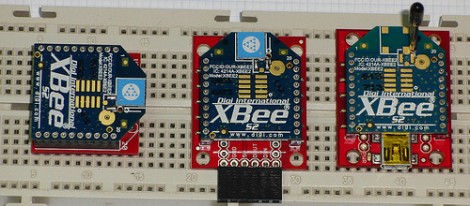
As you can see, several different renditions of an XBee module are used as examples. They pretty much all rely on a series of SparkFun breakout boards that each serve different purposes. Once you’ve acquired these modules, there’s a fair number of choices needed to configure them to play nicely with each other. We read most of the tutorial (we’ll save the rest for later enjoyment) and had no problem following along even without owning the hardware or being able to use the interface as we learned.

Whenever we cover XBee modules we always like to mention that it’s quite easy to use these for remote sensors with no additional microcontroller needed.