Using An MSP430 For Time Lapse Photography

vistaquest_keychain_timelapse_msp430

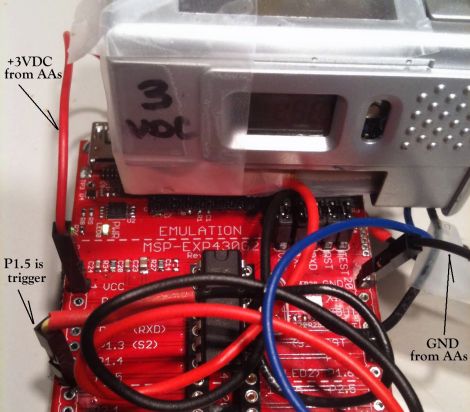
Hackaday reader [onefivefour] had an old VistaQuest VQ1005 keychain camera kicking around, and wanted to do something useful with it. A while back he hooked up a 555 timer and did a bit of time lapse photography, but he wanted more control over the process. Specifically, he desired the ability to tweak the delay between shots in a more granular fashion, as well as way to prevent the VistaQuest from going to sleep after sitting idle for 60 seconds.

His weapon of choice to get this task done was an MSP430, since the microcontroller can be found quite cheaply, and because it is relatively easy to use. He added a few header pins to the LaunchPad board wiring them up to the camera’s trigger as well as the on/off switch. When the wire connected to the trigger is pulled low, the camera snaps a picture. The wire connected to the on/off switch is always held low, ensuring that the camera is on and ready to go whenever it’s time to take a shot.

It’s a relatively simple project, but definitely useful. While there are many ways to build an intervalometer, the MSP430 is a great platform to use, especially for beginners.

Stick around to see a quick video [onefivefour] put together, showing off his time lapse rig’s capabilities.

Continue reading “Using An MSP430 For Time Lapse Photography”
Bootloader Burning Basics

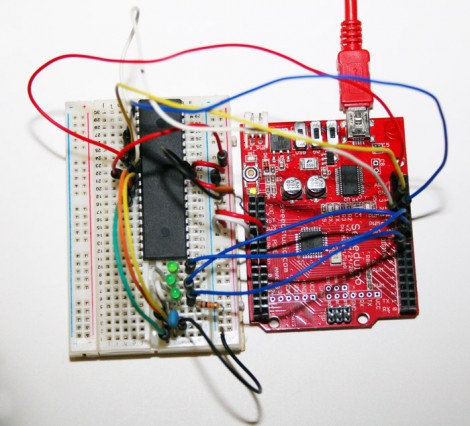
[Charles Gantt] and a few others were having trouble burning the Sanguino bootloader to an ATmega644 chip. With some help from the [Nils Vogil] via the RepRap IRC [Charles] got it worked out and wrote a guide for burning the bootloader using an Arduino as an ISP programmer.

We’re not familiar with the specifics of the Sanguino bootloader, but [Charles] mentioned that he was unable to flash it onto the AVR chip without a resonator. The resonator serves as an external clock source for the chip. We’d bet the programming process changes the fuse settings on the chip to use an external source. Without that source, you won’t be able to communicate with the chip afterwards.

The solution just adds the resonator to the programming circuit. This should be useful when burning any bootloader using an Arduino. But it does make us wonder if there isn’t an alternative method that would let you draw the clock signal from the Arduino itself?

A Stackable Motor Driver Shield For The Arduino

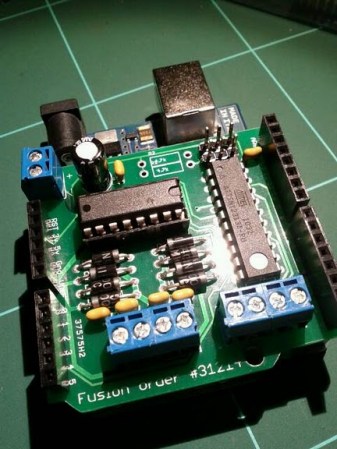
The Arduino has been used for many purposes, and  “shields” are available to make many common tasks easier.  However, [Nick] wanted a stackable motor driver shield, so he build one himself!. There are many motor driver shields available for the Arduino, however, there aren’t any that allow one to drive as many motors as were needed for his project, and none that were stackable.

[Nick] had no experience designing and fabricating a custom board, but decided to try his hand at it anyway. Armed with a free version of [Eagle] PCB design software, he designed the board that he needed then sent it to [Seeed] to be manufactured. According to his article, a quantity of 10 Arduino-sized boards can be purchased for the price of $25. At that price point, some hobbyists may want to consider this option rather than manually creating their own circuit.

According to [Nick], he was able to manufacture his first board with no errors on his first run! Not bad for his first try at something like this.

Shock Yourself To Better Health!

cranial_electrotherapy_stimulation_rig

Flickr user [n Bryan] has been keeping busy lately, trying his hand at developing some cranial electrotherapy stimulation instruments for home use. While visions of [Peter Venkman] electrocuting hapless college students initially came to mind, this sort of therapy is not the same thing, nor as painful as what is depicted in the film.

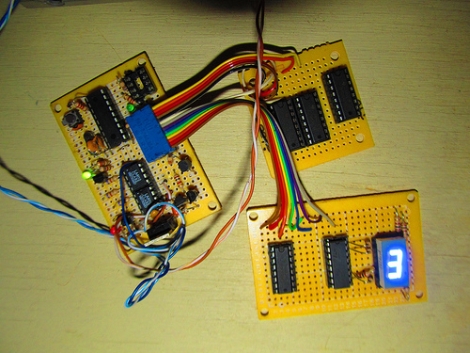
Cranial electrotherapy stimulation relies on small currents which are pulsed along a patient’s skull at specific bioactive frequencies. It is believed that these treatments can have positive responses on the nervous system, and in fact has been approved by the FDA for certain ailments such as insomnia and anxiety. [n Bryan’s] rig is controlled by a PIC 16F88, which generates both the carrier and pre-programmed bioactive frequencies used in electrotherapy sessions.

As with all things that involve strapping electrodes to your head, take caution if you plan on replicating his work in any way, shape or form. With that said, we’d be willing to give it a shot.

[via BuildLounge]

Keeping Tabs On Your Tabby With A Camera And GPS

cat_eye_pictures_and_gps

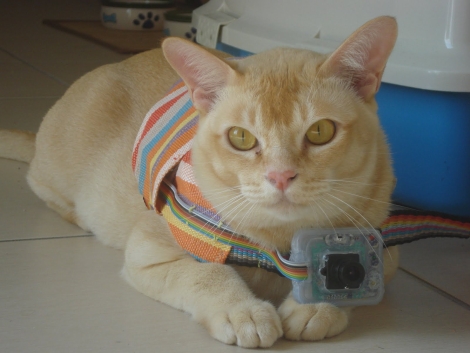
[Janis] has an outdoor cat that likes to roam all over the neighborhood. He was curious to see what he was up to all day, so he decided to build a small cat cam to document the feline’s comings and goings. After the cat returned one evening with a snail riding along on his back, [Janis] thought it would be pretty interesting to see where the cat was going as well.

He calls his creation “CatEye”, and it consists of a small JPEG color camera and GPS sensor, both of which are managed by what looks to be an ATMega328. The camera snaps pictures as the cat roams around, while the GPS sensor records its location throughout its travels. All of the data is stored on an SD card, making it easy to transfer the pics and .KML files back to his computer. A few clicks later, he can see everywhere his cat has been, using Google Earth.

It seems like a pretty interesting project, and we would love to see some schematics and code so that we can strap one of these on [Caleb] our cat to see where he’s been all day.

Stretch Your Circuit’s Battery Life By Putting Your PIC To Sleep

pic_power_savings

[Rajendra Bhatt] wrote in to share the latest in a series of PIC tutorials, which covers the microcontroller’s Sleep mode – a very useful tool for limiting current consumption in battery-powered applications.

He discusses how to put the PIC in sleep mode, as well as some common mistakes to watch out for, such as accidentally allowing I/O pins to sink or source current while sleeping. [Rajendra] also walks through the various ways a PIC can be brought out of sleep mode, focusing the majority of his tutorial to the mcu’s watchdog timer.

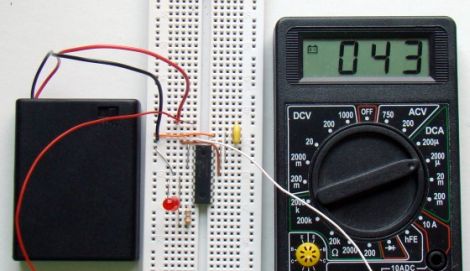
Using a PIC16F628A, he constructs a test circuit which allows him to demonstrate the power savings gained by using sleep mode rather than the microcontroller’s built-in delay function. The circuit simply blinks an LED every 4.3 seconds, using the watchdog timer for the first 2.3 seconds, and a delay() call for the rest of the time.

The power savings are quite substantial, similar to the results we saw using AVR microcontrollers a few weeks ago. [Rajendra] found that using the sleep function limited current consumption to about 4.5% of the current used when calling the mcu’s delay function – a huge savings.

Ever Wonder Where Cool Interactive Museum Exhibits Come From?

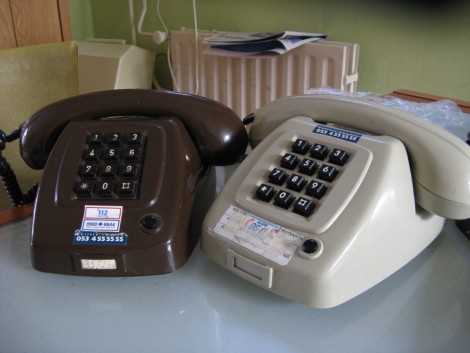
[Victor’s] girlfriend works at a museum and enlisted his expertise in designing an interactive detective game for kids visiting the museum. The vision was for the kids to discover phone numbers that they could call for clues. Originally he planned to display the clues on a character LCD, but obviously it’s much neater to hear the clues in the handset of the phone.

Quickly switching gears, [Victor] dropped the ATtiny2313 and started over with an Xmega chip — in fact, it was our recent Xmega post that inspired him to document his project. The microcontroller is responsible for a lot of goings-on. It scans the key matrix for inputs, simulates the DTMF touch tones, reads audio files from a FAT file system on an SD card, and plays them back over the hand set’s speaker. Since most of the hardware is already built into the phones, it was not hard to fit his add-ons inside the case. A simple audio amplifier circuit joins the microcontroller, which is patched into the rows and columns of the keyboard. Take a gander at the video after the break to see the device in action.

Continue reading “Ever Wonder Where Cool Interactive Museum Exhibits Come From?”