High Detail 3D Printing With An Airbrush Nozzle

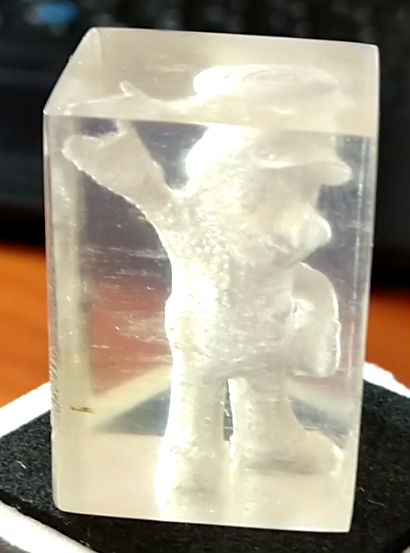
On a fused deposition modeling (FDM) 3D printer, the nozzle size dictates how small a detail you can print. Put simply, you can’t print features smaller than your nozzle for the same reason you’d have trouble signing a check with a paint roller. If the detail is smaller than the diameter of your tool, you’re just going to obliterate it. Those who’ve been around the block a few times with their desktop 3D printer may have seen this come up in practice when their slicer refused to print lines which were thinner than the installed nozzle (0.4mm on the vast majority of printers).

Smaller nozzles exist for those looking to improve their printer’s detail on small objects, but [René Jurack] wasn’t happy with just putting a finer nozzle on a stock E3D-style hotend. In his opinion it’s still a hotend and arrangement intended for 0.4mm printing, and doesn’t quite fully realize the potential of a smaller diameter nozzle. After some experimentation, he thinks he’s found the solution by using airbrush nozzles.

As [René] sees it, the hotend is too close to the subject being printed when using nozzles finer than 0.4mm. Since you’re working on tiny objects, the radiant heat from the body of the hotend being only a few millimeters away is enough to deform what you’re working on. But using the long and tapered airbrush nozzle, the hotend is kept at a greater distance from the print. In addition, it gives more room for the part cooling fan to hit the print with cool air, which is another critical aspect of high-detail FDM printing.

Of course, you can’t just stick an airbrush nozzle on your E3D and call it a day. As you might expect, they are tiny. So [René] designed an adapter that will let you take widely available airbrush nozzles and thread them into an M6 threaded hotend. He’s now selling the adapters, and judging by the pictures he posted, we have to say he might be onto something.

If you’re more about brute strength than finesse, you might be interested in outfitting your E3D with a ruby nozzle instead.

Continue reading “High Detail 3D Printing With An Airbrush Nozzle”

555 timer circuit robot

555 Timer Robots Will Rule The World

A running joke we see in the comments by Hackaday readers whenever a project includes an Arduino or Raspberry Pi that seems like overkill is to proclaim that “I could have done it with a 555 timer!” That’s especially the case if the project amounts to a blinking light or anything which oscillates. Well [Danko Bertović] has made a whole robot out of a 555 timer circuit in his latest Volos Projects video.

Okay, it’s really a dead bug circuit in the shape of a robot but it does have blinking lights. We also like how the base is the battery, though some unevenness under it seems to make the whole thing a bit unstable as you can see in the video below. There are also a few parts which are cosmetic only. But it’s cute, it’s a 555 timer circuit, and it’s shaped like a robot. That all makes it a win.

We do wonder how it can be taken further. After all, a walk cycle is a sort of oscillation so the 555 timer circuit could run some servo motors or at least some piezoelectric feet. Ideas anyone?

On the other hand, if you’re looking for a dead bug circuit which belongs in a fine arts museum then you need look no further than The Clock.

Continue reading “555 Timer Robots Will Rule The World”

Super Magnesium: Lighter Than Aluminum, Cheaper Than Carbon Fiber

We think of high tech materials as the purview of the space program, or of high-performance aircraft. But there are other niche applications that foster super materials, for example the world of cycling. Magnesium is one such material as it is strong and light, but it has the annoying property of burning in its pure state. Alloys of magnesium meanwhile generally don’t combust unless they are ground fine or exposed to high temperatures. Allite is introducing a new line known as “super magnesium” which is in reality three distinct alloys that they claim are 30% lighter than aluminum, as well as stronger and stiffer than the equivalent mass of that metal. They also claim the material will melt at 1200F instead of burning. To lend an air of mystique, this material was once only available for defense applications but now is open to everyone.

It’s a material that comes in three grades. AE81 is optimized for welding, ZE62 is better suited for forging, while WE54 is made for casting processes. Those names might sound like made up stock numbers, but they aren’t, as magnesium allows typically have names that indicate the material used to mix with the magnesium. A stands for aluminum, Z is for zirconium zinc, W is for yttrium, and E stands for rare earths. So AE81 is a mix of magnesium, aluminum, and some rare earth material. The numbers indicate the approximate amount of each addition, so AE81 is 8% aluminum and 1% rare earth.

Continue reading “Super Magnesium: Lighter Than Aluminum, Cheaper Than Carbon Fiber”

Automagic Tool Makes KiCAD Schematic Symbols From PDFs

Last time we talked about a KiCAD tool it was to describe a way to make the zen-like task of manual assembly more convenient. But what about that most onerous of EE CAD tasks, part creation? Home makers probably don’t have access to expensive part library subscriptions or teams of people to create parts for them, so they are left to the tedium of creating them by hand. What if the dream tool existed that could read the darn PDF by itself and make a part? It turns out [Sébastien] made that tool and it’s called uConfig.

uConfig has a pretty simple premise. It scrapes manufacturer datasheets in PDF form, finds what it thinks are diagrams of parts with pin names, functions, etc, and emits the result as parts in a KiCAD library. To aid in the final conversion [Sébastien] added rules engine which consume his custom KiCAD Style Sheets which specify how to categorize pins. In the simple case the engine can string match or use regex to let you specify things like “all pins named VDD[A-C] should be power pins”. But it can also be used to move everything it thinks belongs to “GPIOB” and stick them on the bottom of the created symbol. We could imagine features like that would be of particular use breaking out gigantic parts like a 400 ball BeagleBone on a chip.

Thanks for the tip [arturo182]!

A Motion Coprocessor Without The Proprietary Layer

When you have a complex task that would sap the time and energy of your microprocessor, it makes sense to offload it to another piece of hardware. We are all used to this in the form of the graphics chipsets our computers use — specialised processors whose computing power in that specific task easily outshines that of our main CPU. This offloading of tasks is just as relevant at the microcontroller level too. One example is the EM Microelectronics EM7180 motion co-processor. It takes input from a 3-axis gyroscope/accelerometer and magnetometer, acting for all intents and purposes as a fit-and-forget component. Given an EM7810, your host can determine its heading and speed at a simple command, with no need for any hard work.

[Kris Winer] used the EM7810, but frustrated at its shortcomings decided to create a more versatile alternative. The result is a small PCB holding a Maxim MAX32660 ARM Cortex M4F microcontroller and the relevant sensors, with the MAX32660’s increased power and integrated flash easily eclipsing the EM7810.

As a design exercise it’s an interesting read even if you have no need for one. His write-up goes into detail on the state of the motion coprocessor art, and then looks carefully at pushing the limits of what is possible using an inexpensive PCB fabrication house such as OSH Park — you can get this chip as a Wafer-Level Package (WLP) which is definitely off-limits. Even with the TQFN-24 he picked though, the result is a tiny board and we’re happy to see it as an entry in the Return of the Square Inch Project!

It is perhaps surprising how few projects like this one make it into our sphere, as a community we tend to focus upon making one processor do all the hard work. But with the ready availability of inexpensive and powerful devices, perhaps this is an approach that we should reconsider.

No SD Card Slot? No Problem!

We feature hacks on this site of all levels of complexity. The simplest ones are usually the most elegant of “Why didn’t I think of that!” builds, but just occasionally we find something that is as much a bodge as a hack, a piece of work the sheer audacity of which elicits a reaction that has more of the “How did they get away with that! ” about it.

Such a moment comes today from [Robinlol], who has made an SD card socket. Why would you make an SD card socket when you could buy one is unclear, beyond that he didn’t want to buy one on an Arduino shield and considered manufacture his only option. Taking some pieces of wood, popsicle sticks, and paperclips, he proceeded to create a working SD card of such bodgeworthy briliance that even though it is frankly awful we still can’t help admiring it. It’s an SD card holder, and despite looking like a bunch of bent paperclips stuck in some wood, it works. What more could you want from an SD card holder?

Paperclips are versatile items. If an SD card holder isn’t good enough, how about using them in a CNC build?

Zener Diode Tutorial

We always enjoy [w2aew’s] videos, and his latest on zener diodes is no exception. In it, he asserts that all Zener diodes are not created equal. Why? You’ll have to watch the video below to find out.

Zener diodes are one of those strange items that have several uses but are not as popular as they once were. There was a time when the Zener was a reasonable way to regulate a voltage inexpensively and easily. Unfortunately the regulation characteristics were not very good, and the power lost was very high. But that was sometimes a reasonable trade, compared to putting a pass transistor and the associated discrete circuitry in place to make a linear regulator. With the advent of chips like the 7800-series regulators, you can have a high-quality regulator with one extra wire and still keep your costs under $1. Even if you want to do better and go with a switching power supply, that’s easy now and not much more expensive.

Continue reading “Zener Diode Tutorial”