How To Survive A Wet Bulb Event

Territories across the northern hemisphere are suffering through record-breaking heatwaves this summer. Climate scientists are publishing graphs with red lines jagging dangerously upwards as unprecedented numbers pour in. Residents of the southern hemisphere watch on, wondering what the coming hot season will bring.

2023 is hinting at a very real climate change that we can’t ignore. As the mercury rises to new heights, it’s time to educate yourself on the very real dangers of a wet bulb event. Scientists predict that these deadly weather conditions could soon strike in the hottest parts of the world. What you learn here could end up saving your life one day.

Hot Bodies
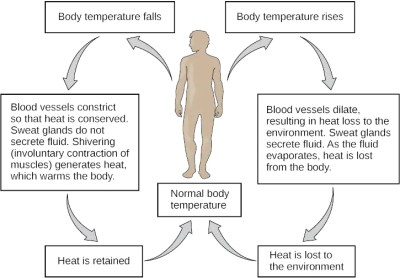
The body has methods of maintaining a set temperature. Credit: Wikimedia Commons, CNX OpenStax, CC BY-SA 4.0

To understand the danger of a wet bulb event, we must first understand how our bodies work. The human body likes to maintain its  temperature at approximately 37 °C (98.6 °F). That temperature can drift slightly, and the body itself will sometimes move its temperature setpoint higher to tackle infection, for example. The body is a delicate thing, however, and a body temperature above 40 °C (104 °F) can become life threatening. Seizures, organ failures, and unconsciousness are common symptoms of an overheating human. Death is a near-certainty if the body’s temperature reaches 44 °C (112 °F), though in one rare case, a patient in a coma survived a body temperature of 46.5 °C (115.7 °F).

Thankfully, the body has a host of automated systems for maintaining its temperature at its chosen set point. Blood flow can be controlled across the body, and we instinctively seek to shed clothes in the heat and cover ourselves in the cold. However, the bare naked fact is that one system is most crucial to our body’s ability to cool itself. The perspiration system is vital, as it uses sweat to cool our body via evaporation. Water is a hugely effective coolant in this way, with beads of sweat soaking up huge amounts of heat from our skin as they make the phase change from liquid to vapor.

Continue reading “How To Survive A Wet Bulb Event”

ChatGPT, The Worst Summer Intern Ever

Back when I used to work in the pharma industry, I had the opportunity to hire summer interns. This was a long time ago, long enough that the fresh-faced college students who applied for the gig are probably now creeping up to retirement age. The idea, as I understood it, was to get someone to help me with my project, which at the time was standing up a distributed data capture system with a large number of nodes all running custom software that I wrote, reporting back to a central server running more of my code. It was more work than I could manage on my own, so management thought they’d take mercy on me and get me some help.

The experience didn’t turn out quite like I expected. The interns were both great kids, very smart, and I learned a lot from them. But two months is a very tight timeframe, and getting them up to speed took up most of that time. Add in the fact that they were expected to do a presentation on their specific project at the end of the summer, and the whole thing ended up being a lot more work for me than if I had just done the whole project myself.

I thought about my brief experience with interns recently with a project I needed a little help on. It’s nothing that hiring anyone would make sense to do, but still, having someone to outsource specific jobs to would be a blessing, especially now that it’s summer and there’s so much else to do. But this is the future, and the expertise and the combined wisdom of the Internet are but a few keystrokes away, right? Well, maybe, but as you’ll see, even the power of large language models has its limit, and trying to loop ChatGPT in as a low-effort summer intern leaves a lot to be desired.

Continue reading “ChatGPT, The Worst Summer Intern Ever”

Retrotechtacular: The Computer Center Of 1973

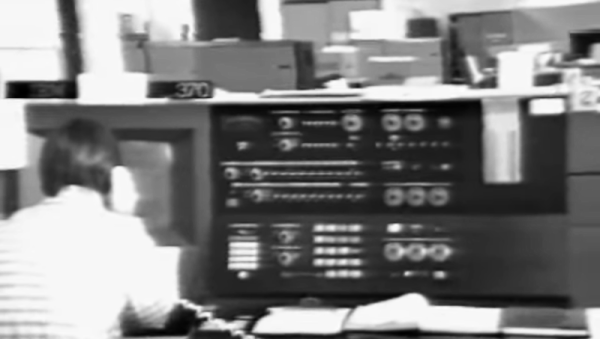
You might expect Bell Labs would have state-of-the-art computers, and they did. But it is jarring to realize just how little that was in 1973, fifty years ago. If you started work at Bell’s Holmdel Computing Center back then, you might have watched one of the orientation videos below. Your first clue about how far things have come might be the reference to the IBM 370/165, which had “3 million bytes of core, 2 million of which are available for programmer use.” Even our laptops today have at least 8 gigabytes of RAM. There were at least two other smaller IBM 370s, too. Plenty of 029 card punches are visible.

If you were trying to run something between 8:00 AM and 5:30 PM, you had to limit your job run time to three minutes, 4,000 lines of output, and no more than 1,000 cards in and 5,000 cards out. Oh, and don’t use more than 384 kB of that core memory, either. If you fell within those limits, you could hand your card deck over at the express counter and get your results in only five or ten minutes. If you were not in the express line but still rated “premium” service, you could expect to wait a half hour.

Continue reading “Retrotechtacular: The Computer Center Of 1973”

PCIe For Hackers: Our M.2 Card Is Done

We’ve started designing a PCIe card last week, an adapter from M.2 E-key to E-key, that adds an extra link to the E-key slot it carries – useful for fully utilizing a few rare but fancy E-key cards. By now, the schematic is done, the component placement has been figured out, and we only need to route the differential pairs – should be simple, right? Buckle up.

Getting Diffpairs Done

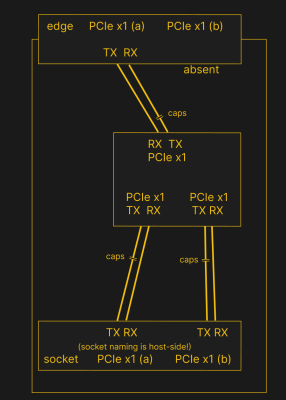
PCIe needs TX pairs connected to RX on another end, like UART – and this is non-negotiable. Connectors will use host-side naming, and vice-versa. As the diagram demonstrates, we connect the socket’s TX to chip’s RX and vice-versa; if we ever get confused, the laptop schematic is there to help us make things clear. To sum up, we only need to flip the names on the link coming to the PCIe switch, since the PCIe switch acts as a device on the card; the two links from the switch go to the E-key socket, and for that socket’s purposes, the PCIe switch acts as a host.



While initially routing this board, I absolutely forgot about one more important thing for PCIe – series capacitors on every data pair, on the host TX side of the link. We need three capacitor pairs here – on TX of the PCIe switch uplink, and two pairs on TX side of the switch – again, naming is host-side. I only remembered this after having finished routing all the diffpairs, and, after a bit of deliberation, I decided that this is my chance to try 0201 capacitors. For that, I took the footprints from [Christoph]‘s wonderful project, called “Effect of moon phase on tombstoning” – with such a name, these footprints have got to be good.

We’ve talked about differential pair calculations before in one of the PCIe articles, and there was a demo video too! That said, let’s repeat the calculations on this one – I’ll show how to get from “PCB fab website information” to “proper width and clearance diffpairs”, with a few fun shortcuts. Our setup is, once again, having signals on outer layers, referenced to the ground layer right below them. I, sadly, don’t yet understand how to calculate differential impedance for signal layers sandwiched between two ground planes, which is to say – if there’s any commenters willing to share this knowledge, I’d appreciate your input tremendously! For now, I don’t see that there’d be a tangible benefit to such an arrangement, anyway.

Continue reading “PCIe For Hackers: Our M.2 Card Is Done”

Retro Gadgets: The Real Desktop Computer

People argue about the first use of the computer desktop metaphor. Apple claims it. Xerox probably started it. Yet, when I think of computer desktops, I think of the NOVAL 760. Not a household name, to be sure, but a big ad spread in a June 1977 Byte magazine was proud to introduce it. At $2995, we doubt many were sold, but the selling point was… well… it was built into a “handsome wood desk, designed to compliment any decor.” The desk folded down when you were not using the computer, and the keyboard recessed into a drawer.

The computer itself was no slouch for 1977, but nothing you couldn’t find elsewhere. An 8080, speed unspecified, had 16 kB of RAM and 3 kB of PROM. There was also a display with a few kB of memory hanging around, too. And just in case you were worried, the bottom of the page entitled “The Ultimate in Home Computers” reads, “The NOVAL 760 COMPUTER. A fully-assembled, fully-tested personal computer … not a kit!” Of course, for us, that’s not really a selling point. If you wonder why the computer was memory limited, this is the time that Extensys bragged in an ad: 64 kB for $1495! If you ordered one, you could have it in 15 to 30 days, too!

There were options for more memory, and it wasn’t clear how many of the I/O devices in the ad were actually included in the advertised price. Some of the devices seemed very specialized, so we are guessing the basic system didn’t include some of them.

Continue reading “Retro Gadgets: The Real Desktop Computer”

CircuitPython Happenings Hack Chat With Adafruit

Join us on Wednesday, July 26 at noon Pacific for the CircuitPython Happenings Hack Chat with The folks from Adafruit!

join-hack-chatIt’s always a party when the good folks from Adafruit stop by the Hack Chat, and we expect no less than that this time around. It’s hard to predict where the conversation will go when [LadyAda], [pt], and [Scott] roll in, but we strongly suspect it’ll center on what’s new in the world of CircuitPython.

We’ve heard that they’ve got some cool stuff going on with CircuitPython on the RP2040, which just might lead to a Python-based fix for the current Bus Pirate supply chain problem. It’ll be a swashbucklingly good time, so make sure you stop by.

Our Hack Chats are live community events in the Hackaday.io Hack Chat group messaging. This week we’ll be sitting down on Wednesday, July 26 at 12:00 PM Pacific time. If time zones have you tied up, we have ahandy time zone converter.

DisplayPort: Tapping The Altmode

Really, the most modern implementation of DisplayPort is the USB-C DisplayPort altmode, synonymous with “video over USB-C”, and we’d miss out if I were to skip it. Incidentally, our last two articles about talking USB-PD have given a few people a cool new toy to play with – people have commented on the articles, reached out to me for debugging help, and I’ve even seen people build the FUSB302B into their projects! Hot on the heels of that achievement, let’s reach further and conquer one more USB-C feature – one that isn’t yet openly available for us to hack on, even though it deserves to be.

For our long-time readers, it’s no surprise to see mundane capabilities denied to hackers. By now, we all know that many laptops and phones let you get a DisplayPort connection out of a USB-C port. Given that the USB-C specifications are openly available, and we’ve previously implemented a PD sink using those specifications, you’d expect that we could do DisplayPort with the same ease. Yet, the DisplayPort altmode specification is behind a VESA membership paywall, with a hefty pricetag – a practice of theirs that has been widely criticized, counter to their purpose as a standards organization and having resulted in some of their standards failing.

Not to worry, however – we can easily find an assortment of PDFs giving a high-level overview and some details of the DisplayPort altmode, and here’s my favorite! I also have a device running MicroPython with a FUSB302 chip connected, and a few DisplayPort altmode devices of mine that I can disassemble. This, turns out, is more than enough for us to reverse-engineer our way into an open-source DisplayPort altmode library!

Continue reading “DisplayPort: Tapping The Altmode”