tempescope_in_bookshelf

An Extemely Unique Weather Display

Most home weather displays use an LED screen or other moderately interesting methods of showing you what’s going on outside. The [Tempescope], however, takes an entirely different route, actually recreating a tiny weather environment on your bookshelf!

This active weather device is controlled via an Arduino as well as a pump, ultrasound diffuser, and other assorted components connected to a computer. It was originally meant to display, or more accurately recreate (precreate?) tomorrow’s weather. What is even more interesting is that using [World Weather] software, it’s able to simulate the weather on any place on earth.

Early in this article [Ken] lists the art of [bonsai] as one of his inspirations. He’s open to suggestions as to how to expand this device, which can be seen after the break. We (I at least) would think it was awesome if there was actually a bonsai tree in the environment in keeping with its influences. Certainly our readers can give him some feedback as well! Continue reading “An Extemely Unique Weather Display”

.NET For The STM32 F4 Discovery Board

Here’s a technique that will let you use the .NET framework on an STM32 Discovery board. [Singular Engineer] was happy to learn that the .NET Micro Framework had been ported for STM32 chips. It’s doesn’t look like the port has hit a stable version yet, but these instructions will be enough to get you up and running. This lets you use managed code in the C# language to program an embedded device: the STM32 F4 Discovery board.

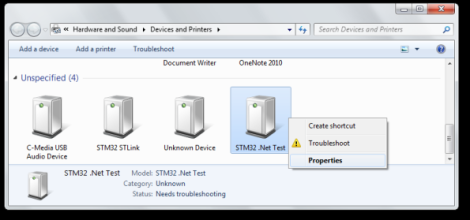
After flashing a new bootloader to the board a driver needs to be added for Windows to communicate with it. Above you can see that the board will enumerate as ‘STM32 .Net Test’. Once the driver is installed the rest of the firmware can be loaded on the board using a GUI supplied with the NETMF for STM32 package. That takes care of prepping the hardware, the rest is a painless process of configuring Visual Studio to use the board as a target. The ‘Hello World’ application then uses C# to blink an LED.

Face Tracking With An Android Device

This Android device can recognize faces and move to keep them in frame. It’s a proof of concept that uses commonly available parts and software packages.

The original motivation for the project was [Dan O’s] inclination to give the OpenCV software a try. OpenCV is an Open Source Computer Vision package that takes on the brunt of the job when it comes to discerning meaning from images. To give the phone the power to move he designed and printed his own mounting brackets for the phone and a couple of hobby servos. An IOIO board connects to the Android device in order to control the motors. On the software side all [Dan] needed to do was write some code to interface the output of the OpenCV face tracking modules with the input of the IOIO. See the finished project demonstration after the jump.

This system can easily be implemented with other hardware, like this Arduino-based version we looked at earlier in the year.

Continue reading “Face Tracking With An Android Device”

Emulators 101: How To Write A Program That Functions Like An NES CPU

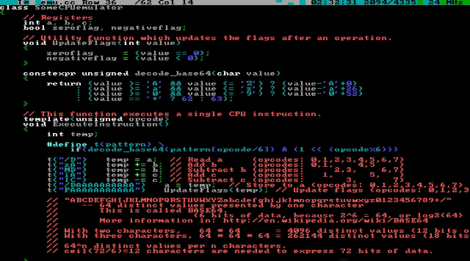
We’d bet everyone reading this article has played a game on an emulator at some time or another. And you may have a base idea of how those emulators work. But we’d wager the vast majority of you are clueless about the actual implementation of game emulators (we know we are). But that has all changed after seeing this demonstration of how [Bisqwit] wrote his own NES emulator. The description doesn’t cover anything more than the basics of writing code that emulates the NES CPU hardware itself. But it’s presented in such a way that makes it quite easy to understand for anyone who has a basic knowledge of programming. He starts with a switch statement for handling the processor’s opcodes and then moves through piece by piece showing how he refined his code to make it work while keeping it readable. We think this is a great teaching method and appreciate the time he put into producing this tutorial.

The explanation starts about 4:22 into the video which is embedded after the break. You’ll also find the first two demo videos there. Those involve mostly fast-motion text editing of the emulator coding process with some gameplay tests at the end of the second video.

Continue reading “Emulators 101: How To Write A Program That Functions Like An NES CPU”

Hackaday-proofing Your Hackerspace’s Server

Last month we posted a tutorial from Hub City Labs on making your own PCBs at home. At the time, Hub City was hosting their hackerspace web site on a tiny vps graciously provided by a member. As you might expect, the throngs of Hackaday readers turned Hub City Labs’ server into a pile of molten slag and made their admin’s hair a little more gray. Their web site is up again, and Hub City provided a tutorial on protecting your server from the ravages of being Slashdotted, Farked, Reddited, and even Hackaday’d.

The solution for the first few hours was to transfer Hub City Labs’ site to an Amazon EC2 instance. Since then, they’ve moved over to a Debian EC2 instance that is able to handle half a million pageviews an hour for a WordPress site.

This amazing capability required a good bit of optimizations. A WordPress installation is set to run cron tasks on every page load; not good if you’re going to see thousands of hits every minute. The guys added define(‘DISABLE_WP_CRON’, true) to their wp-config.php file and set all the background tasks – checking to see if a page should be updated – to a fixed schedule every minute or so. Along with an increase in the WordPress cache, these optimizations increased the number of pageviews an hour from 1500 to 60000.

To get up to half a million pageviews an hour, the EC2 instance was loaded up with Varnish, a front-end cache that really speeds things up.

The result – 375 million pageviews for $15 a month – is more than Hub City Labs will probably ever need. The nature of hackerspace web sites, though – light load until Hackaday, Slashdot, or Reddit figure out you did something cool – means hosting on an expandable EC2 instance is probably the way to go.

Turning Video Game Sprites Into 3D Objects

Anyone who has played Minecraftfor a good amount of time should have a good grasp on making 3D objects by placing voxels block by block. A giant voxel art dragon behind your base is cool, but what about the math behind your block based artwork? [mikolalysenko] put together a tutorial for making 3D objects out of video game sprites and covers a lot of the math involved in turning pixels into voxels.

The process of modeling a 3D object from a series of 2D images is a very well-studied computer vision problem called multiview stereo reconstruction. This process has been used to build 3D models of random objects with devices such as the Stanford spherical gantry. Unfortunately the math for this algorithm is a mess, but there is another way: using photo hulls (PDF warning) to find the largest possible object from a series of images showing the top, bottom, left, right, front, and back views.

[mikolaly] put together an algorithm to produce 3D images from a series of images and even went so far as to build a web-based shape carving editor. With this web app, it’s possible to make 3D objects simply by inputting a bunch of colored pixels onto six 2D grids.

Once the models were complete, [mikolaly] sent some of the 3D models off to Shapeways for 3D printing. He’s completed Meat boy, Mario, and Link 3D sprites, all available for sale.

Now the only thing left to do is build a script to turn these objects into Minecraft object schematics.

The Python Programming Language For Physical Hacking

We see projects here all the time that blend computing with the real world. Some people are naturally stronger on the mechanical end of things, whereas some are better with electronics or coding. All three specialities can be needed depending on your project. If your weakness lies in making a computer do your bidding, I might suggest that the Python language is a good one to learn.

I’ve been going through Learn Python the Hard Way, which is offered for free online, or you can pay for it if you so choose. I’ve published my thoughts on lessons 1-10 and 11-20 so far. As a mechanical engineer with limited (but not totally nonexistent) programming skills, it’s been an excellent experience so far.

If you’re wondering if Python is a good language to learn if you’d like to participate in [HAD] style projects, why not check out the following projects featured here:

Or just do a search of [HAD], and you’ll find many other projects for inspiration. If you’ve got a Python project to share, be sure to tell us about it in the comments!