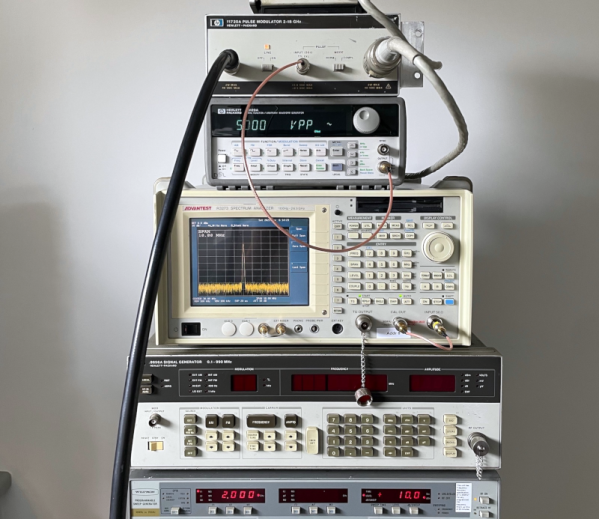
In the realm of test equipment, there are a number of items that you don’t know you need until you need one. That’s probably the case with the HP11720A pulse modulator. [Tom] acquired two of these even though, by his own admission, he had “no need for these things.” We’d like to say we don’t get that, but — alas — we do.
The good news, though, is he used one of them to measure the quality of some coax cable and shared the exercise with us in the post and a video, which you can watch below. The device can generate pulses with extremely fast rise and fall times (under 10 nanoseconds) at frequencies from 2 to 18 GHz. These were often used in pulsed radar applications and probably cost quite a bit more new than [Tom] shelled out for them.
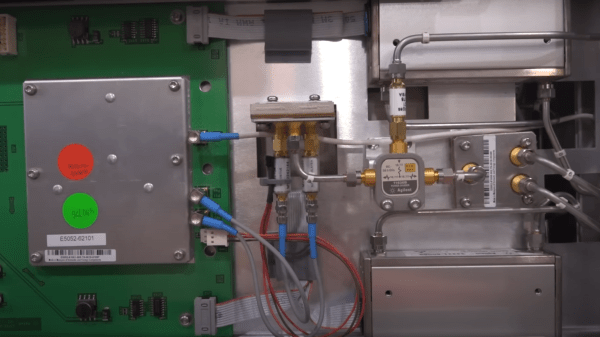
[Shahriar] of The Signal Path is back with another fascinating video teardown and analysis for your viewing pleasure. (Embedded below.) This time the target is an Agilent E5052A 7 GHz signal Source/Analyser which is an expensive piece of kit not many of us are fortunate enough to have on the bench. This particular unit is reported as faulty, with a signal power measurement that is completely off-the-rails wrong, which leads one to not trust anything the instrument reports.
After digging into the service manual of the related E5052B unit, [Shahriar] notes that the phase noise measurement part of the instrument is totally separate from the power measurement, only connected via some internal resistive power splitters, and this simplifies debugging a lot. But first, a short segue into that first measurement subsystem, because it’s really neat.
Cross-correlating time-gated FFT (TG-FFT) subsystem at the top, dodgy power detector at the bottom
A traditional swept-mode instrument works by mixing the input signal with a locally-sourced low-noise oscillator, which when low-pass filtered, is fed into a power meter or digitizer. This simply put, down-converts the signal to something easy to measure. It then presents power or noise as a function of the local oscillator (LO) frequency, giving us the spectral view we require. All good, but this scheme has a big flaw. The noise of the LO is essentially added to that of the signal, producing a spectral noise floor below which signals cannot be resolved.
The E5052 instrument uses a cunning cross-correlation technique enabling it to measure phase noise levels below that of its own internal signal source. The instrument houses an Oven-Compensated Crystal Oscillator (OCXO) for high stability, in fact, two from two different vendors, one for each LO, and mounted perpendicular to each other. The technique splits the input signal in half with a power splitter, then feeds both halves into identical (apart from the LOs) down-converters, the outputs of which are fed into a DSP via a pair of ADCs. Having identical input signals, but different LOs (with different phase noise spectra) turns the two signals from a correlated pair to an uncorrelated pair, with the effects of chassis vibration and gravity effects also rolled in.
The DSP subtracts the uncorrelated signal from the correlated signal, therefore removing the effect of the individual LO’s effect on the phase noise spectrum. This clever technique results in a phase noise spectrum below that of the LOs themselves, and a good representation of the input signal being measured.
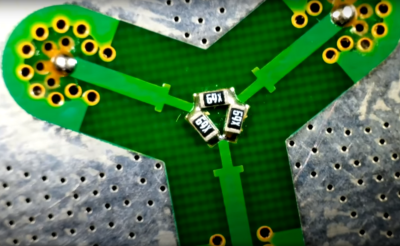
This is what a DC-7GHz resistive power divider looks like. Notice the inductive matching section before each resistor branch.
Handily for [Shahriar] this complex subsystem is totally separate from the dodgy power measurement. This second system is much simpler, being fed with another copy of the input signal, via the main resistive power splitter. This second feed is then split again with a custom power divider, which upon visual inspection of the input SMA connector was clearly defective. It should not wobble. The root cause of the issue was a cold solder joint of a single SMA footprint, which worked loose over time. A little reflow and reassembly and the unit was fit for recalibration, and back into service.
If you’re willing to spend $200 USD on nothing more than 100 grams of plastic, there are a few trendy sunglasses brands that are ready to take your money before you have time to think twice. Sure, you can get a pair of sunglasses for an order of magnitude less money that do the exact same job, but the real value is in the brand stamped into the plastic and not necessarily the sunglasses themselves. Not so with this pair of Ray-Bans, though. Unlike most of their offerings, these contain a little bit more than a few bits of stylish plastic and [Becky Stern] is here to show us what’s hidden inside.
At first glance, the glasses don’t seem to be anything other than a normal pair of sunglasses, if a bit bulky But on closer inspection they hide a pair of cameras and a few other bits of electronics similar to the Google Glass, but much more subtle. The teardown demonstrates that these are not intended to be user-repairable devices, and might not be repairable at all, as even removing the hinges broke the flexible PCBs behind them. A rotary tool was needed to remove the circuit boards from the ear pieces, and a bench vice to remove the camera modules from the front frame. We can presume these glasses will not be put back together after this process.
Hidden away inside is a pair of cameras, a Snapdragon quad-core processor, capacitive touch sensors, an amplifier for a set of speakers. Mostly this is to support the recording of video and playback of audio, and not any sort of augmented reality system like Google Glass attempted to create. There are some concerning ties with Facebook associated with this product as well which will be a red flag for plenty of us around here, but besides the privacy issues, lack of repairability, and lack of features, we’d describe it as marginally less useful as an entry-level smartwatch. Of course, Google Glass had its own set of privacy-related issues too, which we saw some clever projects solve in unique ways.
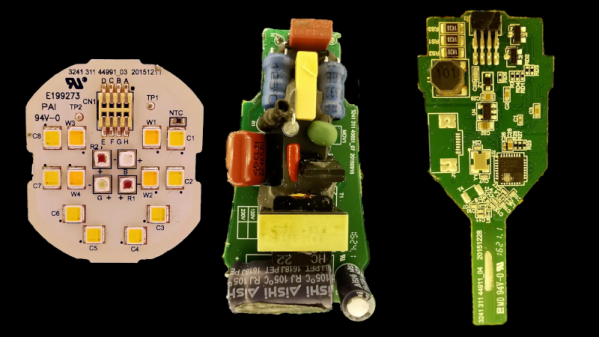
What do you do with a Hue smart lightbulb? Well, if you are [Chris Greening], you take it apart and get hacking. If you ever wondered what’s inside, the teardown is pretty good, and you can also watch the video below. The potting compound, however, makes a mess.
Once you get the potting undone, there are three PCBs: an LED carrier, a power supply, and a logic board. The arrangement of the LEDs is a bit confusing, but [Chris] explains it along with providing schematics for all of the boards.
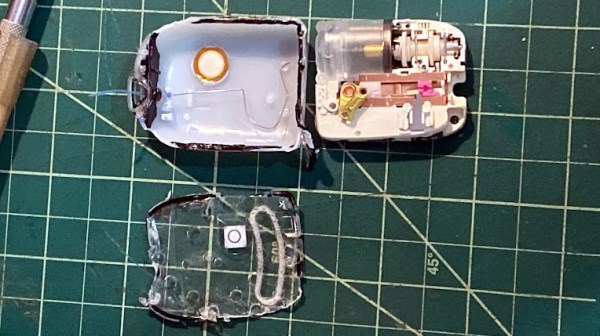
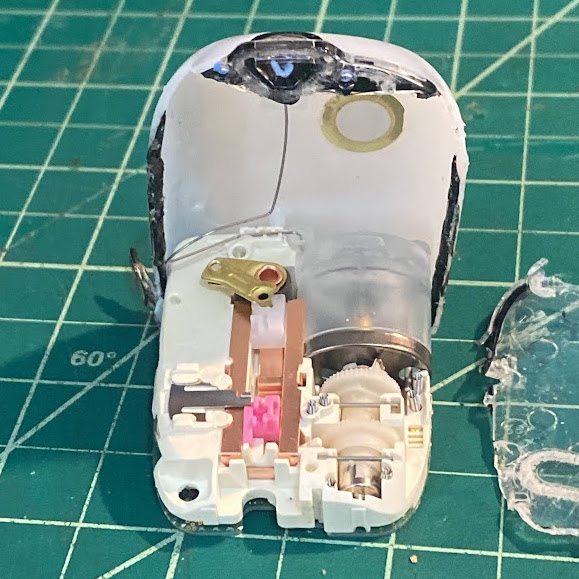
Modern insulin pumps are self-contained devices that attach to a user’s skin via an adhesive patch, and are responsible for administering insulin as needed. Curious as to what was inside, [Ido Roseman] tore down an Omnipod Dash and took some pictures showing what was inside.
A single motor handles inserting the cannula into the skin, retracting the insertion needle, and administering insulin.
These devices do quite a few things. In addition to holding a reservoir of insulin, they automatically insert a small cannula (thin tube) through the skin after being attached, communicate wirelessly with a control system, and pump insulin through the cannula as needed. All in a sealed and waterproof device. They are also essentially disposable, so [Ido] was curious about what kind of engineering went into such a thing.
The teardown stops short of identifying exactly how all the mechanisms inside work, but [Ido] was able to learn a few interesting things. For example, all of the mechanical functions — inserting the cannula with the help of a needle (and retracting the needle afterwards) and pumping insulin — are all accomplished by one motor and some clever mechanical engineering.
The electronics consist of a PCB with an NXP EX2105F 32-bit Arm7 microcontroller, a second chip that is likely responsible for the wireless communications, three captive LR44 button cells, and hardly a passive component in sight.
The software and communications side of an insulin pump like this one has had its RF communications reverse-engineered with the help of an SDR, a task that took a lot more work than one might expect. Be sure to follow that link if you’re interested in what it can take to get to the bottom of mystery 433 MHz communications on a device that isn’t interested in sharing.
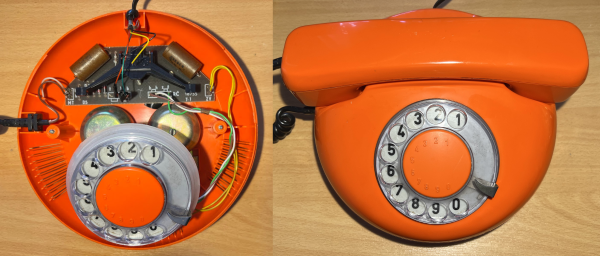
The 20th century saw everything from telephones to computers become mainstream. Many of these devices were beautifully designed in the mid-century period, something that’s hard to say about a lot of today’s cheaper technology. [John Graham-Cumming] has shown us one exquisite example, with his teardown of a simple Czech telephone.
The model in question is a DS3600 telephone built by Tesla Stropkov in the early 1980s. Despite this, it’s a design that looks like it hails more from the 1960s based on its smooth curves and rounded features. It’s a rotary dial phone, though a push-button version was also produced.
Inside the phone is a simple single-sided PCB clearly marked out with a tidy silkscreen. The ringer and a few capacitors make up the bulk of the circuitry inside the base, along with the rotary dial. The handset itself plays host to most of the other componentry, including the mystery “WNB 068 hybrid circuit” which [John] couldn’t positively identify.
It’s great to get a look inside vintage hardware and see how things were done in yesteryear. It’s particularly funny to think about how simple telephones used to be in contrast to today.
Often we bring you projects at the end of their trajectory so that you can marvel at a job well done, but sometimes we point you instead to the start of the story. Such is the case with [Brett Smith]’s investigation of discarded fish aggregation buoys, referred to as FADs. These 700-plus dollar devices are deployed in the ocean in the thousands by commercial fishing fleets, and most are not recovered. He’s looking at them from the point of view of re-using their technology in the marine conservation business.
His progress has been documented in a series of short YouTube videos, starting with an introduction that we’ve placed below the break. So far he’s gone on to a complete teardown, and then a detailed look at the PCB. Inside they have a solar charger for a bank of NiCd cells, an echo sounder, a GPS receiver, and an Iridium satellite modem allowing the device to phone home. There’s certainly plenty in there to experiment with, including a few slightly exotic parts, so keep an eye on his channel as we’re sure to see more.