Single Piece 3D-Printed PCB Vise

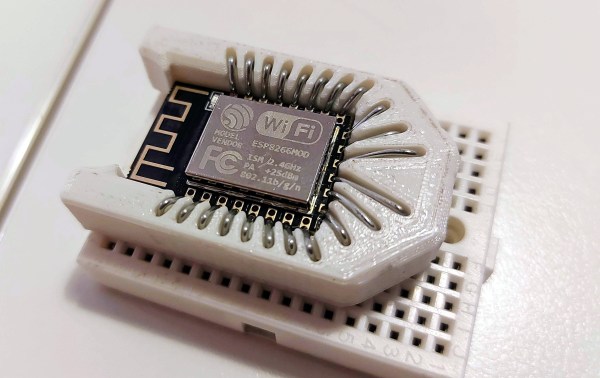
Making full use of the capabilities and advantages of 3D printing requires a very different way of thinking compared to more traditional manufacturing methods. Often we see designs that do not really take these advantages into account, so we’re always on the lookout for interesting designs that embrace the nature of 3D-printed parts in interesting ways. [joopjoop]’s spring-loaded PCB vise is one such ingenious design that incorporates the spring action into the print itself.

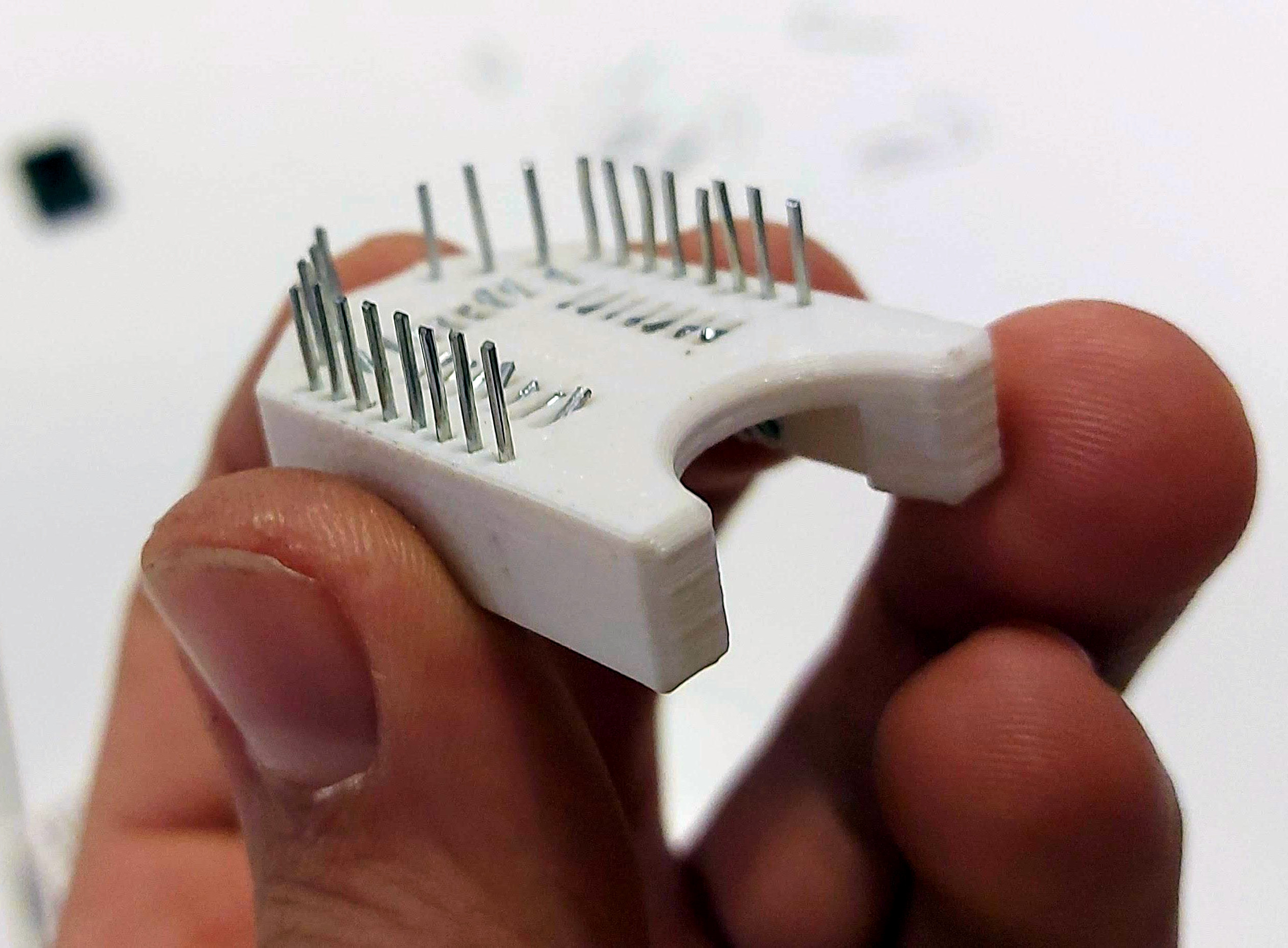
This vise is designed to be printed as a single piece, with very little post-processing required if your printer is dialed in. There is a small gap between the base plate and the springs and clamping surfaces that need to be separated with a painters knife or putty knife. Two “handles” have contours for your fingers to operate the clamping surfaces. It opens quickly for inserting your latest custom PCB.

PLA can be surprisingly flexible if the right geometry is used, and these springs are an excellent example of this. In the video below [Chuck Hellebuyck] does a test and review of the design, and it looks like it works well for hand soldering (though it probably won’t hold up well with a hot air station). Last month our own [Tom Nardi] recently reviewed a similar concept that used spiral springs designed into the printed part. While these both get the job done, [Tom’s] overall verdict is that a design like this rubber-band actuated PCB vise is a better long-term option.

It takes some creativity to get right, but printing complete assemblies as a single part, is a very useful feature of 3D printing. Just be careful of trying to make it the solution for every mechanical problem.

Tensile Testing Machine Takes 3D Printed Parts To The Breaking Point

If you’re serious about engineering the things you build, you need to know the limits of the materials you’re working with. One important way to characterize materials is to test the tensile strength — how much force it takes to pull a sample to the breaking point. Thankfully, with the right hardware, this is easy to measure and  [CrazyBlackStone] has built a rig to do just that.

Built on a frame of aluminium extrusion, a set of 3D printed parts to hold everything in place. To apply the load, a stepper motor is used to slowly turn a leadscrew, pulling on the article under test. Tensile forces are measured with a load cell hooked up to an Arduino, which reports the data back to a PC over its USB serial connection.

It’s a straightforward way to build your first tensile tester, and would be perfect for testing 3D printed parts for strength. The STEP files (13.4 MB direct download) for this project are available, but [CrazyBlackStone] recommends waiting for version two which will be published this fall on Thingiverse although we didn’t find a link to that user profile.

Now we’ll be able to measure tensile strength, but the stiffness of parts is also important. You might consider building a rig to test that as well. Video after the break.

Continue reading “Tensile Testing Machine Takes 3D Printed Parts To The Breaking Point”

Glasgow Uses An FPGA As An Embedded Systems Multitool

Everyone who builds embedded systems wants tools to help build and debug systems faster, so it isn’t uncommon to see boards outfitted with various tools like serial port sniffers. We’ve seen a few incarnations and the latest is Glasgow. The small board uses an FPGA and claims to do the following:

  • UART with automatic baud rate determination
  • SPI or I2C
  • Read and write common EEPROMs and flash chips
  • Read and write common EPROMs including a data rescue function
  • Program AVR chips via SPI
  • Play back JTAG SVF files
  • Debug ARC and some MIPS CPUs
  • Program XC9500LX CPLDs
  • Communicate to several wireless radios and CPUs
  • Do sound synthesis
  • Read raw data from floppy drives

The revC board is the first to be relatively functional and sports 16 I/O pins operating at up to 100 MHz, although the documentation hints that 6 MHz might be the top of what’s easily accomplished. The software is written in Python and the iCE40 FPGA toolchain that we’ve talked about many times in the past.

This already looks like a useful tool and the reconfigurable nature of FPGAs makes it a good platform to expand. The documentation discusses the difficulty in debugging things for the board, so the base software offers support such as a built-in logic analyzer to help.

We have seen dev boards become bench tools, like using the iCEstick as a logic analyzer. It’s nice to see dedicated tools like this one built up around the speed and versatility of FPGAs.

Continue reading “Glasgow Uses An FPGA As An Embedded Systems Multitool”

True Craftsmanship: Pneumatic Powered Drone Wasn’t Made To Fly

From time to time it’s good to be reminded that mechanical engineering can also be art. [José Manuel Hermo Barreiro], also known as [Patelo], is a retired naval mechanic with a love for scale model engines. Using only basic tools and a lathe, he has built a non-flying hexacopter display model, each propeller turned by a tiny single cylinder motor that runs on compressed air. From the tiny components of the valve systems, the brass framed acrylic windows into the crankcases, and the persistence of vision disc on the exhaust, the attention to detail is breathtaking.

One of the six hand crafted pneumatic motors

[Patelo] started the project on paper, and created a set of detailed hand-drawn blueprints to work from. Sadly a large part of the build took place during lockdown, and was not filmed, but we still get to see some work on a crankcase, connecting rod, camshaft, propellers, flywheel, and exhaust tubes. It is very clear that [Patelo] knows his way around his lathe very well, and is very creative with custom tools and jigs. The beautiful machine took approximately 1,560 hours to build, consists of 265 individually made parts held together with 362 screws.

We previously featured tiny V-12 engine that [Patelo] built around 2012. At that time he was 72 years of age, which means he should be around 80 now. We can only hope to come to emulate him one day, and that we get to see more of what comes out of his workshop. Hats off to you, sir.

The Redesigned CNC Scroll Saw Rides Again

When [Andrew Consroe] tried to build a CNC scroll saw, he quickly learned how tricky of a design problem it is. With a blade that only cuts in one direction, you can’t simply move the tool in the X and Y dimensions like you can with a laser or router; either the work piece or the blade itself needs to continuously rotate towards the direction of the cut.

He’s recently shown off the third version of the machine, and while it’s still not exactly a practical tool, there’s no question it’s a brilliantly designed one, or that it works, slowly. Earlier attempts used a rotating table to spin the work piece, but [Andrew] found this to be an imperfect solution. Building a mechanism heavy duty enough to spin the material being cut while remaining accurate enough not to break the blade was a tall order, though he did get pretty close.

The earlier version used a rotating table.

This time around he’s decided to simply rotate the blade itself. This can be accomplished with a single stepper motor and some suitably sized pulleys, while maintaining an exceptionally high degree of accuracy. The whole blade assembly moves up and down on an aluminum extrusion rail with a motor and crank arrangement. By synchronizing the rotation of the blade with the vertical movement of the saw, the software can be sure that everything is where it needs to be before the cutting stroke actually happens.

Judging by the video after the break, the system works quite well. The complex rounded shapes he cuts out of the piece of plywood look essentially perfect, and it sounds like this new version of the machine isn’t breaking blades due to positional errors like the previous one did. Unfortunately, it’s also very slow. There’s so many moving parts and careful positioning required that even when the video is sped up 10x, the saw still appears to only be creeping its way through the  material.

On the back half of the video, [Andrew] details another approach to rotating the blade that would reduce the amount of moving mass in the saw. This would give the machine a considerable speed boost, and we’d love to see him implement it. By the way, before anyone says it: using a spiral blade is cheating.

Continue reading “The Redesigned CNC Scroll Saw Rides Again”

A DIY 6.5-Digit Multimeter Is A Lesson In Clever Circuitry

A multimeter is an easy prospect, right? Back in the day you could make one fairly easily with a decent panel meter and a set of precision resistors, and now a digital one can be had for throwaway prices from China.

But what if instead of a cheap-and-cheerful bench instrument your needs extend to a high-precision device, a really good multimeter? It’s a path [jaromir.sukuba] has trodden with his 6.5 digit multimeter project, and along the way he’s offered us a fascinating window into their design that should be of interest to any electronic engineer even if they never intend to build a multimeter.

The range selection network of switches and resistors, microcontroller, and seven-segment displays are universal to a multimeter design, meaning that there is nothing too special about them in a high-precision instrument except that here he’s using an FPGA for timing.

Where the meat lies in this project is in the ADC and its associated voltage reference, and for that he takes a surprising turn. Instead of taking an off-the-shelf ADC part from one of the usual manufacturers, he’s created his ADC from scratch using op-amps, and to understand why that is the case he takes us on a journey into the world of dual-slope integrating ADCs. These circuits are very well explained in a 1989 HP journal article (PDF, page 8), and are a clever design that measures the time taken to charge and discharge a capacitor from the voltage to be measured and compares it to the same time from the reference voltage.

The beauty of it comes out in the HP article, that the mathematics of the charge/discharge cycle cancel out any effects of the analogue component values, allowing the much higher precision of the reference and the clock timing to dictate that of the reading. We look forward to seeing more of this project.

It’s surprising how few home-made multimeters we have on these pages, perhaps because of those cheap ones. Of the few we’ve had, perhaps this state-based Nixie one is most unusual.

Digital Caliper Talks For Accessibility, With This App

A good instrument stays with its owner for a lifetime, becoming part of their essential trusted toolkit to be consulted as a matter of habit. If you use a caliper to measure dimensions  you’ll know this, and a quick glance at its scale or digital display will be second nature. But if you aren’t fortunate enough to have the eyesight to see the caliper, then it’s off-limits, and that’s something [Naomi Wu] has addressed with her open-source accessible speaking caliper app. It’s an Android app that connects to digital calipers that contain Bluetooth connectivity, and as well as speaking aloud the caliper reading it also displays it in very large text on the device screen. As well as the source link from which you can build the app, it’s available for installation directly from the Google Play Store.

If you’re used to [Naomi] from her video tours of the electronics businesses in her native Shenzhen, her eye-catching wearable projects, or her exploits with an industrial CNC machine in her living room, you might be interested to know that aside from this app she’s been a long-time proponent of open-source in China. She was responsible among other projects for the Sino:bit educational computer board, which holds the distinction for her of having secured the first ever Chinese OSHWA certification.

You can see the caliper app in action below the break.

Continue reading “Digital Caliper Talks For Accessibility, With This App”