E-Ink Calendar Paves A Path For All

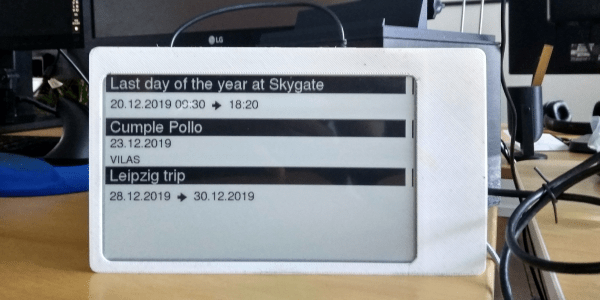
[Martin Fasani] has set out to build a beautiful low power E-Ink Calendar he can hang on his wall. But perhaps more importantly, the work he has done makes it easier for everyone in the future to have a e-ink display. Many battery-powered e-ink projects connect to some server, download a bitmap image, display the new image, and then go into a deep sleep power mode. [Martin’s] project is no different, but it uses a handy microservice that does the conversion and rendering for you.

The firmware for this ESP32/ESP32S2 based calendar is open sourced on GitHub, with a version based on the Arduino framework as well as the native ESP-IDF framework. One particularly fantastic part of the firmware is a C++ component called CalEPD that drives e-paper displays. CalEPD extends the Adafruit_GFX class and is broken out in a separate repo, making it easy to consume on other projects. Since this supports dozens of different e-paper displays, this simplifies the process of building a calendar with different screens. The firmware includes a Bluetooth setup flow from a smartphone or tablet. This means you can quickly configure how often it wakes up, what it queries, and other important features.

The hardware shown in the demo video has a 7.5″ Waveshare screen with 800 x 400 resolution nestled inside a 3D-printed shell. There is also a 5,000 mAh battery with an ESP32 TinyPICO powering the whole system. The TinyPICO was picked for its incredible deep sleep power consumption. All this fits into a frame just 11 mm thick, for which STL files are available. [Martin] continues to work on this calendar display and has recently added support for FocalTech touch panel controllers. We’re excited to see where he takes it next!

This isn’t the first e-ink display project we’ve seen but this is a great reference to build your own. If you need another good starting point, this weather display might give you that little bit of inspiration you need.

Continue reading “E-Ink Calendar Paves A Path For All”

Wireless Earphones And Getting Them Back After They Fall On Tram Tracks

Over the past years, the trend has become to ditch anything with wires. This has led to many people dropping wired earphones and headphones for wireless (Bluetooth) versions. Yet along with the freedom from having the wires snagged on something and having earphones painfully torn out of your ears comes the very real risk of having them drop out of your ears to land potentially very inconvenient.

In Japan this has led to a big issue for railway companies, where throngs of commuters will often accidentally drop possessions onto the tracks. Staff members will then use a mechanical claw (‘magic hand’) to fetch them without having to risk their life by jumping down. With small items such as wireless earphones, this is however not so easy. With 947 cases of dropped earphones in the period of July-September in just the Tokyo area, this has led to desperate staff members coming up with new methods of easily retrieving the small gadgets.

Solutions range from putting something sticky like tape at the end of a stick, to modifying vacuum cleaners. Most recently Tokyo railway company JR East has collaborated with Panasonic to develop a vacuum cleaner-like device that is especially designed to easily retrieve such small items from the tracks, according to the Japan Times article.

The embedded video (also found after the break) from a Japanese broadcaster describes the issue in detail, along with tips on how to properly wear earphones so that they’re far less likely to fall out when you’re waiting on the tram or walking down the street. While it’s possible to fetch your dropped wireless earphones from the tracks, having someone step on it right after it falls out of your ear on the street is less easy to recover from.

Continue reading “Wireless Earphones And Getting Them Back After They Fall On Tram Tracks”

Automated Tools For WiFi Cracking

Knowing how WiFi networks can be attacked is a big part of properly securing them, and the best way to learn about it is to (legally) run some attacks. [Matt Agius] has been going down the WiFi-cracking rabbit hole, and in the process created Pwnagotchi Tools to automate the actual password cracking part.

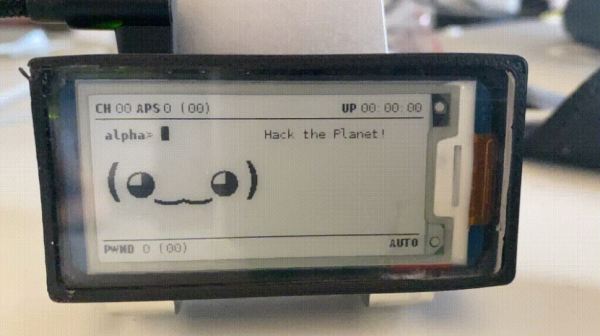
The first step in cracking a WiFi network is to record the handshake that gets exchanged when a client connects to an access point. This has been made very simple thanks to Pwnagotchi, which turns a Raspberry Pi into an automated handshake collection tool and Pwnagothi Tools helps to automate the steps that follow. It downloads the handshakes (pcap files) from the pwnagotchi, and converts it to pmkid/hccapx files to use with the hashcat password recovery tool. Hashcat scripts can then be generated for the actual cracking using any of the attacks that [Matt] has compiled. WPA/WPA2 is slow to crack and requires a lot of processing power, so [Matt] also added the option to automatically provision AWS GPU instances to run the cracking task in the cloud. It also keeps track of the status of each of the handshakes being cracked.

As wireless networks and IoT devices become more pervasive, it’s important to know the dangers, and how to protect against them. WiFi and Bluetooth security is probably the easiest to learn about, but other networks are just as vulnerable when an RTL-SDR is used. Another option Flipper Zero, a hacking gadget for Sub-1 GHz networks inspired by Pwnagotchi, which recently hit $4.8 million in its Kickstarter campaign.

A Battery To Add A Tingling Sensation To Your Tweets

Internet-connected sex toys are a great way to surprise your partner from work (even the home office) or for spicing up long-distance relationships. For some extra excitement, they also add that thrill of potentially having all your very sensitive private data exposed to the public — but hey, it’s not our place to kink-shame. However, their vulnerability issues are indeed common enough to make them regular guests in security conferences, so what better way to fight fire with fire than simply inviting the whole of Twitter in on your ride? Well, [Space Buck] built just the right device for that: the Double-Oh Battery, an open source LiPo-cell-powered ESP32 board in AA battery form factor as drop-in replacement to control a device’s supply voltage via WiFi.

Battery and PCB visualization
Double-Oh Battery with all the components involved

In their simplest and cheapest form, vibrating toys are nothing more than a battery-powered motor with an on-off switch, and even the more sophisticated ones with different intensity levels and patterns are usually limited to the same ten or so varieties that may eventually leave something to be desired. To improve on that without actually taking the devices apart, [Space Buck] initially built the Slot-in Manipulator of Output Levels, a tiny board that squeezed directly onto the battery to have a pre-programmed pattern enabling and disabling the supply voltage — or have it turned into an alarm clock. But understandably, re-programming patterns can get annoying in the long run, so adding WiFi and a web server seemed the logical next step. Of course, more functionality requires more space, so to keep the AA battery form factor, the Double-Oh Battery’s PCB piggybacks now on a smaller 10440 LiPo cell.

But then, where’s the point of having a WiFi-enabled vibrator with a web server — that also happens to serve a guestbook — if you don’t open it up to the internet? So in some daring experiments, [Space Buck] showcased the project’s potential by hooking it up to his Twitter account and have the announcement tweet’s likes and retweets take over the control, adding a welcoming element of surprise, no doubt. Taking this further towards Instagram for example might be a nice vanity reward-system improvement as well, or otherwise make a great gift to send a message to all those attention-seeking people in your circle.

All fun aside, it’s an interesting project to remote control a device’s power supply, even though its application area might be rather limited due to the whole battery nature, but the usual Sonoff switches may seem a bit unfitting here. If this sparked your interest in lithium-based batteries, check out [Lewin Day]’s beginner guide and [Bob Baddeley]’s deeper dive into their chemistry.

ESP8266 Turned Secretive WiFi Probe Request Sniffer

When a Wi-Fi device is switched on, it starts spewing out probe requests to try and find a familiar access point. These probe requests contain the device’s MAC address and the SSID of the hotspot it’s looking for, which can potentially be used to identify a specific device and where it’s been. After experimenting with these probe requests, [Amine Mehdi Mansouri] has created OpenMAC, a tiny ESP8266 based sniffer that could be hidden anywhere.

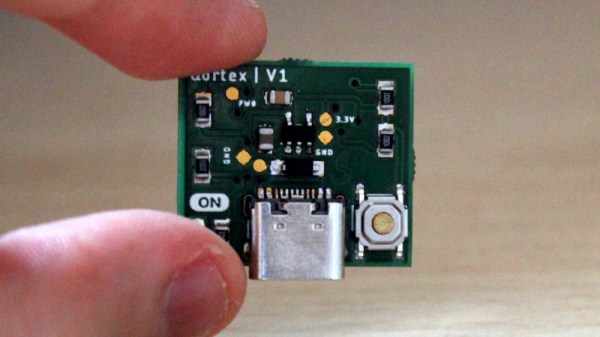
The device consists of an ESP-07S module, a regulator circuit for getting power from a USB-C connector, and a button for power cycling. An external antenna is required for the module, which can be selected based on the size or gain requirements for a specific deployment. [Amine] tested the OpenMAC at a local library (with permission), in combination with a number of his own little Wi-Fi repeaters to expand the reach of the network. All the recorded MAC addresses were logged to a server, where the data can be used for traffic analysis in and around the library, or even for tracking and locating specific devices.

This is nothing new, and is relatively common technique used for gathering information in retail locations, and could be also be used for more nefarious purposes. Newer versions of iOS, Android, and Windows 10 feature MAC address randomization which can limit the ability to track devices in this manner, but it isn’t always activated.

We’ve seen a number of projects that exploit probe requests. FIND-LF can be used for locating devices in your home, and Linger fools probe requests sniffers by replaying previously recorded requests.

Weather Warnings And Dust Detection From This Meteorological Marvel

We love getting our weather in a flurry of different methods, but have you tried building your own sensor suite to harvest the data for you? [Giovanni ‘CyB3rn0id’ Bernardo] needed to monitor isolated locations outside the reach of WiFi. His ray of hope is an ESP32 controller coupled with a LoRa module to beam data to a remote station that can access the cloud.

In addition to radios, he poured a deluge of sensors into the base station to read the temperature, barometric pressure, humidity, and fine dust. Why monitor dust as part of weather data collection? Particulate matter has a huge effect on air quality, something of great interest during a respiratory pandemic. For those readers near wildfires, quantifying your air quality (both indoors and out) is certainly of interest. [Giovanni] is using an SDS011 air quality sensor and has a long writeup just on this part. It uses a fan to move air past a laser-based sensing mechanism.

At the base station, live readings are shown on an OLED screen, but you can also connect to the ESP32 through your phone like a hotspot. If you keep a memory card installed, it will cache the readings in a perpetually-updated CSV file. In regular operation, the LoRa module overcasts the telemetry to its sister unit that acts as a Wifi/LoRa bridge so anyone can view gauges and graphs in real-time on ThingSpeak.

We want to shower [CyB3rn0id] with praise for seeing the cirrus serious impact of harmful dust and making something that can alert people. We don’t want to rain on anyone’s parade, but sometimes it is better to stay inside.

Cell Phone Signal Booster Gets Teardown And Demo

Ever wonder what was inside a cell phone booster, or what it is like to set up or use one? If so, [Kerry Wong]’s got you covered with his teardown of a Cel-Fi Go X Cell Signal Booster by Nextivity. [Kerry] isn’t just ripping apart a cheap unit for laughs; his house has very poor reception and this unit was a carefully-researched, genuine investment in better 4G connectivity.

The whole setup consists of three different pieces: the amplifier unit pictured above, and two antennas. One is an omnidirectional dome antenna for indoors, and the other is a directional log-periodic dipole array (LPDA) antenna for outdoors. Mobile phones connect to the indoor antenna, and the outdoor antenna connects to the distant cell tower. The amplifier unit uses a Bluetooth connection and an app on the mobile phone to manage settings and actively monitor the device, which works well but bizarrely doesn’t seem to employ any kind of password protection or access control whatsoever.

Overall [Kerry] is happy, and reports that his mobile phone enjoys a solid connection throughout his house, something that was simply not possible before. Watch a hands-on of the teardown along with a short demonstration in the video embedded below.

Continue reading “Cell Phone Signal Booster Gets Teardown And Demo”