
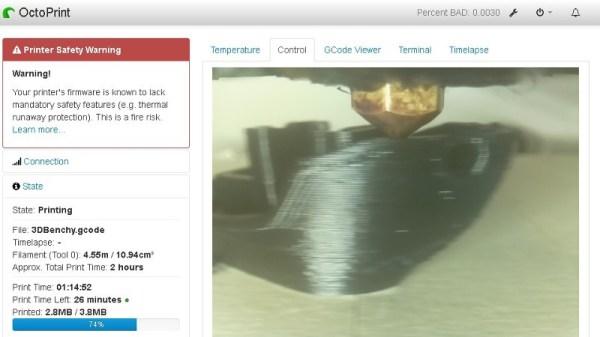
TensorFlow is a popular machine learning package, that among other things, is particularly adept at image recognition. If you want to use a webcam to monitor cats on your lawn or alert you to visitors, TensorFlow can help you achieve this with a bunch of pre-baked libraries. [Eric] took a different tack with PrintRite – using TensorFlow to monitor his 3D printer and warn him of prints gone bad – or worse.
The project relies on training TensorFlow to recognize images of 3D prints gone bad. If layers are separated, or the nozzle is covered in melted goo, it’s probably a good idea to stop the print. Worst case, your printer could begin smoking or catch fire – in that case, [Eric] has the system configured to shut the printer off using a TP-Link Wi-Fi enabled power socket.
Currently, the project exists as a plugin for OctoPrint and relies on two Raspberry Pis – a Zero to handle the camera, and a 3B+to handle OctoPrint and the TensorFlow software. It’s in an early stage of development and is likely not quite ready to replace human supervision. Still, this is a project that holds a lot of promise, and we’re eager to see further development in this area.
There’s a lot of development happening to improve the reliability of 3D printers – we’ve even seen a trick device for resuming failed prints.

 [critsrandom] shared the method








