ESP32 Weather Station On A PCB

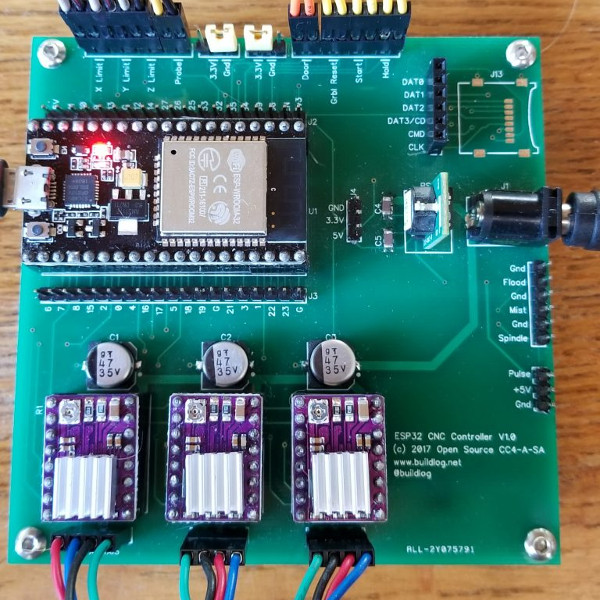
We see lots of ESP8266 projects, but considerably fewer for the ESP32. So this good-looking weather station on a PCB using an ESP32 caught our eye. The board has a few sockets for common weather gear, but with a little modification, it would be a great carrier for an ESP32. Since the PCB layout is available, you could change things around to suit you. You can see a video from [Rui Santos] about his project and its progress from breadboard to PCB in the video below.

Continue reading “ESP32 Weather Station On A PCB”

ESP32, We Have Ways To Make You Talk

One of our favorite scenes from the [James Bond] franchise is the classic exchange between [Goldfinger] and [Bond]. [Connery] (the One True Bond) says, “You expect me to talk?” And the reply is, “No Mr. Bond, I expect you to die!” When it comes to the ESP32, though, apparently [XTronical] expects it to talk. He posted a library to simplify playing WAV files on the ESP32. There is also a video worth watching, below.

Actually, you might want to back up to his previous post where he connects a speaker via one of the digital to analog converters on the board. In that post, he just pushes out a few simple waveforms, but the hardware is the same setup he uses for playing the WAV files.

Continue reading “ESP32, We Have Ways To Make You Talk”

ESP32 Makes For World’s Worst Radio Station

We can say one thing for [bitluni]: the BOMs for his projects, like this ESP32 AM radio transmitter, are always on the low side. That’s because he leverages software to do jobs traditionally accomplished with hardware, always with instructive results.

In this case, the job at hand is creating an RF oscillator in the broadcast AM band and modulating some audio onto it. From his previous experience using an ESP32 to watch video on an oscilloscope, [bitluni] knew that the microcontroller’s DACs were up to the task of producing an 800-kHz signal, and he managed to produce a more-or-less sine wave carrier with some clever code. His sketch takes data from a header file, modulates it onto the carrier, and sends it out over the ether using a short stub of wire for an antenna. The range is severely limited, but for what it is, it gets the job done and shows the basics. And as a bonus, [bitluni] included a bit of JavaScript that turns an audio file into a header file that’s ready to go out over the airwaves for all your trolling needs.

If you’re looking for a little more range for your low power transmitter and you’re a licensed amateur operator, you might want to explore the world of QRP radio.

Continue reading “ESP32 Makes For World’s Worst Radio Station”

Easier End-User Setup For ESP32 Projects

As hackers, we occasionally forget that not everyone is enamored with the same nerdy minutia that we are. Configuring hardware by changing some lines in the code and compiling a new firmware doesn’t sound like that big of a deal to those of us who’ve been around the block a few times, but might as well be ancient Sanskrit to the average person. As long as your projects are for personal use this isn’t really a concern, but what if you plan on distributing the code for a project or perhaps even selling finished products? Shipping it out with hard-coded variables simply isn’t an option.

Code for loading configuration file from SPIFFS

In a recent video, [Proto G] shows a clever way to use WiFiManager to make configuring your ESP32 project easier for end-users. Not only can you use the captive portal system to configure the ESP32’s WiFi against a nearby access point, but it can allow users to enter in configuration data which can be picked up in your code by using SPI Flash File System (SPIFSS).

With the setup demonstrated in the video below by [Proto G], you don’t need anything more exotic than a web browser to configure the device. The end user simply searches for the device’s WiFi network, connects to it, and is presented with an easy to understand dialog which has them select a WiFi network to configure against along with some fields to enter in custom variables. All this information is then stored to a file on the SPI flash. When the ESP32 reboots, it reads the configuration from the saved file and applies the requested settings.

This is very similar to how many consumer devices are now configured, and even the less technically-inclined recipients of such a device should be able to work through the setup with a bit of hand-holding. If you plan on handing one of your ESP32 projects to John Q. Public, this is the kind of configuration you should be aiming for.

We’ve covered using WiFiManager to make ESP32 projects easier to manage, but the addition of arbitrary variables to the captive portal opens up a lot of possibilities. Just the kind of thing you need when you start considering the leap to commercial product.

Continue reading “Easier End-User Setup For ESP32 Projects”

Imagine A Cluster Of ESP32s

When the ESP32 microcontroller first appeared on the market it’s a fair certainty that somewhere in a long-forgotten corner of the Internet a person said: “Imagine a Beowulf cluster of those things!”.

Someone had to do it, and it seems that the someone in question was [Kodera2t], who has made a mini-cluster of 4 ESP32 modules on a custom PCB. They might not be the boxed computers that would come to mind from a traditional cluster, but an ESP32 module is a little standalone computer with processing power that wouldn’t have looked too bad on your desktop only in the last decade. The WiFi on an ESP32 would impose an unacceptable overhead for communication between processors, and ESP32s are not blessed with wired Ethernet, so instead the board has a parallel bus formed by linking together a group of GPIO lines. There is also a shared SPI SRAM chip with a bus switchable between the four units by one of the ESp32s acting as the controller.

You might ask what the point is of such an exercise, and indeed as it is made clear, there is no point beyond interest and edification. It’s unclear what software will run upon this mini-cluster as it has so far only just reached the point of a first hardware implementation, but since ESP32 clusters aren’t exactly mainstream it will have to be something written especially for the platform.

This cluster may be somewhat unusual, but in the past we’ve brought you more conventional Beowulf clusters such as this one using the ever-popular Raspberry Pi.

ESP32 Makes Not-So-Smart Lights Smart

Long taken for granted – lights are a basic necessity of modern life. From the time of the first light bulb, we’ve been able to navigate the dark without the use of fire. With the advent of the Internet of Things, it has become somewhat of a requirement to bring a little intelligence to lights before labeling yourself as a hardware hacker. There are many ways to do this; one of the most common being making use of an ESP32. [Luca Dentella] is somewhat of an ESP32 expert, and has written a fantastic tutorial on how to use the chip. The tutorial builds up to making a set of lights controllable from a smartphone web browser as well a light intensity sensor.

Now before you brush this off as simple n0Ob stuff – consider the following. He’s using a Lolin32 lite dev board, a BH1750 light intensity sensor and a relay to interface with mains for the lights. He wrote his own firmware and gets into the gritty details of developing the HTTP interface and flashing code to the correct memory.

We’ve seen a lot of ESP32 projects here at Hackaday, including this most interesting clock. Be sure to check out the video below to see the smart lights in action.

Continue reading “ESP32 Makes Not-So-Smart Lights Smart”

Watch Video On A Oscilloscope With An ESP32

[bitluni] got a brand new scope, and he couldn’t be happier. No, really — check the video below; he’s really happy. And to celebrate, he turned his scope into a vector display using an ESP32.

Using a scope in X-Y mode is nothing new, of course. The technique is used to display everything from Lissajous patterns from an SDR to bouncing balls from an analog computer. Taken on as more of an exercise to learn how to use his new tool than a practical project, [bitluni]’s project starts by using two DACs on an ESP32 to create simple Lissajous patterns to learn about the scope’s controls. Next he built some code to display 3D point clouds, but learned that the native DAC code wasn’t up to the job. A little hacking improved the speed 27-fold, which was enough for great 3D images and live video from an I²S camera module. The latter was accomplished by grabbing frames from the camera and rendering them pixel by pixel, CRT style. The results are pretty clean, and there’s a lot to be learned about both using scopes as X-Y displays and tweaking the ESP32 for maximum performance.

Need more background on the ESP32? Start by checking out these ESP32 tutorials.


Continue reading “Watch Video On A Oscilloscope With An ESP32”