USB Volume Control

If you buy expensive computer speakers, they often have a volume knob you can mount somewhere on your desk so you aren’t dependent on the onboard volume control. [Kris S] decided to build his own version of the remote volume control. Not surprisingly, it uses an Arduino-compatible Digispark board and a rotary controller. The Digispark (that [Kris S] bought for $2) is compatible with the Adafruit Trinket. This is key because the Trinket libraries are what make it easy to send media keys over the USB (using the HID interface) to control the volume.

Really, though, the best part of the build is the good looking knob made out of a pill bottle (see the video below). The micro Digispark is small enough to fit in the lid of the pill bottle, and some wax and pellets add some heft to the volume control. Continue reading “USB Volume Control” →

Hackaday Links: November 22, 2015

There’s a new documentary series on Al Jazeera called Rebel Geeks that looks at the people who make the stuff everyone uses. The latest 25-minute part of the series is with [Massimo], chief of the arduino.cc camp. Upcoming episodes include Twitter co-creator [Evan Henshaw-Plath] and people in the Madrid government who are trying to build a direct democracy for the city on the Internet.

Despite being a WiFi device, the ESP8266 is surprisingly great at being an Internet of Thing. The only problem is the range. No worries; you can use the ESP as a WiFi repeater that will get you about 0.5km further for each additional repeater node. Power is of course required, but you can stuff everything inside a cell phone charger.

I’ve said it before and I’ll say it again: the most common use for the Raspberry Pi is a vintage console emulator. Now there’s a Kickstarter for a dedicated tabletop Raspi emulation case that actually looks good.

Pogo pins are the go-to solution for putting firmware on hundreds of boards. These tiny spring-loaded pins give you a programming rig that’s easy to attach and detach without any soldering whatsoever. [Tom] needed to program a few dozen boards in a short amount of time, didn’t have any pogo pins, and didn’t want to solder a header to each board. The solution? Pull the pins out of a female header. It works in a pinch, but you probably want a better solution for a more permanent setup.

Half of building a PCB is getting parts and pinouts right. [Josef] is working on a tool to at least semi-automate the importing of pinout tables from datasheets into KiCad. This is a very, very hard problem, and if it’s half right half the time, that’s a tremendous accomplishment.

Last summer, [Voja] wrote something for the blog on building enclosures from FR4. Over on Hackaday.io he’s working on a project, and it’s time for that project to get an enclosure. The results are amazing and leave us wondering why we don’t see this technique more often.


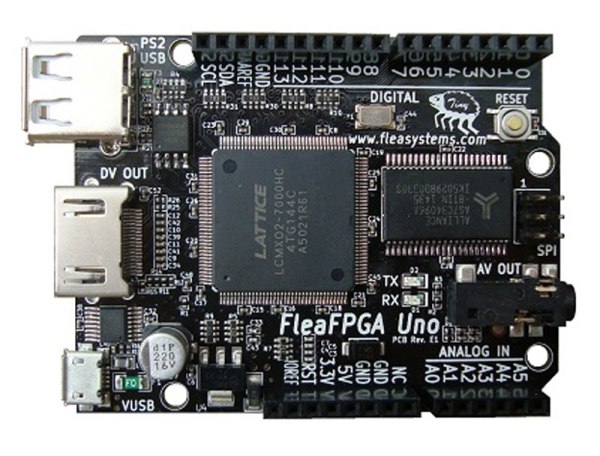
FleaFPGA + Arduino Uno = FleaFPGAUno

Some things are better together: me and my wife, peanut butter and jelly, and FPGAs and Arduino Unos. Veteran hacker [Valentin Angelovski] seems to agree: the FleaFPGA Uno is his latest creation that combines an FPGA (a Lattice MachX02 700HC) with an Arduino-compatible CPU.

It’s a step-up model from the origional FleaFPGA. With a few other components thrown in (such as a HDMI and composite video output and a WiFi option), you have a killer combination for experimenting with FPGAs or building an embedded system. That is because the Arduino part frees the FleaFPGA Uno from the breadboard: you can easily program, control and interface with the FPGA over a serial line or a wireless link using the Arduino IDE. There is even support for Arduino shields (albeit only 3.3V ones), making it even more expandable. This would be an awesome starting point for a retro gaming system, as many 8-bit consoles can be easily emulated in an FPGA. [Valentin] is currently selling the boards directly, and they are very reasonably priced at $50 or $60 for the WiFi version.

Continue reading “FleaFPGA + Arduino Uno = FleaFPGAUno” →

Garbage Can CNC Machine Build

Forget sourcing parts for your next project from some fancy neighborhood hardware store. If you really want to show your hacker chops, be like [HomoFaciens] and try a Dumpster dive for parts for a CNC machine build.

OK, we exaggerate a little – but only a little. Apart from the control electronics, almost everything in [HomoFacien]’s build could be found by the curb on bulk-waste pickup day. Particle board from a cast-off piece of flat-pack furniture, motors and gears from an old printer, and bits of steel strapping are all that’s needed for the frame of a serviceable CNC machine. This machine is even junkier than [HomoFacien]’s earlier build, which had a lot more store-bought parts. But the videos below show pretty impressive performance nonetheless.

Sure, this is a giant leap backwards for the state of the art in DIY CNC builds. but that’s the point – to show what can be accomplished with almost nothing, and that imagination and perseverance are more important for acceptable results than an expensive BOM.

With that in mind, we’re throwing down the gauntlet: can anyone build a CNC machine from cardboard and paperclips?

Continue reading “Garbage Can CNC Machine Build” →

Tiny Arcade, Based On Arduino

Who can resist video games when they’re packed up in tiny, tiny little arcade machines? [Ken]’s hoping that you cannot, because he’s making a cute, miniature Arduino-based arcade game platform on Kickstarter. (Obligatory Kickstarter promo video below the break.)

The arcades are based on [Ken]’s TinyCircuits Arduino platform — a surprisingly broad range of Arduino modules that click together using small snap connectors in place of pin headers. The system is cool enough in its own right, and it appears to be entirely open source. Housing these bits in a cute arcade box and providing working game code to go along with it invites hacking.

There’s something about tiny video cabinets. We’ve seen people cram a Game Boy Advance into a tiny arcade cabinet and re-house commercial video game keyfobs into arcade boxes. Of course, there’s the Rasbperry Pi. From [Sprite_TM]’s cute little MAME cabinet to this exquisite build with commercially 3D-printed parts, it’s a tremendously appealing project.

But now, if you’re too lazy to build your own from scratch, and you’ve got $60 burning a hole in your pocket, you can get your own tiny arcade — and tiny Arduino kit — for mere money. A lot of people have already gone that route as they passed the $25k funding goal early yesterday. Congrats [Ken]!

Continue reading “Tiny Arcade, Based On Arduino” →

Code Craft-Embedding C++: Hidden Activities?

What is an embedded system? The general definition is a computer system dedicated to a specific purpose, i.e. not a general purpose system usable for different tasks. That is a very broad definition. I was just skimming the C++ coding guidelines for the Joint Strike Fighter. That’s a pretty big embedded system and the first DOD project that allowed C++! When you use an ATM to get money you’re using an embedded system. Those are basically hardened PCs. Then at the small end we have all the Internet of Things (IoT) gadgets.

The previous articles about embedding C++ discussing classes, virtual functions, and macros garnered many comments. I find both the positive and critical comments rewarding. More importantly, the critical comments point me toward issues or questions that need to be addressed, which is what got me onto the topic for this article. So thank you, all.

Let’s take a look at when embedded systems should or should not use C++, taking a hard look at the claim that there may be hidden activities ripe to upset your carefully planned code execution.

Continue reading “Code Craft-Embedding C++: Hidden Activities?” →

The E-Traces Shoes

Visualizing Ballet Movements With E-Traces

When we think of wearable technologies, ballet shoes aren’t the first devices that come to mind. In fact, the E-Traces pointé shoes by [Lesia Trubat] may be the first ever “connected ballet shoe.” This project captures the movement and pressure of the dancer’s feet and provides this data to a phone over Bluetooth.

The shoes are based on the Lilypad Arduino clone, which is designed for sewing into wearables. It appears that 3 force sensitive resistors are used as analog pressure sensors, measuring the force applied on the ground by the dancer’s feet. A Lilypad Accelerometer measures the acceleration of the feet.

This data is combined in an app running on an iPhone, which allows the dancer to “draw” patterns based on their dance movements. This creates a video of the motion based on the dance performed, and also collects data that can be used to analyze the dance movements after the fact.

While these shoes are focused on ballet, [Lesia] points out that the same technique could be extended to other forms of dance for both training and visualization purposes.