Moppy Lets You Play Your Floppy Drives

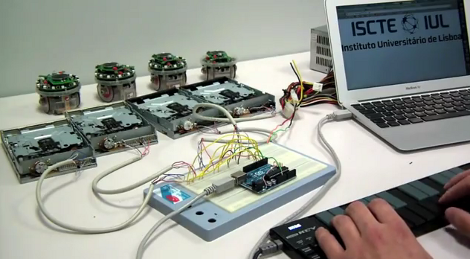
Get ready to join a band. Just follow the guide over at the Moppy project page and you’ll have your very own floppy drive instrument.

The name is a mashup between Musical and Floppy. By using an Arduino UNO as a translator, you can command an array of floppy drives with a musical keyboard (think piano). The head on each floppy drive is controlled by a stepper motor which will put out some sweet sounds if driven at just the right frequency. The lower notes tend to fair a bit better than the high range. One great example of this is the Imperial March theme as heard after the break.

Once you get the base system up and running, it’s time to think of some alternate interfaces. Sure, you can obvious things like toy keyboards. But wouldn’t it be more fun to make it fruit controlled?

Continue reading “Moppy Lets You Play Your Floppy Drives”

Arduino Tells You How Rough Your Last Mountain Bike Ride Was

If you want to see what kind of abuse you’re causing your body when out on those single-track rides this system is just the thing. It’s an Arduino data logger that [Wdm006] takes along on the rides with him. When he gets back home, a Python scripts captures the data dump and graphs it. It may sound like a neat trick, but he’s got something planned for that information.

The enclosure mounts to the stem of his bike. It houses an Arduino board with a data logging shield of his own design. That shield holds an SD card for storage, and breaks the other pins out as screw terminals. Right now there’s an accelerometer on the front fork, and some method of recording wheel speed. This is the research phase of an anti-lock brake system (ABS) he plans to build for mountain biking. No word on what hardware he’ll use for that, but we can’t wait to see how it comes out.

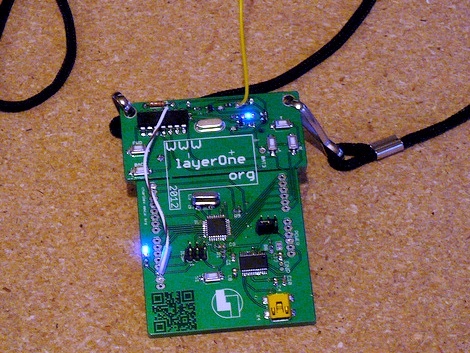
LayerOne Badges Stop Bullets; Drive Away

We love badges. And we’ve really got to thank [Charliex] for taking the time to write a huge post about this year’s LayerOne badges, especially since they’ve got their backs up against the deadline for pulling everything together in time.

Here it is, the stock badge on the left, with an add-on shield on the right. Now the original intent was to make this badge the chassis of an RC car. [Charliex] chewed through his development time trying to source toy cars that could be gutted for parts that would mount easily on the badge. This looked promising at first, but turned out to be folly. Instead what we have here is an Arduino compatible board with an RF transmitter which can be cut off and used separately if you wish. Attendees will be able to use the badge to take control of the toy cars (cases of them have been shipped to the conference), with the option to use the USB functionality to facilitate automation.

So what about stopping bullets? There is a bug in the module [Charliex] used to export the board design from Eagle. They came back from the fab house as 0.125″ substrate. That’s pretty beefy!

The conference is this weekend… better get on that!

Salvaged LCD Screen Hacking

You can find all kinds of LCD screens in broken electronics. But it’s often a chore to figure out how they are controlled if you don’t have a working device that can be used to sniff the communications protocol. [Justin] grabbed this character LCD screen from an old Brother printer and decided to see if he could reuse it in his own projects. Luckily the driver card still worked so he patched into the LCD’s control lines and sniffed the signals when the printer is powered on.

He used the OpenBench Logic Sniffer for this project. It easily captured the data, and also provided analysis tools. The SPI analyzer managed to decode the command signals and message of “Please wait” that pops up at power up. After a bit of folly with the pin out of the display, he is now able to control it thanks to an Arduino library which he wrote. Check out the demo after the break to seem him scrolling through a bunch of different functions for the device.

Continue reading “Salvaged LCD Screen Hacking”

Building Sensors For The Scratch Programming Language

[Kevin Osborn] is making it a bit easier for young programmers to write programs that interact with the physical world. The device he’s holding in the picture is an Arduino based accelerometer and distance sensor meant for the Scratch language.

Scratch is a programming language developed at MIT. It has kids in mind, and focuses on graphical building blocks. This can make it quite a bit easier to introduce youngsters to programming concepts without the roadblocks and gotchas that come with learning syntax.

As you can see in the clip after the break, [Kevin’s] Arduino sketch includes hooks that automatically pull the accelerometer and distance data into the Scratch environment. We figure his example provides everything you need to get just about any type of sensor up and running, be it a magnetometer or LDR (both of which would make a nice burglar-alarm type project). Give it a try with your own hardware and see what you can accomplish.

Continue reading “Building Sensors For The Scratch Programming Language”

Time And Date Clock Does It With RGB LED Strips

[Craig’s] color clock really came together quite nicely. The majority of the body is acrylic, with two large clear squares and a pair of colored discs. All are held in place by a ring of hardware with spacers in them, and the RGB LED strip that is used to display time and date wraps around those spacers. This hides the components in the center, with a USB cord connecting to the Arduino compatible board to power the device.

Hours are displayed in red, with minutes shown in green, and blue used as a background color. In the center you can see one of two red LEDs which alternate like a pendulum to mark the passing seconds. There are timed events every ten , fifteen, and thirty minute. At the fifteen minute mark the clock switches to display the date. The other two events are animations to keep things interesting. All of the settings for the clock are accessed using just two momentary push buttons mounted on the back of the clock.

Continue reading “Time And Date Clock Does It With RGB LED Strips”

Motion Sensitive RGB Lamp Can Standby For 3 Years

Ooooh, nice enclosure! This is a little motion sensing lamp which [Krazatchu] built a few years back as a Mother’s Day gift. The PIR sensor is easy enough to see as the white dome on the front of the case. But look closely below that and you’ll see the LDR which it uses to keep the thing asleep during the day. This is intended to save on batteries but the original version still ate through them like crazy. This year he gutted it and worked out a much more power-friendly design.

He moved to a TLC1079 OpAmp which greatly reduced power consumption when reading from the PIR sensor. The microcontroller was also upgraded from an ATtiny13 to an ATmega328, making the new version Arduino compatible. It puts itself to sleep and keeps the lights out during the day, drawing just 0.08 mA. When driving the RGB LED the lamp pulls about 50 mA. That should still last a while on three AA batteries but we’d still recommend using rechargeables.

Continue reading “Motion Sensitive RGB Lamp Can Standby For 3 Years”