NBA Hangtime Pinball Display

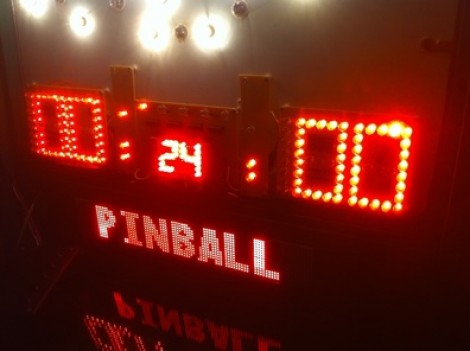
[Ed Zarick] continues work on his NBA Hangtime pinball machine with the completion of the scoreboard and backglass. You should remember this project as we already covered the layer audio he developed for the system. Now he’s proving to be a protoboard master, using point-to-point techniques to build a pair of two and a half digit LED displays for team scores, as well as a shot clock timer and other status indicators.

The lighting board that controls it all is commanded via the i2c protocol, just like the three audio modules. It uses shift registers along with MOSFETs and [Ed] has taken the time to add pin headers and sockets for board interconnects. As is true with the audio system, one Arduino Mega acts as the master on the i2c bus and you’ll notice in the video after the break that the display works in perfect harmony with the sound effects.

We can’t wait to see what he comes up with for the play field!

Continue reading “NBA Hangtime Pinball Display”

Passcode Protected Laser Tripwire Alarm System

laser_tripwire

Sometimes security doesn’t need to be overly complex to be effective. Instructables user [1234itouch] recently built a simple laser tripwire alarm that can be mounted virtually anywhere, complete with a keypad for disarming the device.

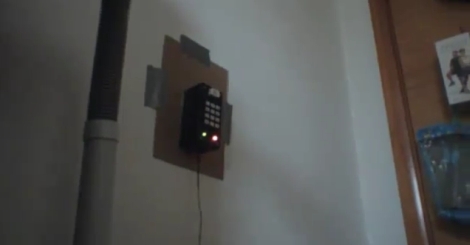
He mounted a photo cell in a project box, along with an Arduino and a 12-button key pad. A laser pointer is aimed at the photo cell from across a gap, which results in a steady voltage being read by the Arduino. When the laser beam is broken, a drop in voltage is detected, and the alarm sounds until you enter the proper pre-configured passcode. Entering the passcode triggers a 15 second grace period during which the the alarm cannot be tripped again.

It might not be built with triple-thick steel doors and thermo-sensors, but it’s a simple device for simple needs. In its current form it could be pretty useful, and with a little reworking, there are a wide range of things it could be used for.

Continue reading to see a demo video of the tripwire alarm, and be sure to check out these other tripwire-based security systems.

Continue reading “Passcode Protected Laser Tripwire Alarm System”

Bench-top Laser Engraver Does Some Cutting Too

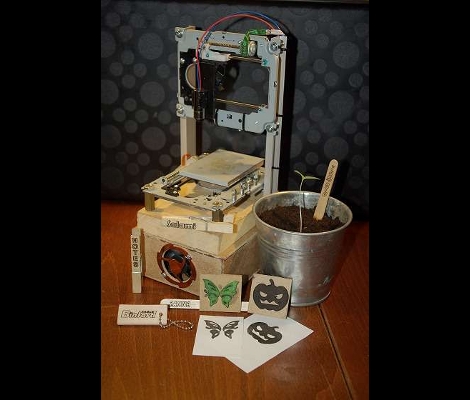
Grab that stack of old optical drives you have in the corner and get to work building this laser engraver. [Groover] is taking a no-nonsense approach to the build and we think it is just simple enough to be accessible to a very wide audience.

The physical assembly uses sleds from two optical drives. These are mounted some angle bracket. Since lasers cut at one specific focal length, there is not need for a Z axis (simplifying the build greatly). In fact, we think the hardest part of the assembly is retrieving the laser diode from a DVD-R drive and packaging it for use with this setup.

The electronics are a combination of a couple of consumer products. Two pre-fab motor drivers are used to command the stepper motors on the optical sleds. These receive their commands from an Arduino. A package called GRBL reads in G-code ([Groover] shows how to generate this from Inkscape) and in turn sends commands to the Arduino.

The results are quite remarkable. It can engrave wood with great resolution and contrast. The video after the break even shows it cutting out shapes from construction paper. Now we still want our own full-size laser cutter, but this project is much more fiscally possible for us.

Continue reading “Bench-top Laser Engraver Does Some Cutting Too”

Lol Shield Theatre Brings Online Video To The Pixelated Screen

lol_shield_theatre

[FallDeaf] bought a Lol Shield, and after making all sorts of blinky displays, he thought to himself, “What in the world can I use this thing for?”

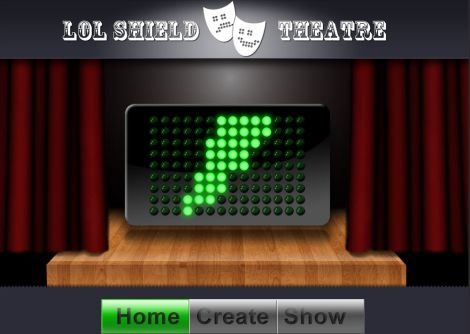
In a really slick fusion of hardware, software, and the power of the Internet, he has created what he calls, “Lol Shield Theatre”.

The idea goes something like this:

You visit his site, and create your own “movie” by drawing on his virtual Lol Shield. Add as many frames as you would like, set the frame rate, then submit your creation. From there, you can download an Arduino sketch that contains your entire animation so you can play it on your own Lol Shield. You can also visit his Lol Shield gallery, where you have the ability to watch, download, and vote on movie submissions from other visitors.

He has also provided the source code to drive your Lol Shield, as well as created an API through which you can stream the various animation feeds from his Lol Shield gallery directly to your Arduino via a USB cable.

Be sure to check out the video demo we have embedded below, and show off your pixel cinematography skills over in the theatre.

Continue reading “Lol Shield Theatre Brings Online Video To The Pixelated Screen”

Header File Brings Arduino Sketches To The TI Launchpad

[Chris Hulbert] is making it easy for Arduino users to program MSP430 chips with a header file that allows you to compile Arduino sketches for the Launchpad. This makes sense, as the growing number of Arduino sketches available, and the low cost of the TI Launchpad make for a good bedfellows. It’s really wasn’t that hard to make this happen, although you’re not going to find support for all of the Arduino functions just yet.

At the time of writing, [Chris] has just 51 lines of code committed to the project. It provides macros for setup(), loop(), delay(), pinMode(), pinBit(), digitalWrite(), and digitalRead(). You’ll notice that one of the most important parts of the header file is that it disables the watchdog timer for the user (a stumbling block for many MSP430 beginners). It’s an interesting solution, but to be truly useful we’d want to see hardware integration with the Arduino IDE. That, as well as the rest of the Arduino functions are at the tips of your fingers. Get coding and submit your push requests to [Chris] for inclusion in his repository.

[Thanks Chris]

Beginner Concepts In Electronics And Arduino

arduino_tutorial_series

[Jeremy] is all about the Arduino, but also into helping people get started working with electronics. He has put together a series of videos on his web site which discuss the basics of using an Arduino. Having just published his tenth tutorial, he dropped us a line to let us know. His videos cover a wide range of topics and include source code, schematics, and a full parts list to help you follow along with him.

While the core of his lessons focus specifically on how to use the Arduino to perform particular tasks, he does introduce the viewer to many different concepts along the way. He covers PWM, button debouncing, interrupts, SPI communications, analog inputs, and more – all of which are must-know topics that extend beyond the realm of experimenting with Arduinos.

The videos run anywhere from 6 to 20 minutes in length, so you will want to set a block of time aside if you plan on checking them out.

If Arduino-specific videos aren’t your thing, he also has a series of general tech-related videos on his site as well which may be of interest. Otherwise, stick around to see the latest in his series of tutorials.

Continue reading “Beginner Concepts In Electronics And Arduino”

Follow-up: Radio-controlled LED Light Show

travelling_light_circus

[Alan] shared an update with us regarding a project he has been working on for some time, radio-controlled LED light strips destined for use by the Travelling Light Circus. If you are not familiar with the project or need a quick refresher, you can read our post about it here.

He recently met up with the guys from TLC to finish things up and was happily surprised that they did not want to mount his lights on the performers, as was originally planned. He would have had to make a few modifications if that was the case, but instead, they planned on attaching them to bicycle wheels. The light strips were mounted inside translucent plastic tubes that fan out from the center of the wheels, where the battery and radio equipment is located. The wheels were mounted on aluminum poles, allowing the performers to create a visually stunning show, just by spinning the pole.

Check out the pair of videos we have embedded below, the project came together quite nicely.

Continue reading “Follow-up: Radio-controlled LED Light Show”