Data Confirmation With RF Communications

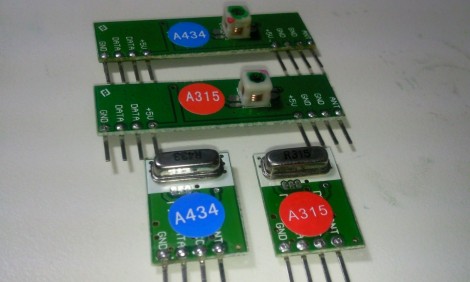
[Rafael] built a system that uses radio frequency for communications. The code he was using with the inexpensive receiver/transmitter pairs already had some error correction but from time to time an entire message would be missed by the receiver. He set out to make these RF communications more robust.

A little more than a year ago we looked at using these same transmitters with an Arduino. [Rafael] has a similar setup but since they are unidirectional he chose to use two pairs for bidirectional communication (each operating at a different frequency to avoid interference). On one end, a computer transmits data to the Arduino which is in a remote location. His confirmation protocol relies on a randomly generated message identifier. The computer will continually transmit the same message. The Arduino continually receives these messages, comparing them with the last successfully received message. If they match, it is considered a successful data transfer and the Arduino transmits a confirmation back to the computer which then starts transmitting the next message.

This isn’t an application-specific protocol. For demonstration purposes [Rafael] built a quick home automation setup that uses it to operate a house lamp.

Data Plotting For The Visually Impaired

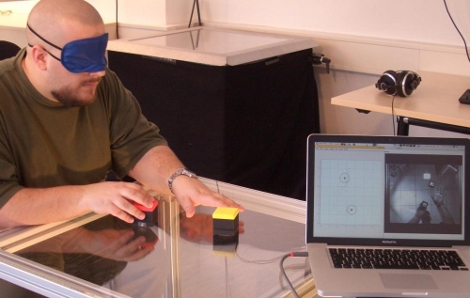
This setup helps to represent data in a meaningful way to for visually impaired people. It uses a combination of physical objects to represent data clusters, and audio feedback when manipulating those objects. In the video after the break you’ll see that the cubes can orient themselves to represent data clusters. The table top acts as a graphing field, with a textured border as a reference for the user. A camera mounted below the clear surface allows image processing software to calculate the locations for the cubes. Each cube is motorized and contains an Arduino and ZigBee module, listening for positioning information from the computer that is doing the video processing. Once in position, the user can move the cubes, with modulated noise as a measure of how near they are to the heart of each data cluster.

The team plans to conduct further study on the usefulness of this interactive data object. We certainly see potential for hacking as this uses off-the-shelf components that are both inexpensive, and easy to find. It certainly reminds us of a multitouch display with added physical tokens.

Continue reading “Data Plotting For The Visually Impaired”

Brightest Day, Darkest Night, Charge It With Arduino’s Light

To userp the Green Lantern oath is a sacrilege. But calm your rage as you take in this Green Lantern battery and ring project. [Jon] built the power battery portion out of LEGO, but inside you’ll find an added bonus. An Arduino uses a set of LEDs and an RFID reader to bring the object alive. A matching ring contains the RFID tag that activates the lights when held up to the lantern’s lens. You can see this used to charge the power ring (and join in by saying the oath) in the video after the break.

Want to build something like this but don’t have an RFID reader? This would be easy to pull off by adding a magnet to the ring and a hall effect sensor in the lantern. Maybe this will make you rethink your Halloween costume this year.

Continue reading “Brightest Day, Darkest Night, Charge It With Arduino’s Light”

Add-on Panel Brings Automated Vents Flaps To A PC

[SXRguyinMA] built a replacement top bezel for his computer case. He wanted to add vents that would automatically open or close based on the cooling needs of the computer. With some careful measurements he modeled the parts in Sketchup and sent out for them to be cut from styrene with a water jet cutter. The parts came back looking great and the assembly of the shutters went swimmingly. The bezel also includes a lighted screen for temperature information, as well as the front USB ports, headphone and mic jacks, etc. Hidden underneath is an Arduino board and servo motor. The Arduino polls the temperature and drives the servo to adjust the fins accordingly. There’s even a supercap in the circuit that will close the vents when the PC powers down or when power is unexpectedly lost. See it in action after the break.

Continue reading “Add-on Panel Brings Automated Vents Flaps To A PC”

Using An Arduino Or Seeeduino For Its FTDI Chip

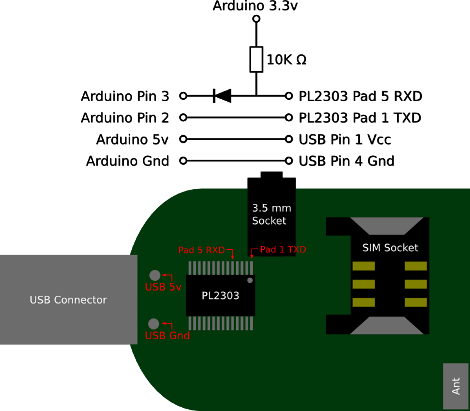
We think of the Arduino as a rapid prototyping tool but we never thought of it as an FTDI breakout board before. [Ihsan Kehribar] wrote a quick post to show how it’s done. You’ll find an FTDI chip on Arduino boards that have a USB connector. It’s used to handle the USB communications on one side, and TTL serial communications on the other. The serial pins from the chip are mapped to the UART on the AVR chip, and in turn they appear on the pin headers for easy connections. Just load up a really simple sketch(available from Ihsan’s post) to make sure the processor doesn’t get in the way and you’ve got yourself an FTDI breakout board. If you happen to have a Seeeduino there’s even more functionality as the board has a selector switch that allows you to choose between 5V and 3.3V levels.

This doesn’t hold true to the newest generation of Arduino, as those board have replaced the FTDI chip with an ATmega8U2. That’s basically and ATmega8 with native USB handling… fancy.

[Thanks Marcus]

Automated Chip Burning

[Alexsoulis] needed to burn the Arduino bootloader to a slew of ATmega328 chips. Instead of sitting there and plugged the chips into a programmer one at a time, he build a robotic microcontroller programmer.

It starts with the DIP package microcontrollers in a tube, with a servo motor to dispense them one-by-one. An arm swings over and picks up the chip with a fish pump powered vacuum tweezers similar to the pick-and-place head we saw recently. From there the chip is dropped into a ZIF socket and programmed by an Arduino. Once the process is complete it is moved to the side and the process repeats.

We’ve reported on using an Arduino as an AVR programmer but we’ve never actually done it ourselves (we use an AVR Dragon programmer). Take a look at the video after the break and let us know if you think the actual programming seems incredibly slow.

Continue reading “Automated Chip Burning”

Arduino, RFID, And You

[Matt] has mixed up a batch of two RFID reading door lock systems. While the “door lock” part of the setup has yet to come into existence, the “RFID reading” section is up and running. By using the Parallax RFID readers (for cheap, remember?) and an Arduino, [Matt] is able to parse an RFID tag, look its number up in a database, and then have a computer announce “Access Denied” in a creamy “Douglas Adam’s sliding door of Hitchiker’s Guide” kind of way with Python.

Good books aside, catch a not as exciting as you’re thinking video after the jump.

Continue reading “Arduino, RFID, And You”