Groovin’ With A Gesture-Controlled MP3 Player

Touchscreens are great, but they’re not always the perfect solution. Trying to operate one with gloves on (even alleged “touchscreen-friendly” ones) can be cumbersome at best, and if the screen is on a publicly-shared device, such as a checkout kiosk it can easily become a home for bacteria, viruses and all sorts of other nasty stuff.

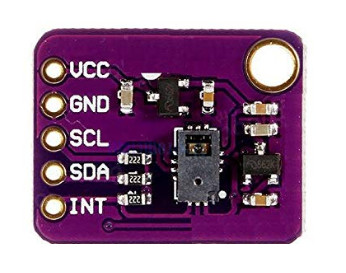
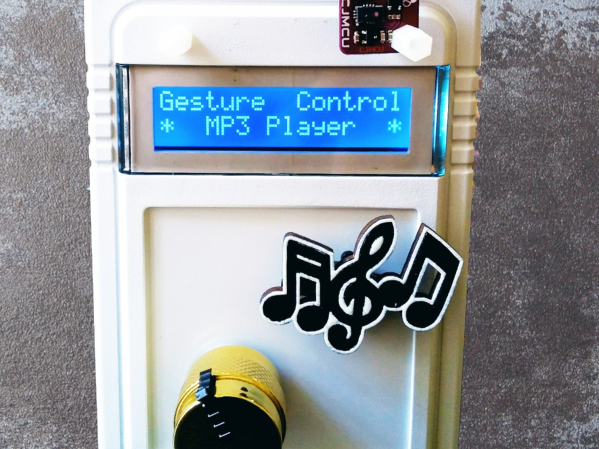
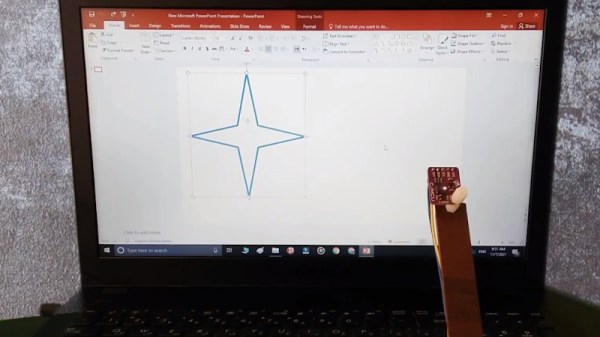
That’s what [Norbert Zare] was thinking when he built his gesture-controlled MP3 player. It uses a PAJ7620U2 gesture sensor to register a few intuitive hand motions including finger twirls to control the volume, hand swipes to skip forward and backwards, and a flat hand to play and pause the song. It even has a motorized knob and cute cutout music notes that move to provide some visual feedback for the gestures, which you can see in-action in the video below. If this seems familiar, it’s because on Tuesday we took a look at the camera-based, glance-to-skip-tracks controller he built.

To actually play some music, he gutted an old MP3 player and hooked the solder pads from the control buttons up to an Arduino, which reads gesture information from the sensor and emulates the MP3 player’s buttons by setting the appropriate pins to HIGH and LOW. Finally, he topped the whole thing off with an LCD screen and a case.

The great thing about [Norbert]’s approach is that it isn’t just limited to an MP3 player — it can be extended to replace the buttons on pretty much any device. Because the Arduino only needs to be connected to the button inputs of the device, it should be relatively easy to adapt most existing tactile interfaces to be touch-free. Paired with this gesture-tracking macro keyboard we saw earlier in the year, the days of actually having to touch our tech may soon be behind us.

Continue reading “Groovin’ With A Gesture-Controlled MP3 Player”

Fake motivational plant squirts you in the wherever.

Focus Flower Motivates By Squirting Water In Your Face

When you need to get some tasks done and are short on attention, it’s hard to beat a timer. But whenever you do, it feels pretty darn good. The problem is that when you don’t finish in time, what’s the punishment? There are no consequences baked into the Pomodoro Technique other than good ol’ guilt. Wouldn’t it be better if there was a bit of negative reinforcement involved?

[Hardware Unknown]’s Focus Flower never needs watering, at least not in the normal horticultural way. You will have to fill a reservoir, because this flower provides liquid motivation. No, it’s not a spirit spritzer, though we suppose you could turn it into an avant-garde vodka fountain when the novelty of water wears off, making this Pomodoro with a twist into more of a Bloody Mary. It’s a natural next step, especially if you were already into the hot sauce idea.

Operation Focus Flower is simple: just push the easy button to start the task timer, and the Arduino Nano attached will begin a countdown. Push the button again when you’re done, but if you don’t do it before the countdown is over, the plant squirts you with a steady, skin-blasting stream of water from a solenoid-driven flosser tip. An air compressor nearby is required, which blows the minimalist vibe a bit, but you could always stow that part underneath your desk.

The Focus Flower sure looks to be effective at the whole negative reinforcement thing. And it doesn’t leave you totally clueless — there’s a ring of LEDs around the base that show how much time is left. Whenever you do successfully hit the button in time, it will say ‘that was easy’ in one of 12 languages, hence all the flags. Do not miss the totally free infomercial below.

Maybe you want a more friendly way to manage your time — we understand. Meet the Pomodachi productivity pet.

Continue reading “Focus Flower Motivates By Squirting Water In Your Face”

Pomodoro timer helps you focus on tasks without burning out.

World’s Cutest Pomodoro Timer Is Also A Clock

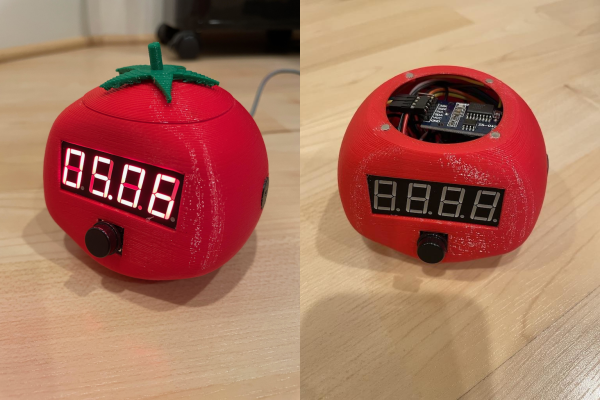
Student and hacker [prusteen] recently fell in love with the Pomodoro method of time management. That’s where you concentrate on your task for 25 minutes, then take a five-minute break, and repeat this four times with a longer break at the end. Initially, [prusteen] was keeping track on their phone, but hated having to change the timer value between Pomodoros and break times. In order to keep the flow mode engaged, [prusteen] came up with this darling little study buddy that does it all with the push of a button.

By default, this tomato shows the current time, which we think is a handy and often-overlooked feature of Pomodoro timer builds. Press that momentary switch on the front, and it starts counting upward to 25 minutes. Then it beeps in stereo through a pair of buzzers when the time is up, and automatically starts a five-minute break timer. Press it again and the display goes back to clock mode, although judging by the code, doing this will cancel the timer.

Inside the juicy enclosure is an Arduino Nano, an RTC, and a 7-segment display. We love the attention to detail here, from the little green leaves on top to the anatomically-correct dimple on the underside. And we always like to see lids that snap on with magnets. So satisfying. Check out the brief demo after the break, which unfortunately does not include any lid-snapping action.

Do you need more interaction with your Pomodoro timer? Build yourself a pomo-dachi instead.

Continue reading “World’s Cutest Pomodoro Timer Is Also A Clock”

Quit Hunching Over Your Screen With A Little Robotic Help

[Norbert Zare] has identified a problem many of us suffer from – chronically bad posture. Its very common to see computer users hunched forwards over a screen, which eventually will lead to back problems. He mentions that most posture correction devices are pretty boring, so the obvious solution to [Norbert] was to build a simple robot to give you a friendly nudge into the correct position.

This simple Arduino-based build uses the ubiquitous MPU-6050 which provides 3-axis acceleration and 3-axis gyro data all processed on-chip, so it can measure where you’re going, which way you are orientated and how fast you are rotating. This is communicated via the I2C bus, so hooking into an Arduino or Raspberry Pi is a simple affair. There are plenty of Open Source libraries to work with this very common device, which helps reduce the learning curve for those unfamiliar with programming a fairly complex device.

At the moment, he is mounting the sensor on his body, and hard-wiring it, so there’s already some scope for improvement there. The operating premise is simple, if the body angle is more than 55 degrees off vertical, move the servos and shove the body back in to the correct position.

The project GitHub has the code needed, and the project page over on Hackaday.io shows the wiring diagram.

We have seen quite a few projects on this subject over the years, like this one that sends you mobile notifications, an ultrasonic rangefinder-based device, and one that even uses a webcam to keep an eye on you. This one has the silliness-factor, and we like that round these parts. Keep an eye on [Norbert] we’re sure there more good stuff to come!

Continue reading “Quit Hunching Over Your Screen With A Little Robotic Help”

Flickering Jack O’ Lantern Is An Easy Beginner Build

The Jack o’ Lantern is a fun Halloween tradition, though one that does come with a few risks. It’s pretty easy to slice off a bit of finger when carving a stiff pumpkin, and candles draw more enmity from fire crews than most household items. For the electronics beginner looking for a learning project, [Oyvind’s] build might be a nice safe bet.

The build starts with a 3D-printed pumpkin figurine with a suitably spooky face, though [Oyvind] notes there’s nothing stopping this project from being executed with a real orange gourd instead. Inside, an Arduino is hooked up to a trio of orange LEDs. They’re attached to PWM pins and each is given a random brightness value at regular intervals to create a pleasant flickering effect.

It’s a very simple project, but it’s also the kind of thing that’s perfect for introducing new people into the world of electronics. There’s little to get wrong, and mistakes aren’t costly, making it an ideal project for beginners. From there, the sky really is the limit! Video after the break.

Continue reading “Flickering Jack O’ Lantern Is An Easy Beginner Build”

The Quadrivium EnsembleBot Is A Labour Of Love

The Quadrivium EnsembleBot project is a mashup between old school musical instruments and the modern MIDI controlled world. Built by a small team over several years, these hand crafted instruments look and sound really nice.

The electronics side of things is taken care of with a pile of Arduinos and off-the-shelf modules, but that doesn’t mean the design isn’t well thought through, if a little more complicated than it could be in places. Control is taken care of with a PC sending commands over the USB to an Arduino 2560. This first Arduino is referred to as the Master Controller and has the immediate job of driving the percussive instruments as well as other instruments that are struck with simple solenoids. All these inductive loads are switched via opto-isolators to keep any noise generated by switching away from the microcontroller. A chain of four sixteen-channel GPIO expander modules are hung off the I2C bus to give even more opto-isolated outputs, as even the Arduino 2560 doesn’t quite have enough GPIO pins available. The are a number of instruments that have more complex control requirements, and these are connected to dedicated slave Arduinos via an SPI-to-CAN module. These are in various states of development, which we’ll be keeping our beady eyes on.

One of the more complex instruments is the PipeDream61 which is their second attempt to build a robotic pipe organ. This is powered by a Teensy, as they considered the Arduino to be a little too tight on resources. This organ has a temperature controller using an ATTiny85, in order to further relieve the main controller of such a burden and simplify the development a little.

Another interesting instrument is Robro, which is a robotic resophonic guitar which as they say is still work in progress despite how long they have been trying to get it to work. There’s clearly a fair bit of control complexity here, which is why it is taking so much fiddling (heh!) to get it work.

This project is by no means unique, lately we’ve covered controlling a church organ with MIDI, as well as a neat Arduino Orchestra, but the EnsembleBot is just so much more.

Continue reading “The Quadrivium EnsembleBot Is A Labour Of Love”

A game board with five LEDs and a hand shining a laser pointer at it

Laser Pointer And Arduino Make A Minimalistic Shooting Game

Video games are great and all, but sometimes you just want the thrill of manipulating actual objects in addition to watching action on a screen. This must have been the reason why Nintendo’s Duck Hunt became so popular despite the simplicity of its gameplay. Prolific hacker [mircemk] similarly made a computer-plus-physical game called “Laser Shooter“, which somehow reminds us of the good old NES game.

The game is based on an Arduino Nano, to which five LEDs as well as five photoresistors (LDRs) are connected. When the game is started, the LEDs light up at random and the player has a limited time to “shoot” the corresponding LDR with a laser pointer. This time limit is decreased as the game progresses, and the game is over once the player fails to hit the target on time. The “Game Over” message is accompanied by a sad tune, but luckily no giggling dog.

Complete schematics and code are available for anyone willing to try their hand at replicating or improving this game. And no, you can’t simply sweep your laser across the five LDRs all the time, because you lose if you shoot at the wrong target. For more laser pointer-based games, try this Laser Command clone or this laser tag badge system.

Continue reading “Laser Pointer And Arduino Make A Minimalistic Shooting Game”