LUFA Open Source USB Stack Now For NXP ARM Processors

Looks like the Lightweight USB Framework for AVRs (LUFA) has just been ported for ARM microcontrollers. NXP recently released a package for their LPC Cortex M3 family of ARM controllers. You won’t find a reference to LUFA on their nxpUSBlib description page (which we think is kind of sad), but if you grab a copy of the beta code the Version.h header file shows that it is indeed a port of the project. This is further backed up by the LUFA creator, [Dean Camera], who consulted with the NXP team doing the work.

The package provides an open-source USB stack that you can use in your projects as a USB host or USB device. We’re advocates of open source packages like this one as it makes it much easier for hobbyists to get help using the tools, and it allows the community to give back through bug fixes and feature additions.

We’ve highlighted a few LUFA projects, like this keyboard remapper and this AVR programmer. We’re looking to seeing the first set of NXP LUFA projects roll through!

[Thanks Johnny]
Say Hello To Our Little Friend, The BeagleBone

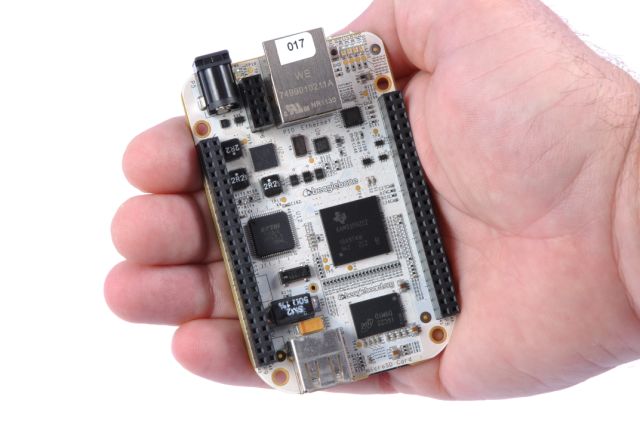
Small and more powerful… what more can you want? This is the newest BeagleBoard offering, called the BeagleBone. It’s packed with some pretty intriguing features, but let’s take a tour of the hardware first.

Like its predecessors, the BeagleBone sports an ARM processor. This time around it’s a TI AM3358 ARM Cortex-A8. It will ship with a 2 GB microSD card and has an Ethernet port and USB connection. The dual pin headers on either side of the board are designed to receive ‘Capes’ for expansion. Currently a DVI cape is in the works, with HDMI and others to follow.

Linux is running on board and one of the best features we see in the video after the break is the browser-based programming interface. When connected to a network, the BeagleBone serves HTML5 web pages. One of these is an IDE that lets you write and execute code directly from your browser.

Now, can we finally have our open-hardware set top box (hopefully running XBMC)?? At an MSRP of $89 this should be able to give AppleTV 2 a run for its money as an easy way to get your television some network connectivity. Continue reading “Say Hello To Our Little Friend, The BeagleBone”

How To Develop For STM32 Discovery Boards Using Linux

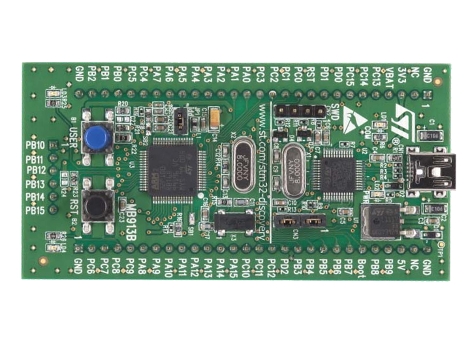
Some hard work has gone into making it possible to develop for the STM32 Discovery board using a Linux system. The board boasts an ARM Cortex-M3 processor, which can be programmed via the mini-USB port on the side. But the company only supports development through their IDE’s which don’t run natively on Linux. The stlink project aims to solve this, providing a toolchain, and making it possible to flash the microcontroller via the USB connection.

The github project linked above also includes a tutorial to get you started (pdf). In addition to a walk through on compiling the software packages, it includes a simple blink program that you can use to test out your hardware. GDB, the familiar open-source debugger, is used to flash the chip. This is a bare-bones tutorial so if you end up posting about your experiences using this toolchain with the Discovery boards we’d love to hear about it.

[Thanks Texane]

Robotic Arm Follows The Movements Of Your Own Limbs

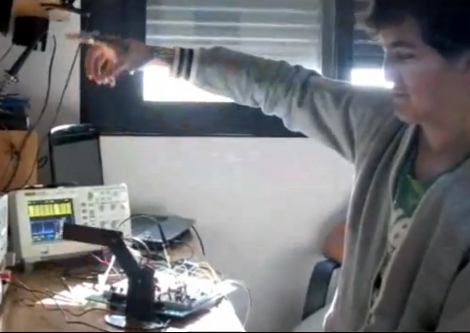
[Alejandro] and his friends recently finished a first prototype of scratch-built robotic arm. They’ve got some nice electronics bench equipment for use with a project like this, but for the actual fabrication work it’s off to the kitchen.

As you can see in the video after the break, they’re using PVC as the stock material in this build. Flat sheets are produced by slitting a PVC pipe down the middle, warming it in oven until soft, then compressing it between two floor tiles with a big jug of water used as a weight for the makeshift press. Mounting holes for the servo motors that make up the joints are drilled with a hand drill, and the assembly was affixed to an old CD as a base.

Once assembled they wired it to the control circuitry and build a set of sensors that you wear on your arm. Now your elbow, wrist, and pointer finger are in control of the servos. A demonstration of this functionality starts around two minutes into the video.

We’ve seen other examples of robot arms built without the use of machine tools. This arm made out of ShapeLock plastic is one of the most interesting examples.

Continue reading “Robotic Arm Follows The Movements Of Your Own Limbs”

Arduino Releases New Products; Help Them Develop ARM-based Arduino

The Arduino folks took advantage of Maker Faire New York to announce their new line of products. There’s several interesting new additions to their product line.

They’ve got a WiFi shield in the works that utilizes a module from H&D Wireless in conjunction with an AVR32 processor to take the workload off of the ATmega chip on the Arduino board. It even has room for you to run your own code on the shield’s processor.

Notable (but of less interest to us) is the 1.0 release of the IDE and the development of a new low-cost board. That hardware is intended to make USB device development easier for those already familiar with the Arduino platform.

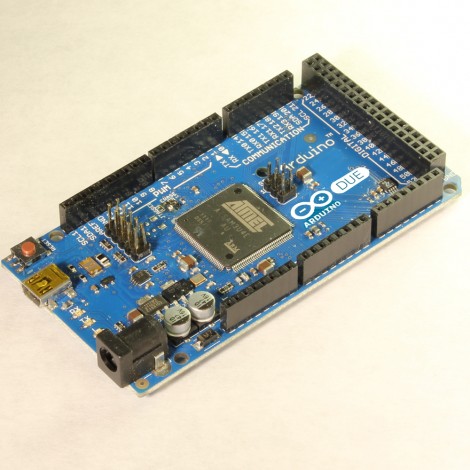
But the big news that caught our eye is the announcement of an ARM Cortex-M3 Arduino called the Due (we already wish that had been named something different just for search term contrast to the Duemilanova). The hardware hasn’t been finalized yet, although you can see a prototype in the picture above. They want community input on the final touches, so get in there and give them a hand!

[Thanks Insapio and Tom]

Have You Got What It Takes To Code Android Apps Using Assembly?

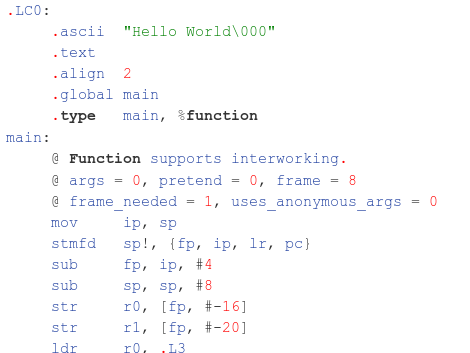
Do you have a rooted Android device and a computer running Linux? If so, you’re already on your way to coding for Android in Assembly. Android devices use ARM processors, and [Vikram] makes the argument that ARM provides the least-complicated Assembly platform, making it a great choice for those new to Assembly programming. We think his eight-part tutorial does a great job of introducing the language and explaining how to get the development tools up and running. You’ll need to know some basic programming concepts, but from what we saw you don’t need any prior experience with ARM or Android.

So why learn Assembly at all? We took a stab at Assembly for AVR a few months ago and really learned a lot about the hardware that we just never needed to know writing in C. It’s a great way to optimise functions that waste too much time because of quirks with higher-level language compilers. That means you don’t need to write your entire application in Assembly. You can simply use it to streamline hairy parts of your code, then include those Assembly files at compile time.

Making Oscilloscopes From ARM Development Boards

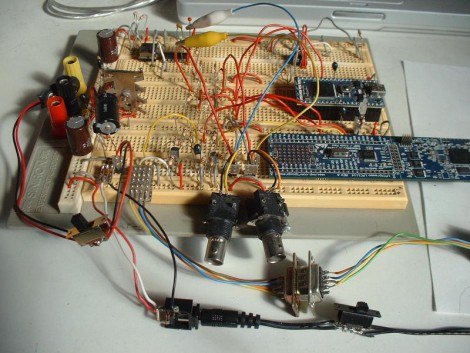
If you’ve got an ARM development board gathering dust in the corner of your shop, perhaps you could repurpose it as an oscilloscope. [Arend-Paul Spijkerman] was able to use an mbed and LPCXpresso as the hardware end of an oscilloscope. He didn’t use a standalone screen as a display, instead opting to push the scope readings from the hardware to a computer for display. This was greatly simplified by using StampDock as a basis for the GUI.

His circuit diagrams calls for an RS-232 connection for the LPCXpresso but not for the mbed. We’re not quite familiar enough with the mbed to know why, but perhaps those in the know can clue us in by leaving a comment. The probe connections are quite simple, each made up of a voltage divider and a pair of diodes. But the breadboard above looks much busier because it has two oscilloscope circuits built on it, and there’s a 10 MHz clock and a 4040 ripple counter which were used to provide a test signal.