An ARM Dev Board You Can Make At Home


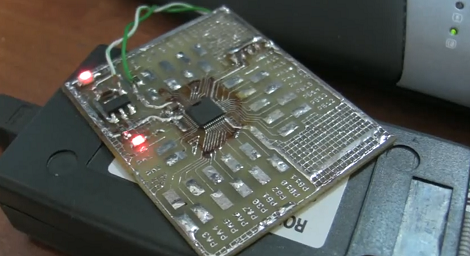
[BarsMonster] just challenged our conceptions of ARM development with his single-sided development board that’s loaded with an STM32F100 (PDF warning) ARM microcontroller. The board is remarkably simple – just a regulator, resistor and a few caps are necessary to get a $1 ARM μC up and running.

Continue reading “An ARM Dev Board You Can Make At Home”

Desktop Email Notification Bell

email_notification_bell

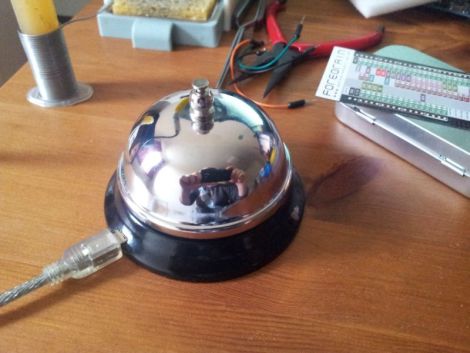
Instructables user [meseta] wanted an audible notification whenever he received an email, but must have thought that his computer’s built-in sounds were lacking in some regard. To get the perfect sound that he desired, he built himself a USB-powered notification bell.

Using an off the shelf “front desk bell” and a hand made electromagnet, he constructed a bell that could be triggered whenever a message showed up in his desktop email client. The electromagnet can be triggered by a quick pulse from a microcontroller, and in [meseta’s] case, he used a Forebrain dev board. He created a filter in his email client that runs an executable each time a message is received. This executable in turn sends a message to his microcontroller via USB, triggering the bell.

While we think that the notifier could have been put together using a far less powerful microcontroller, it’s a neat idea regardless. People seem to love alternative notification systems, so we’re pretty sure this bell will appeal to many in that crowd.

Keep reading to see a short video demonstration of his email notifier in action.

Continue reading “Desktop Email Notification Bell”

Put Your ARM Skills To The Test With The Freescale Make It Challenge

Throw down your mad skills and you might win some cash while you’re at it. [Zeta] tipped us off that Freescale just announced a new challenge. They call it the Make It Challenge and it centers around their 32-bit Kinetis microcontrollers. These are ARM Cortex-M4 chips and if you’re selected to compete they’ll offer their development hardware at a discount for you to get started.

You’ll need to jump through a few hoops. To be considered as a contestant you’ll need to preregister, cruise through some online training, and complete a quiz. From there, just come up with an idea and submit a design paper as the first round of competition. Ten finalists will rise from the group and take their design through to completion for judging in the fall. The top three will get some serious cash ($11,000 for first place) and be treated to an expense paid trip to Austin, Texas.

Modifying A Cheap Robot Arm For Arduino Control

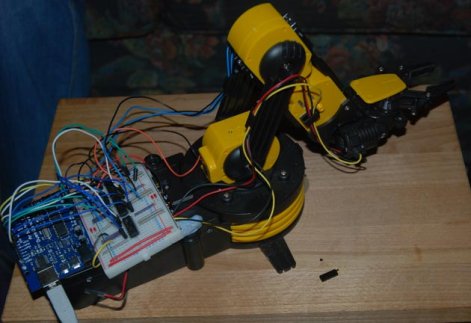
Many a hacker has put together one of those cheap $30 robot arm kits you can get in just about any store with a section labeled, “science”.  In an ongoing search for a cheap robot arm, [Larry] decided to modify one of them to be controlled with a PC through an Arduino. The article doubles as a really basic tutorial on dc motor control. On the site he gives a brief explanation of how to use H-bridges and a good explanation of how he wired them up for this purpose. He eventually goes on to add a processing interface to the project. The next step would be figuring out how to add some kind of position feedback, such as encoders. Though, if modifying an arm is not your style, [Larry] has another cool article on rolling your own robot arm cheaply with some foam board and hobby servos.

Blox That Play Back

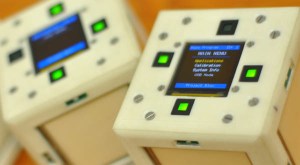
I’m sure most of us remember playing with blocks when we were kids, well now this age old children’s toy has been crammed full of electrical goodness by a team of Electrical Engineers from the University of Texas. The Blox, which are about the size of a standard Rubiks Cube each contain 16 IR sensors, 4 touch panels, a 3-axis accelerometer, a ZigBee Wireless Module, a 2″ OLED display and a battery, all controlled using an ARM Cortex processor.

The Blox show their full potential when used together as an interactive distributed computing system. Blox is an open source project so all of the build details, schematics and code can be found on the website. For an overview and demonstration of the Blox check out the video after the break.

Continue reading “Blox That Play Back”

How Canonical Automates Linux Package Compilation

pandaboard

What do you do when it’s time to port the most popular Linux distribution to a completely different architecture? Canonical employee [David Mandalla] works on their ARM development team and recently shared the answer to that question with his fellow Dallas Makerspace members.

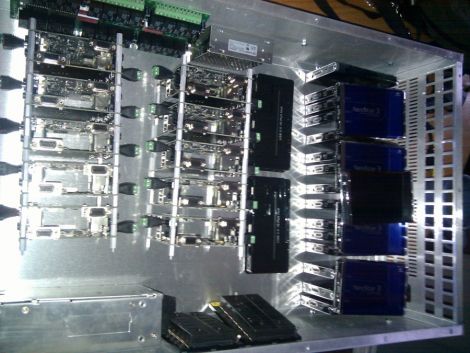
Canonical needed a way to compile about 20,000+ packages for the ARM platform, however they did not want to cross-compile, which is quite time consuming. Instead, they opted to build a native solution that could handle the load while ensuring that all packages were compiled securely. To tackle this immense task, [David] and his team constructed a 4U server that runs 20 fully-independent ARM development platforms simultaneously.

The server is composed of 21 PandaBoards, small OMAP development boards featuring a dual-core ARM cortex processor with just about all the connectivity options you could possibly ask for. One board operates as the server head, keeping track of the other 20 modules. When someone requests server time to build a package, the main board checks for unused server, triggering a relay to reboot it before the server is automatically reimaged. Once the pristine, secure environment is ready to go, it’s handed off to the customer who requested it.

If you’re interested in learning more about the build process, [David] has put together a blog with additional details.

[Thanks Leland]

Trobot: Kickstarting The 6-axis Minature Robot Arm

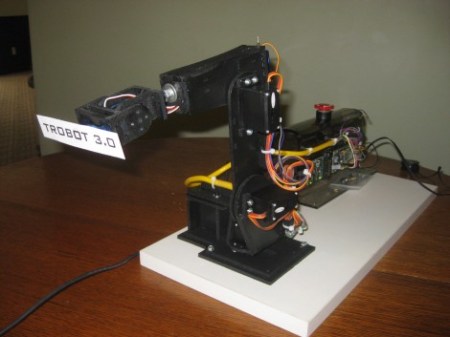
Having already made it to three hardware development versions, [Toby Baumgartner] is looking for some financial backing to make version four of this robot arm possible.

He’s modelling the arm after much larger ABB industrial robots. Like those, it mounts on a stationary base, and features movement along six axes.  The first couple of iterations even used ABB Software’s RobotStudio for control. This is the same software used by the full-sized robots, and features a special design language to integrate the robots into just about any production facility.

We don’t think the need for high-end software used with these small manipulator arms is very great, but we could see the finished product used for small-scale assembly line work some day. In the mean time these might be useful in your own projects. [Toby] has been using an mBed microcontroller board as the hardware driver. It communicates with the computer via an Ethernet connection and he’s even working on an Android interface right now.

Check out a video demonstration of version 2 and 3 embedded after the break.

Continue reading “Trobot: Kickstarting The 6-axis Minature Robot Arm”