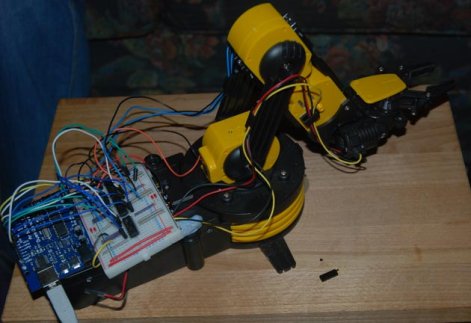
Many a hacker has put together one of those cheap $30 robot arm kits you can get in just about any store with a section labeled, “science”. In an ongoing search for a cheap robot arm, [Larry] decided to modify one of them to be controlled with a PC through an Arduino. The article doubles as a really basic tutorial on dc motor control. On the site he gives a brief explanation of how to use H-bridges and a good explanation of how he wired them up for this purpose. He eventually goes on to add a processing interface to the project. The next step would be figuring out how to add some kind of position feedback, such as encoders. Though, if modifying an arm is not your style, [Larry] has another cool article on rolling your own robot arm cheaply with some foam board and hobby servos.
arm386 Articles
Blox That Play Back

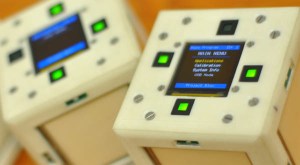
I’m sure most of us remember playing with blocks when we were kids, well now this age old children’s toy has been crammed full of electrical goodness by a team of Electrical Engineers from the University of Texas. The Blox, which are about the size of a standard Rubiks Cube each contain 16 IR sensors, 4 touch panels, a 3-axis accelerometer, a ZigBee Wireless Module, a 2″ OLED display and a battery, all controlled using an ARM Cortex processor.
The Blox show their full potential when used together as an interactive distributed computing system. Blox is an open source project so all of the build details, schematics and code can be found on the website. For an overview and demonstration of the Blox check out the video after the break.
How Canonical Automates Linux Package Compilation

What do you do when it’s time to port the most popular Linux distribution to a completely different architecture? Canonical employee [David Mandalla] works on their ARM development team and recently shared the answer to that question with his fellow Dallas Makerspace members.
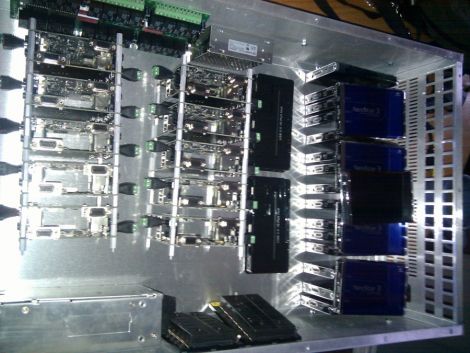
Canonical needed a way to compile about 20,000+ packages for the ARM platform, however they did not want to cross-compile, which is quite time consuming. Instead, they opted to build a native solution that could handle the load while ensuring that all packages were compiled securely. To tackle this immense task, [David] and his team constructed a 4U server that runs 20 fully-independent ARM development platforms simultaneously.
The server is composed of 21 PandaBoards, small OMAP development boards featuring a dual-core ARM cortex processor with just about all the connectivity options you could possibly ask for. One board operates as the server head, keeping track of the other 20 modules. When someone requests server time to build a package, the main board checks for unused server, triggering a relay to reboot it before the server is automatically reimaged. Once the pristine, secure environment is ready to go, it’s handed off to the customer who requested it.
If you’re interested in learning more about the build process, [David] has put together a blog with additional details.
[Thanks Leland]
Trobot: Kickstarting The 6-axis Minature Robot Arm

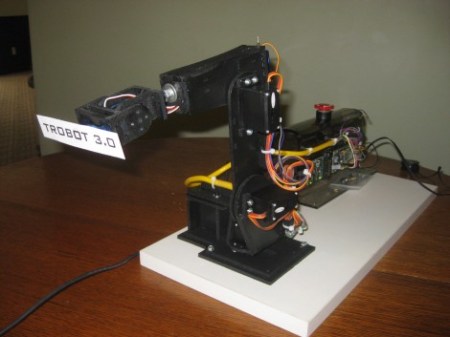
Having already made it to three hardware development versions, [Toby Baumgartner] is looking for some financial backing to make version four of this robot arm possible.
He’s modelling the arm after much larger ABB industrial robots. Like those, it mounts on a stationary base, and features movement along six axes. The first couple of iterations even used ABB Software’s RobotStudio for control. This is the same software used by the full-sized robots, and features a special design language to integrate the robots into just about any production facility.
We don’t think the need for high-end software used with these small manipulator arms is very great, but we could see the finished product used for small-scale assembly line work some day. In the mean time these might be useful in your own projects. [Toby] has been using an mBed microcontroller board as the hardware driver. It communicates with the computer via an Ethernet connection and he’s even working on an Android interface right now.
Check out a video demonstration of version 2 and 3 embedded after the break.
Continue reading “Trobot: Kickstarting The 6-axis Minature Robot Arm”
Color Object Tracking With An 8-bit Microcontroller
![]()
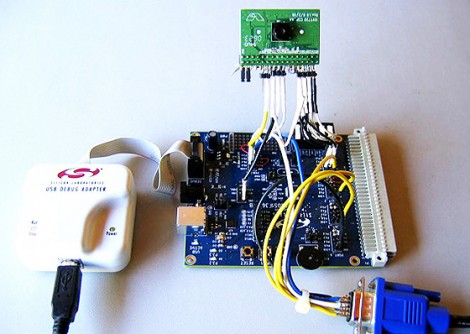
[Craig] sent in a link to this project which manages to implement color tracking on an 8-bit microcontroller at 60 frames per second. That’s some pretty incredible performance, but we’re also not talking about using a hobby-grade microcontroller. The C8051F360 is an ARM microcontroller with 100 MIPS throughput and with a system clock that can operate at up to 100 MHz. You also must consider that the chip will be able to do nothing else while in the tracking mode. Even with those gotchase, it’s still pretty incredible.
The setup uses an Omnivision OV7720 camera module. It has its own 24 MHz clock, which is used as the clock signal on the microcontroller’s PLL to generate a 96 MHz system clock. The code, which is written in a combination of C and assembly language, pushes captured tracking data to a PC via a serial port connection. After the break you can watch a bare-bones demo video that illustrates what the camera sees and what data shows up on the PC.
If you had the system in hand, what would you use it for? Perhaps it’s a perfect addition to that paintball sentry gun at which you’ve been hacking away?
Continue reading “Color Object Tracking With An 8-bit Microcontroller”
Advanced Robotic Arm Control Using Kinect

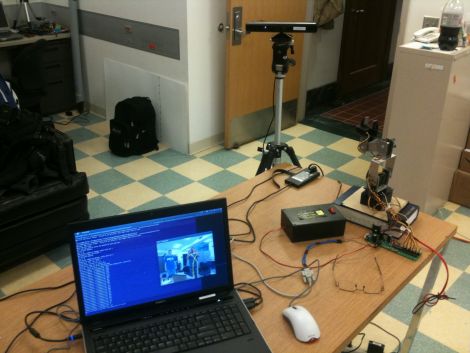
[Ryan Lloyd], [Sandeep Dhull], and [Ruben D’Sa] wrote in to share a robotics project they have been keeping busy with lately. The three University of Minnesota students are using a Kinect sensor to remotely control a robotic arm, but it’s not as simple as it sounds.
Using OpenNI alongside PrimeSense, the team started out by doing some simple skeleton tracking before working with their robotic arm. The arm has five degrees of freedom, making the task of controlling it a bit tricky. The robot has quite a few joints to play with, so the trio not only tracks shoulder, elbow, and wrist movements, but they also monitor the status of the user’s hand to actuate the robot’s gripper.
When everything was said and done, the results were pretty impressive as you can see in the video below, but the team definitely sees room for improvement. Using inverse kinematics, they plan on filtering out some of the joint tracking inaccuracies that occur when the shoulders are moved in a certain way. They also plan on using a robotic arm with even more degrees of freedom to see just how well their software can perform.
Be sure to check out their site to see more details and videos.
Continue reading “Advanced Robotic Arm Control Using Kinect”
Tiny Atari 810 Disk Drive Upgrade
Everything gets smaller as technology improves. [Rossum] reduced the space needed for an Atari 810 disk drive by building this tiny replacement. Of course it doesn’t use floppy disks, but takes a microSD card instead. And it doesn’t stand in the place of one floppy drive, but can emulate up to eight different drives. The best part is that [Rossum] went to the trouble of designing an enclosure and having it fabricated via 3D printing in order to look just like a doll house version of the original hardware. It uses an LPC1114 ARM Cortex-M0 microprocessor to translate data transmissions to and from the Atari hardware, storing it on the 8 GB card.
As usual, you’ll soon find the schematic, board artwork, and code up on his git repository soon.