Audio Eavesdropping Exploit Might Make That Clicky Keyboard Less Cool

Despite their claims of innocence, we all know that the big tech firms are listening to us. How else to explain the sudden appearance of ads related to something we’ve only ever spoken about, seemingly in private but always in range of a phone or smart speaker? And don’t give us any of that fancy “confirmation bias” talk — we all know what’s really going on.

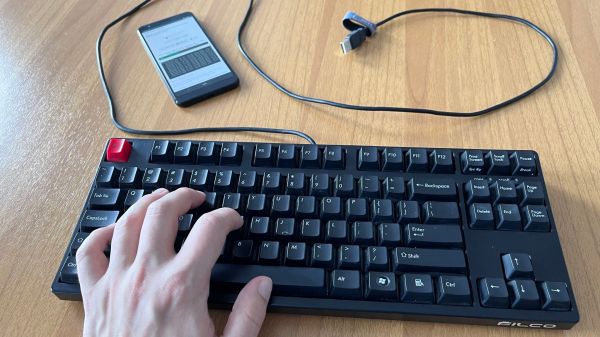
And now, to make matters worse, it turns out that just listening to your keyboard clicks could be enough to decode what’s being typed. To be clear, [Georgi Gerganov]’s “KeyTap3” exploit does not use any of the usual RF-based methods we’ve seen for exfiltrating data from keyboards on air-gapped machines. Rather, it uses just a standard microphone to capture audio while typing, building a cluster map of the clicks with similar sounds. By analyzing the clusters against the statistical likelihood of certain sequences of characters appearing together — the algorithm currently assumes standard English, and works best on clicky mechanical keyboards — a reasonable approximation of the original keypresses can be reconstructed.

If you’d like to see it in action, check out the video below, which shows the algorithm doing a pretty good job decoding text typed on an unplugged keyboard. Or, try it yourself — the link above implements KeyTap3 in-browser. We gave it a shot, but as a member of the non-mechanical keyboard underclass, it couldn’t make sense of the mushy sounds it heard. Then again, our keyboard inferiority affords us some level of protection from the exploit, so there’s that.

Editors Note: Just tried it on a mechanical keyboard with Cherry MX Blue switches and it couldn’t make heads or tails of what was typed, so your mileage may vary. Let us know if it worked for you in the comments.

What strikes us about this is that it would be super simple to deploy an exploit like this. Most side-channel attacks require such a contrived scenario for installing the exploit that just breaking in and stealing the computer would be easier. All KeyTap needs is a covert audio recording, and the deed is done.

Continue reading “Audio Eavesdropping Exploit Might Make That Clicky Keyboard Less Cool”

Processing Audio With The RP2040

The Raspberry Pi, although first intended as an inexpensive single-board computer for use in education, is now ubiquitous in electronics communities. Its low price as well as Linux platform and accessible GPIO make it useful in many places outside the classroom. But, if you want to abandon the ease-of-use in favor of an even lower price, the Raspberry Pi foundation makes that possible as well with the RP2040 chip, commonly found on the Pico. [Jason] shows us one way to make use of this powerful chip by putting one in an audio digital signal processing board.

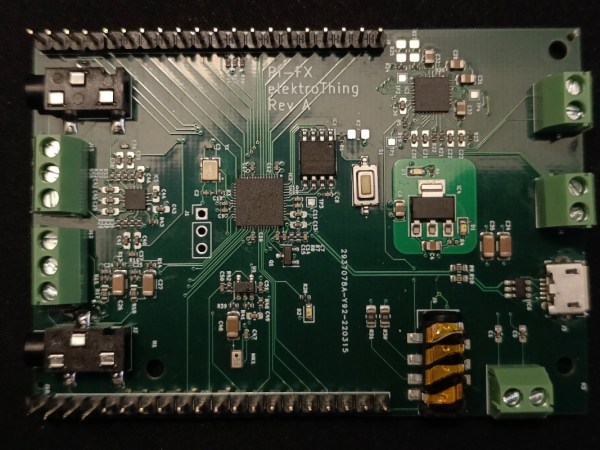
While development boards are available for this chip, [Jason] has opted instead for a custom PCB which he designed himself and includes an integrated headphone amplifier and 3.5 mm audio jacks. To do the actual DSP work, the RP2040 chip uses three 12-bit ADC channels and 16 controllable PWM channels. The platform is also equipped with the TLV320AIC3254 codec from Texas Instruments. With all of this put together, he has a functioning open-source platform he calls the DS-Pi.

[Jason] has built this as a platform for guitar effects and as a customizable guitar amp modeler, but with a platform that is Arduino-compatible and fairly easy to program it could be put to use for anything involving other types of music or audio processing, like this specialized MIDI-compatible guitar effects platform which is built around the same processor.

A New Wrinkle On Wooden Ribbon Microphones

Not too many people build their own microphones, and those who do usually build them out of materials like plastic and metal. [Frank Olson] not only loves to make microphones, but he’s also got a thing about making them from wood, with some pretty stunning results.

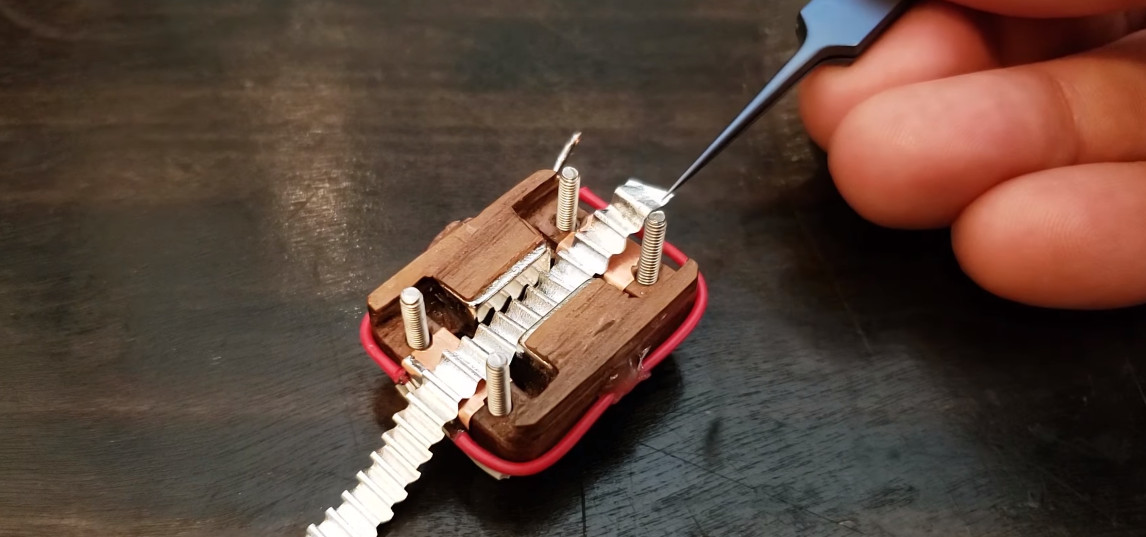
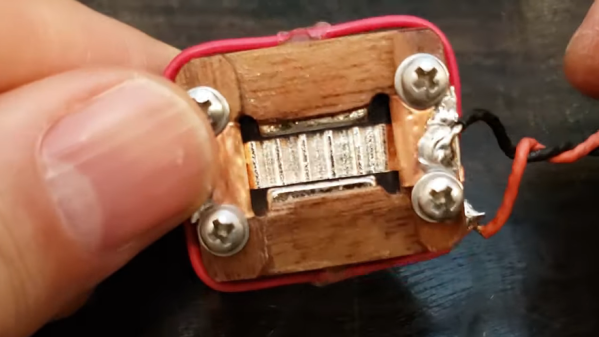
[Frank]’s latest build is a sorta-kinda replica of the RCA BK-5, a classic of mid-century design. Both the original and [Frank]’s homage are ribbon microphones, in which a thin strip of corrugated metal suspended between the poles of magnets acts as a transducer. But the similarities end there, as [Frank] uses stacked layers of walnut veneer as the frame of his ribbon motor. The wood pieces are cut with a vinyl cutter, stacked up, and glued into a monolithic structure using lots of cyanoacrylate glue. The video below makes it seem easy, but we can imagine getting everything stacked neatly and lined up correctly is a chore, especially when dealing with neodymium magnets. Cutting and corrugating the aluminum foil ribbon is no mean feat either, nor is properly tensioning it and making a solid electrical contact.

The ribbon motor is suspended in a case made of yet more wood, all of which contributes to a warm, rich sound. The voice-over for the whole video below was recorded on a pair of these mics, and we think it sounds just as good as [Frank]’s earlier wooden Model 44 build. He says he has more designs in the works, and we’re looking forward to hearing them, too. Continue reading “A New Wrinkle On Wooden Ribbon Microphones”

Solving Grounding Issues On Switch Audio

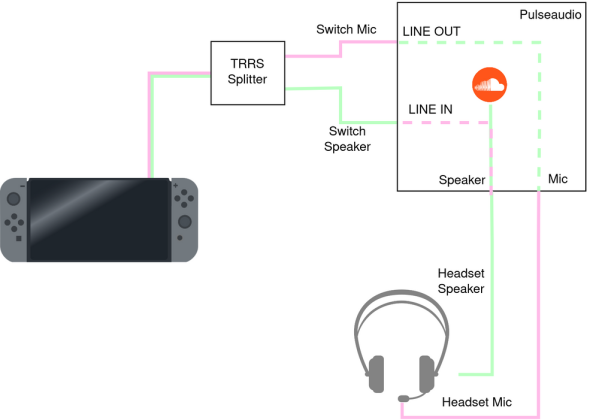
Grounding of electrical systems is an often forgotten yet important design consideration. Issues with proper grounding can be complicated, confusing, and downright frustrating to solve. So much so that engineers can spend their entire careers specializing in grounding and bonding. [Bsilvereagle] was running into just this sort of frustrating problem while attempting to send audio from a Nintendo Switch into a PC, and documented some of the ways he attempted to fix a common problem known as a ground loop.

Ground loops occur when there are multiple paths to ground, especially in wires carrying signals. The low impedance path creates oscillations and ringing which is especially problematic for audio. When sending the Switch audio into a computer a loop like this formed. [Bsilvereagle] set about solving the issue using an isolating transformer. It took a few revisions, but eventually they settled on a circuit which improved sound quality tremendously. With that out of the way, the task of mixing the Switch audio with sources from other devices could finally proceed unimpeded.

As an investigation into a nuisance problem, this project goes into quite a bit of depth about ground loops and carrying signals over various transforming devices. It’s a great read if you’ve ever been stumped by a mysterious noise in a project. If you’ve never heard of a ground loop before, take a look at this guide to we featured a few years ago.

Reverse Engineering Your Own Bluetooth Audio Module

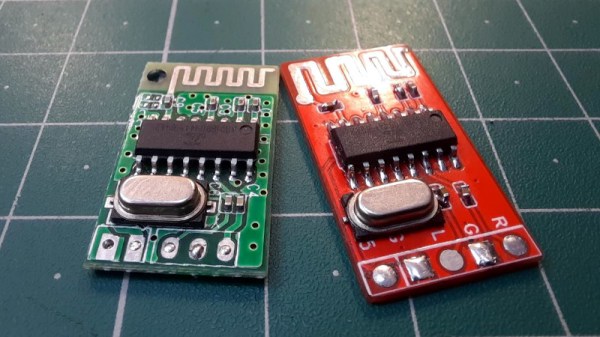
There was a time when we would start our electronic projects with integrated circuits and other components, mounted on stripboard, or maybe on a custom PCB. This is still the case for many devices, but it has become increasingly common for an inexpensive ready-built module to be treated as a component where once it would have been a project in its own right. We’re pleased then to see the work of [ElectroBoy], who has combined something of both approaches by reverse engineering the pinout of a Chinese Bluetooth audio chip with minimal datasheet, and making his own take on an off-the-shelf Bluetooth audio module.

The JL_AC6939B comes in an SOIC16 package and requires a minimum number of components. The PCB is therefore a relatively simple proposition and indeed he’s fitted all parts and traces on one side with the other being a copper ground plane. It’s dangerous to assume that’s all there is to a board like this one though, because many an engineer has come unstuck trying to design a PCB antenna. We’d hazard a guess that the antenna here is simply a wavy PCB line rather than an antenna with a known impedance and bandwidth, at the very least it looks to have much thicker traces than the one it’s copying.

It’s possible that it’s not really worth the effort of making a module that can be bought for relative pennies ready-made, but to dismiss it is to miss the point. We make things because we can, and not merely because we should.

Immersive Stereo Sound Recording With This Binaural Microphone

Sound recording has been a consumer technology for so long now that it is ubiquitous, reaching for a mobile device and firing up an app takes only an instant. Anyone who takes an interest in audio recording further will find that while it’s relatively straightforward to make simple recordings. But, as those among you who have fashioned a pair of Shure SM58s into an X configuration with gaffer tape will know, it can be challenging to create a stereo image when recording outside the studio. In the quest to perfect this, [Kevin Loughin] has created a binaural microphone, which simulates a human head with microphones placed as ears to produce ambient recordings with an almost-immersive stereo image.

Commercial binaural microphones can cost thousands of dollars, but this one opts for a more budget design using an off-the-shelf mannequin head sold for hairdressers. It’s filled with high-density foam, and in its ears [Kevin] placed 3D-printed ear canals with electret microphone capsules. On the back goes a battery and a box for the bias circuitry.

The results as you can hear in the video below the break are impressive, certainly so for the cost. It’s not the first such microphone we’ve shown you, compare it with one using a foam-only head.

Continue reading “Immersive Stereo Sound Recording With This Binaural Microphone”

Python Web Proxy Convinces Sonos To Stream YouTube

[Maurice-Michel Didelot] owns a Sonos smart speaker, and was lamenting the devices inability (or plain unwillingness) to stream music from online sources without using a subscription service. YouTube Music will work, but being a subscription product there is a monthly fee, which sucks since you can listen to plenty of content on YouTube for free. [Maurice] decided that the way forward was to dig into how the Sonos firmware accesses ‘web radio’ sources, and see if that could be leveraged to stream audio from YouTube via some kind of on-the-fly stream conversion process.

What? No MP4 support for web radio? Curses!

So let’s dig in to how [Maurice] chose to approach this. The smart speaker can be configured to add various streaming audio sources, and allows you add custom sources for those. The Sonos firmware supports a variety of audio codecs, besides MP3, but YouTube uses the MP4 format. Sonos won’t handle that from a web radio source, so what was there to do, but make a custom converter?

After a little digging, it was determined that Sonos supports AAC encoding (which is how MP4 encodes audio) but needs it wrapped in an ADTS (Audio Data Transport Stream) container. By building a reverse web-proxy application, in python using Flask, it was straightforward enough to grab the YouTube video ID from the web radio request, forward a request to YouTube using a modified version of pytube tweaked to not download the video, but stream it. Pytube enabled [Maurice] to extract the AAC audio ‘atoms’ from the MP4 container, and then wrap them up with ADTS and forward them onto the Sonos device, which happily thinks it’s just a plain old MP3 radio stream, even if it isn’t.

Sonos doesn’t have the best reputation, let’s say, but you can’t deny that there’s some pretty slick tech going on inside. Here’s a neat hack we covered last year, adding Sonos support to an old school speaker, and a nice teardown of a IKEA Sonos-compatible unit, which uses some neat design hacks.

Thanks [mip] for the tip!

Featured image by Charles Deluvio on Unsplash.