Minions Turn Your Keyboard Into A Bluetooth Keyboard

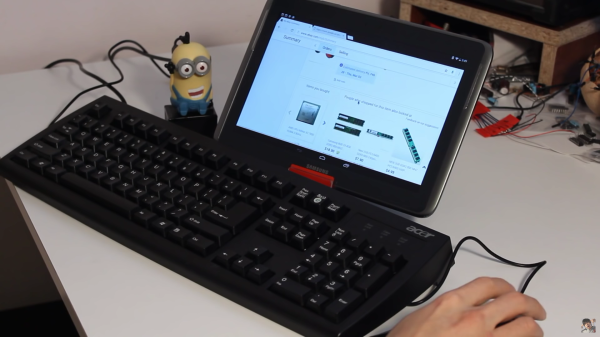
Evil geniuses usually have the help of some anonymous henchmen or other accomplices, but for the rest of us these resources are usually out of reach. [Evan], on the other hand, is on his way to a helpful army of minions that will do his bidding: he recently built a USB-powered minion that turns a regular PS/2 mouse and keyboard into a Bluetooth mouse and keyboard.

[Evan] found his minion at a McDonald’s and took out essentially everything inside of it, using the minion as a case for all of the interesting bits. First he scavenged a PS/2 port from an old motherboard. An Arduino Nano is wired to an HC-05 Bluetooth chip to translate the signals from the PS/2 peripherals into Bluetooth. The HC-05 chip is a cheaper alternative to most other Bluetooth chips at around $3 vs. $40 for more traditional ones. The programming here is worth mentioning: [Evan] wrote a non-interrupt based and non-blocking PS/2 library for the Arduino that he open sourced which is the real jewel of this project.

Once all the wiring and programming is done [Evan] can turn essentially any old keyboard and mouse into something that’ll work on any modern device. He also put an NFC tag into the minion’s head so that all he has to do to connect the keyboard and mouse is to swipe his tablet or phone past the minion.

If you’re looking for an interesting case for your next project, this McDonald’s Minion toy seems to be pretty popular. PS/2 keyboards are apparently still everywhere, too, despite their obsolescence due to USB. But there are lots of other ways to get more use out of those, too.

Continue reading “Minions Turn Your Keyboard Into A Bluetooth Keyboard”

Put Words In Your Dog’s Mouth With A Talking Dog Collar

It’s just a little past Halloween, but Adafruit’s talking dog collar, modeled after the movie Up, is still a nice fusion between crafting and hacking.

One reason that Adafruit is so popular is that every time they sell us something, they give us some of the worlds best tutorials and libraries for free. For this project they’re using their Bluetooth LE board and their Audio FX board with a few more mundane vitamins to construct the collar. We’re sure the enterprising hacker could find alternatives if they so choose.

The collar is made of leather and 3D printed props. They went with alkaline batteries rather than lithium, to keep their doggy companion a little safer. All the electronics are hidden under the various props and the wiring is routed behind the belt. To control the app, the different sound bytes are mapped to buttons on their Bluetooth-to-serial phone app.

It’s a good starter tutorial, and the concept applied differently would definitely be good for at least one good prank on a coworker or friend.


Tiny BLE UART Makes Bluetooth Low Energy Simple

Last time I talked about the internals of how Bluetooth Low Energy (BLE) handles data. I mentioned that the way it is set up is meant to conserve power and also to support common BLE devices like heart rate monitors. On the other hand, I also mentioned that you often didn’t need to deal with that because you’d use an abstraction layer.

This time, I want to show you how I used the Hackaday special edition Tiny BLE (from Seeed Studios) and its mbed library to do a quick simple BLE project. If you didn’t read the first part, don’t worry. The abstraction is so good, you probably won’t have to unless you want to circle back around later and get a more detailed understanding of what’s happening under the covers.

I wanted something simple for an example so you could build on it without having to remove much code. For that reason, I decided to allow my phone to control the state of a three-color LED via BLE. To do that, I’m going to use a virtual UART and some off-the-shelf phone software. The whole thing won’t take much code, but that’s the point: the abstraction makes BLE relatively simple.

Continue reading “Tiny BLE UART Makes Bluetooth Low Energy Simple”

Lazy Bluetooth: Build With BLE, Don’t Reinvent It

It is a good bet that you have at least one Bluetooth device hanging around. Headsets, mice, keyboards, and speakers have become increasingly common. Bluetooth forms a short range wireless network and can also perform file transfers and create virtual serial ports.

If you have ever had to stop listening to music to recharge a Bluetooth headphone, you know Bluetooth won’t run long on batteries. In 2006, Nokia introduced Wibree, which would later become Bluetooth Low Energy (or BLE). These days it’s used in everything and it’s well worth your time to gather a basic understanding of this technology.

Continue reading “Lazy Bluetooth: Build With BLE, Don’t Reinvent It”

Nanocounter: Frequency Counter With An Android UI

Have you ever started a project, run into an issue, started a new project to solve the issue, and completely forgot about the original project? [Andy] went down a rabbit hole of needing a tool to calibrate an MCU oscillator, but not having an accurate way to measure frequency. Most people would just buy a frequency counter and be done with it, but [Andy] decided to build his own.

The Nanocounter is an accurate, open source frequency counter that uses an Android phone as its display. It’s based on a high accuracy temperature compensated crystal oscillator (TCXO) fed into a phase locked loop (PLL) to create a high frequency, accurate reference clock.

This reference clock, along with the signal to be measured, are sent into a Xilinx FPGA which uses a method called equal precision measurement to determine the frequency. A STM32F072 microcontroller uses a SPI interface to get this data out of the FPGA, and controls the whole system. Finally, a cheap HC-06 Bluetooth module facilitates communication with an Android device.

The project achieves the goal of frequency counting, though [Andy] doesn’t remember what project sparked the idea to build it. (Classic yak shaving!) But the result is a great read of a detailed writeup, and you can watch a video of the Nanocounter in action after the break. That’s a win in our book.

Continue reading “Nanocounter: Frequency Counter With An Android UI”

White Oak Illuminated Bluetooth Speaker

Besides being common tools available to most hackers and makers out there, 3D printing, CNC machines, and cheap Chinese electronics have one more things in common: they were all used by [Nick] to build a bluetooth speaker system that has some interesting LED effects built into the case.

This is fresh on the heels of another hack that used similar construction methods to build a “magic” wood lamp. [Nick] takes it a step further, though. His case is precisely machined in white oak and stuffed with the latest China has to offer: a bank of lithium-ion batteries, a DC-DC converter to power the amplifier, and a Bluetooth module. After some sanding, the speakers look professional alongside the blue light features hiding behind the polycarbonate rings.

Of course you’ll want to visit the project site for all the details of how [Nick] built his speaker case. He does admit, however, that the electronics are fairly inefficient and need a little work. All in all though, it’s a very refined set of speakers that’ll look great on a bookshelf or on a beach, workshop bench, or anyplace else that you could take them.

Continue reading “White Oak Illuminated Bluetooth Speaker”

The Raspberry Pi 3 does Eddystone!

Turn Your RPi 3 Into A BLE Beacon

With the launch of the Raspberry Pi 3, Bluetooth Low Energy (BLE) is now at our disposal. With BLE, there are a few technologies for implementing one-way beacons that broadcast data. Apple has been pushing iBeacon since 2013, and Google just launched their Eddystone solution last year.

If you’re looking to target Google’s Eddystone on your RPi 3, [Yamir] has you covered. He’s put together a guide on setting up an Eddystone-URL beacon within Raspbian. This type of beacon just broadcasts a URL. Users within range will get a notification that the URL is available, and can navigate through to it. Eddystone-URL works on both iOS and Android.

The process for setting this up is pretty simple. The hciconfig and hcitool commands do all the work. [Yamir] was even nice enough to make a calculator tool that generates the hcitool command for your own URL. While is hack is a simple one, it’s a nice five-minute project. It’s also handy for broadcasting the URL of your Raspberry Pi if it’s running a web server as part of a more intricate hack.