Bluetooth Control In A Power Strip

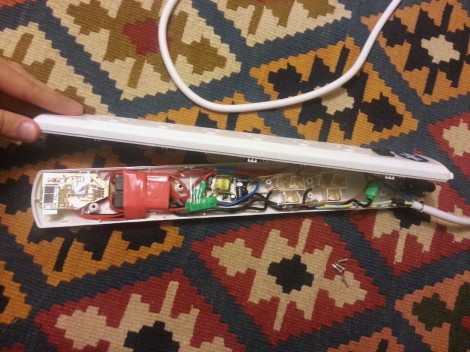
[Mansour] had a ceramic space heater mounted near the ceiling of his room. Since heat rises this is not the best design. He upgraded to an infrared heater which works a lot better, but lacks the timer function he used on the old unit. His solution wasn’t just to add a timer. He ended up building a Bluetooth module into a power strip in order to control the device wirelessly. He ends up losing all but two outlets on the strip, but everything fits inside the original case so we think it’s a reasonable trade-off.

He uses relays on both the live and neutral wires to switch the two outlets. These are driven via MOSFETs to protect the ATmega168 which controls the board. The microcontroller and Bluetooth module both need a regulated DC power source, so he included a transformer and regulator in the mix. After the break you can see him demonstrating the system using two lamps. There’s even a terminal interface which lets you select different control commands by sending the appropriate character. This interface makes script a breeze.

At least this power strip doesn’t spy on you.
Continue reading “Bluetooth Control In A Power Strip”

Another Android Controlled Roving Robot

[Sam] has been working on a cellphone controlled robot for a while now and with the launch of a few similar Kickstarter campaigns he thought it would be good to share his progress so far.

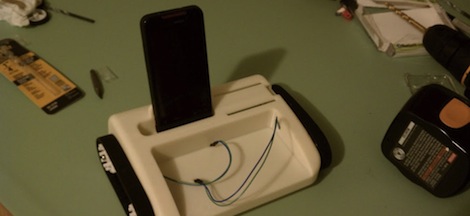
[Sam]’s robot is controlled by an Android device with the help of an IOIO dev board. This setup provides more than enough computational power to send a robot on its merry way, and has the bonus of allowing [Sam] to connect additional sensors.

The case is designed to put the headers on the IOIO board on the outside, just above a little shelf perfect for holding a breadboard or two. With the right hardware and software setup, [Sam]’s bot can rove around the neighborhood collecting data and sending it to a server in real time.

If you’re wondering why a tiny Android/IOIO powered sounds so familiar, it might be because of the Botiful robot we posted a few days ago. Unlike Botiful, [Sam] can only control his treaded Android bot through Bluetooth as the whole ‘programming a web interface’ is a bit over his head. Hopefully [Sam] will meet an enthusiastic coder when he brings his Arduino tank to Dorkbots Boston this evening.

You can check out a prototype of [Sam]’s bot in action after the break.

Continue reading “Another Android Controlled Roving Robot”

NXT Android Telepresence Robot

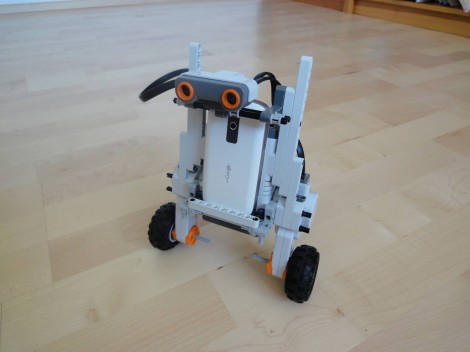
Here is a telepresence robot that uses an Android device and LEGO NXT parts. [Wolfgang] had an extra phone on hand and decided to put it to good use. The Mindstorm parts make it really easy to produce a small robot, and adding the phone really ups the computing and connectivity options available to him.

The Android device is able to control the NXT bot via Bluetooth. [Wolfgang] didn’t go into detail on that part, but you can get some pointers on the topic from this other Android controlled Mindstorm project. [Wolfgang] wanted the ability to check in at home when he’s travelling. He uses nanohttpd on the Android device to serve up a simple web interface. It uses HTML5 to push a snapshot from the phone’s camera as user feedback, and provides a set of directional arrows which let him drive the bot around.

Obviously this thing is going to run out of juice if he’s away for too long. To combat that problem he included a battery which powers both the NXT parts and the phone. Now he just needs to build an inductive charging station and he’ll really be set.

Continue reading “NXT Android Telepresence Robot”

A Wireless MAME Coffee Table Controller

MAME coffee table plan

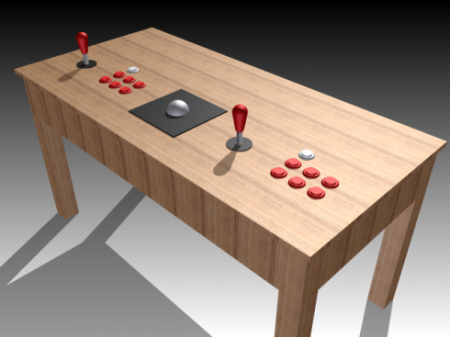
Although we’ve featured quite a few MAME controllers here, we thought we’d feature one more. It’s only a well-drawn mechanical plan at this point, but if the results are anything like the model or detail drawing, we will be quite impressed.

One thing that is of particular interest is the planned parts list. Amongst them are the typical joysticks, buttons, and even a trackball. What may be new to some of our readers is the bluetooth arcade controller by [Wayne and Layne] opensource hardware kits. Although they aren’t cheap at just under $80, and requre an Arduino Mega for use, this is nonetheless an interesting control option. The maximum button presses may be another limiting factor at 6, but it should be a cleaner solution than cannibalizing one or more wireless controllers.

Of course, we’d be negligent if we didn’t at least give you a link to a completed MAME controller. Be sure to feast your eyes on these images if you’d like some finished controller eye candy or check out the pic after the break!

Continue reading “A Wireless MAME Coffee Table Controller”

Adding Bluetooth Audio Playback To A Toyota Matrix

In this project [Ryan] shows how he added Bluetooth audio to the stock stereo of his Toyota Matrix. The work he did with his add-on hardware is quite good. And the installation was surprisingly easy. For example, the dashboard bezel which is hanging in the foreground of this picture simply pulls off without the need for any tools. Also, the CD changer input for the stereo is what he uses to patch into the system. It just happened to have a 0.1″ pin header so finding a connector that would work wasn’t a problem.

As for the add-on hardware, he built his own circuit board around an ATmega168 microcontroller and Bluegiga WT32 Bluetooth module. To connect to the car’s data system he went with an RS485 driver chip. It’s not quite the right part but it works well enough for his purposes. So far he can get audio playback working and plans to add support for hands free phone calls and displaying audio track information. Hey, maybe he’ll even add some extra shake-based automation; who knows?

Get a look at the install in the clip after the break.

Continue reading “Adding Bluetooth Audio Playback To A Toyota Matrix”

[RobB’s] House Has No Light Switches

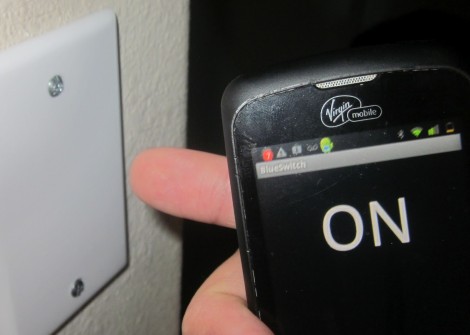
So [RobB] wanted to take out all the light switches in his house. His plan was to replace them with a system that could be operated from his smart phone. But his wife insisted that there still must be some way to control the lighting directly — we have to agree with her on that one. The solution was to develop a system that switches the lights via a touch sensor or by Bluetooth.

The touch part of the project is pretty easy. He coated the back of a blank outlet plate with tin foil and hooked it to a microcontroller with a couple of resistors. He’s using an ATtiny85, which can be programmed using Arduino sketches, so the software side is made easy by the CapSense Library. The chip also uses the software serial library to communicate with a Bluetooth module. You can see the result of both in the demo video after the break.

Of course you need to throw a relay in there to switch mains, and find a way to power the uC and Bluetooth module. [RobB] went with a tiny plug-in USB power converter and managed to fit everything in a single-gang switch.

Continue reading “[RobB’s] House Has No Light Switches”

Linux Picture Frame Serves As Wireless Raspberry Pi Display

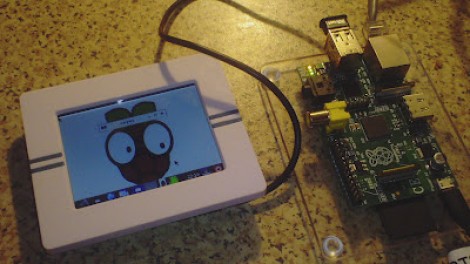
Here’s a novel approach to adding a display to your Raspberry Pi. Instead of using a wired display — either via the HDMI (which can feed a DVI port with a simple hardware adapter) or the composite video out — [Chris Bryden] decided to use Bluetooth to provide a wireless display. This really depends on the hardware that you have available. He snapped up a hackable digital picture frame for a song and used the 320×240 display for this project.

You can see the USB nub plugged into the RPi in the image above. It’s a Bluetooth dongle and there’s with a matching one on the digital frame. With the two networked in such a way [Chris] got to work setting up a VNC that would let him pull up the X desktop over the network.

This ends up being one of the best uses we’ve seen for the Bluetooth protocol, and the small screen offers a huge advantage over the use of a simple character display.