[RobB’s] House Has No Light Switches

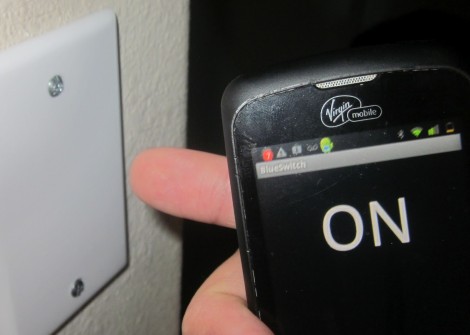
So [RobB] wanted to take out all the light switches in his house. His plan was to replace them with a system that could be operated from his smart phone. But his wife insisted that there still must be some way to control the lighting directly — we have to agree with her on that one. The solution was to develop a system that switches the lights via a touch sensor or by Bluetooth.

The touch part of the project is pretty easy. He coated the back of a blank outlet plate with tin foil and hooked it to a microcontroller with a couple of resistors. He’s using an ATtiny85, which can be programmed using Arduino sketches, so the software side is made easy by the CapSense Library. The chip also uses the software serial library to communicate with a Bluetooth module. You can see the result of both in the demo video after the break.

Of course you need to throw a relay in there to switch mains, and find a way to power the uC and Bluetooth module. [RobB] went with a tiny plug-in USB power converter and managed to fit everything in a single-gang switch.

Continue reading “[RobB’s] House Has No Light Switches”

Linux Picture Frame Serves As Wireless Raspberry Pi Display

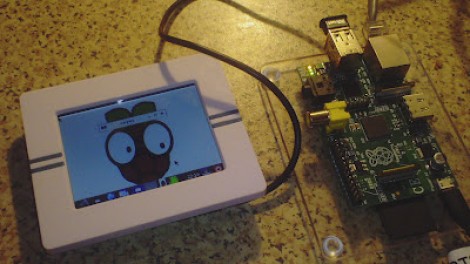
Here’s a novel approach to adding a display to your Raspberry Pi. Instead of using a wired display — either via the HDMI (which can feed a DVI port with a simple hardware adapter) or the composite video out — [Chris Bryden] decided to use Bluetooth to provide a wireless display. This really depends on the hardware that you have available. He snapped up a hackable digital picture frame for a song and used the 320×240 display for this project.

You can see the USB nub plugged into the RPi in the image above. It’s a Bluetooth dongle and there’s with a matching one on the digital frame. With the two networked in such a way [Chris] got to work setting up a VNC that would let him pull up the X desktop over the network.

This ends up being one of the best uses we’ve seen for the Bluetooth protocol, and the small screen offers a huge advantage over the use of a simple character display.

Shake Phone To Start Scooter

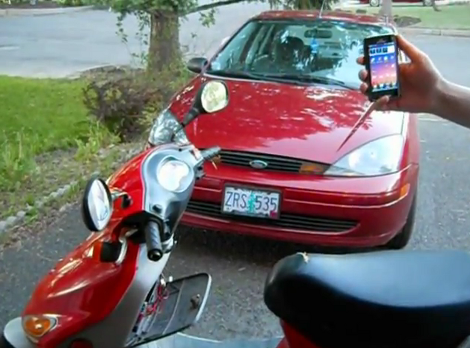
This scooter starts right up with a shake of your Android device. This shake must be done from front-to-back, because a side-to-side shake is reserved for unlocking the saddle ([Brad] stores his helmet within).

Connectivity is facilitated over Bluetooth, with a rocker switch near the left handle bar to disable the receiver so that you don’t run down the battery. You can see the locking panel hanging open on the front portion of the scooter. Inside he installed the driver board which patches into the ignition system and drives a solenoid for the seat latch. It sounds like the latching mechanism used a bowden cable whose handle was inside that locking panel. By adding a solenoid and generously lubricating the cable he  managed to get it functioning from the driver board.

Check out the video after the break for a proper demonstration. The phone is running a Python script via SL4A, which takes care of the user interface.

Continue reading “Shake Phone To Start Scooter”

Update: Androcade 2.0

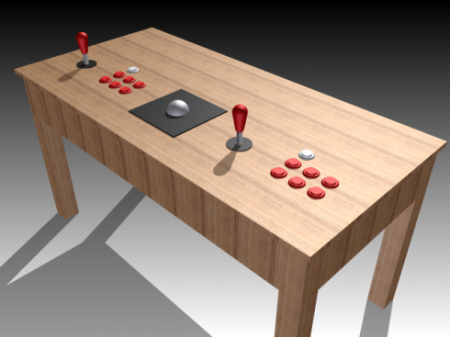
[Chris] has been going about his business, letting his interest guide him as it will. But always in the back of his mind is his Androcade project, and he’s spent the last year making improvements. It’s an arcade controller for playing games on an Android tablet. It connects to the device via Bluetooth, and includes a built-in stand.

His original version was featured here last year. It was made from wood (with a nice Android green finish) and included three buttons and a joystick. This time around he moved to some black laser-cut acrylic for the case, and has doubled up on the buttons. It also now enumerates as an HID Bluetooth device, whereas before it was pushing serial data over the BT connection.

He’s had enough interest from his friends to also create an iPad version all in white. It connects and works just the same as the Android flavor. Check out a bit of Donkey Kong gameplay after the break.

Continue reading “Update: Androcade 2.0”

Outdoor Stereo Helps Your Neighbors Learn To Issue Noise Complaints

Backyard parties are going to rock over at [Effin_dead_again’s] house. That’s because he just finished building this outdoor stereo. It carries its own power supply so you can take it on the road with you, and we don’t think you’ll have trouble hearing it with the 240 Watt amplifier hidden inside.

He shared the equipment details in his Reddit conversation. A 12V lawn mower battery sits in the base of the wooden enclosure. One of the commenters mentioned the dangers of hydrogen off-gassing from that power source, but [Effin_dead_again] thought of that and included venting around the lid. The subwoofer is an 8″ Alpine, and speakers are out of a Hyundai car. The head unit has Bluetooth built in for easy connection to your smart phone. It of course has the ability to play CDs and MP3s too, and we’d bet you can tune the radio if there’s an antenna connected.

Need similar power but a bit more portability? Check out this stereo built into a cooler.

NES Controllers For Any Bluetooth Application

[Dustin Evans] wanted to used his original NES controllers to play emulated games. The problem is he didn’t want to alter the classic hardware. His solution was to use the connectors and enclosure from a dead NES to build a Bluetooth translator that works with any NES controller.

Here he’s showing the gutted half of an original NES. Although the motherboard is missing, the connectors for the controllers are still there. They’ve been rewired to an Arduino board which has a BlueSMiRF modem. The controller commands are harvested by the Arduino and sent to whatever is listening on the other end of the Bluetooth connection. He also has plans to add a couple of SNES ports to the enclosure so that those unaltered controllers may also be used.

In the video after the break [Dustin] walks us through the hardware setup. He then demonstrates pairing the device with an Android phone and playing some emulators with the pictured controllers.

Continue reading “NES Controllers For Any Bluetooth Application”

Classic VW Bug Stereo Gets Bluetooth

If any of you deal with older car fanatics, you’ll know that the original dash stereo is a coveted piece of equipment. If they haven’t been removed and replaced with something more modern over the years, they’re usually non functional. [Hadrien] has gone through some trouble to retain his original stereo in his 69 Volkswagen Beetle. First, he did a common hack we see even in modern cars. He added an auxiliary input.

This satiated his desire for modern audio for a while, but he really found the necessity for a cable attachment annoying. He decided he was going to add bluetooth (google translated from french).  To do this, he took a pair of bluetooth headphones and tore them apart. Using an old cassette tape as the case, he rebuilt them as something that could be wired directly to his dash stereo. He even kept the mic just in case he wanted to use this as a hands free device.

Being build in 1969, his car stereo doesn’t use a cassette, so he just keeps it in the glove box. This isn’t optimal, but as he says, at least he doesn’t have to plug in his phone.