A Beautiful Pinhole Camera Takes Wonderful Photos

With digital cameras in everything and film slowly disappearing from shelves, everyone loses an awesome way to learn about photography. Pinhole cameras allow anyone to build a camera from scratch and also learn about those crazy f-stops, exposure times, and focal planes that Instagram just won’t teach you. [Matt] put up a great tutorial for building your own pinhole camera, and the project looks easy enough for even those who are still playing around with their cell phone cameras.

For film, [Matt] used 120 film, a medium-format medium that is sill available for purchase and processing in some areas. Because [Matt]’s pinhole is relatively large and made out of very thin material, the camera could take very large pictures – much larger than standard 35mm fare. If you’re using a smaller camera projecting a smaller image onto the film, 35mm would be the way to go as it greatly decreases the difficulty of finding film and a processing center.

[Matt]’s camera is constructed out of laser-cut plywood. Because he’s producing extremely wide images with his camera (6 x 17cm), [Matt] needed to curve the film around the focal plane of the camera to keep the entire image in focus.

The mechanics of the camera are simple – just a pair of knobs to wind the film and a small metal shutter. [Matt] added a shutter release cable to open and close the aperture without moving the camera and had a wonderful camera perfect for capturing either sirs and madams or Civil War battlefields.

Magic Finger Input Device Is A Camera On Your Finger Tip

What if we could do away with mice and just wear a thimble as a control interface? That’s the concept behind Magic Finger. It adds as movement tracking sensor and RGB camera to your fingertip.

Touch screens are great, but what if you want to use any surface as an input? Then you grab the simplest of today’s standard inputs: a computer mouse. But take that one step further and think of the possibilities of using the mouse as a graphic input device in addition to a positional sensor. This concept allows Magic Finger to distinguish between many different materials. It knows the difference between your desk and a piece of paper. Furthermore, it opens the door to data transfer through a code scheme they call a micro matrix. It’s like a super small QR code which is read by the camera in the device.

The concept video found after the break shows off a lot of cool tricks used by the device. Our favorite is the tablet PC controlled by moving your finger on the back side of the device, instead of interrupting your line of sight and leaving fingerprints by touching the screen.

Continue reading “Magic Finger Input Device Is A Camera On Your Finger Tip”

Tripod Mount Anything!

webcam-mounted

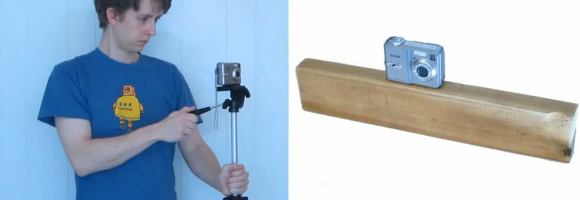
[Shawn] wrote in to tell us about his extremely simple method he used for mounting a webcam on a tripod. His article explains it better, but the basic premise is to glue a 1/4 – 20 nut onto the bottom of it. The hack-worthiness of this could be in question, but the technique could come in handy at some point.

After seeing this tip, I was reminded of a slightly crazier, if effective mount that I made for my state of the art Env2 phone. Referenced in a links post in March, it was made of a 2×4 with a 1/2 inch slot milled in it.  After some thought, it was drilled and tapped for a 1/4 – 20 bolt in the other side to mount it on a tripod. So this could be an option in very limited circumstances.

On the other hand, if you want something a bit more hack-worthy, why not check out this motorized camera rig that we featured in July. Sure, it’s more complicated than gluing a nut onto a webcam, but at least it still uses 2 x 4s in it’s mounting hardware!

Pan/Tilt Wheel Trainer Ends Up Being A Different Way To Play Quake

This is a special controller that [Gary Scott] built to help train camera operators. The pan and tilt controls on high-end movie cameras use wheels to pan and tilt smoothly. This rig can be built rather inexpensively and used to practice following a subject as you would with a camera. This is where the project takes a turn into familiar territory. [Gary] set up a system so that you can play the game Quake using this controller, with your feet doing the rest.

The pan/tilt controller uses two heads from an old VCR. They are mounted above the guts from an old ball-type mouse. A couple of rubber belts connect the heads to the two mouse bars that are normally rotated by the ball. This gives him control of where the Quake game is looking. But he still needed to be able to move, jump, change weapons. and shoot. So he built a second controller for his feet. It uses a CD and some switches as a joystick, and a set of buttons for the other controls. He actually rigged up solenoids to each of those foot switches to physically press keys on a keyboard. You really must see it for yourself. We’ve embedded his set of videos after the break.

Continue reading “Pan/Tilt Wheel Trainer Ends Up Being A Different Way To Play Quake”

Binoculars As A Zoom Lens

It may seem trivial at first, but the effect [Dan] gets when using binoculars as a telephoto lens is surprising. The images are well in focus with great colors. This technique not only brings your subject mater closer but also provides a depth-of-focus feature not normally available on simple cameras or camera phones.

The proof is in the example footage found after the break, but you’ll also find a video tutorial detailing the build. [Dan] already had the expensive components are a pair of mini binoculars and a Kodak Zx3 pocket camcorder. The camcorder is the same form factor as a smart phone so using different hardware will be a breeze. He started off by building a prototype out of paper. Basically it’s a bracket that properly aligns the camera with one lens of the binoculars. Once he had everything lined up he transferred his measurements to some sheet metal. The bracket for the binoculars is attached to the one for the camera using bolts and wing nuts to make it adjustable. One important part of the design is to gut a hole for access to the binocular focus wheel.

Continue reading “Binoculars As A Zoom Lens”

Biological-inspired Robotic Eye Movements

Researchers at Georgia Tech have developed a biologically inspired system to control cameras on board robots that simulate the Saccadic optokinetic system of the human eye. Its similarity to the muscular system of the human eye is uncanny.

Joshua Schultz, a Ph.D candidate, says that this system has been made possible in part to piezoelectric cellular actuator technology. Thanks to the actuators developed in their laboratory it is now possible to capture many of the characteristics associated with muscles of the human eye and its cellular structure.

The expectation is that the piezoelectric system could be used for future MRI-based surgery, furthering our ability to research and rehabilitate the human eye.

[via engadget]

Building A SkyCam-like Camera Mount

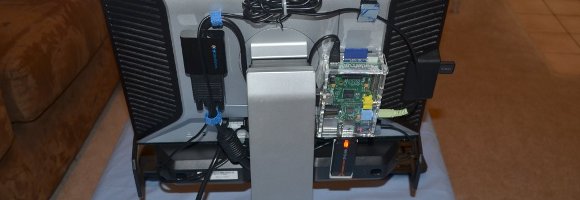
With the Olympics on there are a lot of really great camera shots shown during the events. One of the best is the overhead view, which is provided by a camera suspended between cables. It’s not new for the Olympics, SkyCam has been around for over twenty years. What is new is [Dan Royer’s] attempts to build his own aerial camera setup.

He’s not starting from zero with this project. [Dan] has done some really great work with the Drawbot. It’s a two-motor, two-axis plotter which uses CNC to draw on a white board. For this project he combined two Drawbots in order to add a third axis. The image above shows the camera mount suspended between the four strings. He’s been working hard on getting the software ready for this kind of addressing. Along the way he broke the strings a few times because he was too far from the kill switch to stop it in time. But what he’s got is a nice start and we hope to see a more illustrative follow-up soon.

One of the things that SkyCam has going for it is a stabilization system. We wonder if a spinning gyroscope would work as well as it did for that balancing bike.