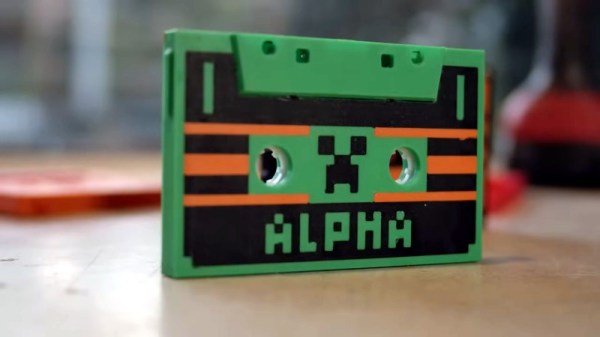
Make Your Music Simpler With The User-Unfriendliest Cassette Deck Ever

Call us crazy, but music was a whole lot more fun when it was on physical media. Or perhaps just easier to use, especially in the car. Whether your particular vintage favored CDs, cassettes, or even 8-tracks, being able to fish out that favorite album and slam it in the player while never taking your eyes off the road was a whole lot easier than navigating a playlist on a locked phone, or trying to control an infotainment system through soft buttons on a touch screen.

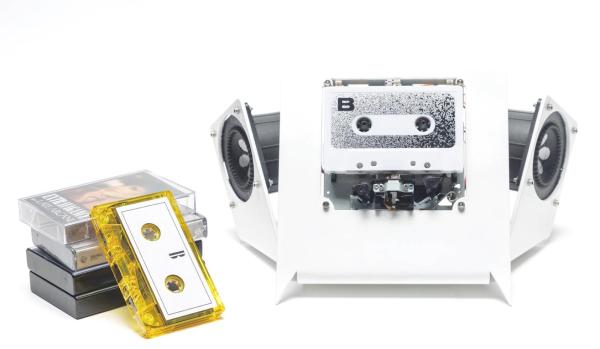
It seems like [Jarek Lupinski] is as much a Spotify Luddite as we are, since his “tape-deck” project is aimed to be as user-unfriendly as possible. It’s just an auto-reversing cassette deck movement stripped bare of all useful appurtenances, like a way to fast forward or rewind. You just put a cassette in and it plays, start to finish, before auto-reversing to play the other side in its entirety. It doesn’t even have a volume control — his cheeky advice is to “listen to louder or quieter albums” to solve that problem. Pretty easy, really, and not a EULA or advertisement in sight. Build files are available if you hate yourself enough to build one of your own.

All kidding aside, this is kind of a nice reminder of how much things have changed, and how much complexity we’ve layered onto the simplest of pleasures. If you like the minimalist approach of this project but not the deconstructed aesthetics, we’ve got you covered.

Documenting Real Hidden Messages In Music

During the 1980s, a moral panic swept across the landscape with the mistaken belief that there were Satanic messages hidden in various games, books, and music that at any moment would corrupt the youth of the era and destroy society as we knew it. While completely unfounded, it turns out that there actually were some hidden messages in vinyl records of the time although they’d corrupt children in a different way, largely by getting them interested in computer science. [Dandu] has taken to collecting these historic artifacts, preserving the music and the software on various hidden recordings.

While it was possible to record only programs or other data to vinyl, much in the same way that cassette tapes can be used as a storage medium, [Dandu]’s research focuses mostly on records, tapes, and CDs which had data included alongside music. This includes not only messages or images, but often entire computer programs. In some cases these programs were meant to be used with the accompanying music, as was the case for The Other Side Of Heaven by Kissing The Pink with a program for the BBC Micro. Plenty of other contemporary machines are represented here too including the ZX Spectrum, Atari, Apple II, and the Commodore 64. The documentation extends through the CD era and even into modern music platforms like Spotify and Apple Music.

The process of extraction and recovery is detailed for each discovery, making it a comprehensive resource for retro computing enthusiasts stretching from the 80s to now. There are likely a few hidden pieces of data out there hidden in various antique storage media that [Dandu] hasn’t found yet, either. You could even make your own records with hidden programs provided you have some musical and programming talents, and a laser engraver for the record itself.

A Tape Echo For Anyone

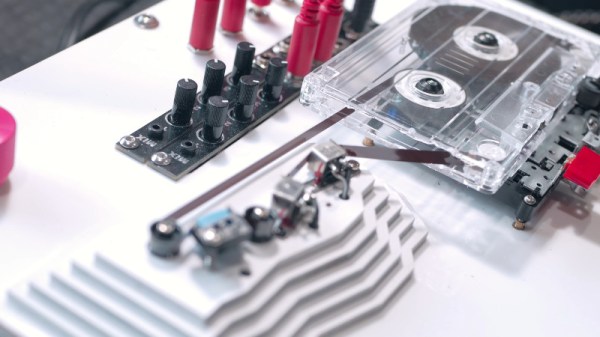
If you’ve ever looked into how artists from the 1960s made their music, you’ll learn about the many inventive ways in which the tape recorder enabled new effects. One of the simplest of those is the tape echo, as distinct from a reverb which introduces the many delayed echoes of a large auditorium, an echo provides a single delayed version of the original. It’s something [Mark Gutierez] shows us as he makes a tape echo from a cheap Walkman-style cassette player. It’s hardly the highest quality of its ilk, but it does the job.

The player in question sports the ubiquitous Chinese mechanism that’s the last still in production. It has a radio incorporated which he doesn’t use, but for all that it has only a permanent magnet erase head rather than one driven from the bias oscillator. He first puts another head in the space between the record head and the pinch roller, then further modifies the cassette so a loop can be pulled out of the side of it, moving all heads off-board. As you can see in the video below the break it’s in no way high-fidelity, but with a couple of Eurorack mixer kits added on it makes for an interesting effect.

If you can lay your hands on a reel-to-reel machine, you can make a more traditional echo machine.

Continue reading “A Tape Echo For Anyone”

Persistence Pays In TI-99/4A Cassette Tape Data Recovery

In the three or four decades since storing programs on audio cassettes has been relevant, a lot of irreplaceable personal computing history has been lost to the ravages of time and the sub-optimal conditions in the attics and basements where tapes have been stored. Luckily, over that time we’ve developed a lot of tools and techniques that might make it possible to recover some of these ancient treasures. But as [Noel] shows us, recovering data from cassette tapes is a tricky business.

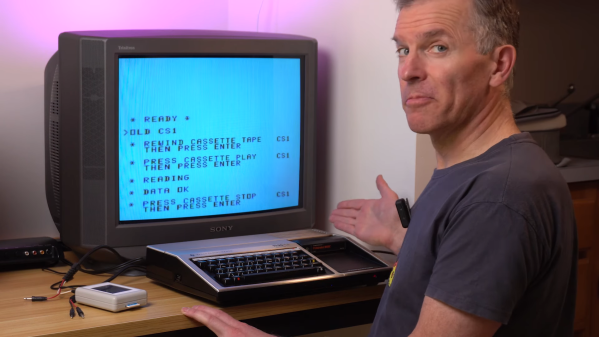
His case study for the video below is a tape from a TI-99/4A that won’t load. A quick look in Audacity at the audio waveform seems to show the problem — an area of severely attenuated signal. Unfortunately, no amount of boosting and filtering did the trick, so [Noel] had to dig a bit deeper. It turns out that the TI tape interface standard, with its redundant data structure, was somewhat to blame for the inability to read this particular tape. As [Noel] explains, each 64-bit data record is recorded to tape twice, along with a header and a checksum. If neither record decodes correctly, then tape playback just stops.

Luckily, someone who had already run into this problem spun up a Windows program to help. CS1er — our guess would be “Ceaser” — takes WAV file input and loads each record, simply flagging the bad ones instead of just bailing out. [Noel] used the program to analyze multiple recordings of the same data and eventually got enough good records to reassemble the original program, a game called Dogfight — or was it Gogfight? Either way, he managed to get most of the data off the tape, and since it was a BASIC program, it was pretty easy to figure out the missing bytes by inspection.

[Noel]’s experience will no doubt be music to the ears of the TI aficionados out there. Of which we’ve seen plenty, from the TI-99 demoscene to running Java on one, and whatever this magnificent thing is.

Continue reading “Persistence Pays In TI-99/4A Cassette Tape Data Recovery”

Mod, Repair And Maintain Your Cassette Tapes With 3D Printed Parts

The benefit of 3D printers is that they have made it relatively easy to reproduce just about any little plastic thing you might happen to break. If you’re one of the diehards that still has a cassette collection, you might find these 3D prints from Thingiverse useful to repair and maintain any broken tapes you may have.

If you’ve ever stepped on a cassette tape, you’ll know it’s easy to crack the housing and render it unplayable. If you find yourself in this position, you can always 3D print yourself a new cassette tape housing as created by [Ehans_Makes]. The housing design only covers the outer parts of the cassette tape, and doesn’t include the reels, screws, or other components. However, it’s perfect for transplanting the guts of a damaged cassette into a new housing to make it playable once again. The creator recommends using Maxell cassette parts with the design, as it was based on a Maxell cassette shell.

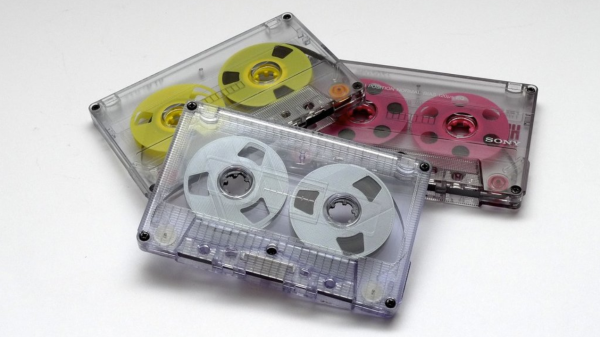
For the modders and musique concrèters out there, [sveltema] designed a simple 3D printed guide for creating tape loops of various lengths. Simply adding a few of these guides to a cassette shell will let you wind a longer continuous loop of tape inside a regular cassette shell. Meanwhile, if you simply want to jazz up your next mixtape gift, consider this cosmetic reel-to-reel mod from [mschiller] that makes your cassettes look altogether more romantic.

Many called the Compact Cassette dead, and yet it continues to live on with enthusiasts. Meanwhile, if you want to learn more about keeping your cassette deck operating at its best, we’ve featured a masterclass on that very topic, too!

Wear Your Fave Cassette Tapes As A Necklace With This 3D Printed Adapter

While packing merch for a recent gig, I realised I had the opportunity to do something a little fun. I’d released an album on tape, and spent a little extra to ensure the cassette itself was a thing of beauty. It deserved to be seen, rather than hidden away in a case on a shelf. I wanted to turn this piece of musical media into a necklace.

Of course, cassette tapes aren’t meant to be used in this way. Simply throwing a chain through the cassette would lead to tape reeling out everywhere. Thus, I fired up some CAD software and engineered a solution to do the job! Here’s how I built an adapter to turn any cassette tape into a cool necklace.

Find the design on Thingiverse, and more details below!

Continue reading “Wear Your Fave Cassette Tapes As A Necklace With This 3D Printed Adapter”

A Cassette Interface For A 6502 Breadboard Computer, Kansas City-Style

It’s been a long time since computer hobbyists stored their programs and data on cassette tapes. But because floppy drives were expensive peripherals and hard drives were still a long way from being the commodity they are today, cassettes enjoyed a long run at the top of the bulk data storage heap.

Celebrating that success by exploring the technology of cassette data storage is the idea behind [Greg Strike]’s Kansas City decoder project, which he hopes to use with his [Ben Eater]-style 6502 computer. The video below explains the Kansas City standard in some detail, and includes some interesting historical context we really hadn’t delved into before. There are also some good technical details on the modulation scheme KCS used, which [Greg] used to base his build. After a failed attempt to use an LM567 tone decoder chip, he stumbled upon [matseng]’s KCSViewer project, which decodes KCS-encoded audio signals using nothing but discrete components.

[Greg]’s prototype has a comparator to convert sine waves to square waves, followed by pair of monostable timers, each tuned to either the high or low frequency defined in the KCS specs. A test signal created using Audacity — is there anything it can’t do? — was successfully decoded, providing proof of concept for the project’s first phase. We’re looking forward to the rest of the series, which will turn this into an actual decoder, and presumably add an encoder as well.

Listeners of the Hackaday Podcast may recall we experimented with using KCS to hide some data within an episode a few months back.

Continue reading “A Cassette Interface For A 6502 Breadboard Computer, Kansas City-Style”