The Inner Workings Of The Intel 8086’s Arithmetic Logic Unit

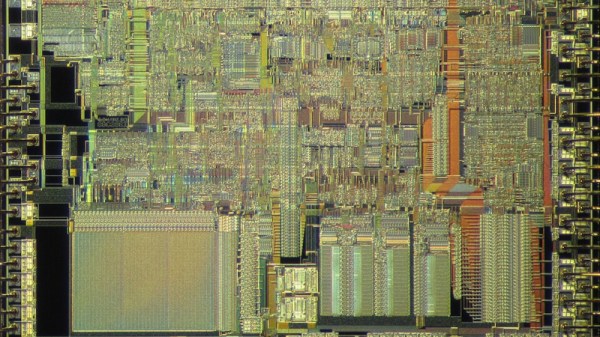
In the 1970s CPUs still had wildly different approaches to basic features, with the Intel 8086 being one of them. Whereas the 6502 used separate circuits for operations, and the Intel 8085 a clump of reconfigurable gates, the 8086 uses microcode that configures the ALU along with two lookup tables. This complexity is one of the reasons why the Intel 8086 is so unique, with [Ken Shirriff] taking an in-depth look at its workings on a functional and die-level.

These lookup tables are used for the ALU configuration – as in the above schematic – making for a very flexible but also complex system, where the same microcode can be used by multiple instructions. This is effectively the very definition of a CISC-style processor, a legacy that the x86 ISA would carry with it even if the x86 CPUs today are internally more RISC-like. Decoding a single instruction and having it cascade into any of a variety of microcodes and control signals is very powerful, but comes with many trade-offs.

Of course, as semiconductor technology improved, along with design technologies, many of these trade-offs and disadvantages became less relevant. [Ken] also raises the interesting point that much of this ALU control technology is similar to that used in modern-day FPGAs, with their own reconfigurable logic using LUTs that allow for on-the-fly reconfiguration.

Commodore 64 Helps Revive The BBS Days

Before the modern Internet existed, there were still plenty of ways of connecting with other computer users “online”, although many of them might seem completely foreign to those of us in the modern era. One of those systems was the Bulletin Board System, or BBS, which would have been a single computer, often in someone’s home, connected to a single phone line. People accessing the BBS would log in if the line wasn’t busy, leave messages, and quickly log out since the system could only support one user at a time. While perhaps a rose-tinted view, this was a more wholesome and less angsty time than the modern algorithm-driven Internet, and it turns out these systems are making a bit of a comeback as a result.

The video by [The Retro Shack] sets up a lot of this history for context, then, towards the end, uses a modern FPGA-based recreation called the Commodore 64 Ultimate to access a BBS called The Old Net, a modern recreation of what these 80s-era BBS systems were like. This involves using a modern networking card that allows the C64 to connect to Wi-Fi access points to get online instead of an old phone modem, and then using a terminal program called CCGMS to connect to the BBS itself. Once there, users can access mail, share files, and even play a few games.

While the video is a very basic illustration of how these BBS systems worked and how to access one, it is notable in that it’s part of a trend of rejecting more modern technology and systems in favor of older ones, where the users had more control. A retro machine like a C64 or Atari is not required either; modern operating systems can access these with the right terminal program, too. A more in-depth guide to the BBS can be found here for those looking to explore, and we’ve also seen other modern BBS systems recently.

Thanks to [Charlie] for the tip!

Continue reading “Commodore 64 Helps Revive The BBS Days”

M8SBC-486 Is An FPGA-Based “Kinda PC Compatible” 486 SBC

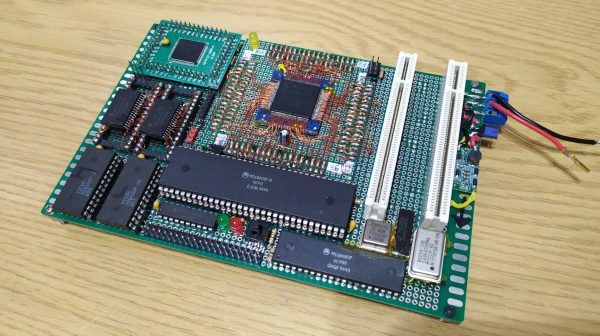
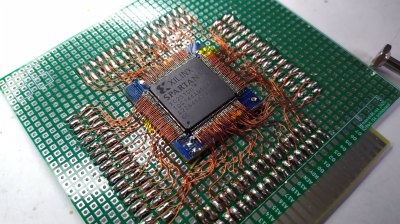
[Editor’s note: We got this one wrong! The computer uses an actual 486: the FPGA is running essentially as the chipset, interfacing the RAM and the ISA bus with the CPU. And since this went to press, [maniek-86] put out a nicer writeup of the project, which you should go check out, in addition to the GitHub link below.]


Given the technical specs of the FPGAs available to hobbyists these days, it really shouldn’t be a shock that you can implement a relatively-modern chipset on one, like one for a 486 system. In spite of knowing that in the technical sense, we were still caught off guard by [maniek-86]’s M8SBC project that does just that– the proas both CPU and BIOSducing a 486 FPGA chipset with a motherboard to boot.

Boot what? Linux 2.2.6, MS-DOS 6.22 or FreeDOS all work. It can run DOOM, of course, along with Wolfenstien 3D, Prince of Persia, and even the famous Second Reality demo– though that last without sound. [maniek-86]’s implementation is lacking direct memory access, so sound card support is right out. There are a few other bugs that are slowly being squished, too, according to the latest Reddit thread. Continue reading “M8SBC-486 Is An FPGA-Based “Kinda PC Compatible” 486 SBC”

FPGA Dev Kit Unofficially Brings MSX Standard Back

In the 1980s there were an incredible number of personal computers of all shapes, sizes, and operating system types, and there was very little interoperability. Unlike today’s Windows-Mac duopoly, this era was much more of a free-for-all but that didn’t mean companies like Microsoft weren’t trying to clean up all of this mess. In 1983 they introduced the MSX standard for computers, hoping to coalesce users around a single design. Eventually it became very successful in Japan and saw some use in a few other places but is now relegated to the dustbin of history, but a new FPGA kit unofficially supports this standard.

The kit is called the OneChip Book and, unlike most FPGA kits, includes essentially everything needed to get it up and running including screen, keyboard, and I/O all in a pre-built laptop case. At its core it’s just that: and FPGA kit. But its original intent was to recreate this old 80s computer standard with modern hardware. The only problem is they never asked for permission, and their plans were quickly quashed. The development kit is still available, though, and [electricadventures] goes through the steps to get this computer set up to emulate this unofficially-supported retro spec. He’s also able to get original MSX cartridges running on it when everything is said and done.

Although MSX is relatively unknown in North America and Western Europe, it remains a fairly popular platform for retro computing enthusiasts in much of the rest of the world. We’ve seen a few similar projects related to this computer standard like this MSX-inspired cyberdeck design, but also others that bring new hardware to this old platform.

Continue reading “FPGA Dev Kit Unofficially Brings MSX Standard Back”

A blue screen is visible, with an ASCII image of the text "Hello World" is displayed.

Designing A CPU For Native BASIC

Over the years there have been a few CPUs designed to directly run a high-level programming language, the most common approach being to build a physical manifestation of a portable code virtual machine. An example might be the experimental Java processors which implemented the JVM. Similarly, in 1976 Itty Bitty Computers released an implementation of Tiny BASIC which used a simple virtual machine, and to celebrate 50 years of Tiny BASIC, [Zoltan Pekic] designed a CPU that mirrors that VM.

The CPU was created within a Digilent Anvyl board, and the VHDL file is freely available. The microcode mapping ROM was generated by a microcode compiler, also written by [Zoltan]. The original design could execute all of the 40 instructions included in the reference implementation of Tiny BASIC; later iterations extended it a bit more. To benchmark its performance, [Zoltan] set the clock rate on the development board equal to those of various other retrocomputers, then compared the times each took to calculate the prime numbers under 1000 using the same Tiny BASIC program. The BASIC CPU outperformed all of them except for Digital Microsystems’ HEX29. Continue reading “Designing A CPU For Native BASIC”

FPGA Brings Antique Processor To Life

For the retro gaming enthusiast, nothing beats original hardware. The feel of the controllers and the exact timing of the original, non-emulated software provide a certain experience that’s difficult or impossible to replicate otherwise. To that end, [bit-hack] wanted to play the original EGA, 16-color version of The Secret of Monkey Island in a way that faithfully recreated the original and came up with this FPGA-based PC with a real NEC V20 powering it all.

The early 90s-style build is based on a low-power version of the V20 called the V20HL which makes it much easier to interface with a modern 3.3 V FPGA compared to the original 5 V chip. It’s still an IBM XT compatible PC though, with the FPGA tying together the retro processor to a 1 MB RAM module, a micro SD slot that acts as a hard disk drive, a digital-to-analog audio converter, and of course the PS/2 keyboard and mouse and VGA port. The mouse was one of the bigger challenges for [bit-hack] as original XT PCs of this era would have used a serial port instead.

With a custom PCB housed in a acrylic case, [bit-hack] has a modern looking recreation of an XT PC running an original processor and capable of using all of the period-correct peripherals that would have been used to play Monkey Island when it was first released.

FPGAs enable a ton of retrocomputing projects across a wide swath of platforms, and if you’re looking to get started the MiSTer FPGA project is a great resource.

Continue reading “FPGA Brings Antique Processor To Life”

An FPGA-Based Mechanical Keyboard

You can buy all kinds of keyboards these days, from basic big-brand stuff to obscure mechanical delicacies from small-time builders. Or, you can go the maker route, and build your own. That’s precisely what [Lambert Sartory] did with their Clavier build.

This build goes a bit of a different route to many other DIY keyboards out there, in that [Lambert] was keen to build it around an FPGA instead of an off-the-shelf microcontroller. To that end, the entire USB HID stack was implemented in VHDL on a Lattice ECP5 chip. It was a heavy-duty way to go, but it makes the keyboard quite unique compared to those that just rely on existing HID libraries to do the job. This onboard hardware also allowed [Lambert] to include JTAG, SPI, I2C, and UART interfaces right on the keyboard, as well as a USB hub for good measure.

As for the mechanical design, it’s a full-size 105-key ISO keyboard with one bonus key for good measure. That’s the coffee key, which either locks the attached computer when you’re going for a break, or resets the FPGA with a long press just in case it’s necessary. It’s built with Cherry MX compatible switches, has N-key rollover capability, and a mighty 1000 Hz polling rate. If you can exceed that by hand, you’re some sort of superhuman.

The great thing about building your own keyboard is you can put in whatever features you desire. If you’re whipping up your own neat interface devices, don’t hesitate to let us know!