Fixing A Broken Game Installer By Sheer Force Of Will

These days, we seldom purchase games on physical media. Even when buying titles from yesteryear, we usually download them from an online service. Some of these older games haven’t been properly ported to their new delivery platform, as [Slortibort] found out. Thus, it was time to dive into the game files and sort the problem out.

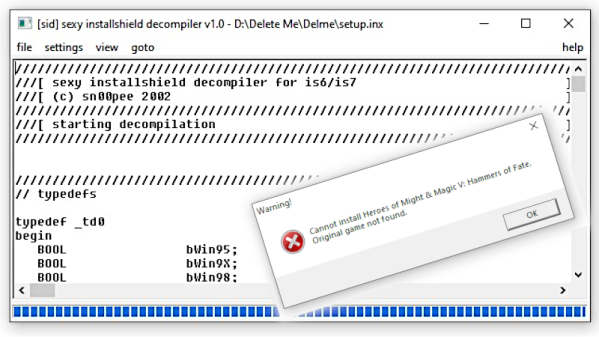
The game in question was the Hammers of Fate expansion pack for the base game Heroes of Might and Magic V. [Slortibort’s] partner bought it from Ubisoft, and ran the installer. However, the installer would report that it couldn’t find the original files from the base game, and fail to start.

Fixing the issue was no mean feat, requiring use of the Sexy Installshield Decompiler to dive into the guts of the installer to see what was going wrong. In the end, it came down to some registry key shenanigans, but the route of how [Slortibort] got there is well worth the read.

It’s a fine example of some of the issues around moving games to digital distribution; proper attention must be paid to do it right. Even then, there’s always the risk you’ll lose your games down the track. There are benefits, of course, but there’s always a tradeoff to be made.

The Doom computer game rendered with HTML checkboxes

Play DOOM Using Web Browser Checkboxes (Finally)

If you’ve ever felt the need to render DOOM using nothing but web browser checkboxes, [Andrew Healey] has you covered with his recent port of the first-person shooter. Naturally, this gets our tick of approval.

Yes, you read that right. You can now play DOOM in a 160 x 100 grid of HTML-generated checkboxes, much like this: ☑. The secret sauce for this project is partly derived from the fascinating Checkboxland project by fellow hacker Brian Braun, who uses HTML checkboxes to generate a variety of artistic demos.

[Andrew Healey] also made use of Cornelius Diekmann’s port of DOOM using WebAssembly, which we recently covered here on Hackaday. A smattering of code ties both projects together, and the end result is DOOM at 160×100 resolution, rendered entirely with HTML checkboxes.

The port can be played here using Chrome or Edge (other browsers may have issues if they do not support the zoom property in CSS). The source code is also available over on GitHub.

While the resolution and color palette aren’t what we have come to expect from DOOM, it’s likely that the graphics could be further improved by tinkering with the dithering and threshold settings. Higher resolutions may also be possible with further optimization.

We would be hard pressed to pick our favorite port of DOOM, as the list is becoming quite long. However for something completely different, check out our story on how DOOM was brought to Twitter.

Continue reading “Play DOOM Using Web Browser Checkboxes (Finally)”

Game Development Hack Chat

Join us on Wednesday, August 18 at noon Pacific for the Game Development Hack Chat with Kyle Donnelly!

Chances are we all have fallen into the time trap of computer games at one point or another. It’s easy to do — the worlds that games put before us can be immersive and addictive, and even if they’re populated by fantastical creatures hell-bent on our virtual destruction, they offer a degree of escapism and relaxation that can be hard to come by with any other form of entertainment.

But what does it take to build these virtual worlds? How exactly does one come up with all the ideas needed to make a game fresh and exciting? And once you’ve got the ideas, how do you turn them into the code needed to make the whole thing work? Kyle Donnelly has quite a bit of experience with the game development process, seeing his idea through from initial prototyping to working with a publisher and even getting the game demonstrated at conventions. Along the way, he picked up a collection of tips and shortcuts to make the process easier, as well as developing a small suite of tools to help set up and test game levels quickly and easily, and to deal with the custom physics of his virtual world.

Join us as Kyle stops by the Hack Chat to talk about game development from an angle that rarely gets much coverage — from the software side.

join-hack-chatOur Hack Chats are live community events in the Hackaday.io Hack Chat group messaging. This week we’ll be sitting down on Wednesday, August 18 at 12:00 PM Pacific time. If time zones have you tied up, we have a handy time zone converter.

Banner Art: Video Games Awesome Fanart by sacolin99.

The Faux-Vintage Becomes Vintage

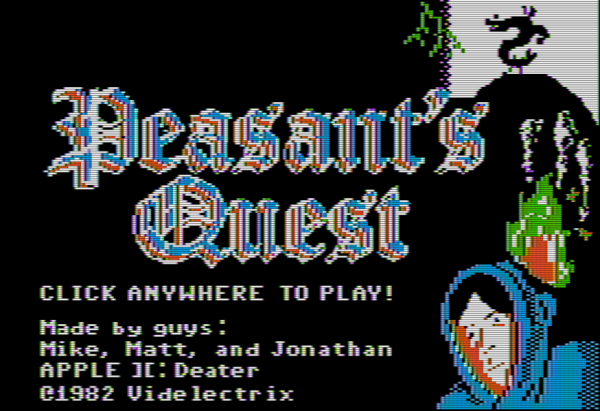
For those who might have missed it, there was a brief period in the mid-00s where gamers everywhere eschewed consoles and PCs in favor of simple Flash-based games to be played in a browser. Among these was the game Peasant’s Quest, created by the folks at Homestar Runner and modeled after video games from the 80s. [deater] was a fan of this game and wondered if it would actually be possible to play this retro-styled game on actual retro hardware.

For the experiment he decided on using an Apple II since this computer is featured as a prop rather often by the developers at Videlectrix. It turns out that with some determination it’s actually possible to run this game on the late 80s hardware with very little modifications. Squeezing the sprites into the required space was a challenge, as well as getting the sound tracks to play properly, but in the end the game runs within the hardware’s 280×192 resolution with 6 colors. There are also detailed notes on how the complicated graphics system on the Apple works for those willing to take a deep dive. There’s a lot going on here, but surprisingly few compromises needed to be made to get this to work.

The game itself is available on the project’s webpage for anyone who still has an Apple II kicking around, or for anyone who is willing to try it out in an emulator. Of course you could always play the original Flash version but that’s missing a certain charm that decades old retrocomputers have with games. We certainly aren’t seeing video game controllers like those built for the Apple II anymore, for example.

Continue reading “The Faux-Vintage Becomes Vintage”

A Model Of Dry Humor

If you want to see a glorious combination of model bananas in a treehouse mixed with a lot of tongue-in-cheek humor, you will appreciate [Studson]’s build video. Video also after the break. He is making an homage to Donkey Kong 64 from 1999, which may be a long time ago for some folks’ memory (Expansion Pak). Grab a piece of your favorite banana-flavored fruit and sit tight for joke delivery as dry as his batch of baked bark.

The treehouse uses a mixture of found material and crafting supplies. In a colorful twist, all the brown bark-wielding sticks are green, while the decorative greenery came from a modeling store shelf. It all starts with a forked branch pruned from the backyard and a smooth-sided container lid that might make you look twice the next time you nuts are buying a bin of assorted kernels. If you thought coffee stirrers couldn’t be used outside their intended purpose, prepare to have your eyes opened, but remember to wear eye protection as some of the wood clippings look like they could achieve escape velocity. The key to making this look like an ape abode, and not a birdhouse, is the color choices and finishing techniques. Judging by the outcome and compared to the steps, making a model of this caliber is the sign of an expert.

If you wish to binge on wooden Donkey Kong, we can grant your desire, but if you prefer your treehouses life-sized, this may launch your imagination.

Continue reading “A Model Of Dry Humor”

[Emily]’s Eerie Educational Electric Eyeball Entertains

Like many of us, [Emily’s Electric Oddities] has had a lot of time for projects over the past year or so, including one that had been kicking around since late 2018. It all started at the Hackaday Superconference, when [Emily] encountered the Adafruit Hallowing board in the swag bag. Since that time, [Emily] has wanted to display the example code eyeball movement on a CRT, but didn’t really know how to go about it. Spoiler alert: it works now.

See? It’s educational.

Eventually, [Emily] learned about the TV out library for Arduino and got everything working properly — the eyeball would move around with the joystick, blink when the button is pressed, and the pupil would respond visually to changes in ambient light. The only problem was that the animation moved at a lousy four frames per second. Well, until she got Hackaday’s own [Roger Cheng] involved.

[Roger] was able to streamline the code to align with [Emily]’s dreams, and then it was on to our favorite part of this build — the cabinet design. Since the TV out library is limited to black and white output without shades of gray, Emily took design cues from the late 70s/early 80s, particularly the yellow and wood of the classic PONG cabinet. We love it!

Is Your Pet Eye the worst video game ever, as [Emily] proclaims it to be? Not a chance, and we’re pretty sure that the title still rests with Desert Bus, anyway. Even though the game only lasts until the eye gets tired and goes to sleep, it’s way more fun than Your Pet Rock. Don’t miss the infomercial/explanation/demonstration video after the break. If one video is just not enough, learn more about [Emily’s] philosophy of building weird projects from the Supercon talk she presented. It’s also worth mentioning that this one fits right into the Reinvented Retro contest.

Why are eyeballs so compelling? We can’t say for sure, but boy, this eyeball web cam sure is disconcerting.

Continue reading “[Emily]’s Eerie Educational Electric Eyeball Entertains”

Four Servo Fingers Play Simon Better Than You Ever Could

Remember Simon? We sure do. Simon — as in “Simon says…” — from the leading edge of electronic games in the 1970s, which used four buttons, colored lights, and simple tones as the basis for a memory game. Players had to remember the specific sequence of lights and replay the pattern in order to advance to the next round. It was surprisingly addictive, at least for the era.

For those who never quite got into the Simon groove, fear not — the classic game has now been fully automated. While there were plenty of approaches that could have taken to interfacing to the game, [ido roseman] went with the obvious — and best, in our opinion — technique and simulated a human player’s finger presses with servo-controlled arms. Each arm carries a light-dependent resistor that registers the light coming from the key it’s poised above; the sequence of lights is sensed and recorded by an Arduino, which then drives the servo fingers’ replay attack. The fingers aren’t exactly snappy in their response, which might cause problems — if we recall correctly, Simon is somewhat picky about the speed with which the keys are pressed, at least at higher levels of play.

On the whole, we really like this one, not least for the nostalgia factor. We’ve had a lot of recreations of Simon over the years, including a Dance Dance Revolution version, but few attempts to automate it. And a crazy idea: wouldn’t it be fun to replace the replay attack with a machine learning system that figures out how to play Simon by randomly pressing keys and observing the results?

Continue reading “Four Servo Fingers Play Simon Better Than You Ever Could”