Cheat At Cornhole With A Bazillion-Dollar Robot

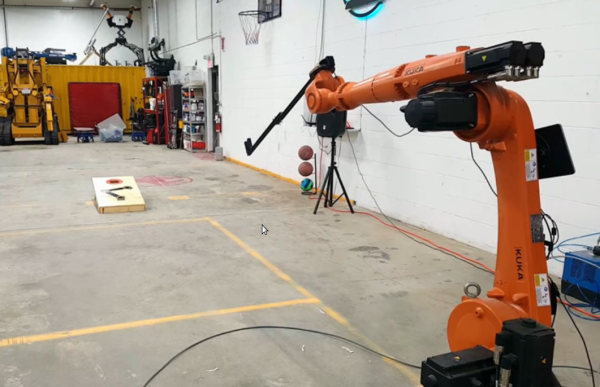
While the days of outdoor cookouts may be a few months away for most of us, that certainly leaves plenty of time to prepare for that moment. While some may spend that time perfecting recipies or doing various home improvement projects during their remaining isolation time, others are practicing their skills at the various games played at these events. Specifically, this group from [Dave’s Armory] which have trained a robot that helps play the perfect game of cornhole. (Video, embedded below.)

While the robot in question is an industrial-grade KUKA KR-20 robot with a hefty price tag of $32,000 USD, the software and control system that the group built are fairly accessible for most people. The computer vision is handled by an Nvidia Jetson board, a single-board computer with extra parallel computing abilities, which runs OpenCV. With this setup and a custom hand for holding the corn bags, as well as a decent amount of training, the software is easily able to identify the cornhole board and instruct the robot to play a perfect game.

While we don’t all have expensive industrial robots sitting around in our junk drawer, the use of OpenCV and an accessible computer might make this project a useful introduction to anyone interested in computer vision, and the group made the code public on their GitHub page. OpenCV can be used for a lot of other things besides robotics as well, such as identifying weeds in a field or using a Raspberry Pi for facial recognition.

Continue reading “Cheat At Cornhole With A Bazillion-Dollar Robot”

Planetary Escape (-Room In A Box)

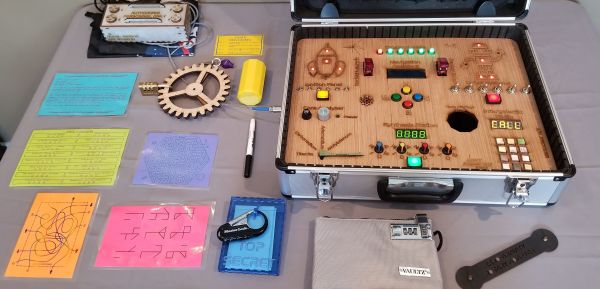
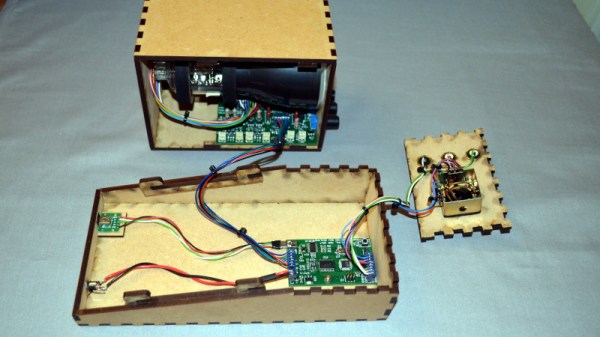
The trick to a fun escape room is layers. For [doktorinjh]’s Spacecase, you start with an enigmatic aluminum briefcase and a NASA drawstring backpack. A gamemaster reads the intro speech to set the mood, and you’re ready to start your escape from the planet. The first layer is the backpack with puzzles you need to solve to get into the briefcase. In there, you discover a hidden compartment and enough sci-fi references to put goofy smiles on our faces. We love to see tools reused as they are in one early puzzle, you use a UV LED to reveal a hidden message, but that light also illuminates puzzle clues later.

All the tech in Spacecase makes it a wonder of mixed media. The physical layer has laser engraved wood featuring the font from the 1975 NASA logo, buttons, knobs, LEDs, toggle switches, and a servo. Beneath the visible faceplate is an RGB sensor, audio player, speaker, and at the center is an Arduino MEGA. We’d love to get our hands on Spacecase for a game, and we’re inspired to pull out all the stops and build games with our personal touches. Maybe something with a mousetrap.

This isn’t the first escape room hardware we’ve seen and [doktorinjh] similarly made a bomb diffusing defusing game.

Continue reading “Planetary Escape (-Room In A Box)”

Print Chess Pieces, Then Defeat The Chess-Playing Printer

Chess is undoubtedly a game of the mind. Sadly, some of the nuances are lost when you play on a computer screen. When a game is tactile, it carries a different gravity. Look at a poker player shuffling chips, and you’ll see that when a physical object is on the line, you play for keeps. [Matou], who is no stranger to 3D printing, wanted that tactility, but he didn’t stop at 3D printed pieces. He made parts to transform his Creality Ender 3 Pro into a chess-playing robot.

To convert his printer, [Matou] designed a kit that fits over the print head to turn a hotend into a cool gripper. The extruder motor now pulls a string to close the claw, which is a darn clever way to repurpose the mechanism. A webcam watches the action, while machine vision determines what the player is doing, then queries a chess AI, and sends the next move to OctoPrint on a connected RasPi. If two people had similar setups, it should be no trouble to play tactile chess from opposite ends of the globe.

Physical chess pieces and computers have mixed for a while and probably claimed equal time for design and gameplay. There are a couple of approaches to automating movement from lifting like [Matou], or you can keep them in contact with the board and move them from below.

Continue reading “Print Chess Pieces, Then Defeat The Chess-Playing Printer”

Python Settles Bet About Best Strategy In Children’s Board Game

Simulating a tabletop game can be done for several reasons: to play the game digitally, to create computer opponent(s), or to prove someone wrong. In [Everett]’s case, he used Python to prove which adult was right about basic strategy in a children’s game.

[Everett]’s 5-year-old loves a simple game called Hoot Owl Hoot! in which players cooperatively work to move owls along a track to the safety of a nest. Player pieces move on spaces according to the matching colors drawn from a deck of cards. If a space is already occupied, a piece may jump ahead to the next available spot. The game has a bit more to it than that, but those are the important parts. After a few games, the adults in the room found themselves disagreeing about which strategy was optimal in this simple game.

It seemed to [Everett] that it was best to move pieces in the rear, keeping player pieces grouped together and maximizing the chance of free moves gained by jumping over occupied spaces. [Everett]’s wife countered that a “longest move” strategy was best, and one should always select whichever piece would benefit the most (i.e. move the furthest distance) from any given move. Which approach wins games in the fewest moves? This small Python script simulates the game enough to iteratively determine that the two strategies are quite close in results, but the “longest move” strategy does ultimately come out on top.

As far as simulations go, it’s no Tamagotchi Singularity and [Everett] admits that the simulation isn’t a completely accurate one. But since its only purpose is to compare whether “no stragglers” or “longest move” wins in fewer moves, shortcuts like using random color generation in place of drawing the colors from a deck shouldn’t make a big difference. Or would it? Regardless, we can agree that board games can be fitting metaphors for the human condition.

Building A Vector Graphics Machine From Scratch Including The CRT

Over the years we’ve seen quite a few projects involving vector graphics, but the spaceship game created by [Mark Aren] especially caught our eye because in it he has tackled building a vector display from scratch rather than simply using a ready-made one such as an oscilloscope. As if the vector game itself wasn’t interesting enough, the process of designing the electronics required to drive a CRT is something that might have been commonplace decades ago but which few electronics enthusiasts in 2020 will have seen.

In his write-up he goes into detail on the path that took him to his component choices, and given the unusual nature of the design for 2020 it;s a fascinating opportunity to see the job done with components that would have been unheard of in the 1950s or 1960s. He eventually settled on a high voltage long-tailed pair of bipolar transistors, driven by a single op-amp to provide the differential signal required by the deflection electrodes. The mix of old and new also required a custom-fabricated socket for the CRT. On the game side meanwhile, an ATmega328 does the heavy lifting, through a DAC. He goes into some detail on DAC selection, having found some chips gave significant distortion.

All in all this is an impressive project from all angles, and we’re bowled over by it. Of course, if you fancy a play with vector graphics, perhaps there’s a simpler way.

Among Us Emergency Meeting Button Becomes Reality

Among UsĀ has been an indie gaming success story. A game built by a small team has, after several years on the market, become a worldwide sensation. Gameplay consists of players attempting to find the imposter amongst their ranks and an “Emergency Meeting” can be called if players need to speak to each other. [john lemme] wanted to be able to do the same with his roommates, and set about building the real thing.

The build relies on an ESP32, which reads the state of a big red emergency button. When pressed, the ESP32 uses its WiFi connection to trigger a Discord conference call containing all the roommates. Naturally, it also plays the buzzer sound from the actual game, too – via a small amplifier and a speaker yanked from some headphones.

It’s a fun build, though [john] notes it has its limits. The call takes 10 seconds to initiate after the button press, and the audio hardware doesn’t do a great job of recreating the buzzer noise from the game. However, it’s a good starting point, and we think the concept could actually prove useful with some refinement. Video after the break.

Continue reading Among Us Emergency Meeting Button Becomes Reality”

Automation With A New Twist

Turning on a lightbulb has never been easier. You can do it from your mobile. Voice activation through home assistants is robust. Wall switches even play nicely with the above methods. It was only a matter of time before someone decided to make it fun, if you consider a Rubik’s cube enjoyable. [Alastair Aitchison] at Playful Technology demonstrated that it is possible to trigger a relay when you match all the colors. Video also after the break.

The cube does little to obfuscate game data, so in this scope, it sends unencrypted transmissions. An ESP32 with [Alastair]’s Arduino code, can track each movement, and recognize a solved state. In the video, he solves the puzzle, and an actuator releases a balloon. He talks about some other cool things this could do, like home automation or a puzzle room, which is in his wheelhouse judging by the rest of his YouTube channel.

We would love to see different actions perform remote tasks. Twisting the top could set a timer for 1-2-3-4-5 minutes, while the bottom would change the bedroom lights from red-orange-yellow-green-blue-violet. Solving the puzzle should result in a barrage of NERF darts or maybe keep housemates from cranking the A/C on a whim.

Continue reading “Automation With A New Twist”