Exercise Bike Hacked As Input For Xbox 360

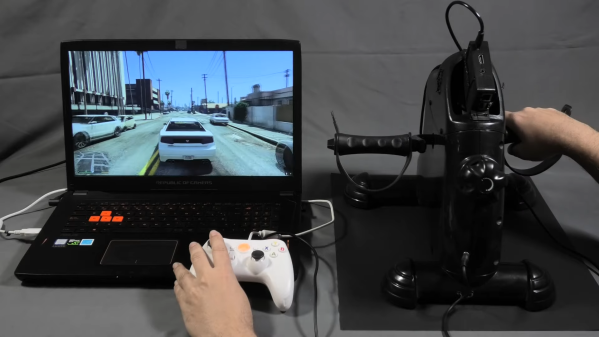
If you like playing Grand Theft Auto, you’re pretty familiar with squeezing the triggers for accelerating and braking while driving around. [David Programa] decided this was too easy, and instead developed a system to allow him to pedal his way around the virtual world.

The device relies on a flywheel-based exercise bike, with six magnets placed on the flywheel that triggers a reed switch six times per rotation. The extra magnets give the system better resolution at slow speeds. A Hall Effect sensor would be a more reliable way to build this to survive in the long term, but the reed switch does work. It’s paired with a debounce circuit to keep the output clean. A Raspberry Pi is pressed into service, running a Python program to read a GPIO pin activated by the reed switch, counting pulses to determine the speed of pedalling.

The trigger control used in the Xbox 360 controller is a potentiometer that creates varying voltages depending on its position, allowing it to act as an analog accelerator input. 0 volts corresponds to no input, while the trigger reads 3.3 volts when fully depressed. The Raspberry Pi emulates this with its PWM output, paired with a low-pass filter to create the relevant voltage to inject into the trigger input on a generic Xbox 360 controller.

While it’s a lot less practical than simply using a regular controller, the pedal controls do allow you to get a great workout while playing Grand Theft Auto. Some of the more intense chase missions should be a great way to get your heart rate up, and that’s got to be a good thing.

Ironically, though, the system only works for cars and motorbikes in game. The bicycles in Grand Theft Auto are controlled by mashing the A button instead. Alternatively, you might consider a similar system for playing Mario Kart on the Nintendo Switch. Video after the break.

Continue reading “Exercise Bike Hacked As Input For Xbox 360”

Google’s T-Rex Game Ported To The ESP32

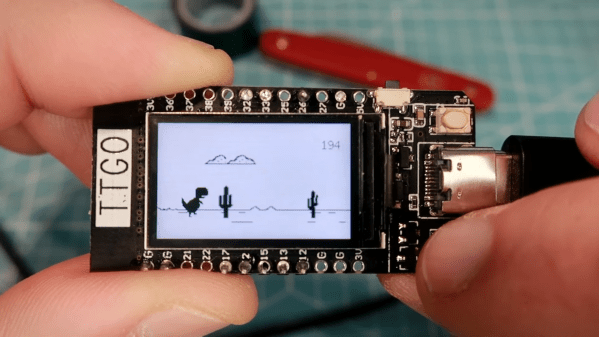
Most Chrome users will have come across a neat little Easter egg when their Internet connection has gone down – a game known as “T-Rex” where a dinosaur must be jumped over cactii. Whether or not this is accurate in terms of the evolutionary timeline, it’s a bit of fun, and Volos Projects educator [Danko Bertović] decided to port the game to the ESP32.

The game runs on the LILYGO TTGO T-Display development board, which pairs the powerful microcontroller with a 1.14-inch color LCD. His clone goes as far as authentically replicating the “No Internet” page from within Google Chrome, before kicking into the game at the press of a tactile button.

The game is built using a sprite-based engine, which enables gameplay with a minimum of flickering on the screen. Transparency is included to stop the sprites from occluding other screen elements unnecessarily. [Danko] hasn’t yet released a full tutorial on using sprites on the ESP32, but code is available for your own digestion.

It’s not the first time we’ve seen [Danko]’s ESP32 games, as he’s developed a few over the years. Others have gone so far as coding 8-bit emulators for the platform. Video after the break.

Continue reading “Google’s T-Rex Game Ported To The ESP32”

N-Gage Controller Uses All The Buttons

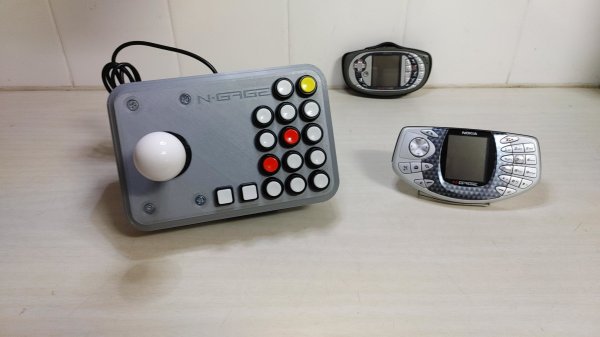
If there’s anything you can guarantee about a video game system, it’s that in 20 years after one suffers a commercial failure there will be a tiny yet rabid group of enthusiasts obsessed with that system. It’s true for the Virtual Boy, the Atari Jaguar, and of course, the Nokia N-Gage. For those not familiar, this was a quirky competitor of the Game Boy Advance that was also a cell phone. And for that reason it had more buttons than a four-player arcade cabinet, which has led to things like this custom controller.

Most N-Gage gaming these days takes place on emulators, this build is specifically built for the emulator experience. The original system had so many buttons that it’s difficult to get even a standard 102-key keyboard mapped comfortably to it, so something custom is almost necessary. [Lvaneede], the creator of this project, took some parts from an existing arcade cabinet he had and 3D printed the case in order to craft this custom controller. The buttons he chose are a little stiff for his liking, but it’s much better than using a keyboard.

In the video below, [Lvaneede] demonstrates it with a few of the N-Gage’s games. It seems to hold up pretty well. With backing from Sony and Sega, it’s a shame that these gaming platforms weren’t a bigger hit than they were, but there are plenty of people around with original hardware who are still patching and repairing them so they can still play some of these unique games.

Thanks to [Michael] for the tip!

Continue reading “N-Gage Controller Uses All The Buttons”

LEDBOY Is A Retro-Modern Handheld Game

Back in the 1970s, there were a few LED-based games on the market that were quickly superseded by the rise of LCDs and other fancier technologies. However, [grossofabian] wanted to recreate that classic style of game but with more modern hardware. The result is the LEDBOY, a colorful handheld game built in tribute to that era.

The handheld is based around the ATtiny 1614 microcontroller, driving a 10×10 array of NeoPixel Nano 2427 LEDs, named for their small 2.4 mm x 2.7 mm form factor. They’re RGB, too, so there’s lots of wonderful colors to play with.

Wrapped up in a neat enclosure with a rechargeable 130 mAh lithium-ion battery and some simple tactile buttons, it’s a tidy little handheld game console. Add in the CH340C chip for USB to serial duties, and it’s easy to program with the Arduino IDE, too.

Code is available on Github for those keen to take a closer look. Amusingly, the project bears a striking resemblance to a similarly-named build we featured just under 12 years ago. Time is a flat circle, and the video, my friends, is after the break.

Continue reading “LEDBOY Is A Retro-Modern Handheld Game”

Game Development Hack Chat

Join us on Wednesday, August 18 at noon Pacific for the Game Development Hack Chat with Kyle Donnelly!

Chances are we all have fallen into the time trap of computer games at one point or another. It’s easy to do — the worlds that games put before us can be immersive and addictive, and even if they’re populated by fantastical creatures hell-bent on our virtual destruction, they offer a degree of escapism and relaxation that can be hard to come by with any other form of entertainment.

But what does it take to build these virtual worlds? How exactly does one come up with all the ideas needed to make a game fresh and exciting? And once you’ve got the ideas, how do you turn them into the code needed to make the whole thing work? Kyle Donnelly has quite a bit of experience with the game development process, seeing his idea through from initial prototyping to working with a publisher and even getting the game demonstrated at conventions. Along the way, he picked up a collection of tips and shortcuts to make the process easier, as well as developing a small suite of tools to help set up and test game levels quickly and easily, and to deal with the custom physics of his virtual world.

Join us as Kyle stops by the Hack Chat to talk about game development from an angle that rarely gets much coverage — from the software side.

join-hack-chatOur Hack Chats are live community events in the Hackaday.io Hack Chat group messaging. This week we’ll be sitting down on Wednesday, August 18 at 12:00 PM Pacific time. If time zones have you tied up, we have a handy time zone converter.

Banner Art: Video Games Awesome Fanart by sacolin99.

The Faux-Vintage Becomes Vintage

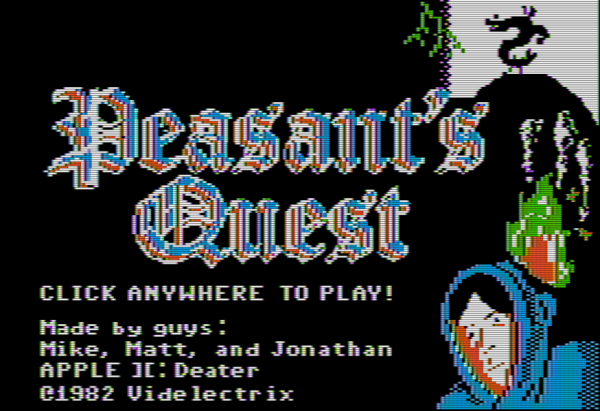
For those who might have missed it, there was a brief period in the mid-00s where gamers everywhere eschewed consoles and PCs in favor of simple Flash-based games to be played in a browser. Among these was the game Peasant’s Quest, created by the folks at Homestar Runner and modeled after video games from the 80s. [deater] was a fan of this game and wondered if it would actually be possible to play this retro-styled game on actual retro hardware.

For the experiment he decided on using an Apple II since this computer is featured as a prop rather often by the developers at Videlectrix. It turns out that with some determination it’s actually possible to run this game on the late 80s hardware with very little modifications. Squeezing the sprites into the required space was a challenge, as well as getting the sound tracks to play properly, but in the end the game runs within the hardware’s 280×192 resolution with 6 colors. There are also detailed notes on how the complicated graphics system on the Apple works for those willing to take a deep dive. There’s a lot going on here, but surprisingly few compromises needed to be made to get this to work.

The game itself is available on the project’s webpage for anyone who still has an Apple II kicking around, or for anyone who is willing to try it out in an emulator. Of course you could always play the original Flash version but that’s missing a certain charm that decades old retrocomputers have with games. We certainly aren’t seeing video game controllers like those built for the Apple II anymore, for example.

Continue reading “The Faux-Vintage Becomes Vintage”

Cloud-Based Atari Gaming

While the Google Stadia may be the latest and greatest in the realm of cloud gaming, there are plenty of other ways to experience this new style of gameplay, especially if you’re willing to go a little retro. This project, for example, takes the Atari 2600 into the cloud for a nearly-complete gaming experience that is fully hosted in a server, including the video rendering.

[Michael Kohn] created this project mostly as a way to get more familiar with Kubernetes, a piece of open-source software which helps automate and deploy container-based applications. The setup runs on two Raspberry Pi 4s which can be accessed by pointing a browser at the correct IP address on his network, or by connecting to them via VNC. From there, the emulator runs a specific game called Space Revenge, chosen for its memory requirements and its lack of encumbrance of copyrights. There are some limitations in that the emulator he’s using doesn’t implement all of the Atari controls, and that the sound isn’t available through the remote desktop setup, but it’s impressive nonetheless

[Michael] also glosses over this part, but the Atari emulator was written by him “as quickly as possible” so he could focus on the Kubernetes setup. This is impressive in its own right, and of course he goes beyond this to show exactly how to set up the cloud-based system on his GitHub page as well. He also thinks there’s potential for a system like this to run an NES setup as well. If you’re looking for something a little more modern, though, it is possible to set up a cloud-based gaming system with a Nintendo Switch as well.

Continue reading “Cloud-Based Atari Gaming”