Natural Language AI In Your Next Project? It’s Easier Than You Think

Want your next project to trash talk? Dynamically rewrite boring log messages as sci-fi technobabble? Happily (or grudgingly) answer questions? Doing that sort of thing and more can be done with OpenAI’s GPT-3, a natural language prediction model with an API that is probably a lot easier to use than you might think.

In fact, if you have basic Python coding skills, or even just the ability to craft a curl statement, you have just about everything you need to add this ability to your next project. It’s not free in the long run, although initial use is free on signup, but for personal projects the costs will be very small.

Basic Concepts

OpenAI has an API that provides access to GPT-3, a machine learning model with the ability to perform just about any task that involves understanding or generating natural-sounding language.

OpenAI provides some excellent documentation as well as a web tool through which one can experiment interactively. First, however, one must create an account and receive an API key. After that is done, the doors are open.

Creating an account also gives one a number of free credits that can be used to experiment with ideas. Once the free trial is used up or expires, using the API will cost money. How much? Not a lot, frankly. Everything sent to (and received from) the API is broken into tokens, and pricing is from $0.0008 to $0.06 per thousand tokens. A thousand tokens is roughly 750 words, so small projects are really not a big financial commitment. My free trial came with 18 USD of credits, of which I have so far barely managed to spend 5%.

Let’s take a closer look at how it works, and what can be done with it!

Continue reading “Natural Language AI In Your Next Project? It’s Easier Than You Think”

TapType: AI-Assisted Hand Motion Tracking Using Only Accelerometers

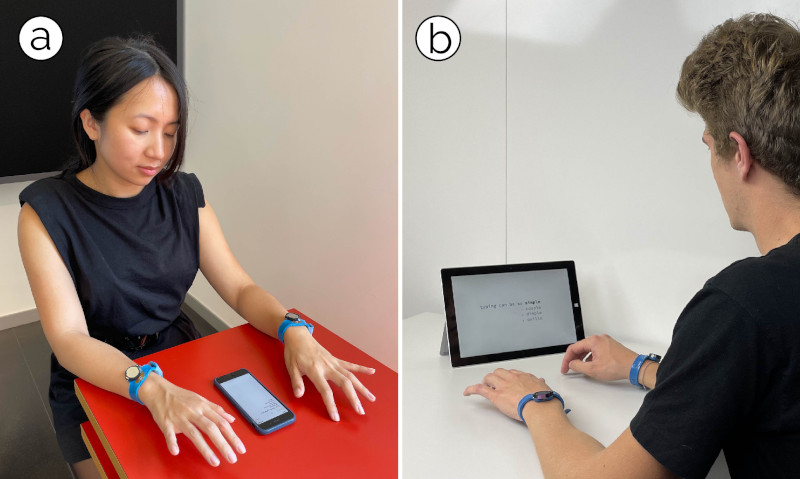
The team from the Sensing, Interaction & Perception Lab at ETH Zürich, Switzerland have come up with TapType, an interesting text input method that relies purely on a pair of wrist-worn devices, that sense acceleration values when the wearer types on any old surface. By feeding the acceleration values from a pair of sensors on each wrist into a Bayesian inference classification type neural network which in turn feeds a traditional probabilistic language model (predictive text, to you and I) the resulting text can be input at up to 19 WPM with 0.6% average error. Expert TapTypers report speeds of up to 25 WPM, which could be quite usable.

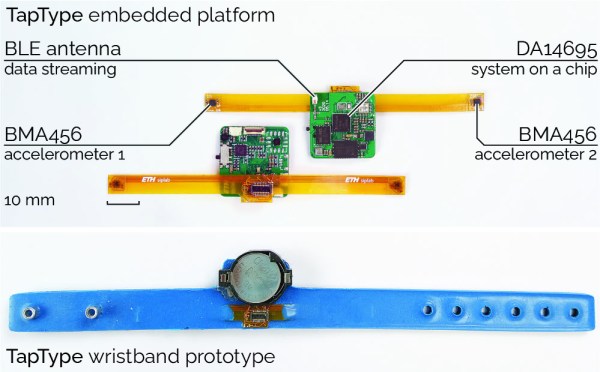
Details are a little scarce (it is a research project, after all) but the actual hardware seems simple enough, based around the Dialog DA14695 which is a nice Cortex M33 based Bluetooth Low Energy SoC. This is an interesting device in its own right, containing a “sensor node controller” block, that is capable of handling sensor devices connected to its interfaces, independant from the main CPU. The sensor device used is the Bosch BMA456 3-axis accelerometer, which is notable for its low power consumption of a mere 150 μA.

User’s can “type” on any convenient surface.

The wristband units themselves appear to be a combination of a main PCB hosting the BLE chip and supporting circuit, connected to a flex PCB with a pair of the accelerometer devices at each end. The assembly was then slipped into a flexible wristband, likely constructed from 3D printed TPU, but we’re just guessing really, as the progression from the first embedded platform to the wearable prototype is unclear.

What is clear is that the wristband itself is just a dumb data-streaming device, and all the clever processing is performed on the connected device. Training of the system (and subsequent selection of the most accurate classifier architecture) was performed by recording volunteers “typing” on an A3 sized keyboard image, with finger movements tracked with a motion tracking camera, whilst recording the acceleration data streams from both wrists. There are a few more details in the published paper for those interested in digging into this research a little deeper.

The eagle-eyed may remember something similar from last year, from the same team, which correlated bone-conduction sensing with VR type hand tracking to generate input events inside a VR environment.

Continue reading “TapType: AI-Assisted Hand Motion Tracking Using Only Accelerometers”

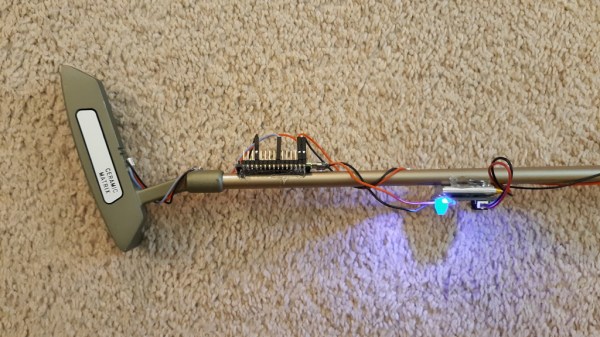
A putter with an Arduino attached to its shaft

This Golf Club Uses Machine Learning To Perfect Your Swing

Golf can be a frustrating game to learn: it takes countless hours of practice to get anywhere near the perfect swing. While some might be lucky enough to have a pro handy every time they’re on the driving range or putting green, most of us will have to get by with watching the ball’s motion and using that to figure out what we’re doing wrong.

Luckily, technology is here to help: [Nick Bild]’s Golf Ace is a putter that uses machine learning to analyze your swing. An accelerometer mounted on the shaft senses the exact motion of the club and uses a machine learning algorithm to see how closely it matches a professional’s swing. An LED mounted on the club’s head turns green if your stroke was good, and red if it wasn’t. All of this is driven by an Arduino Nano 33 IoT and powered by a lithium-ion battery.

The Golf Ace doesn’t tell you what part of your swing to improve, so you’d still need some external instruction to help you get closer to the ideal form; [Nick]’s suggestion is to bundle an instructor’s swing data with a book or video that explains the important points. That certainly looks like a reasonable approach to us, and we can also imagine a similar setup to be used on woods and irons, although that would require a more robust mounting system.

In any case, the Golf Ace could very well be a useful addition to the many gadgets that try to improve your game. But in case you still end up frustrated, you might want to try this automated robotic golf club.

Continue reading “This Golf Club Uses Machine Learning To Perfect Your Swing”

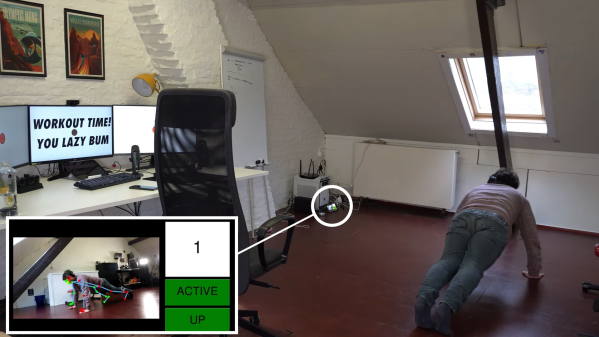
A man performing push-ups in front of a PC

Machine Learning Helps You Get In Shape While Working A Desk Job

Humans weren’t made to sit in front of a computer all day, yet for many of us that’s how we spend a large part of our lives. Of course we all know that it’s important to get up and move around every now and then to stretch our muscles and get our blood flowing, but it’s easy to forget if you’re working towards a deadline. [Victor Sonck] thought he needed some reminders — as well as some not-so-gentle nudging — to get into the habit of doing a quick workout a few times a day.

To this end, he designed a piece of software that would lock his computer’s screen and only unlock it if he performed five push-ups. Locking the screen on his Linux box was as easy as sending a command through the network, but recognizing push-ups was a harder task for which [Victor] decided to employ machine learning. A Raspberry Pi with a webcam attached could do the trick, but the limited processing power of the Pi’s CPU might prove insufficient for processing lots of raw image data.

[Victor] therefore decided on using a Luxonis OAK-1, which is a 4K camera with a built-in machine-learning processor. It can run various kinds of image recognition systems including Blazepose, a pre-trained model that can recognize a person’s pose from an image. The OAK-1 uses this to send out a set of coordinates that describe the position of a person’s head, torso and limbs to the Raspberry Pi through a USB interface. A second machine-learning model running on the Pi then analyzes this dataset to recognize push-ups.

[Victor]’s video (embedded below) is an entertaining introduction into the world of machine-learning systems for video processing, as well as a good hands-on example of a project that results in a useful tool. If you’re interested in learning more about machine learning on small platforms, check out this 2020 Remoticon talk on machine learning on microcontrollers, or this 2019 Supercon talk about implementing machine vision on a Raspberry Pi.

Continue reading “Machine Learning Helps You Get In Shape While Working A Desk Job”

Camera held in hand

Review: Vizy Linux-Powered AI Camera

Vizy is a Linux-based “AI camera” based on the Raspberry Pi 4 that uses machine learning and machine vision to pull off some neat tricks, and has a design centered around hackability. I found it ridiculously simple to get up and running, and it was just as easy to make changes of my own, and start getting ideas.

Person and cat with machine-generated tags identifying them
Out of the box, Vizy is only a couple lines of Python away from being a functional Cat Detector project.

I was running pre-installed examples written in Python within minutes, and editing that very same code in about 30 seconds more. Even better, I did it all without installing a development environment, or even leaving my web browser, for that matter. I have to say, it made for a very hacker-friendly experience.

Vizy comes from the folks at Charmed Labs; this isn’t their first stab at smart cameras, and it shows. They also created the Pixy and Pixy 2 cameras, of which I happen to own several. I have always devoured anything that makes machine vision more accessible and easier to integrate into projects, so when Charmed Labs kindly offered to send me one of their newest devices, I was eager to see what was new.

I found Vizy to be a highly-polished platform with a number of truly useful hardware and software features, and a focus on accessibility and ease of use that I really hope to see more of in future embedded products. Let’s take a closer look.

Continue reading “Review: Vizy Linux-Powered AI Camera”

Using Statistics Instead Of Sensors

Statistics often gets a bad rap in mathematics circles for being less than concrete at best, and being downright misleading at worst. While these sentiments might ring true for things like political polling, it hides the fact that statistical methods can be put to good use in engineering systems with fantastic results. [Mark Smith], for example, has been working on an espresso machine which can make the perfect shot of coffee, and turned to one of the tools in the statistics toolbox in order to solve a problem rather than adding another sensor to his complex coffee-brewing machine.

To make espresso, steam is generated which is then forced through finely ground coffee. [Mark] found that his espresso machine was often pouring too much or too little coffee, and in order to improve his machine’s accuracy in this area he turned to the linear regression parameter R2, also known as the coefficient of determination. By using a machine learning algorithm tuned to this value, which assesses predictable variation in a data set, a computer can more easily tell when the coffee begins pouring out of the portafilter and into the espresso cup based on the pressure and water flow in the machine itself rather than using some other input such as the weight of the cup.

We have seen in the past how seriously [Mark] takes his coffee-making, and this is another step in a series of improvements he has made to his equipment. In this iteration, he has additionally produced a simulation in JupyterLab to better assist him in modeling the system and making even more accurate predictions. It’s quite a bit more effort than adding sensors, but since his espresso machine already included quite a bit of computing power it’s not too big a leap for him to make.

AI-Generated Sleep Podcast Urges You To Imagine Pleasant Nonsense

[Stavros Korokithakis] finds the experience of falling asleep to fairy tales soothing, and this has resulted in a fascinating project that indulges this desire by using machine learning to generate mildly incoherent fairy tales and read them aloud. The result is a fantastic sort of automated, machine-generated audible sleep aid. Even the logo is machine-generated!

The Deep Dreams Podcast is entirely machine-generated, including the logo.

The project leverages the natural language generation abilities of OpenAI’s GPT-3 to create fairytale-style content that is just coherent enough to sound natural, but not quite coherent enough to make a sensible plotline. The quasi-lucid, dreamlike result is perfect for urging listeners to imagine pleasant nonsense (thanks to Nathan W Pyle for that term) as they drift off to sleep.

We especially loved reading about the methods and challenges [Stavros] encountered while creating this project. For example, he talks about how there is more to a good-sounding narration than just pointing a text-to-speech engine at a wall of text and mashing “GO”. A good episode has things like strategic pauses, background music, and audio fades. That’s where pydub — a Python library for manipulating audio — came in handy. As for the speech, text-to-speech quality is beyond what it was even just a few years ago (and certainly leaps beyond machine-generated speech in the 80s) but it still took some work to settle on a voice that best suited the content, and the project gradually saw improvement.

Deep Dreams Podcast has a GitLab repository if you want to see the code that drives it all, and you can go to the podcast itself to give it a listen.