scantron

Bubbles, Belts, And Bulbs: How The Scantron Works

Many of us remember back in our school days taking tests and filling out answers on a Scantron sheet, those long rows of A, B, C, D, and E that had to be filled in with a #2 pencil. Ever wonder why it needed a #2 pencil, or what the point of using a Scantron was at all? That question is answered in the latest video from [SimonRetro], where he takes a look at the Scantron and how it works.

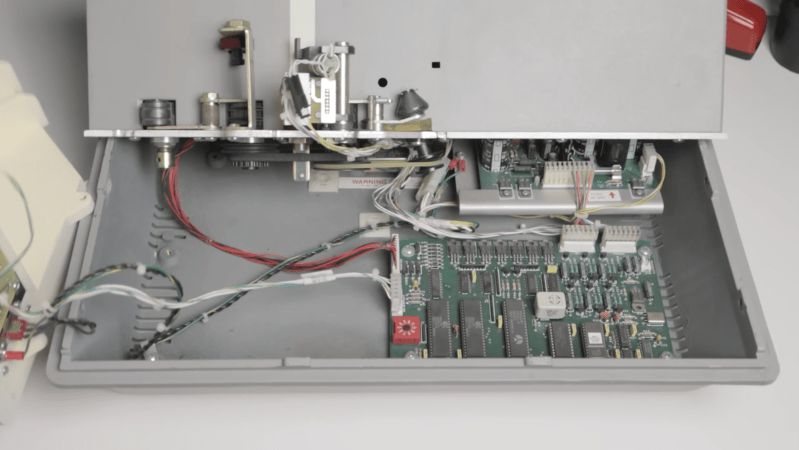
One of the more interesting things about the Scantron is that it’s such a standalone device. No software needed, no keypad to mess with just two rocker switches. The on/off switch is also the way you tell it to forget the last answer sheet and allow you to program in a new test. Upon booting, you feed in a Scantron sheet with some specific boxes filled in, and then it’s programmed and ready to take in and grade all the students’ answers. Opening up the Scantron reveals it’s pretty interesting inside: one control board with early-’90s-era chips. There’s also a lightbulb (no LEDs) shining through the six reading sections of the card, as well as an arrangement of belts and motors to move the card through the machine. The printer is a seven-pin printer used in conjunction with a pair of ink rollers to print out the results on the cards.

[SimonRetro] also went ahead and tried different ways to mark the sheets including pens, Sharpies, colored pencils, and different thicknesses of pencils besides the #2 to see which would and wouldn’t work in the Scantron. Thanks [SimonRetro] for exploring this machine from many of our childhoods and sharing its inner workings. Be sure to check out some of our other reverse engineering articles that explore how classic devices work.

Continue reading “Bubbles, Belts, And Bulbs: How The Scantron Works”

Motorized Camera Slider Rides On Carbon

While not every camera mount needs to have six degrees of freedom, one or two can be extremely helpful in the photographic world. In order to make time-lapse shots with some motion or shots that incorporate some parallax, a moving camera mount or dolly is needed, and this small one builds upon a pre-existing, although non-motorized, camera slider.

The slider is an inexpensive model from everyone’s favorite online warehouse, with rails that are at least coated in carbon, if not made out of it entirely, to ensure smooth camera motion. To add the motorization to automatically move the camera, a stepper motor with a belt drive is used which is controlled by an Arduino. A few limit switches are added, letting the dolly perform different movement patterns automatically, and a pair of potentiometers for fine and coarse speed control are included as well, letting the camera take both time-lapse and video while using this mount at various controllable speeds.

With everything tucked into a relatively small box at one end of the dolly, the build is both accessible and functional. The code for the microcontroller is also available on the project’s GitHub page for anyone looking to replicate or build upon the project. And, for those looking to add more degrees of freedom to their camera setups, take a look at this DIY pan and tilt mount.

Continue reading “Motorized Camera Slider Rides On Carbon”

Plants compared side-by-side, with LED-illuminated plants growing way more than the sunlight-illuminated plants

Plant Growth Accelerated Tremendously With LEDs

[GreatScott!] was bummed to see his greenhouse be empty and lifeless in winter. So, he set out to take the greenhouse home with him. Well, at least, a small part of it. First, he decided to produce artificial sunlight, setting up a simple initial experiment for playing with different wavelength LEDs. How much can LEDs affect plant growth, really? This is the research direction that Würth Elektronik, supporting his project, has recently been expanding into. They’ve been working on extensive application notes, explaining the biological aspects of it for us — a treasure trove of resources available at no cost, that hackers can and should learn from.

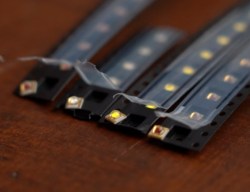
Initially, [GreatScott!] obtained LEDs in four different colors – red, ‘hyper red’, deep blue, and daylight spectrum. The first three are valued because their specific wavelengths are absorbed well by plants. The use of daylight LEDs though has been controversial.  Nevertheless, he points out that the plant might require different wavelengths for things other than photosynthesis, and the daylight LEDs sure do help assess the plants visually as the experiment goes on.Four cut tapes of the LEDs used in this experiment, laid out side by side on the desk

Next, [GreatScott!] borrowed parts of Würth’s LED driver designs, creating an Arduino PWM driver with simple potentiometers. He used this to develop his own board to host the LEDs.

An aluminum PCB increases heat dissipation, prolonging the LEDs lifespan. [GreatScott!] reflowed the LEDs onto it with solder paste, only to find that the ‘hyper red’ LEDs died during the process. Thankfully, by the time this problem reared its head, he managed to obtain the official horticulture devkit, with an LED panel ready to go.

[GreatScott!’s] test subjects were Arugula plants, whose leaves you often find on prosciutto pizza. Having built a setup with two different sets of flower pots, one LED-adorned and one LED-less, he put both of them on his windowsill. The plants were equally exposed to sunlight and equally watered. The LED duty cycle was set to ballpark values.

The results were staggering, as you can see in the picture above — no variable changing except the LEDs being used. This experiment, even including a taste test with a pizza as a test substrate, was a huge success, and [GreatScott!] recommends that we hit Würth up for free samples as we embark on our own plant growth improvement journeys.

Horticulture (aka plant growing) is one of the areas where hackers, armed with troves of freely available knowledge, can make big strides — and we’re not even talking about the kind of plants our commenters are sure to mention. The field of plant growth is literally fruitful and ripe for the picking. You can accomplish a whole lot of change with surprisingly little effort. The value of the plants on your windowsill doesn’t have to be purely decorative, and a small desk-top setup you hack together, can easily scale up! Some hackers understand that, and we’ve started seeing automated growing solutions way before Raspberry Pi was even a thing. The best part is, that you only need a few LEDs to start.

Continue reading “Plant Growth Accelerated Tremendously With LEDs”

Amazing “Connect Fore!” Robot Challenges Your Putting Practice

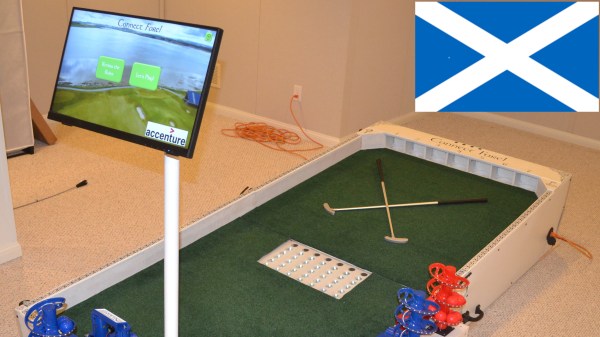
We’ve just come across [Bithead]’s amazing, robotically-automated mashup of miniature golf and Connect Four, which also includes an AI opponent who pulls no punches in its drive to win. Connect Fore! celebrates Scotland — the birthplace of golf, after all — and looks absolutely fantastic.

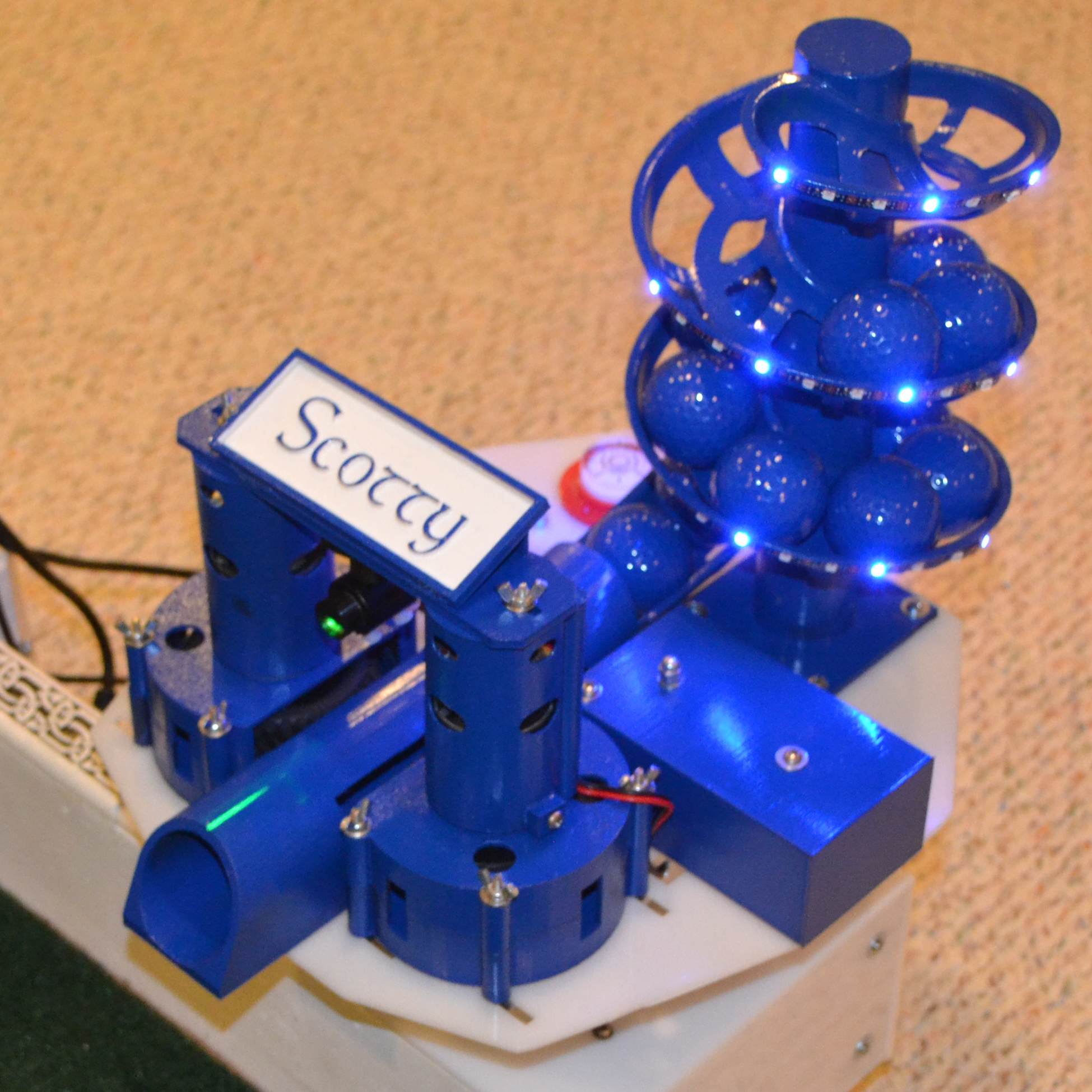
Scotty the AI opponent uses this robotic turret to make their moves in a game of Connect Fore!

The way it works is this: players take turns putting colored balls into one of seven different holes at the far end of the table. Each hole feeds to a clear tube — visible in the middle of the table — which represent each of the columns in a game of Connect Four.

Each player attempts to stack balls in such a way that they create an unbroken line of four in their color, either horizontally, vertically, or diagonally. In a one-player game, a human player faces off against “Scotty”, the computer program that chooses its moves with intelligence and fires balls from a robotic turret.

[Bithead] started this project as a learning experience, and being such a complex project, the write-up is extensive. We really recommend reading through the whole thing if you are at all interested in what goes into making such a project work.

What’s particularly interesting is all of the ways in which things nearly worked, or needed nudging or fine adjustment. One might think that reliably getting a ball to enter a hole and roll down a PVC tube wouldn’t be a particularly finicky task, but it turns out that all kinds of things can go wrong.

Even finding the right play surface was a challenge. [Bithead]’s first purchase from Amazon was a total waste: it looked bad, smelled bad, and balls didn’t roll well on it. There are high-quality artificial turfs out there, but the good stuff gets shockingly expensive, and such a small project pretty much pigeonholes one as a nuisance customer when it comes to vendors. The challenges [Bithead] overcame serve as a reminder to keep the 80/20 rule (or Pareto principle) in mind when estimating what will get a project to the finish line.

Right under the page break below is a brief video tour of the completed table, and after that, you can watch a game in action as [Bithead] faces off against Scotty the AI. Curious about the inner workings? The last video has some build details that fill in a few blanks from the write-up.

We’ve seen an automated Chess table before, but this is an entirely other, utterly fantastic level of work.
Continue reading “Amazing “Connect Fore!” Robot Challenges Your Putting Practice”

AI-Generated Sleep Podcast Urges You To Imagine Pleasant Nonsense

[Stavros Korokithakis] finds the experience of falling asleep to fairy tales soothing, and this has resulted in a fascinating project that indulges this desire by using machine learning to generate mildly incoherent fairy tales and read them aloud. The result is a fantastic sort of automated, machine-generated audible sleep aid. Even the logo is machine-generated!

The Deep Dreams Podcast is entirely machine-generated, including the logo.

The project leverages the natural language generation abilities of OpenAI’s GPT-3 to create fairytale-style content that is just coherent enough to sound natural, but not quite coherent enough to make a sensible plotline. The quasi-lucid, dreamlike result is perfect for urging listeners to imagine pleasant nonsense (thanks to Nathan W Pyle for that term) as they drift off to sleep.

We especially loved reading about the methods and challenges [Stavros] encountered while creating this project. For example, he talks about how there is more to a good-sounding narration than just pointing a text-to-speech engine at a wall of text and mashing “GO”. A good episode has things like strategic pauses, background music, and audio fades. That’s where pydub — a Python library for manipulating audio — came in handy. As for the speech, text-to-speech quality is beyond what it was even just a few years ago (and certainly leaps beyond machine-generated speech in the 80s) but it still took some work to settle on a voice that best suited the content, and the project gradually saw improvement.

Deep Dreams Podcast has a GitLab repository if you want to see the code that drives it all, and you can go to the podcast itself to give it a listen.

Clever Suction For Robot Arm Automates Face Shield Production

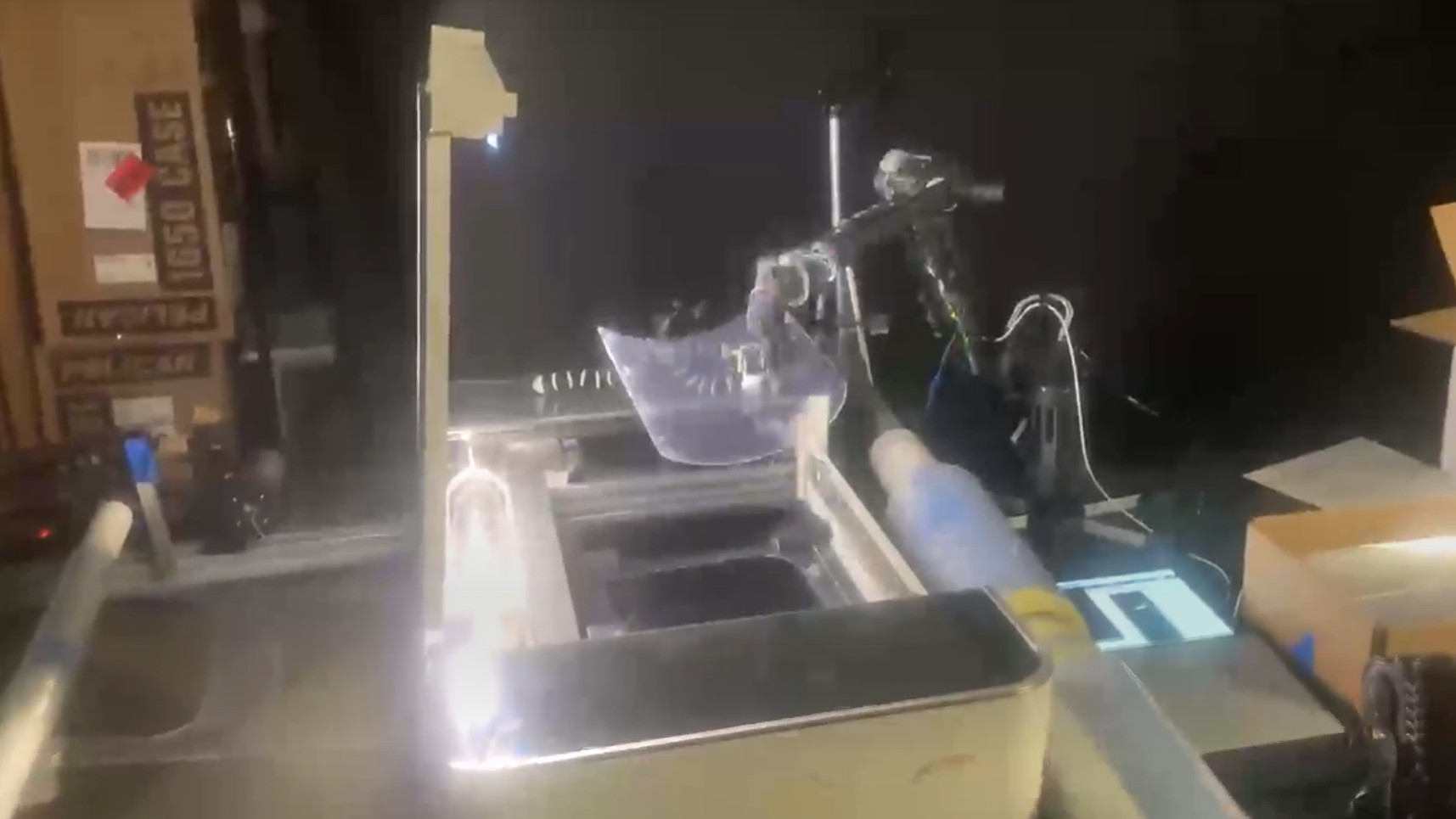
We’re certainly familiar with vacuum grabbers used in manufacturing to pick items up, but this is a bit different. [James Wigglesworth] sent in some renders and demo video (embedded after the break) of the Dexter robot arm and a laser cutter automatically producing face shields.

It’s a nice little bit of automation, where you can see a roll of plastic on the right side of the Glowforge laser cutter feeding into the machine. Once the laser does its thing, the the robot arm reaches in and grabs the newly cut face shield and stacks it in a box neatly for future assembly. There are a lot of interesting parts here, but the fact that the vacuum grabber is doing it’s job without a vacuum air supply is the one we have our eye on.

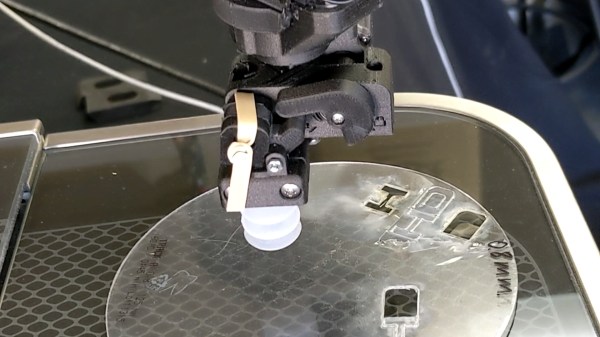
The vacuum comes from a corrugated sleeve that makes up the suction cup on the end of the robot arm. A rubber band holds a hinged piece over a valve on that sleeve that can be opened or closed by a servo motor. When the cuff is compressed against the face shield, the servo closes the valve, using the tape as a gasket, and the corrugated nature of the cuff creates a vacuum due to the weight of the item it is lifting. This means you don’t need a vacuum source plumbed into the robot, just a wire to power the servo.

The robot arm is of course the design that won the 2018 Hackaday Prize. I comes as no surprise to see the Haddington Dynamics crew setting up a manufacturing line like this one. As we discovered a few weeks ago, 3D printers, laser cutters, and robot arms are part of their microfactory setup and well suited to making PPE to help reduce the shortage during the COVID-19 outbreak.

Continue reading “Clever Suction For Robot Arm Automates Face Shield Production”

AI Bot Plays Castlevania So You Don’t Have To

We’re not allowed to have TV here in the Hackaday Wonder Bunker, but occasionally we’ll pool together the bandwidth credits they pay us in and gather ’round the old 3.5 inch TFT LCD to watch whatever Netflix assures us is 93% to our liking. That’s how we found out they’ve made a show based on, of all things, one of the Castlevania games for the NES. We wanted to play the game to understand the backstory, but since it hails from the era of gaming where primitive graphics had to be supplemented with soul-crushing difficulty, we didn’t get very far.

But thanks to a very impressive project developed by [Michael Birken] maybe we’ll have it all figured out by the time we’ve saved enough credits to watch Season 2 (no spoilers, please). The software, which he’s quick to point out is not an example of machine learning, is an attempt to condense his personal knowledge of how to play Castlevania into a plugin for the Nintaco NES emulator. The end result is CastlevaniaBot, which is capable of playing through the original Castlevania from start to finish without human intervention. You can even stop and start it at will, so it can play through the parts you don’t want to do yourself.

[Michael] started this project with a simple premise: if he could make a bot successfully navigate the many levels of Dracula’s castle, then getting it to kill a few monsters along the way should be easy enough. Accordingly, he spent a lot of time perfecting the path-finding for CastlevaniaBot, which included manually playing through the entire game in order to get an accurate map of the background images. These images were then analyzed to identify things like walls and stairs, so the bot would know where it could and couldn’t move protagonist Simon Belmont. No matter what the bot is doing during the game it always considers where it is and where it needs to be going, as there’s a time limit for each stage to contend with. Continue reading “AI Bot Plays Castlevania So You Don’t Have To”