We’ve Got A Real Bone To Pick With This Mouse

Finally, there’s a way you can feel like a real bad-ass while you’re formatting those TPS reports. It’s all thanks to this computer mouse built inside the skull of a dog. [Shannon Larratt] dug through his collection of skulls and came up with this one because it fits nicely in the palm of your hand.

Before you get too grossed out, this is not actually part of an animal’s body like another notable mouse hack that comes to mind. [Shannon] started with the skull of a small dog, making a mold for the pieces used in the finished version above. He was quite creative when fitting the electronic parts inside of his reproduction. He pulled the PCB from a $10 Logitech mouse and had no trouble getting it to fit into the base of the skull. But when it came to the buttons he ended up engineering a couple of rockers and used a belt to reposition the scroll-wheel. Not wanting to lose the middle-click feature there’s an additional lever for that functionality. We’d also like to compliment him on the quality of his write-up. Fantastic!

Vintage Peripheral Hacks Roundup

A few days ago, we featured an Apple ][ USB keyboard mod, and several readers chimed in sharing their own retro conversions in the comments section. We had no idea that many of you had made similar modifications of your own, so here’s a quick roundup of what your fellow Hackaday readers have put together.


Optical Atari STM1 Mouse

atari_stm1_usb

[JJ] had a 25-year old Atari STM1 mouse sitting around and was wondering how to get it to work with his new computer. Instead of interfacing the old mouse with his computer via a custom circuit board, he gutted the STM1 and replaced the innards with those of a much newer optical mouse. He did a bit of trimming to get the new PCB to fit, aiming the optical sensor through the now-empty “ball hole”. According to [JJ] it works just as good as it looks.


ZX Spectrum USB keyboard conversion

sinclair_zx_spectrum_usb

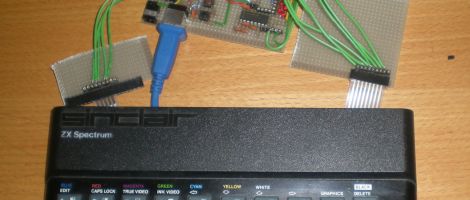
[Lee] is a sucker for vintage hardware, and with the help of his friend [LanceR], resurrected an old Sinclair ZX Spectrum computer into a working USB keyboard. After replacing the deteriorated membrane, the pair mapped out the keyboard to figure out how the matrix was wired. With that done, they built a prototype USB interface board, which they later replaced with a proper PCB.


BBC Master Compact USB keyboard conversion

bbc_master_compact_usb

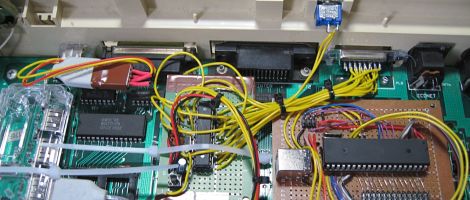
A friend of [MoJo’s] had a BBC Master Compact computer from back in the day and wanted to have the keyboard converted to USB in order to use it with certain emulators. [MoJo] gladly took on the project, stripping some of the old motherboard components out to make room for his new circuitry. He built a USB interface board around an ATMega162, and even got the old built-in speaker working properly. From the outside, the keyboard looks like it has never been touched – nice job!

Wireless Mouse Li-Poly Retrofit With USB Charging

wireless_mouse_lipoly_retrofit

It’s no secret that wireless mice can eat through batteries pretty quickly. Rather than keep a fresh supply of AAs on hand at all times, [Phil] decided he would convert his mouse to use a rechargeable lithium polymer battery instead.

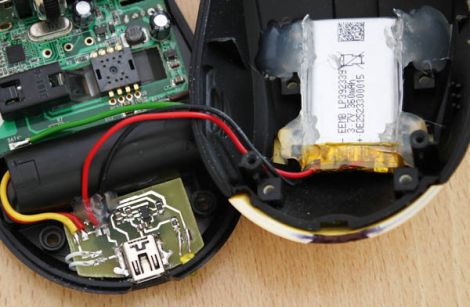
This isn’t the first time we’ve seen a cell phone battery crammed into a mouse to increase capacity, but we think this one has been done quite nicely. [Phil] managed to fit a 2.7 – 4.2v Li-Poly battery in the mouse’s palm rest, where there was a little extra empty space. The battery can be charged from any USB port via a custom-built charging module, which he constructed using a MAX1555 charge controller. Another custom-built circuit resides in the space previously occupied by the AA batteries, which uses an MC340063 DC to DC converter to drop the battery’s voltage down to the 1.25v required by the mouse.

The only part of the build that [Phil] is not pleased with is the power switch on the bottom, but since you rarely see that, we could care less. We think it is quite well done, and with a second version already in the works, we anticipate that it will get even better.

Be sure to check out [Phil’s] video tour of the hack, which you can see below.

Continue reading “Wireless Mouse Li-Poly Retrofit With USB Charging”

Trick Mouse Keeps The Screen Saver At Bay

mouse_wiggler

[Jerry] wrote in to share a little device he built to solve a problem he was having at work. You see, every computer in his office has a policy-enforced idle timeout, requiring the user to enter a password in order to regain access to their desktop.

This is a huge pain, since he sporadically uses an old computer for the sole purpose of monitoring some applications running in his data center. With the computer timing out every 10 minutes, he is constantly required to enter his password in order to take a 10 second glance at the screen to ensure everything is OK.

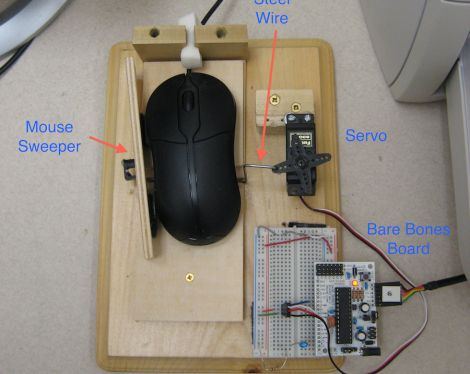
Rather than circumvent the screen saver using a local security policy or by implementing a microcontroller-based signal generator, he opted to create a mechanical solution instead. His computer’s optical mouse resides inside a wooden frame, and is periodically swept from side to side by an ATmega-controlled servo, keeping the screensaver permanently at bay.

Call it a hack, call it a kludge, call it what you will. All we know is that while we might have done it a little differently, it works just fine for [Jerry], and it generates all sorts of interesting conversation to boot.

Stick around for a quick video demonstration of his mouse wiggler box.

Continue reading “Trick Mouse Keeps The Screen Saver At Bay”

Hacking For Feline Enjoyment

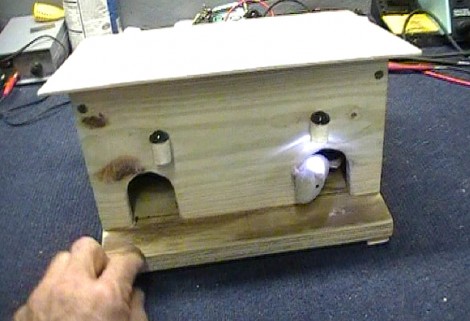
[Dino] is staying true to his goal of hacking one project every week. This time around, he’s working on a toy that will amuse and delight his cats. The project centers around a mouse house that has two holes where mice can stick their heads out. When they do, a little LED lamp illuminates their appearance in hopes to catch the eye of your lazy kitty.

The mechanism that automates this device is quite clever and reminds us of the most useless machine. That is, the armature that holds a mouse on either end actuates a limiting switch in the middle of the box when it moves to expose one of the mice. Each of those mice is attached with a rod, along side a leaf switch that makes the mouse retreat when boinked on the head by the cat.

It only takes [Dino] about six minutes to walk us through the build in the video after the break. What follows is a walk through of the wiring and some playtime with the family pets. Despite the intended purpose, it looks like the dog is much more interested than the cat. Either way, it’s a winner in our book.

Continue reading “Hacking For Feline Enjoyment”

A Visual History Of The Computer Mouse

mouse

As we all go about our day to day activities, it’s easy to get lost in technology and take for granted things that have slowly evolved over long periods of time. Take for instance the mouse on your desk. Whether it’s a standard 2-button mouse with a scroll wheel or a magic mouse with no buttons at all, we’re all a bit spoiled when you think about it.

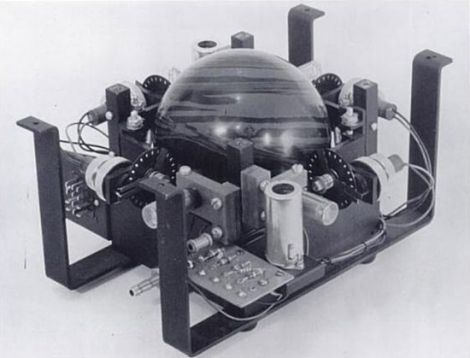
Dvice recently published a visual history of the computer mouse, which is quite interesting. The first pointing device that relied on hand motions to move a cursor was created by the Royal Canadian Navy in 1952. This trackball device, which is predates all other mechanical pointing devices, was crafted using a 5-pin bowling ball and an array of mechanical encoders that tracked the ball’s movement.

As time went on, other mouse-type devices came and went, but it was 30 years ago yesterday that Xerox unveiled the world’s first optical mouse at its PARC facility. The mouse used LEDs and optical sensors along with specialized mouse pads to track the user’s movements. The tech is primitive compared to today’s offerings, but it’s a nice reminder of the humble beginnings something you use every single day.

Be sure to swing by the Dvice site and take a look at how the mouse has evolved over the years – it’s a great way to kill a few minutes.

Cellphone Battery Mouse Modification

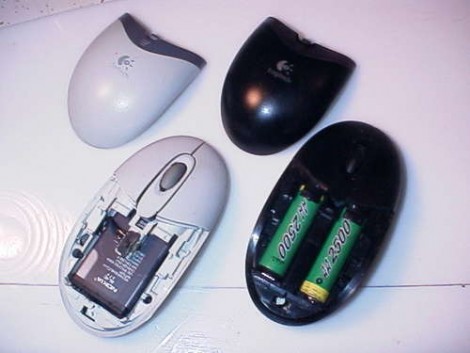
Ever wanted to increase the battery performance in your wireless mouse? [Davetech] shows you the way with this guide for converting a mouse from AA to lithium batteries. We were delighted by his hack-tacular approach that seems to have a nice little work-around at each step in the process. He grinds down the plastic battery housing that is molded into the original mouse body, then uses an old Compact Flash card connector as a set of spring terminals for a Nokia cellphone battery. This battery has more capacity and recharges faster than non-Lithium AA cells. But unfortunately the spring terminals didn’t quite reach the recessed batter contact. No problem, he just builds up solder on the battery to bridge the gap.

[Davetech] manages to fit the entire battery inside the mouse and the pointing-device still works. Your mileage may vary by model (both battery and mouse). It is necessary to take the battery out of the mouse for recharging, but since this only happen about every couple of weeks thanks to the extended capacity it’s not too much of a hassle. Perhaps someone could carry this to the next level by adding a USB port and the necessary charging circuitry?