Just about anyone can make a simple LED cube. But what if you want to make a 1-meter cube using 512 LEDs? [Hari] wanted to do it, so he created two different kinds of LED boards using EasyEDA. There are 270 of each type of board, for a total of 540 (there are only 512 LEDs, so we guess he got some spares due to how the small boards panelized). The goal is to combine these boards to form a cube measuring over three feet on each side.
To simplify wiring, the boards are made to daisy chain like a cordwood module. However, to get things to line up, each column of LED boards have to rotate 90 degrees. You can see several videos about the project below.
Designing pcbs for assembly is easy, right? We just squirt all the footprints onto a board layout, connect all the traces, send out the gerbers and position files, and we’re done–right?
Whoa, hold the phone, there, young rogue! Just like we can hack together some working source code with variables named after our best friends, we can also design our PCBs in ways that make it fairly difficult to assemble.
However, by following the agreed-upon design specs, we’ll put ourselves on track for success with automated assembly. If we want another party to put components on our boards, we need to clearly communicate the needed steps to get there. The best way to do so is by following the standards.
Proper Footprint Orientation
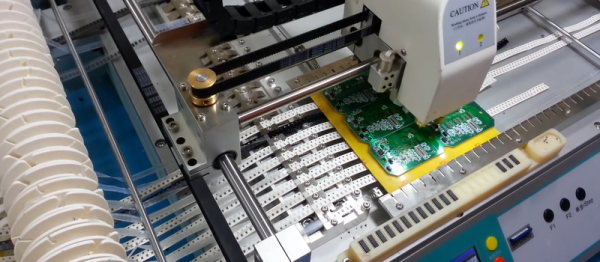
Now, for a moment, let’s imagine ourselves as the tip of a vacuum pickup tool on a pick-and-place machine. These tools are designed to pick up components on the reel from their centroid and plunk them on their corresponding land pattern. Seems pretty straightforward, right? It is, provided that we design our footprints knowing that they’ll one day come face-to-face with the pick-and-place machine.
To get from the reel to the board, we, the designers, need two bits of information from out part’s datasheet: the part centroid and the reel orientation.
The part centroid is an X-Y location that calls out the center-of-mass of the part. It basically tells the machine: “pick me up from here!” As designers, it’s our responsibility to design all of our footprints such that the footprint origin is set at the part’s centroid. If we forget to do so, the pick-and-place will try to suck up our parts from a location that may not stick very well to the package, such as: the corner.
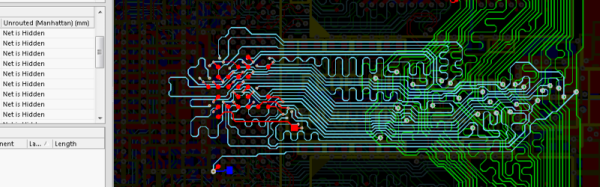
[Helentronica] has been using Altium Designer to lay out PC boards since he was a student. Now as a freelancer, he felt like he didn’t quite know all that he wanted to know. Keep in mind he’d done multilayer boards with BGAs and LVDS routing, so he was no neophyte. He decided to spend about $200 on an advanced course from Fedevel Academy. In this day where everything is free on the Internet, is it worth paying $200 to watch some videos?
[Helentronica] probably weighed the same question. However, he was interested in the course project which is an open-source computer module with an i.MX6 processor, 1 GB of DDR3 SDRAM and lots of expansion options. In fact, the ad copy that sold him was:
You will be practicing on a real high-speed board with 1.2GHz CPU and DDR3, PCIE, SATA, HDMI, LVDS, 1Gb Ethernet and more
He completed the course. Was it worth it? We won’t spoil the story, but you should check out his post and find out. Even if you don’t want to drop $200 or you don’t use Altium, you will probably pick up some tips on PC board layout.
If you’re producing documentation for a PCB project, you might as well make the board renders look good. But then, that’s a lot of work and you’re not an artist. Enter [Jan]’s new tool that takes KiCad board files, replaces each footprint with (custom) graphics, and provides a nice SVG representation, ready for labelling. If you like the output of a Fritzing layout, but have higher expectations of the PCB tool, this is just the ticket.
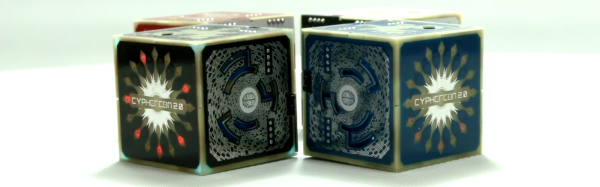
Last week in Milwaukee was Cyphercon, Wisconsin’s premier hacker conference. You can’t do a hacker con without either an electronic conference badge or a 45 hanging off a lanyard, and the Cyphercon 2017 badge doesn’t disappoint. It’s an electronic cube, lovingly designed by the folks at tymkrs. It’s also a puzzle box with security holes and wireless communications. It’s a mesh network of badges, and one of the best conference badges we’ve ever seen.
The most obvious feature of the Cyphercon 2.0 badge is the extra dimension. From the outset, the design of this badge was a 3-dimensional cube, constructed out of beautifully crafted PCBs and soldered together at the edges. The techniques to bring PCBs into the third dimension are really nothing new — we’ve seen 3D PCBs before — but never at this kind of volume. There were over four hundred badges constructed for Cyphercon, and every single joint was hand-soldered. This is something your assembly house just won’t do, and I would hate to think about the poor solder monkeys that would be forced to assemble 3D badges for a larger con.
3D isn’t the only trick up the Cyphercon badge. There are cutouts in each side of the cube exposing LEDs, microprocessors, busses, and a single USB port. This USB port allows the wearer to recharge the battery, yes, but if you install a terminal emulator on your laptop and plug in the badge, you’re dropped into a world of mystery, intrigue, and suffocation. This badge is a text adventure game, with the goal of a game to reassemble a relay-based computer from parts scrounged from around a missile silo. Once the relay computer is complete, the badge turns into an emulator for a vintage time-sharing operating system. In this OS, you’re able to write code and deploy it to other badges. This is seriously impressive stuff.
Between the cubic Cyphercon badge, the Hunter S. Rodriguez badge heading to Vegas this summer, and badges that are Nintendo emulators, this is looking like a great year for electronic conference badges. The artistry and skill here is amazing, and we can’t wait to see what else the community will come up with.
Below, you can check out a few videos on the Cypbercon badge. [Wire]’s explanation of how the badge was created over the last nine months is in there, as is the Cyphercon badge panel talk.
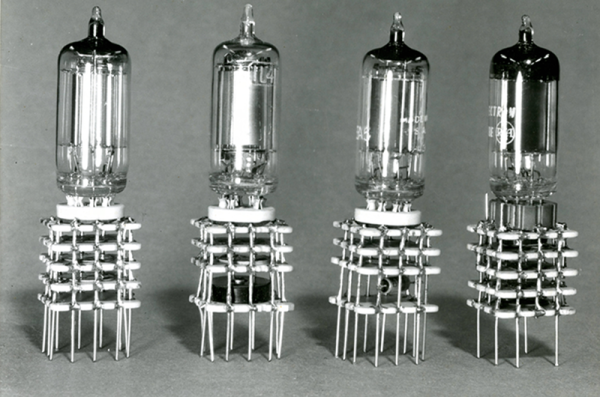
It is widely accepted that Gutenberg’s printing press revolutionized thought in Europe and transformed the Western world. Prior to the printing press, books were rare and expensive and not generally accessible. Printing made all types of written material inexpensive and plentiful. You may not think about it, but printing–or, at least, printing-like processes–revolutionized electronics just as much.
In particular, the way electronics are built and the components we use have changed a lot since the early 1900s when the vacuum tube made amplification possible. Of course, the components themselves are different. Outside of some specialty and enthusiast items, we don’t use many tubes anymore. But even more dramatic has been how we build and package devices. Just like books, the key to lowering cost and raising availability is mass production. But mass producing electronic devices wasn’t always as easy as it is today.
For the last few years, Hackaday has really been stepping up our game with marketing materials. Our t-shirts and swag are second to none, and last year we introduced the ‘Benchoff Buck’ (featured above), a bill replete with Jolly Wrencher EURions that is not yet legal currency. At least until we get a sweet compound in the desert, that is.
[Andrew Sowa] created the Benchoff Nickel. It’s a visage of yours truly emblazoned on a PCB, rendered in FR4, silkscreen, gold, and OSHPark’s royal purple. In doing so, [Andrew] has earned himself a field commission to the rank of lieutenant and can now reserve the dune buggy for a whole weekend.
The Benchoff Nickel was created in KiCad using the Bitmap2Component functionality. Planning this required a little bit of work; there are only five colors you can get on an OSH Park PCB, from white to gold to beige to purple (soldermask on top of copper) to black (soldermask with no copper). Luckily, the best picture we have of me renders very well in five colors.
The Bitmap2Component part of KiCad will only get you so far, though. It’s used mainly to put silkscreen logos on a board, and messing around with copper and mask layers is beyond its functionality. To import different layers of my face into different layers of a KiCad PCB, [Andrew] had to open up Notepad and make a few manual edits. It’s annoying, but yes, it can be done.
OSH Park’s fabs apparently use two different tones of FR4
The Benchoff Nickel can be found on Github and as a shared project on OSH Park ($22.55 for three copies). One little curiosity of the OSH Park fabrication process presented itself with [Andrew]’s second order of Benchoff Nickels. OSH Park uses at least two board houses to produce their PCBs, and one of them apparently uses a lighter shade of FR4. This resulted in a lighter skin tone for the second order of Benchoff Nickels.
This is truly tremendous work. I’ve never seen anything like this, and it’s one of the best ‘artistic’ PCBs I’ve ever held in my hands. It was a really great surprise when [Andrew] handed me one of these at the Hackaday Unconference in Chicago. I’ll be talking to [Andrew] again this week at the Midwest RepRap festival, and we’re going to try and figure out some way to do a small run of Benchoff Nickels.
Edit: OSH Park revealed why there are different tones of FR4. In short, there aren’t. The lighter shade of skintone is actually FR408, which is used on 4-layer boards.