A TV-B-Gone With A PIC Twist

pic-tvbgone

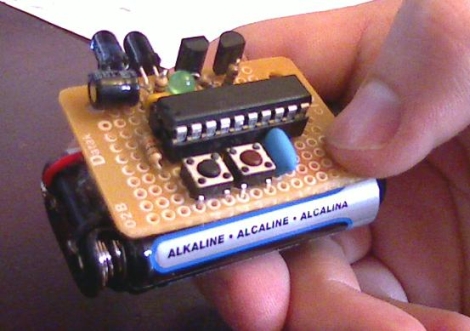
[Kayvon] thought that the TV-B-Gone was a fun little device and wanted to build one, but he didn’t have an AVR programmer handy. Rather than picking up some AVR kit and simply building a replica, he decided to give his PIC skills a workout and build a Microchip derivative of his own.

The PIC-based TV-B-Gone is pretty similar to its AVR-borne brethren, featuring a PIC24F08KA101 at the helm instead of an ATTiny. His version of the TV-B-Gone can be left on indefinitely, allowing him to situate the device in a convenient hiding place to wreak havoc for as long as he likes.

[Kayvon’s] TV-B-Gone does everything the original can at just under $7, which is quite a bit cheaper than the Adafruit kit. If you’re not averse to perfboard construction, be sure to check out the build thread over in the Adafruit forums. [Kayvon] has done most of the heavy lifting for you – all you need to do is build it.

Electronic Candle Protects Sleeping Infant

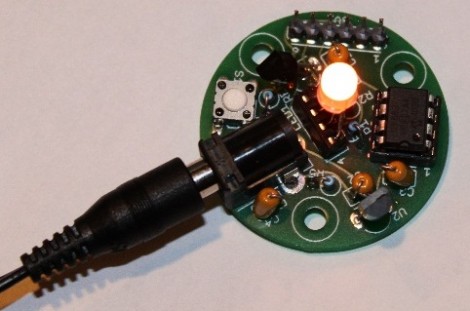
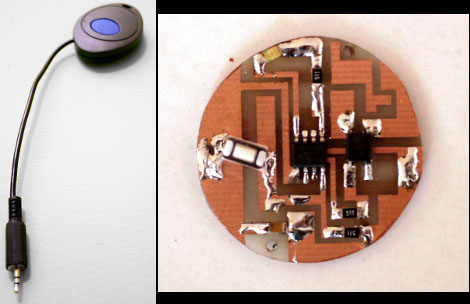
[William] developed this temperature candle as a tool to help keep babies safe as they sleep. It seems that ambient temperature has an effect on Sudden Infant Death Syndrome (SIDS). This device is meant to alert you when room temperature is outside of the recommended envelope.

The board hosts an eight-pin PIC microcontroller (12F683P), a temperature sensor, RGB LED, and a push button. The round PCB is the same size as a votive candle, which is nice except that you’re going to have to drill a hole in your candle holder to accommodate that barrel jack.

The temperature sensor is read by the microcontroller and used to determine the color of the LED. Red is hot, blue is cold, and just right is somewhere in between. But if you’d rather know the exact current temperature you can press the button and it’ll blink out the Celsius reading using blue for 10 degree increments (three blinks is 30 degrees, etc.) and red for single degrees. Don’t miss the demo of the candle in the video after the break.

Continue reading “Electronic Candle Protects Sleeping Infant”

Ball-in-maze Game Shows Creativity And Classic 8-bit Sound

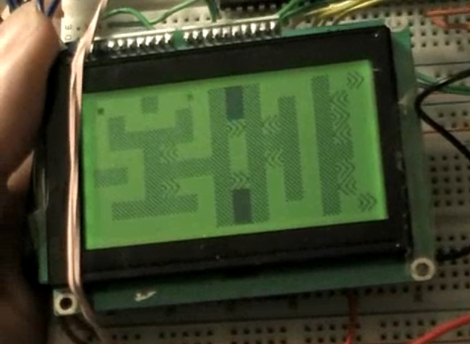
[M. Eric Carr] built this a long time ago as his Senior Project for EET480. It’s an electronic version of the ball-in-maze game. We’ve embedded this video after the break for your convenience.

The game has just one input; an accelerometer. If you’re having trouble visualizing the game, it works the same as this Android-based version, but replaces the physical maze and marble with a virtual maze on the graphic LCD screen. This has huge implications. Instead of just recreating the maze on the screen, [Eric] designed a multi-screen world, complete with warp blocks, which adds difficulty to  finding a solution. It also means that multiple different mazes can be played if you get tired of playing the same level.

This game also features music. A separate PIC microcontroller uses PWM to push out the 8-bit sound heard in the video. From the YouTube comments we learned that [Eric] didn’t write the music himself, but we still appreciate the playback quality he achieves with his hardware.

Continue reading “Ball-in-maze Game Shows Creativity And Classic 8-bit Sound”

Reverse Geocache Box Looks Great And Packed With Features

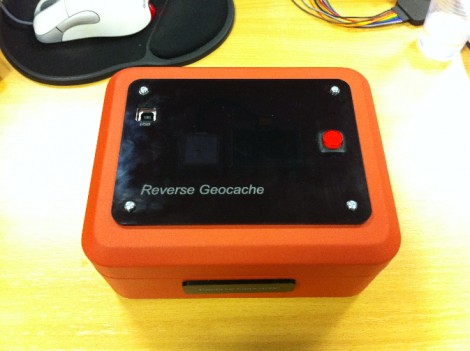
[Ranger Bob] crafted this great looking Reverse Geocache box. Our favorite feature is the black piece of acrylic on top. It’s laser cut (not sure if the letters are engraved or not) and gives a great finished look while hiding a couple of things at the same time.

The orange box is a metal cash box, and there’s a smooth indentation in the lid where the handle resides when not being carried. [Bob] removed the handle and mounted the GPS module in that void. But there’s also an OLED display mounted next to it. As you can see in the demo video after the break, the screen is bright enough to be seen clearly through the smoky acrylic covering that depression.

This project gave [Bob] the chance to order his first professionally made circuit board. He did the design in Eagle, managing to keep within the 5cmx5cm limits of Seeed Studio’s least expensive Fusion PCB option. The board hosts the PIC 18F87J50 responsible for handing the screen, GPS module, input button, and USB port. Power comes from an internal Lithium battery.

We’ve featured a lot of Reverse Geocache boxes and they’re still one of our favorite projects because so much love goes into the design and build process. Here’s another one that we chose randomly for your amusement.

Continue reading “Reverse Geocache Box Looks Great And Packed With Features”

Python Maps Mouse Movements On An LED Matrix

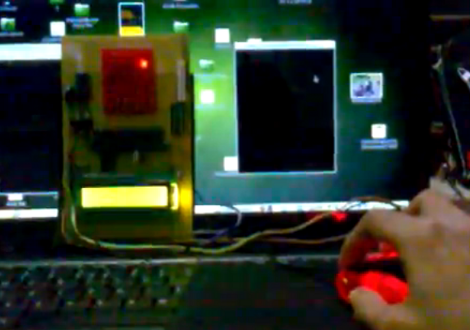
[Vinod Stanur] is working with a mouse input and a microcontroller driven LED matrix. The mouse cursor is tracked inside of a window by Python and the resulting coordinates on the LED grid are illuminated. He calls it an LED matrix “Paint Toy” because one of the features he’s included lets the user create pixel art like in MS Paint.

The 10×8 grid of lights is controlled by a PIC 16F877A. This display orientation is perfect for the 8-bit controller, which uses an array of ten bytes to keep track of the pixel data. A computer running his Python application (which uses the Pygame module to track the mouse movements) communicates with the display board via an RF connection. Five bytes plus a stop character make up the communication packet. The first two bytes contain the coordinates of the cursor, the other three bytes contain mouse button status.

As you can see in the demo after the break, the system is very responsive. The mouse can be moved quickly without latency issues, and if the cursor leaves the tracking window it gets picked up right away when it re-enters.

Continue reading “Python Maps Mouse Movements On An LED Matrix”

Using An ATmega8 To Program PIC24FJ Chips

[Fezoj] likes to play around with microcontrollers and decided that he wanted to try a Bus Pirate as a new tool in his adventures. Since it’s open hardware he had his own board made and populated it himself. The trouble is, he works only with AVR chips and doesn’t have a PIC programmer. No problem, he figured out how to flash the PIC24FJ using an ATmega8.

To get started, he grabbed a copy of the flash programming specifications from Microchip. Once he had implemented the protocol in the AVR code, it was just a matter of getting the downloaded PIC firmware to the AVR. An RS232 chip gives him the serial connection he needs, with the help of his own programming software written with Visual Studio.

It’s not a robust solution for prototyping on the PIC platform, but maybe it could be developed for that purpose. For now, all he needed was a bootloader so that he could flash the Bus Pirate via a USB connection.

[via Dangerous Prototypes]

Naughty Duck Will Be The End Of Secret Santa At Your Place Of Work

Aw, isn’t he cute? Looks are deceiving, because if you get him started, this duck says some vulgar things. [Gigavolt] found the little guy abandoned at the Goodwill store and decided it might have some hacking potential. Boy was he right. The stock toy can already sing a tune while flapping its beak and wings. After spending some time in [Gigavolt’s] lair, this duck is going to be on the naughty list. The best part is that this is going to end up in the hands of someone else thanks to a Secret Santa exchange.

The build article linked above is safe for you to read at work, but the video embedded after the break most certainly is not. [Gigavolt] got to work replacing the integrated circuit inside with his own PIC 16F628 microcontroller. He uses a new audio track, which is played back by a SOMO-14D audio player board. The two use different input voltage levels which is something of a bother, but it’s a standby power drain that has been vexing [Gigavolt] he rolled his own board using the DorkbotPDX order and can’t figure out why the current consumption is so high. Take a look at the cursing duck, then see if you can’t troubleshoot his electrical issues.

Continue reading “Naughty Duck Will Be The End Of Secret Santa At Your Place Of Work”