Your Own Engineering Workstation, With Mame

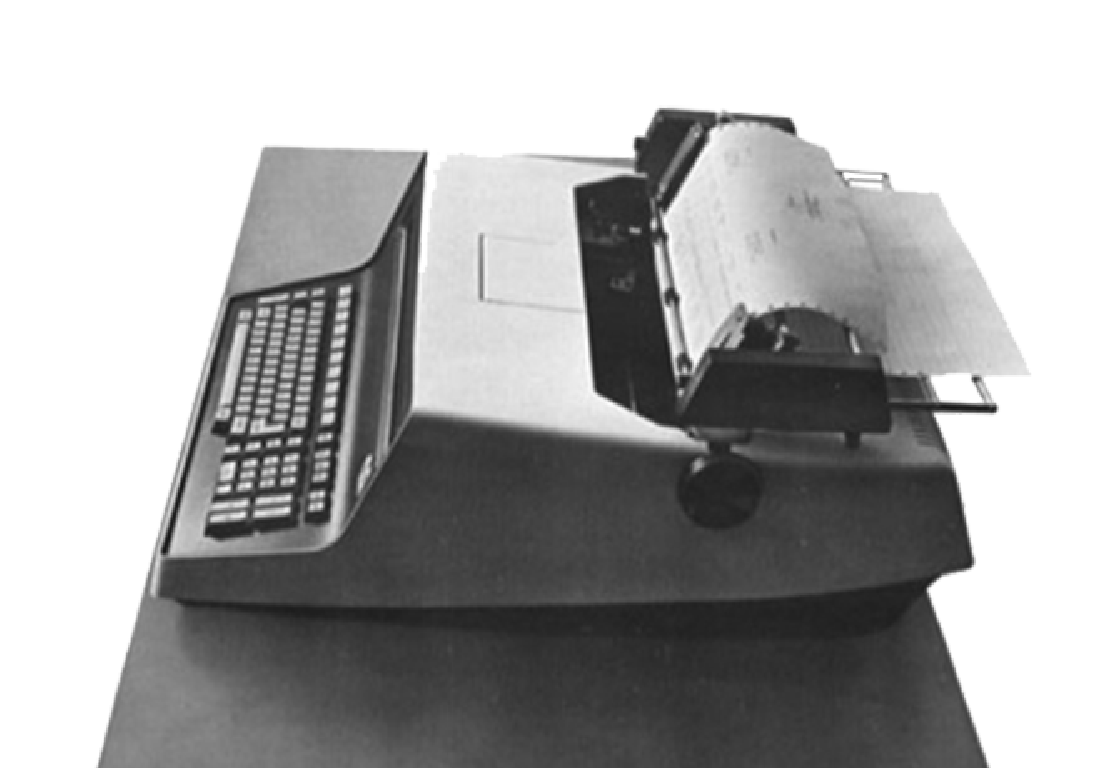
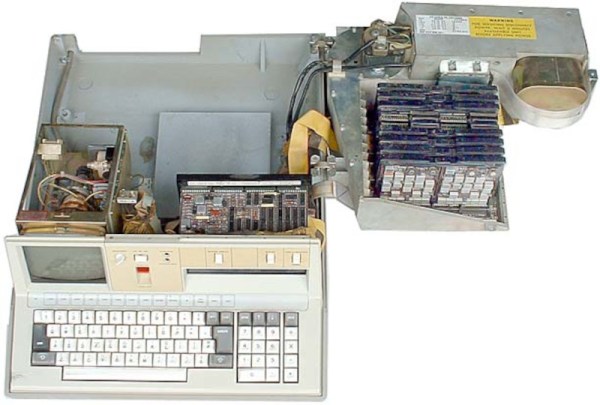
There are some things that leave indelible impressions in your memory. One of those things, for me, was a technical presentation in 1980 I attended — by calling in a lot of favors — a presentation by HP at what is now the Stennis Space Center. I was a student and it took a few phone calls to wrangle an invite but I wound up in a state-of-the-art conference room with a bunch of NASA engineers watching HP tell us about all their latest and greatest. Not that I could afford any of it, mind you. What really caught my imagination that day was the HP9845C, a color graphics computer with a roughly $40,000 price tag. That was twice the average US salary for 1980. Now, of course, you have a much better computer — or, rather, you probably have several much better computers including your phone. But if you want to relive those days, you can actually recreate the HP9845C’s 1980-vintage graphics glory using, of all things, a game emulator.

The Machine

The HP9845C with a Colorful Soft Key Display

Keep in mind that the IBM PC was nearly two years away at this point and, even then, wouldn’t hold a candle to the HP9845C. Like many machines of its era, it ran BASIC natively — in fact, it used special microcode to run BASIC programs relatively quickly on its 16-bit 5.7 MHz CPU. The 560 x 455 pixel graphics system had its own CPU and you could max it out with a decadent 1.5 MB of RAM. (But not, alas, for $40,000 which got you — I think –128K or so.)

The widespread use of the computer mouse was still in the future, so the HP had that wonderful light pen. Mass storage was also no problem — there was a 217 kB tape drive and while earlier models had a second drive and a thermal printer optional, these were included in the color “C” model. Like HP calculators, you could slot in different ROMs for different purposes. There were other options such as a digitizer and even floppy discs.

Continue reading “Your Own Engineering Workstation, With Mame”

A Look Back At The USSR Computer Industry

According to [Asianometry], in 1986 the Soviet Union had about 10,000 computers. At the same time, the United States had 1.3 million! The USSR was hardly a backward country — they’d launched Sputnik and made many advances in science and mathematics. Why didn’t they have more computers? The story is interesting and you can see it in the video below.

Apparently when news of ENIAC reached the USSR, many dismissed it as fanciful propaganda. However, there were some who thought computing would be the future. Sergey Lebedev in Ukraine built a “small” machine around 1951. Small, of course, is relative since the machine had 6,000 tubes in it. It performed 250,000 calculations for artillery tables in about 2 and half hours.

The success of this computer led to two teams being asked to build two different machines. Although one of the machines was less capable, the better machine needed a part they could only get from the other team which they withheld, forcing them to use outdated — even then — mercury delay lines for storage.

The more sophisticated machine, the BESM-1, didn’t perform well thanks to this substitution and so the competitor, STRELA, was selected. However, it broke down frequently and was unable to handle certain computations. Finally, the BESM-1 was completed and was the fastest computer in Europe for several years starting in 1955.

By 1959, the Soviets produced $59 million worth of computer parts compared to the US’s output of around $1 billion.  There are many reasons for the limited supply and limited demand that you’ll hear about in the video. In particular, there was little commercial demand for computers in the Soviet Union. Nearly all the computer usage was in the military and academia.

Eventually, the Russians wound up buying and copying the IBM 360. Not all of the engineers thought this was a good idea, but it did have the advantage of allowing for existing software to run. The US government tried to forbid IBM from exporting key items, so ICL — a UK company — offered up their IBM 360-compatible system.

The Soviets have been known to borrow tech before. Not that the west didn’t do some borrowing, too, at least temporarily.

Continue reading “A Look Back At The USSR Computer Industry”

Looking At Fortran In 100 Seconds

Usually, when we are talking about old computers, we are thinking of BASIC interpreters. But [Fireship] reminds us that it was originally Fortran and promises to give you the essentials in 100 seconds. We didn’t think you could do much in that short amount of time, but we have to admit that they did a pretty good job.

Of course, it doesn’t hurt that we know Fortran — you probably aren’t going to be able to put it on your resume after watching this video. On the other hand, we were impressed with how much they did squeeze in. If you haven’t touched Fortran since the 1960s and 1970s, you should know that it has changed. Pointers, dynamic memory allocation, and even objects are all possible. It is still a very capable language and very adept at crunching large sets of numbers. Besides, there are many sophisticated algorithms you can borrow from decades of Fortran development.

If you decide you want to have a go, there is, of course, GNU Fortran. Honestly, as much time as we spent writing Fortran in years past, we don’t recommend it for new job prospects. But if you have some period hardware and want an authentic experience, it might just be the way to go. Or, just fire up a browser if you want to play.

Not everyone agrees, though, that Fortran is on the wane. There are efforts to bring it even more up to date. You can even use it for web development.

Continue reading “Looking At Fortran In 100 Seconds”

Your Own IBM Mainframe (or Vax, Or Cray…) The Easy Way

If you want the classic experience of working with an IBM mainframe or another classic computer like a DEC VAX, you have a few choices. You could spend a lot of money trying to find one, transport it, and refurbish it. But, of course, most of us will settle for an emulator. While there are great emulators out there, most of the time you aren’t interested in running just the bare machine — you want the operating systems, the compilers, and the other software that made these machines so interesting. Running your three lines of machine code isn’t as much fun as playing hunt the wumpus or compiling some Fortran IV code. Unfortunately, finding copies of all this old software can be daunting. But thanks to the efforts of [Rattydave], you can do it with no problems at all. The secret? Pre-built docker images that have everything you need in one place.

Continue reading “Your Own IBM Mainframe (or Vax, Or Cray…) The Easy Way”

Repairing An HDMI Adapter Doesn’t Go So Well

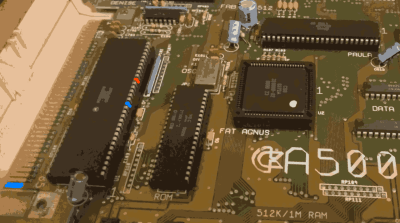
[Adrian] has a lot of retrocomputers, so he uses an RGB to HDMI converter to drive modern monitors. In particular, he has a box that uses a programmable logic chip to read various RGB signals and ships them to a Raspberry Pi Zero to drive the HDMI output. Sounds great until, of course, something goes wrong.

A converter that had worked stopped working due to a bad board with the programmable logic chip on it. Unlike the retrocomputers, this board has little tiny surface mount components. A little analysis suggested that some of the chip pins were not accepting inputs.

Continue reading “Repairing An HDMI Adapter Doesn’t Go So Well”

Striping A Disk Drive The 1970 Way

These days, mass storage for computers is pretty simple. It either uses a rotating disk or else it is solid state. There are a few holdouts using tape, too, but compared to how much there used to be, tape is all but dead. But it wasn’t that long ago that there were many kinds of mass storage. Tapes, disks, drums, punched cards, paper tape, and even stranger things. Perhaps none were quite so strange though as the IBM 2321 Data Cell drive — something IBM internally called MARS.

What is a data cell you might ask? A data cell was a mass storage device from IBM in 1964 that could store about 400 megabytes using magnetic strips that looked something like about a foot of photographic film. The strips resided inside a drum that could rotate. When you needed a record, the drum would rotate the strip you needed to the working part and an automated process would remove the strip in question, wrap it around a read/write head and then put it back when it was done.

Continue reading “Striping A Disk Drive The 1970 Way”

Will MiSTer Fool You Into Learning FPGAs?

What’s the killer app for FPGAs? For some people, the allure is the ultra-high data throughput for parallelizable tasks, which can enable some pretty gnarly projects. But what if you’re just starting out? How about 1980s style video games?

The MiSTer FPGA project created a bit of FPGA hardware that makes it easy to build essentially any old school video game or computer platform. That’s a massive clean slate. Of course, you can simply download someone else’s Atari ST or Commodore 64 setup and load it up, but if you want to learn FPGAs while recreating old-school video game machines, you’re going to want to get your hands dirty.

[Mister Retro Wolf] started up a video series last winter (trailer embedded below) where he’s embarked on a project to recreate a classic video game machine from the ground up using the MiSTer FPGA platform. In particular, he’s going to recreate the Namco Tank Battalion arcade game, from the schematics, in Verilog.

This is literally building a 6502-based video game machine from scratch (in gateware), so if you’re interested in retrocomputing or FPGAs, you’ll have something to learn here. He’s gotten through the CPU, screen, tilemap graphics, and memory so far, but it’s not done yet. To follow along, get yourself some hardware and you can probably catch up.

We’ve covered the MiSTer FPGA project before, of course, because we think it’s cool. And if a video game arcade machine is going to be your gateway drug into the seedy world of programmable gates, then so be it.

Continue reading “Will MiSTer Fool You Into Learning FPGAs?”