Tips On Building The BlackIce BBC Micro

You can look at pictures and video of the Grand Canyon, Paris, New York City or anywhere else, and yet when you finally see those places with your own eyes it is somehow different. Fielding an old computer like the BBC Micro on an FPGA has been done before. But there’s always something to learn when you do it yourself. [Machina] took a BlackIce board and made a BBC Micro replica, but he learned a few things along the way and decided to share them for our benefit.

He used the BlackIce board with [Dave’s] BBC Micro implementation that we’ve covered before. [Machina] was impressed that the board takes PMOD plug ins, so it was easy — almost — to add a VGA and keyboard port. Although both gave him some unexpected problems.

Continue reading “Tips On Building The BlackIce BBC Micro”

Can This Commodore 64 Be Saved?

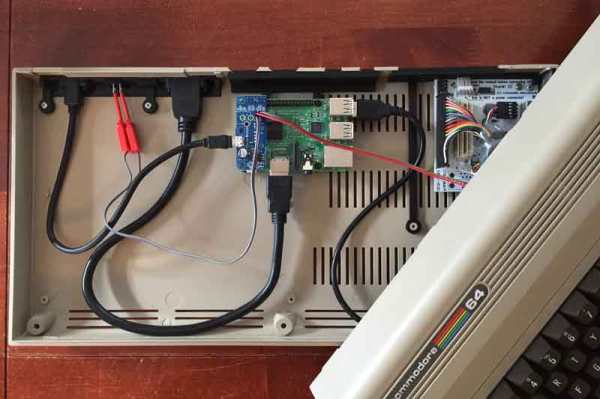
If you are a certain age, there’s a fair chance your first computer was a Commodore 64. These machines are antiques now, and [RetroManCave] received one from a friend’s loft in unknown condition. He’s made two out of three videos covering the machine, its history, and its internals. Assisting is Commodore 64 expert [Jan Beta] who apparently owned one way back when. You can see the first two videos, below.

The machine isn’t as old as you might think — it is the “newer” case style (circa 1987). [Jan] gives a great overview of the different motherboards you might encounter if you are lucky enough to come across one of these in a dumpster somewhere.

Continue reading “Can This Commodore 64 Be Saved?”

Stromberg Carlson Charactron Tube

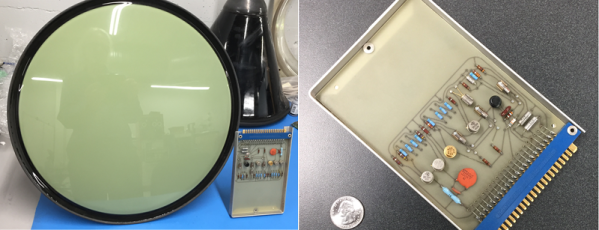
Flat panel TVs have spoiled us. It used to be that a big display took up a lot of room on your desk or living room because of the depth of the CRT’s electron gun. We wonder what the designers of the charactron would think if they could see our big flat screens today. Never heard of a charactron? Check out [uniservo’s] video of one of these old character display tubes.

You might think the device is just a simple small CRT. However, it is much stranger than that. Inside the tube was a stencil that contained all the characters the device could display. A deflection coil would move an electron beam to light up a particular character. Then another coil would deflect the patterned electron beam to the desired space on the screen. In some cases, the entire set of stencils would get the beam and the first deflection coil would pick which character made it through an aperture. Either way, the tube was not just a display, but a character generator.

Continue reading “Stromberg Carlson Charactron Tube”

Another New Old Computer On An FPGA

How would you sell a computer to a potential buyer? Fast? Reliable? Great graphics and sound? In 1956, you might point out that it was somewhat smaller than a desk. After all, in those days what people thought of as computers were giant behemoths. Thanks to modern FPGAs, you can now have a replica of a 1956 computer — the LGP-30 — that is significantly smaller than a desk. The LittleGP-30 is the brainchild of [Jürgen Müller].

The original also weighed about 740 pounds, or a shade under 336 kg, so the FPGA version wins on mass, as well. The LGP-30 owed its relative svelte footprint to the fact that it only used 113 tubes and of those, only 24 tubes were in the CPU. This was possible, because, like many early computers, the CPU worked on one bit at a time. While a modern computer will add a word all at once, this computer — even the FPGA version — add each operand one bit at a time.

Continue reading “Another New Old Computer On An FPGA”

AsciiCam: Make ASCII Art With Your Phone

We admit it, we have a nostalgic soft spot for ASCII Art. Pictures made form characters, printed on an old-fashioned line printer. They’ve been a hacker standby since the 1960’s. Times have moved on though. These days we’re all carrying supercomputers in our pockets.  Why not use them to create more great ASCII art? That’s exactly what [Brian Nenninger] did with AsciiCam. AsciiCam lets you use your Android phone’s camera to create ASCII images.

Using the software is simple. Just launch it and you’re greeted with an ASCII preview of the camera image. Users can select from a 16 color palette and full 24 bit color. Monochrome modes are also available. You can also choose from black text on a white background or white text on black.

The great thing about AsciiCam is the fact that it is open source. You can download the full source code from Github. If you just want to run the software, it’s available through the Google Play Store. This is a labor of love. The first Github commits were six years ago, and [Bran] is still working — the most recent commits were made only a few days back. AsciiCam is also a good example for neophyte Android programmers.

Want to know more about ASCII art? Check out Al’s history of ASCII art, or this talk about both ASCII and ANSI creations.

Hackaday Links Column Banner

Hackaday Links: November 19, 2017

[Peter]’s homebuilt ultralight is actually flying now and not in ground effect, much to the chagrin of YouTube commenters. [Peter Sripol] built a Part 103 ultralight (no license required, any moron can jump in one and fly) in his basement out of foam board from Lowes. Now, he’s actually doing flight testing, and he managed to build a good plane. Someone gifted him a ballistic parachute so the GoFundMe for the parachute is unneeded right now, but this gift parachute is a bit too big for the airframe. Not a problem; he’ll just sell it and buy the smaller model.

Last week, rumors circulated of Broadcom acquiring Qualcomm for the sum of One… Hundred… Billion Dollars. It looks like that’s not happening now. Qualcomm rejected a deal for $103B, saying the offer, ‘undervalued the company and would face regulatory hurdles.’ Does this mean the deal is off? No, there are 80s guys out there who put the dollar signs in Busine$$, and there’s politicking going on.

A few links posts ago, I pointed out there were some very fancy LED panels available on eBay for very cheap. The Barco NX-4 LED panels are a 32×36 panels of RGB LEDs, driven very quickly by some FPGA goodness. The reverse engineering of these panels is well underway, and [Ian] and his team almost have everything figured out. Glad I got my ten panels…

TechShop is gone. With a heavy heart, we bid adieu to a business with a whole bunch of tools anyone can use. This leaves a lot of people with TechShop memberships out in the cold, and to ease the pain, Glowforge, Inventables, Formlabs, and littleBits are offering some discounts so you can build a hackerspace in your garage or basement. In other TechShop news, the question on everyone’s mind is, ‘what are they going to do with all the machines?’. Nobody knows, but the smart money is a liquidation/auction. Yes, in a few months, you’ll probably be renting a U-Haul and driving to TechShop one last time.

3D Hubs has come out with a 3D Printing Handbook. There’s a lot in the world of filament-based 3D printing that isn’t written down. It’s all based on experience, passed on from person to person. How much of an overhang can you really get away with? How do you orient a part correctly? God damned stringing. How do you design a friction-fit between two parts? All of these techniques are learned by experience. Is it possible to put this knowledge in a book? I have no idea, so look for that review in a week or two.

Like many of us, I’m sure, [Adam] is a collector of vintage computers. Instead of letting them sit in the attic, he’s taking gorgeous pictures of them. The collection includes most of the big-time Atari and Commodore 8-bitters, your requisite Apples, all of the case designs of the all-in-one Macs, some Pentium-era PCs, and even a few of the post-97 Macs. Is that Bondi Blue? Bonus points: all of these images are free to use with attribution.

Nvidia is blowing out their TX1 development kits. You can grab one for $200. What’s the TX1? It’s a really, really fast ARM computer stuffed into a heat sink that’s about the size of a deck of cards. You can attach it to a MiniITX breakout board that provides you with Ethernet, WiFi, and a bunch of other goodies. It’s a step above the Raspberry Pi for sure and is capable enough to run as a normal desktop computer.

Hackaday Prize Entry: The Minimalist Z80 Computer

The best projects always seem to come from eBay. A few weeks ago, we found a few tiles meant for gigantic LED panel installations, and fifty bucks got you ten tiles. That eBay auction is now sold out. A while ago, [Just4Fun] realized he could build a Z80 microcomputer with $4 worth of parts from everyone’s favorite online auction house. The result is a $4 Z80 home computer, and a great Hackaday Prize entry to boot.

So, what do he need to build a retrocomputer loaded up with Forth, CP/M, and Basic? A CPU is a necessity, and [Just4Fun] found a Z80 (technically a Z84C00) for just a bit more than a dollar. A computer will need some RAM too, and a 128 kiB parallel SRAM was just the ticket for another dollar.

Here’s where things get a bit more interesting. Where the retrocomputers of yore were loaded up with glue logic, PLAs, or other weird chips, modern technology has come a long way. Instead of a massive amount of glue, [Just4Fun] is using an ATmega32A for all the I/O, address decoding, and a serial terminal.

The ATmega thrown into this cornucopia of vintage chips is itself more than a decade old, but it does have 40 pins and 32 kiB of Flash. That’s enough to ‘virtualize’ all the peripherals you’d need on a Z80 bus and provide the clock signal for the rest of the computer.

This home computer was originally designed and laid out on a solderless breadboard, but [WestfW] managed to stuff this all onto a small PCB. That’s a cheap computer that gets you all the retrocomputing goodies, and it’s something that’s just random enough to be a perfect entry for the Anything Goes portion of the Hackaday Prize.