Using An Arduino To Re-Create A Computer’s Keyboard Decoder

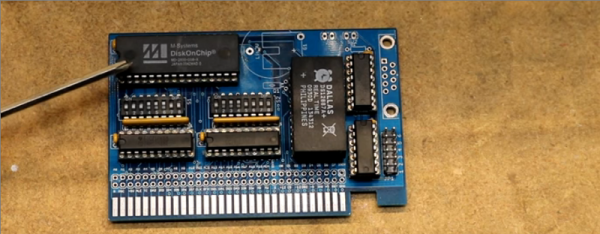
[Max Breedon] found an old Apple IIe clone twenty years ago. He recently dug this Epson AP-200 out of the salvage heap and quickly discovered that the keyboard decoder chip was fried. The old chip was way too obscure to source a replacement — and soon this post will be the top Google result for the string, ‘C35224E’ — so he busted out his trusty UNO and created a replacement keyboard decoder.

Unlike the Apple II, where all the keyboard decoding happens on the keyboard, this clone used a dedicated chip on the main board. Although it’s a rare part that’s virtually ungoogleable, this chip’s architecture and pinout can be figured out by testing out every trace for continuity. After locating what looked like four data pins, he had the Arduino send signals onto the clone to see what characters popped up. That didn’t work, but it led him to idea that two of the wires were clock and data, and after a bit of experimenting figured out that the third pin was a latch enable of some sort that sent the character.

So, [Max] created an Arduino rig to do the same thing. The Arduino uses a shift register to interact with the keyboard’s 8×10 matrix, and the sketch translates any serial data it receives into the keypresses the clone is expecting. After prototyping with the UNO, [Max] hardwired an Arduino Nano (as well as the shift register) into a daughter board with pins extending into the old chip’s sockets. A permanent solution!

In addition to a weird keyboard controller that has been lost to the sands of time, this Apple IIe clone features a few more parts that are downright weird. There are two chips that are found in a few other Apple clones labeled STK 65301 and STK 65371, used as ASICs, MMUs, or a 20-IC expression of Wozzian brilliance condensed into custom silicon. There’s another weird chip in this clone, a 27c32 ROM loaded up with repetitive bits. There is no obvious 6502 code or strings in this ROM, so if anyone has an idea what this chip does, send [Max] a note.

Retrocomputing With Open Source FPGAs

A few years ago, we saw the reverse engineering of the Lattice iCE40 bitstream, opening the door to a completely Open Source development tool chain for FPGAs. This was an astonishing amount of work from [Clifford Wolf], [Mathias Lasser], and [Cotton Seed], but since then we haven’t seen a whole lot from Project IceStorm. Now, that’s about to change, and in the coolest way possible. [hoglet] is retrocomputing on an ICE40 development board.

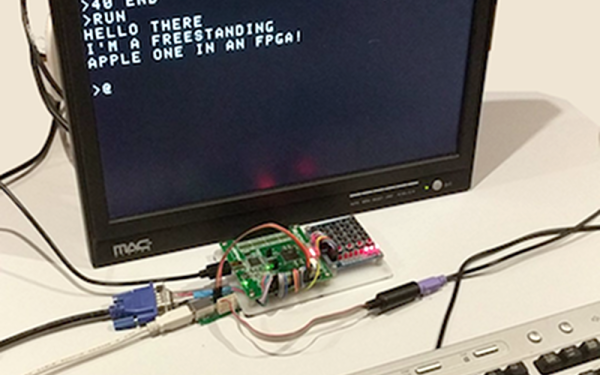
This is an implementation of the Acorn Atom on a myStorm BlackIce board. This board is basically just a Lattice iCE40 FPGA, a few support components, and a bunch of pin headers, some of which are in the not-so-handy Arduino pinout footprint. By porting some Acorn Atom implementations and a 6502 core to verilog, [hoglet] was able to stuff a cool old retrocomputer onto an Open Source FPGA development board. Video output is through a resistor DAC driving a VGA cable, and keyboard input is through PS/2.

Just about everything about this Open Source implementation of the Acorn works, and there’s still a lot left in the iCE40 FPGA. [hoglet] is able to run the 6502 core at 25MHz, which means just about every 6502-based system should be able to run on the BlackIce board.


This 6502 Computer Project Is A Work Of Art

If you were a home constructor in the 8-bit era, the chances are that if you built a microcomputer system you would have ended up with a bare printed circuit board and a terminal. If you were on a budget you might have had a piece of stripboard as well, or maybe even wire-wrap. Beautiful cases were out of reach, they came with expensive commercial computers that were not the preserve of impoverished hobbyists.

Constructing an 8-bit machine in 2017 is a much easier process, there are many more options at your disposal. There is no need to make a bare PCB when you have a 3D printer, and this is demonstrated perfectly by [Dirk Grappendorf]’s 6502 computer project. He’s built from scratch an entire 6502 system, with a text LCD display, and housed it in a case with a keyboard that would put to shame all but the most expensive commercial machines from back in the day.

But this is more than just a hobby project thrown together that just happens to have a nice case, he’s gone the extra mile to the extent that this is professional enough that it could have been a product. If you’d been offered [Dirk]’s machine in 1980 alongside the competitors from Apple and Commodore, you’d certainly have given it some consideration.

We’ve seen retrocomputers too numerous to mention on these pages over the years, so if they are your thing perhaps it’s time to draw your attention to our VCF West reports, and to our reviews of computer museums in Germany, and Cambridge or Bletchley, UK.

Thanks [Colin] for the tip.

Getting Started With Blinking Lights On Old Iron

If you ever go to a computer history museum, you’ll be struck by how bland most modern computers look. Prior to 1980 computers had lights and switches, and sometimes dials and meters. Some had switchboard-like wiring panels and some even had oscilloscope-like displays. There’s something about a machine with all those switches and lights and displays that gets your hacker juices flowing. Have you ever wanted to get started in retrocomputing? Is it difficult? Do you need a lot of money? That depends on what your goals are.

There are at least three ways you can go about participating in retrocomputing: You can pony up the money to buy actual antique computers, you can build or buy old computers recreated with anywhere from zero to one hundred percent of period-authentic components, or you can experiment with emulators that run on a modern computer. As a hybrid of the second and third option there are also emulations in FPGAs.

You can see that the first option can be very expensive and you will probably have to develop a lot of repair and restoration skills. Watching [Mattis Lind] twiddle the bits on an actual PDP-8 in the clip above is great, but you’ll need to work up to it. The two techniques which get you going without the original hardware don’t have to break the bank or even cost anything presuming you already have a PC.

Although some sneer at emulation, for some machines it is almost the only way to go. You couldn’t buy the original EDSAC, for example. It is also a good way to get started without a lot of expense or risk. But regardless of how you do it, there’s one thing in common: you have to know how to operate the thing.

Continue reading “Getting Started With Blinking Lights On Old Iron”

Game Like It Is 1983

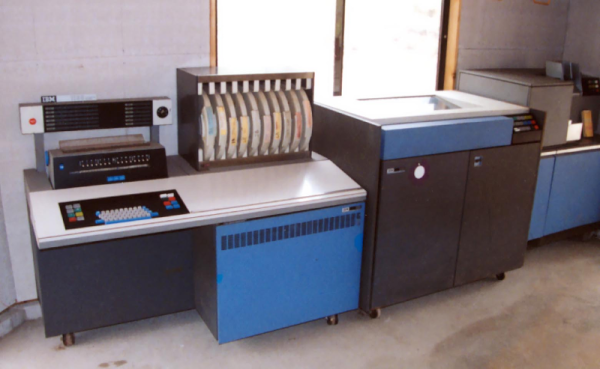
The first computer I ever physically saw — I think — was an IBM System/3. You might not remember them. They were business computers for businesses that couldn’t justify a big mainframe. They were “midrange.” Nevermind that the thing probably had the memory and processing speed of the CPU inside my mouse. Time progressed and IBM moved on to the System/3x (for example, the System/32). Next up was the AS/400 and finally the IBM i, which is still in production. Here’s a secret, though, most of the code I’ve seen running on an IBM i dates back to at least the System/3 days and maybe even before that.

If you are interested in history, or midrange computers (which are mainframe-like in their operation), you might want to actually play with a real machine. A quick glance at eBay tells me that you might be able to get something workable for about $1000. Maybe. That’s a bit much. What if you could get time on one for free? Turns out, you can.

The Cloud Option

Head over to PUB400.com and register for an account. This won’t be instant — mine took a day or two. The system is for educational purposes, so be nice and don’t use it for commercial purposes. You get 150MB of storage (actually, some of the documentation says 250MB, and I have not tested it). While you are waiting for your account, you’ll need to grab a 5250 terminal emulator and adjust your thinking, unless you are a dyed-in-the-wool IBM guy.

Even though the IBM i looks like an old 1970’s midrange, the hardware is quite modern with a 64-bit CPU (and the architecture can handle 128 bits) and well-known stability. However, the interface is, well, nostalgic.

Ready…

Depending on your host computer, there are several IBM 5250 terminal programs available. They recommend tn5250 or tn5250j which use Java. However, I installed Mochasoft’s emulator into my Chrome browser. It is a 30-day free trial, but I figure in 30 days I’ll be over it, anyway.

Continue reading “Game Like It Is 1983”

Homemade Computer From 1970s Chips

Sometimes it starts with a 555 timer and an op-amp. Other times with a small microcontroller. But the timing’s not so great and needs a dedicated timing crystal circuit. And maybe some more memory, and maybe the ATtiny should be swapped out for some 74LS-series chips. And now of course it needs video output too. Before you know it, you’re staring at a 40-chip computer that hearkens back to a simpler, yet somehow more complex, time of computing. At least that’s where [Marcel] is with his breadboard computer based on 1970s-era chips.

For what it does, this homebrew computer is relatively simple and straightforward. It gets 8 bits of processing power from 34 TTL chips. Another 6 round out the other features needed for the computer to operate. It is capable of rendering 64 colors in software and has more than enough memory for a computer of this sort. So far the only recurring problem [Marcel] has had has been with breadboard fatigue, as some of the chips keep popping out of the sockets.

This is a great project for anyone interested in homebrew or 8-bit computing, partially because of some of the self-imposed limitations that [Marcel] imposed on himself, like “only chips from the 70s”. It’s an impressive build on its own and looks to get much better since future plans call for a dedicated PCB to solve the issue with the worn-out breadboards. If you’re already invested in a project like this, don’t forget that the rabbit hole can go a little deeper: you can build a computer out of discrete transistors as well.

A Universal USB To Quadrature Encoder

Computer mice existed long before the Mac, and most of the old 8-bit computers had some software that could use a mouse. These mice had balls and quadrature encoders. While converters to turn these old mice into USB devices exist, going the other way isn’t so common. [Simon] has developed the answer to that problem in the form of SmallyMouse2. It turns a USB mouse into something that can be used with the BBC Micro, Acorn Master, Acorn Archimedes, Amiga, Atari ST and more.

The design of the SmallyMouse2 uses an AT90USB microcontroller that supports USB device and host mode, and allows for a few GPIOs. This microcontroller effectively converts a USB mouse into a BBC Micro user port AMX mouse, generic quadrature mouse, and a 10-pin expansion header. The firmware uses the LUFA USB stack, a common choice for these weird USB to retrocomputer projects.

The project is completely Open Source, and all the files to replicate this project from the KiCad project to the firmware are available on [Simon]’s GitHub. If you have one of these classic retrocomputers sitting in your attic, it might be a good time to check if you still have the mouse. If not, this is the perfect project to delve into to the classic GUIs of yesteryear.