Counting Bees

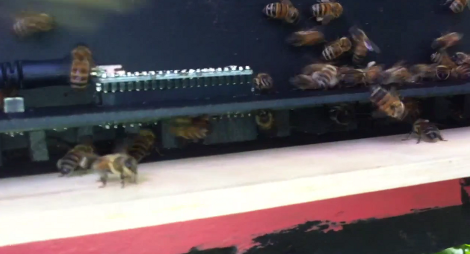
This is the bee counter which [Hydronics] designed. It’s made to attach to the opening for a hive, and will count the number of bees entering and exiting. We’re not experienced bee keepers ourselves (in fact we’re more of the mind of getting rid of stinging beasties) but we understand their important role in agriculture and ecosystem so we’re glad someone’s making a nice home for them.

Most of the apparatus is a circuit board lined with reflective sensors. There is a double-row of pin sockets on the top of the board which accepts the Teensy+ which monitors those sensors. The bees must pass below this PCB every time they enter or leave the hive, thereby tripping a sensor. In the video after the break [Hydronics] shows off the system with a netbook used to monitor the output. But it sounds like he has plans for an integrated display system in future versions of the bee counter.
Continue reading “Counting Bees”

Building Sensors For The Scratch Programming Language

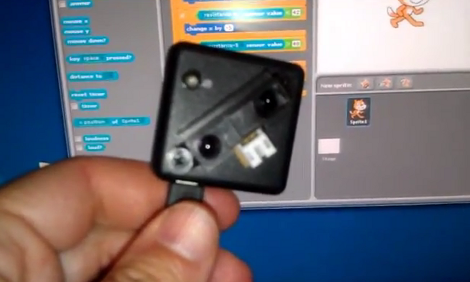
[Kevin Osborn] is making it a bit easier for young programmers to write programs that interact with the physical world. The device he’s holding in the picture is an Arduino based accelerometer and distance sensor meant for the Scratch language.

Scratch is a programming language developed at MIT. It has kids in mind, and focuses on graphical building blocks. This can make it quite a bit easier to introduce youngsters to programming concepts without the roadblocks and gotchas that come with learning syntax.

As you can see in the clip after the break, [Kevin’s] Arduino sketch includes hooks that automatically pull the accelerometer and distance data into the Scratch environment. We figure his example provides everything you need to get just about any type of sensor up and running, be it a magnetometer or LDR (both of which would make a nice burglar-alarm type project). Give it a try with your own hardware and see what you can accomplish.

Continue reading “Building Sensors For The Scratch Programming Language”

Huge Water And Light VU Meter Plus More

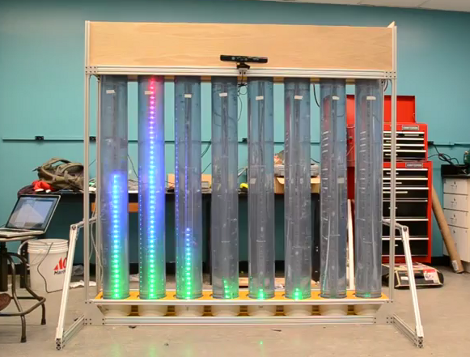
This is the senior design project for a group at the University of Vermont. It’s a wet, bubbly, blinky, interactive thing. Each column is a clear tube filled with water, with a string of fully addressable RGB LEDs suspended in the center. In idle mode, the lights scroll through a series of interesting patterns while the water is filled with bubbles to add some depth to the presentation. There is also a VU meter function, as seen here and during the Portal theme song that ends the video demo after the break.

A Teensy++ board is used to address the display. It’s set up to receive serial commands from a Processing script which is responsible for generating the animations. At the top of the frame you can see there’s a Kinect sensor. By standing in the standard post (we think it should be called the Kinect mug shot) the installation will automatically switch over to body control. We could see this thing making its way into a long airplane terminal hallway, following the travelers along their trek from one terminal to the next.

Continue reading “Huge Water And Light VU Meter Plus More”

Control Your PC With A Remote

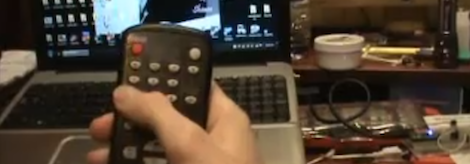
Because his computer is gradually turning into an all-inclusive media display device, [Shawn] figured a remote to control the volume and a video playlist would be a reasonable addition. TV remotes for computers have been around for years, but [Shawn] decided to go the DIY route and build his own computer remote.

For the build, [Shawn] used a Teensy dev board with an IR receiver module and the requisite infrared remote library. To translate infrared signals to keyboard commands,[Shawn] decided to base his project off a previous build that used a small program called AutoHotKey.

Right now the build can cycle through a pre-defined YouTube and Shoutcast playlist and change the volume of the currently playing track. There’s also support for moving the mouse with directional buttons on the remote, but we’re wondering if a better implementation would be using the Windows multimedia keyboard scan codes that should be supported by [Shawn]’s laptop.

Still, [Shawn] managed a very nice build that would fit into our computer battlestations quite nicely. Check out the demo of the remote in action after the break.

Continue reading “Control Your PC With A Remote”

Building A Keyboard From Scratch

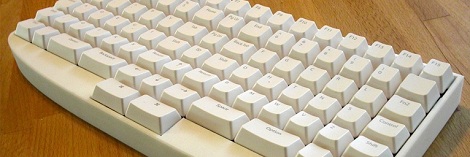
After over a year of work, [dmw] is nearly done with his Humble Hacker Keyboard. It’s a keyboard that has been influenced by some pretty crazy looking designs, but meets all of [dmw]’s needs for a compact, programmer-oriented key layout that’s easy to type on.

[dmw] posted a pseudo-build log  over at the geekhack keyboard forums. Every single part of this keyboard is custom-made. The key caps were made by Signature Plastics, the case was made by Shapeways, and the custom PCB for the key switches came directly from Express PCB. The key switches are blue Alps sliders (one of the best key switches available) with a few white Alps switches taken from an old Apple keyboard.

After soldering a hundred diodes and switches, [dmw] installed a Teensy++ to convert the closing key switches to something his computer can understand. This turned out to be a perfect of the Teensy because of the USB peripheral libraries that already exist. The source is up on github, so if you’ve ever wanted to replace your Model M with something more ergonomic, here’s your chance.

Easy Tactile Controls And Displays For Your Flight Simulator

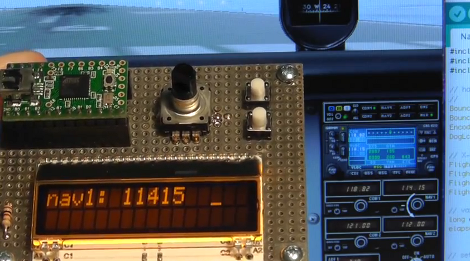
If you’ve been thinking of adding some tactile controls and readouts for your flight simulators this guide should give you the motivation to get started with the project. [Paul] explains how to build controls and connect them to the simulator data. He makes it look easy, and thanks the interface examples in his code it actually is.

Here he’s built the hardware using a Teensy controller board. The controller communicates via USB and the software is cross-platform. He’s controlling the heading information of the X-Plane simulator using the rotary encoder for fine adjustments and the buttons for increments of 100. But he doesn’t stop there. He’s working on an auto-throttle design that uses a servo motor to move the throttle lever. A potentiometer can be used to vary the throttle, with the servo mapped to the position of that knob. But it works both ways, dragging the virtual throttle on-screen will do the same.

This is one way to make flight simulators more interesting without devoting a whole room of your house to the cause. Don’t miss [Paul’s] fantastic demo video after the break.

Continue reading “Easy Tactile Controls And Displays For Your Flight Simulator”

Modular Controllers You Can’t Wait To Show Off To Your Friends

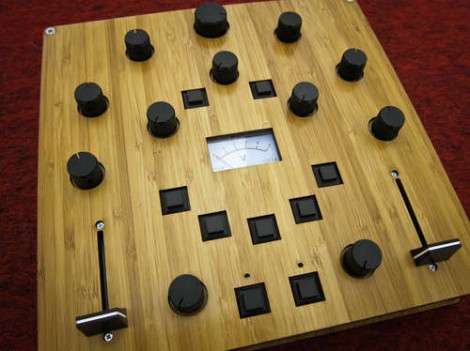
Let’s get this straight, [Alex] is going to show us how to make controllers like this one? Where do we sign up? Even without seeing it in action we want one, but the urge to build is even greater after he shows it off (check the clip after the break). He’s a design student who made an open source project aimed at making it easier to build hardware controllers that pair with just about any software application.

The need for external controllers is on the rise, starting with music-based applications like DJ tools, and Midi controllers for musicians (we’re thinking Monome clones). But anything that can take input from a USB HID can be controlled with something like this. That’s because [Alex] is using the Teensy controller board as an interface. Just select the input types you want – sliders, potentiometers, buttons, switches – then wire them up to the microcontroller pins. If you start to run out of inputs he also discusses some add-on chips to use as port expanders.

Of course there’s a lot to be said for the physical appearance as well. Even though he used point-to-point connections for all of the controls, that wiring is hidden behind the aesthetically pleasing laser-cut dashboard. Follow his advice for layout and find a friend with access to a sweet laser cutter and you’re in business. Continue reading “Modular Controllers You Can’t Wait To Show Off To Your Friends”