Solder Ninja Dabbles In USB Power Arcana

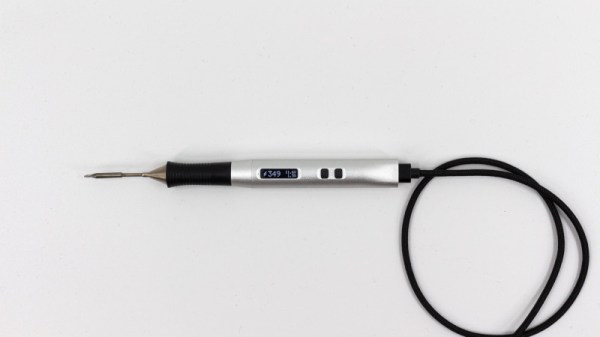
USB first hit the scene in the 1990s, and was intended to simplify connecting peripherals to PCs and eliminate the proliferation of various legacy interfaces. Over 20 years later, it’s not only achieved its initial goals, but become a de facto standard for charging and power supply for all manner of personal electronic gadgets. If you asked someone back in 1995 whether or not you could build a USB-powered soldering iron, they’d have politely asked you to leave the USB Implementers Forum. But times change, and Solder Ninja is just that!

With a maximum power draw of 40 W, the Solder Ninja required careful design to ensure practicality. It supports a variety of USB power standards, including USB-BC 1.2, USB Quick Charge, and USB Power Delivery. This enables it to draw the large amounts of current required for the heating element. To make it easy to use with a variety of chargers out in the wild, it displays the current negotiated voltage and maximum current draw. This enables the user to understand the varying performance of the device, depending on the charger it’s plugged into.

Given the multitude of different USB power standards, we imagine [Nicolas] has the patience of a saint to perfect a project like this. We’ve seen similar builds before, too. Video after the break.

Continue reading “Solder Ninja Dabbles In USB Power Arcana”

An Arduino Pro Micro With USB-C

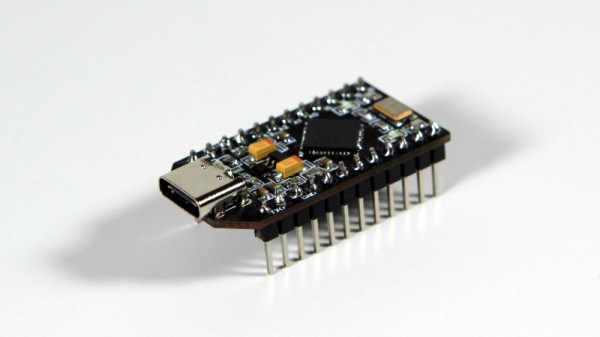
USB-C versus USB Micro connectors are turning into one of the holy wars of our time. Rather than be left on the wrong side of the divide [Stefan S] has come up with his own USB-C version of of an Arduino Pro Micro to avoid having to always find a different cable.

Home made Arduinos come in all shapes and sizes from the conventional to the adventurous, and from the pictures it seems that this one is firmly in the former camp. The USB-C is present in connector form alone as the device is only capable of talking at the much slower speed of the ATMEGA32U4 processor, but having the newer connector should at least make cabling more accessible.

This is one of the most practical Arduino clones we’ve ever seen, but one of our other favourites is also a bit impractical.

USB-C: One Plug To Connect Them All, And In Confusion Bind Them

USB stands for Universal Serial Bus and ever since its formation, the USB Implementers Forum have been working hard on the “Universal” part of the equation. USB Type-C, which is commonly called USB-C, is a connector standard that signals a significant new chapter in their epic quest to unify all wired connectivity in a single specification.

Many of us were introduced to this wonder plug in 2015 when Apple launched the 12-inch Retina MacBook. Apple’s decision to put everything on a single precious type-C port had its critics, but it was an effective showcase for a connector that could handle it all: from charging, to data transfer, to video output. Since then, it has gradually spread to more devices. But as the recent story on the Raspberry Pi 4’s flawed implementation of USB-C showed, the quest for a universal connector is a journey with frequent setbacks.

Continue reading “USB-C: One Plug To Connect Them All, And In Confusion Bind Them”

Hackaday Podcast 027: Confusingly USB-C, Glowey Displays, Logically VGA, Hackers Who Changed Gaming

Hackaday Editors Elliot Williams and Mike Szczys dive into the most interesting hacks of the week. Confused by USB-C? So are we, and so is the Raspberry Pi 4. Learning VGA is a lot easier when abstract concepts are unpacked onto a huge breadboard using logic chips and an EEPROM. Adding vision to a prosthetic hand makes a lot of sense when you start to dig into possibilities of this Hackaday Prize entry. And Elliot gets nostalgic about Counter-Strike, the game that is a hack of Half-Life, grew to eclipse a lot of other shooters, and is now 20 years old.

Take a look at the links below if you want to follow along, and as always tell us what you think about this episode in the comments!

Take a look at the links below if you want to follow along, and as always, tell us what you think about this episode in the comments!

Direct download (60 MB or so.)

Continue reading “Hackaday Podcast 027: Confusingly USB-C, Glowey Displays, Logically VGA, Hackers Who Changed Gaming”

Hackaday Links Column Banner

Hackaday Links: July 7, 2019

Like modular synths? Sure you do, and you need another hole to throw money into! For the last few months, Supplyframe has been hosting synthesizer and electronic music meetups in San Francisco. This week, the HDDG/Piqued meetup will have a great talk with the creator of VCV Rack. VCV Rack is an Open Source, virtual, modular synthesizer — basically a bunch of Eurorack modules inside a computer and it costs a whole lot less. The talk is this Thursday evening in SF. You should come!

The W600 is a new module (you can get it from Seeed, although it’s produced by Winner Micro in various formats) that is basically an ESP32, except it uses an ARM Cortex-M3 instead of a Tensilica core. [ultratechie] recently got their hands on one of these modules and got started with MicroPython. This seems like a capable module and it’s only three dollars, but will that be enough to catch up to the ESP32?

Purple gorilla enters art gallery. At the Het Nieuwe Instituut in Rotterdam there is a new exhibit featuring the, ‘destructive beauty of the computer virus’. The curators are detailing the historical progress of the computer virus from innocent DOS viruses to Melissa to Stuxnet and ransomware.

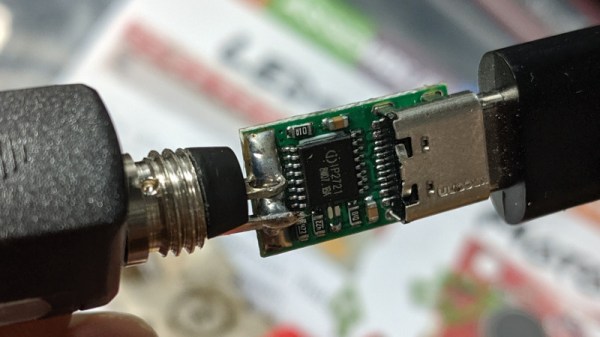
USB C has been around for a while, but 2019 is the year everything started to become USB C. Case in point: the Raspberry Pi 4. The only problem is that the Raspberry Pi Foundation messed up their implementation of USB C. Not a problem, because here’s how you design a USB C power sink. Basically, you give each CC line its own resistor. Don’t even think about it, just copy the USB C spec. You don’t know more about USB C than the people who designed it, and you’re not really saving a ton of money by deleting one resistor. Just copy the spec.

Power To The Pi 4: Some Chargers May Not Make The Grade

The Raspberry Pi 4 has been in the hands of consumers for a few days now, and while everyone seems happy with their new boards there are some reports of certain USB-C power supplies not powering them. It has been speculated that the cause may lie in the use of pulldown resistors on the configuration channel (CC) lines behind the USB-C socket on the Pi, with speculation that one may be used while two should be required. Supplies named include some Apple MacBook chargers, and there is a suggestion is that the Pi may not be the only device these chargers fail to perform for.

Is this something you should be worried about? Almost certainly not. The Pi folks have tested their product with a wide variety of chargers but it is inevitable that they would be unable to catch every possible one. If your charger is affected, try another one.

What it does illustrate is the difficulties faced by anybody in bringing a new electronic product to market, no matter how large or small they are as an organisation. It’s near-impossible to test for every possible use case, indeed it’s something that has happened to previous Pi models. You may remember that the Raspberry Pi 2 could be reset by a camera flash or if you have a very long memory, that the earliest boards had an unseemly fight between two 1.8 V lines that led to a hot USB chip, and neither of those minor quirks dented their board’s ability to get the job done.

Mistakes happen. Making the change to USB-C from the relative simplicity of micro-USB is a big step for all concerned, and it would be a surprise were it to pass entirely without incident. We’re sure that in time there will be a revised Pi 4, and we’d be interested to note what they do in this corner of it.

New Part Day: This $10 Rocking Single Board Computer Does Everything You Want

Single board computers are great, but what we really need are cheap single board computers. Running Linux on anything isn’t as good as running Linux on everything, and all that. To that end, here is the Rock Pi S, a $10 single board computer with Ethernet, WiFi, and it costs $10.

This one comes from the boffins at Radxa, already behind the footnote-worthy Rock Pi 4, a single board computer that appears to be heavily derived from the Raspberry Pi but with a 4 in the name so it’s obviously better. It also has 4 GeeBees of RAM, so it’s got that going for it too. Their latest product is the Rock Pi S, a board that seems as though it’s taking inspiration from the C.H.I.P.. The biggest selling point is of course the price: $10 for the version with 256MB of RAM and without WiFi or Bluetooth. Various other incarnations exist with permutations of 256MB or 512MB of RAM, and with or without WiFi and Bluetooth. The highest spec variant costs $16, but is sold out at the moment.

This tiny little single board computer fills a need in the marketplace; the Raspberry Pi Zero is cheap and small when it’s available, but sometimes you need Ethernet for various reasons and a real USB A port is great to have. We’re looking forward to the builds this tiny board enables and all the fantastic creations that will come from a community so very interested in single board computers.