Multi-system Nintendo Emulator Uses Stock Controllers

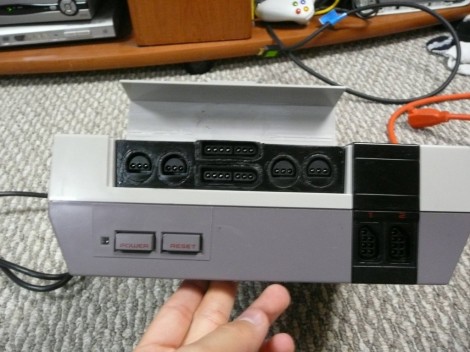
The first month of [WoolyDawg5’s] summer break went into building one Nintendo emulator to rule them all. He thinks there’s nothing like playing the games on the original controllers, and we agree with him 100%. Here you can see that the cartridge door on this NES enclosure hides the extra connectors he needs.

With that door closed this looks like a stock console, but only from the front. If you take a look at the back of it you’ll see how he pulled this off. There’s a Zotac motherboard whose I/O panel has been fitted into the back. It’s responsible for emulating games for the NES, SNES, and GameCube consoles — we’re sure it can do more but that covers the controller ports seen here. Each port is wired to a USB controller module. The cables for these modules exit the back of the case and plug into the motherboard’s I/O panel. There is WiFi for the board, and that’s what [WoolyDawg] uses for configuration, tunneling into the OS instead of connecting a keyboard or mouse.

Of course you could just shoehorn all-original console hardware into one package to accomplish something like this.

[Thanks KoldFuzion]

Multi-channel Analog Input Module Is A Good Jumping-off Point For Many Projects

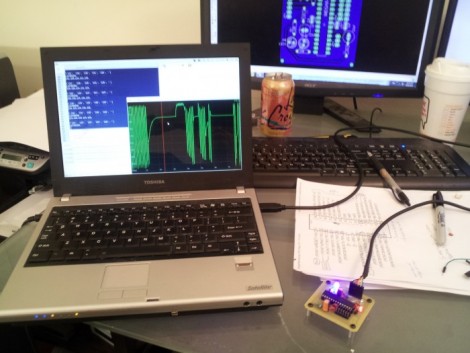
[Scott Harden] has already produced some projects which measure analog inputs. But he’s got plans for more and wanted a base system for graphing analog signals. You can see the small board next to his laptop which offers the ability to sample up to six signals and push them to a PC via USB.

The ATmega48 and a few supporting components are all you’ll find on that board. The USB connection is taken care of by an FTDI cable. He went that route because the cables are relatively cheap, easy to come by, and already have driver support on all the major operating systems. If you look at the screen you can see a window graphing one analog input in real-time. He wrote this in Python (which is once again a cross-platform tool) and it has no problem graphing all six inputs at once.

This is immediately useful as an upgrade to [Scott’s] ECG machine. His future plans include a Pulse Oximeter, EEG, and EEG.

Drop-in Board For NES ROM Chip Makes Cartridge Reprogrammable

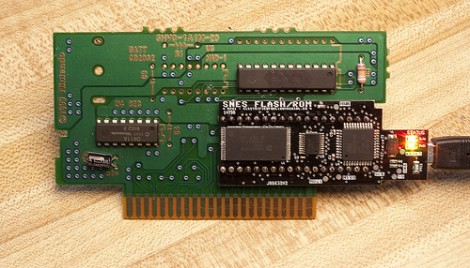
Here’s the guts from [Dext0rb’s] Super Nintendo cartridge. It’s easy to pick out the dark-colored board which lets him reflash SNES ROMs via USB. We’ve seen this done a number of times, but this is a much cleaner option than hacks that just add a dead-bug-style memory chip.

The board he designed has a double-row of pin headers sized to fit the footprint vacated by the original ROM chip. The board has a mini-USB connector which can be accessed through a hole he cut in the side of the cartridge enclosure. This is in the right place so that you cannot plug it in when it’s being used in the SNES (which would cause damage). The ATmega32u4 chip handles USB connectivity and programs the 32 megabit flash chip which stores the ROM. He’s posted a few articles on the blog portion of his site which you’ll find interesting. We suggest starting with this hardware teaser.

Nook Touch Becomes A Desktop Computer

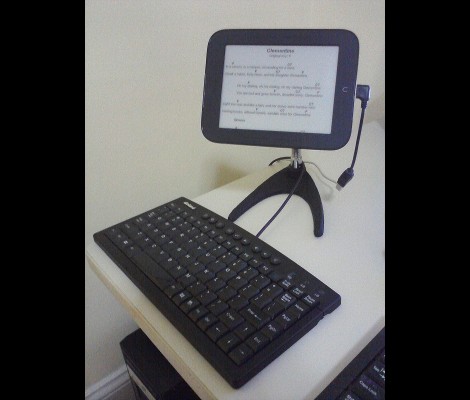
It looks like [Renate] has been pounding out hack after hack on her Nook touch. It stands on its own now thanks to a tripod bracket hack which is the most recent work she’s done. But there are bunch of other modifications, all of which are linked after the break.

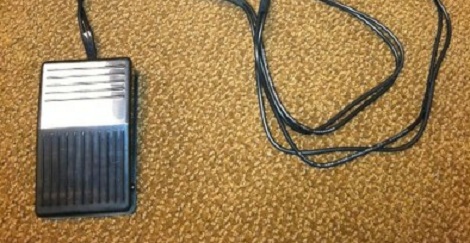
We believe that this is meant for displaying lyrics as she sings and plays along. To that end there’s a foot pedal attachment that lets her control the device. It connects to the Nook via a USB hub that allows her to interface multiple devices at once. This in itself is also a hack, as host mode isn’t an out-of-the-box feature for the device. In order to avoid having to disconnect everything in order to top off the battery, she also manged to get the thing to charge from the USB hub. In fact, with all this in one package she’s basically got herself a desktop computer.

Continue reading “Nook Touch Becomes A Desktop Computer”

Android CNC Controller

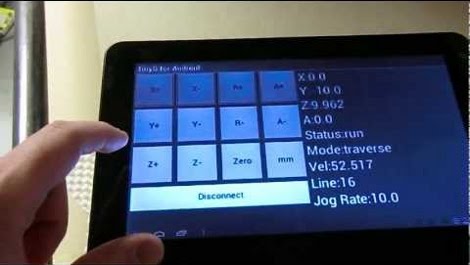
[Matt] is the proud owner of a JGRO-based CNC router and he’s been working on a way to control it without a computer. What he came up with is a way to drive the CNC machine using this Android tablet.

A big part of the hack is the CNC controller that he’s using. The TinyG is a board that can take commands via USB and convert them to instructions for up to six axes. In the video after the break [Matt] shows off a direct USB connection as the control method. This is the most interesting part to us, but the system can also be run through the network with the assistance of a computer feeding commands to the TinyG. This second method means the Android controller would be wireless.

A trio of repositories host the code [Matt] is using. From the demo it looks like the Android app has no shortage of features.

Continue reading “Android CNC Controller”

An Appeal To Microsoft To Consider The Hackers

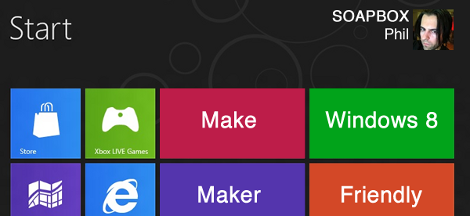
[PT] is climbing up on his soapbox again to make an appeal to Microsoft. We think his editorial is well-aimed; appealing for better support for hobby electronics in Windows 8.

This is of course not strictly a hobby electronics feature request, but deals with how a lot of USB devices are treated by the upcoming operating system. Specifically the Communications Device Class, which is a protocol used by most hobby projects (and boards like the Arduino) that take advantage of the Universal Serial Bus. The way communications are handled by OSX and Linux makes this a snap, but not with Windows 7. [Phil] post specifics about how the former two operating systems handle these communications, and how Windows 8 could be tweaked to fall in line with them.

It means not installing drivers. Drivers…. for a USB device. Think about that for a while and then ask yourself which decade Windows 8 is being developed in. Thanks for pointing this out [PT]. We often get spoiled using a Linux box and don’t realize the hassles sometimes found on other systems.

Self-Powered USB Host Mode On The HP Touchpad

touchpad-usb-host-power

[ften] was having plenty of fun running Android on his HP Touchpad, but he soon discovered that the tablet’s micro USB port didn’t provide enough juice to his peripherals when running in host mode. He started digging around and found the perfect means of providing the extra power while maintaining the device’s stock appearance.

He pried the tablet apart and installed a small DC step up converter in an empty space located behind the Touchpad’s dummy SIM slot. After wiring the converter to the battery terminals, he installed a micro USB adapter in the empty slot, which fit perfectly after a bit of sanding.

He hacked together a USB Y-cable to pull power from his new USB jack, while retaining the existing data connection through the original USB interface. You can see the results of his work in the video below, and while [ften] hasn’t said how much his mod affects the Touchpad’s battery life, he has confirmed that it will still shut down gracefully once you inevitably sap the battery dry.

Continue reading “Self-Powered USB Host Mode On The HP Touchpad”