Sustainability Hacks: Solar Battery/smartphone Charger

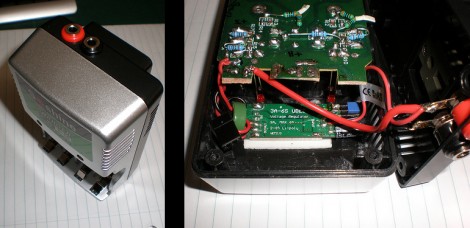
[Michael] took a battery charger meant to be connected to mains power and converted it to work with a solar panel. This was a traditional 4 cell charger which charges the batteries in pairs. He kept that functionality, but added USB charging with a special over-current feature. That’s because his Android phone has a fast and slow USB charging mode. The slow mode makes sure that it draws 500 mA or less to stay within USB specifications. But the fast mode draws more current when the phone detects that the USB connection is attached to a wall charger. [Michael] added a switch that patches a pull-up resistor to the data line, signaling to the phone that it’s okay to switch to fast charging mode.

As for the power supply itself, you can see that [Michael] snapped off the part of the circuit board that housed the original regulator. He’s added his own 5V switching regulator which offers a wide input voltage range. This is connected to two banana plug sockets which can be connected to the solar panel.

SNES Gamepad Coversion To USB

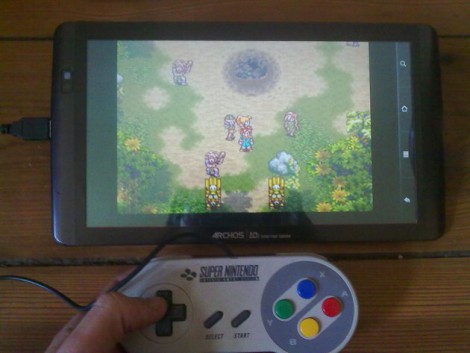
[Kekszumquadrat] wanted to use a classic controller to play emulator games on his Android tablet so he set out to convert an SNES gamepad to connect via USB. He found an old USB keyboard at a yard sale for about 3 Euros. He knew that the emulator he prefers has the option of remapping all the inputs to keyboard keys which means a USB keyboard has all of the electronics he would need to pull this off.

Once he had separated the keyboard circuitry from the case [Kekszumquadrat] plugged it into his Linux box and used Xev to establish how the keyboard matrix is set up. Xev is a common package that opens up an active window on the X desktop. When run from command line, any events that happen to the window will be echoed along with verbose data about that event. When it comes to keypresses, you’ll get the keycode you need. He simply shorted columns and rows until he found the desired mapping, then it was on to soldering.

The SNES controllers are very simple devices. As we’ve seen with previous projects, they use a serial-to-parallel shift register to gather button data and send it to the console. [Kekszumquadrat] simply soldered between button traces and keyboard matrix contacts. Once he finished, the keyboard parts were tucked inside of the controller case and he’s left with a USB controller that appears to be unaltered.

Arduino Releases New Products; Help Them Develop ARM-based Arduino

The Arduino folks took advantage of Maker Faire New York to announce their new line of products. There’s several interesting new additions to their product line.

They’ve got a WiFi shield in the works that utilizes a module from H&D Wireless in conjunction with an AVR32 processor to take the workload off of the ATmega chip on the Arduino board. It even has room for you to run your own code on the shield’s processor.

Notable (but of less interest to us) is the 1.0 release of the IDE and the development of a new low-cost board. That hardware is intended to make USB device development easier for those already familiar with the Arduino platform.

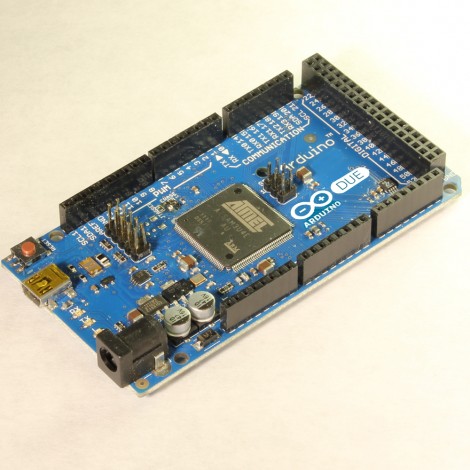
But the big news that caught our eye is the announcement of an ARM Cortex-M3 Arduino called the Due (we already wish that had been named something different just for search term contrast to the Duemilanova). The hardware hasn’t been finalized yet, although you can see a prototype in the picture above. They want community input on the final touches, so get in there and give them a hand!

[Thanks Insapio and Tom]

ATtiny Hacks: Simple USB Temperature Probe

ATtiny Hacks Theme Banner
simple_attiny_usb_temperature_probe

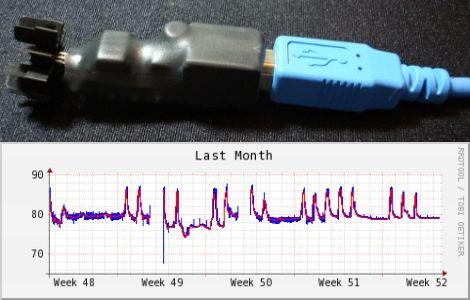
[Dan’s] office is awfully hot, but he needed some real temperature numbers that he could show the building management office to justify opening a maintenance ticket. He had seen some simple temperature probe examples online, and decided to build his own using a small AVR chip.

Based off a similar temperature monitoring example called EasyLogger, his temperature probe uses an LM34 temperature sensor, which is wired to an ATtiny45. The ATtiny communicates with his computer using the Ruby-USB library in conjunction with a bit of Ruby code he put together. Once the data is obtained, all of the temperature measurements are logged and graphed using RubyRRDTool.

As you can see by in the image above, his office is far hotter than it should be, so we’re pretty sure he’s happy to have actual measurements to back up his claims.

If you are looking to make a small temperature probe of your own, his code, schematics, and links to all of the tools he used in the project are available on his site.

Microchip Puts Up Two $1000 Prizes For USB And TCP/IP Stacks!

microchip_call_for_open_source

A couple of weeks ago we put up a post titled Addressing Microchip’s open source problem where we talked about some of their shortcomings as far as open source code goes, specifically the TCP/IP stack and the USB stack. The comments were predictably fairly negative. The interesting part here is that Microchip actually listened. If you read through all of the comments, you will get a bit of an inside look at what is going on internally at Microchip. At the very end, [Marc] from Microchip left a couple of comments outlining a pair of prizes for independently ported stacks for TCP/IP and USB. Microchip can’t fully open the ones that they have because of legal reasons so they need the help of the development community and they are putting up $1000 for each one to prove that they are serious. If you follow this link you will arrive at a page outlining the rules for the contest.

The gauntlet has been dropped! Do you have chops to pull this off and earn yourself a cool $1000?

CheapStat: An Open-source Potentiostat

A commercial potentiostat can cost several thousand dollars, but the CheapStat is an open source project that makes it possible to build your own at a tiny fraction of that cost. It is possible to build one for less than $80, breaking down the cost barrier faced by many labs that would like to have this test hardware.

A potentiostat is used to measure electrochemical properties. To give you a few examples of what it can do, the hardware can measure arsenic levels in water, Vitamin C concentration in orange juice, Acetaminophen concentrations in over-the-counter medications, and a bunch of other less easily explained tests having to do with chemical compounds and DNA.

The device makes use of an Atmel XMEGA microcontroller and connects to a computer via USB. A Java program grabs that data from the hardware displaying test results on your choice of computer platforms. If you’re looking for all the gory details you won’t be disappointed by their journal paper.

Dedicated Hacker Adds USB Capabilities To His Commodore 64

usb_basic_commodore_64

To say that Commodore 64 aficionados are a dedicated group would be quite the understatement. There are still quite a few individuals that spend all sorts of time building and programming for the C64 in order to make using them enjoyable, and to keep up to date with current technologies.

[Luigi] is one of these people. He wanted a way to easily transfer files between his PC and his C64 that was fast but cheap. To [Luigi], this meant USB file transfers, which would take quite a bit of work to implement. He started out by rolling his own BASIC interpreter which could eventually be extended to support USB. Using his BASIC-Plus interpreter, he was able to implement a USB Kernel, which could transfer files at 1.2 KB/s via a USB to serial adapter. Wanting faster file transfers, he built a USB to parallel adapter, which resulted in a nearly 8-fold increase in speed.

So, if you have been dying to have USB capabilities on your C64, look no further, [Luigi] has just what you need!

Continue reading to see a quick video of USB-64 in action.

[Thanks, Matt]

Continue reading “Dedicated Hacker Adds USB Capabilities To His Commodore 64”