Quick & Dirty USB Phone Charger

usb_phone_charger

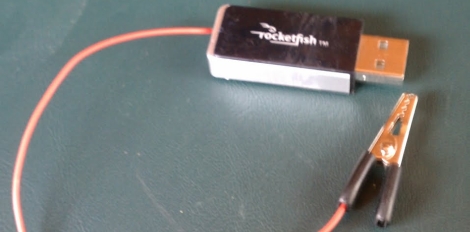
Hackaday forum member [Dan Fruzzetti] wrote in to share a simple, yet useful hack he built just the other day. He and his wife both have Evo 4G smartphones and they were pretty disappointed in the lack of portable charging solutions available.

Instead of buying something and modifying it to his needs, [Dan] decided to build a quick and dirty charger instead. His ghetto-mintyboost was built into a cheap project box he found at Radio Shack, which is stocked with a set of four D-cell batteries. The batteries were wired in series and connected to a pair of salvaged USB ports mounted on a small piece of protoboard.

Knowing that most portable devices get 5.7v from their chargers already, he was not worried about hooking his phones straight into the 6v battery pack he built. He says that the phones actually charge pretty quickly, and that he estimates he should be able to get about 50 charges out of the box before he needs to swap the batteries.

This is not a complex hack by any means. It is quick & dirty, solves an annoying problem, and it’s dead simple to build. That’s exactly why we like it.

Controlling Weapons With Kinect

kinect_rocket_launcher

It was only a matter of time before someone would figure out how to weaponize their Kinect. Hacker [Jonas Wagner] was fiddling with his Kinect one day and thought that it would be cool to launch missiles simply by gesturing. Not having any real missiles on hand, he settled for controlling a USB-powered foam missile launcher instead.

He mounted a webcam to the top of his rocket launcher to record video of his victims, and with a bit of Python along with the libfreenect ilbrary he was well on his way to world cubicle dominance.  The Kinect waits for him to pull his hand out of its holster in dramatic fashion, monitoring his movements for tracking purposes. Once the launcher has been armed, the Kinect watches for [Jonas] to pull his hands out of frame before firing the rocket.

We doubt you’ll see this thing controlling weapons for DARPA any time soon, but it’s cool nonetheless. The launcher seems to move a touch slowly, but we’re guessing that with an uprated servo, things could be a bit snappier.

Continue reading for a quick video of the Kinect-powered rocket launcher in action.

[via KinectHacks]

Continue reading “Controlling Weapons With Kinect”

Fan And Vent Holes Prevent Sweaty Gaming Hands

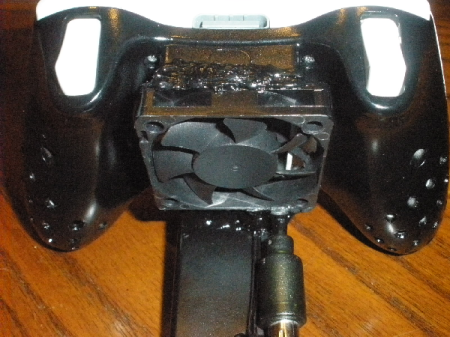
[Happy Dragon] grew tired of wiping moist palms on his pants during intense gaming sessions. To combat the issue he tried adding a fan to an Xbox 360 controller that he had sitting around. He pulled a small PC fan from a Nyko Airflow and glued it over a hole he cut into the battery compartment of the controller. This forces air into the body of the unit, which exits through holes he’s drilled in the wings. He added an external battery pack to power the controller since the original batteries were removed before the fan was glues in place. The fan itself isn’t powered from this external pack, but requires a USB connection that he attaches using the disconnect from a wired Xbox controller.

After some testing, [Happy Dragon] seems… happy… with the results. He tells us that his hands are not sweaty, and that he finds he’s not gripping the controller quite as tightly as he used to so as not to block the vent holes. We can see a couple of issues with this design, like the holes filling up with crud, or the fan blowing dust and dirt into the controller (we’re thinking about the analog sticks). But perhaps a future design could create dedicated ducts inside that keep the electronics isolated from the cooling. Or maybe the exhaust from portable console builds could be used in a similar way?

You’ll notice that there’s no direct link for this hack. [Happy Dragon] didn’t write a post about this, he just sent us a half-dozen images and his description of the project. Check out the rest of the pictures after the break.

Continue reading “Fan And Vent Holes Prevent Sweaty Gaming Hands”

Stirring Plate From USB Enclosure

[Loreno Minati] built his own stir plate out of a hard drive enclosure. It’s the exact same hack as the one we saw a few weeks ago. A magnet was glued to the center of a computer fan, which causes the magnetic capsule inside the beaker to spin. This creates a vortex, evenly mixing the liquid.

Using a hard drive enclosure is a brilliant idea. It’s designed to sit in plain sight so you get a very nice finished look. It’s also exactly the right size for the fan itself. A potentiometer mounted in the cap of the enclosure allows for variable speeds, and the DC barrel jack is being used for the power source. Now that we think of it, this may be the best use of an external HDD enclosure we’ve ever seen (even eclipsing its original purpose). Check out a video and image gallery of the project after the break.

We’ve categorized this as a beer hack since stir plates are often built by hobbyists for growing yeast starters used in home brewing.

Continue reading “Stirring Plate From USB Enclosure”

Writing Python Drivers For Input Devices

[Stealth] put together a post explaining how he writes drivers for input peripherals. He’s using Python which makes the process fairly painless (we’ll get to that in a minute) but the value of his post is in the explanation surrounding how to interpret the data. Once you know how the communications are coming in from a device you can write the driver using any language you want. [Stealth] wrote in to let us know about this post after reading the PlayStation 3 Sixaxis controller sniffing hack. He’s pretty much doing the same thing but the background information is much more bountiful.

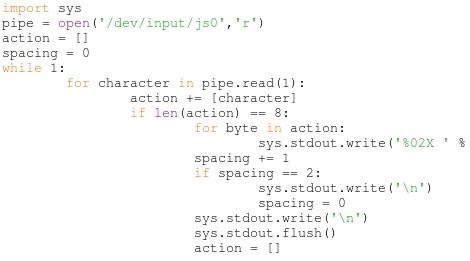
There are a couple of prerequisites to the process. First, [Stealth] is working in a Linux environment. That’s not to say you couldn’t do this on another OS, but you’re going to need to do some research to find out how to tap into the data stream from the device. Secondly, the input you are working with must already be set up and working on the machine. That means if there isn’t any support at all for the peripheral (in this case a USB joystick) you’re not going to be able to sniff the commands. That being said, a short Python snippet is all you need to dump the raw data coming in from the device. With data in hand it’s time to do some pattern hunting. As you start to figure out the size and scope of the incoming packets you can try out your own code to make sure you’ve got it right. Check out the demo video after the break which features a joystick button mapper written in Python.

Continue reading “Writing Python Drivers For Input Devices”

The Basics Of Controlling An Arduino With PHP

You can easily add Internet-based control for your Arduino if it is close enough to your server to be connected via USB. This tutorial will give the basics you need to get it working.

The gist of this method involves a webpage that includes PHP elements. When one of those elements is manipulated, a command is sent via serial connection to the Arduino which then reacts based on what it received. This example uses an Ubuntu box that is running an Apache server. The Arduino sketch sets up the serial connection and then listens for incoming traffic. Whenever it receives a non-zero character an LED will blink. On the server side of things you’ll need to make sure that the system user that runs Apache (www-data) has permission to write to a serial port.

This base example may seem extremely simple, but there’s no end to what you can build on top of it. Different PHP events can be added to push new commands over the serial connection with matching test conditions added to the sketch.

[Thanks Jarryd]

Cellphone Charger Has A USB Port Forced Upon It

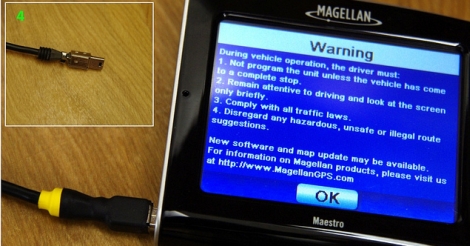
We still can’t figure out why a standard charging scheme hasn’t been developed for handheld devices (other than greed). Certainly we understand that many devices have different electrical needs as far as voltage and current are concerned, but we still long for the ability to use one charger for many different doodads. [Rupin] is trying to narrow down the number of dedicated chargers he uses by adding a USB charging port to his Nokia cellphone charger. Since the USB standard calls for regulated 5V a hack like this can often be done just by patching into the power output coming off of the voltage regulator in the plug housing of the device. [Rupin’s] charger had 5V printed on the case, but when he probed the output he found well over 8 volts. He added a 7805 linear regulator to get the stable output he needed, then cut a hole in the case to house the connector.

Since [Rupin] wants to use this as an iPod charger he couldn’t just let the two data lines float. Apple uses a specific charger verification scheme which requires some voltage dividers to get the device to start charging.