Adding Wireless To The Raspberry Pi

For those of us who haven’t received their Raspberry Pis yet, it may come as a bit of a shock to realize the RasPi doesn’t have an on board WiFi adapter. While the Model B RasPi has an RJ45 Ethernet plug, but the Model A must rely on USB-bound networking dongles. [Mike] over at Mitch Tech put up a great guide to using a Realtek WiFi dongle with his Raspberry Pi.

Stock, the standard Debian install recommended by the folks at Raspberry Pi has the drivers for the Realtek WiFi adapter, but no firmware. [Mike] goes over how to get the firmware for this series of WiFi adapters to keep the kernel from complaining. Interestingly, [Mike]’s instructions also work for a slew of Realtek-based wireless dongles, so the installation instructions should work for a bunch of adapters available from DealExtreme or eBay.

[Mike] also has a guide for installing Quake 3 on a RasPi. Combine these two builds and you’ve got the perfect setup for a Raspberry Pi LAN party. Anyone want to host?
Putting An Atari POKEY In Your Pocket

The Atari POKEY served as the main I/O chip on the venerable Atari 400/800 and XL/XE 8-bit computers. While a chip designed to get voltages from game paddles and scanning a matrix of keyboard switches wouldn’t normally be remembered 30 years later, the POKEY had another function: generating very, very distinctive music and sound effects for those old Atari games. [Markus Gritsch] wanted a portable version of the POKEY, so he emulated one on a modern microcontroller. Now he’s able to take those old Atari chiptunes where ever he goes.

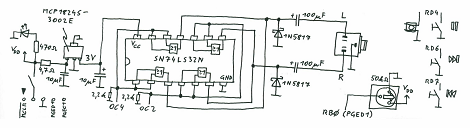
The build uses the Another Slight Atari Player by emulating a 6502 and POKEY chip inside [Markus]’ PIC32MX-based microcontroller. There’s not much physical hardware [Markus] had to deal with – the board is built on a QFP proto board [Markus] picked up with a few buttons and a jack added for some simple I/O.

This isn’t [Markus]’s first attempt at portabalizing chiptunes – last year, we saw a truly awesome portable SID player that used the same PIC32 microcontroller and an emulated 6502. Between the Atari SAP Music Archive and the High Voltage SID Collection, [Markus] has more than enough chiptunes for days of listening pleasure.

Nook Touch Becomes A Desktop Computer

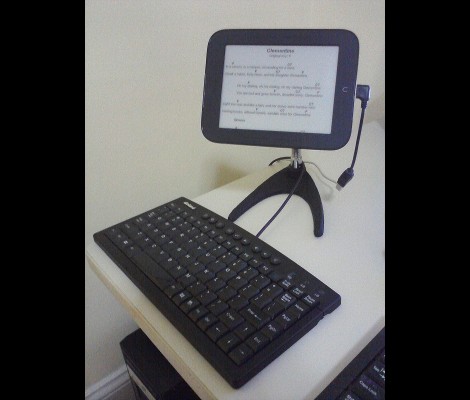
It looks like [Renate] has been pounding out hack after hack on her Nook touch. It stands on its own now thanks to a tripod bracket hack which is the most recent work she’s done. But there are bunch of other modifications, all of which are linked after the break.

We believe that this is meant for displaying lyrics as she sings and plays along. To that end there’s a foot pedal attachment that lets her control the device. It connects to the Nook via a USB hub that allows her to interface multiple devices at once. This in itself is also a hack, as host mode isn’t an out-of-the-box feature for the device. In order to avoid having to disconnect everything in order to top off the battery, she also manged to get the thing to charge from the USB hub. In fact, with all this in one package she’s basically got herself a desktop computer.

Continue reading “Nook Touch Becomes A Desktop Computer”

Penny Auction Hacking; Put On Your Statistician’s Hat

Penny auctions are where you must pay a fee each time you bid. Certainly this alters the behavior of the bidders, but there doesn’t seem to be a lot of info about exactly how. In preparation for an analytics degree, [Jay] decided to study penny auctions and see if he can win a contest based on his findings. Now he’s not necessarily looking to make a living by gaming the auction system. But we were interested to see how he went about getting information, and what he has to say about the results.

Since there really isn’t a large body of data available, he scraped it himself. You’ll want to page through his posts on the topic, but basically he’s using Python on a fast machine. This is made quite a bit easier through the use of Selenium RC, but it also means he’s got a lot of instances of Firefox running to track multiple auctions. Scraped data is stored in CSV files, and posted to his front page daily.

From what he’s captured so far [Jay] suggests that time of day, type of auction, and several other factors dictate when you should bid to attain the best deals.

Embedded Linux Meets Arduino With The Rascal Micro

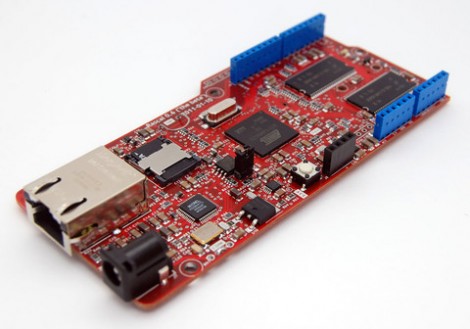
Behold the Rascal Micro. It’s running embedded Linux and has a dual-row of pin headers which probably seem pretty familiar. The idea here is to bring Arduino hardware (ie: shields) to a party with a powerful web server.

The image above is the beta version of the hardware. What’s being shown off in a recent Engadget demo is a version that slides two USB ports in between the barrel jack and the NIC. This makes it easy to jump over to wireless with the use of a USB dongle, or you can figure out what other peripherals you want to include in your project.

The novelty here is that the web server included a built-in editor. So not only can it serve you a webpage to control hardware or display sensor status, but it will let you edit the interface without needing to reflash anything.

The price rings in somewhere around $100-150, and like the popular Raspberry Pi board, you can’t get your hands on it right now.

Mini Maker Faire In Eugene, OR This Weekend

[Rick Osgood] wrote in to tell us about the Eugene, OR Mini Maker Faire going on this weekend. The event is being hosted on the grounds of the Science Factory with a lot of help from the Eugune Makerspace

So far, Steamworks Cycles, the South Eugene Robotics Team, Oregon Rocketry and Eugene Rocketery will be at the Maker Faire showing off their skills and wares. It looks like an excellent place to spend the day, with events hosted by the Science Factor and the Eugene Makerspace all day long.

Tickets are $4.00 a pop; easy enough on our wallets, but unfortunately the official Hackaday transporter pad won’t be ready in time for this weekend. If anyone would like to write a blog post about the sights and sounds of the Eugene Mini Maker Faire, send it in and we’ll put it up.

Raspberry Pi Finds Itself Inside A TRS-80 Model 100

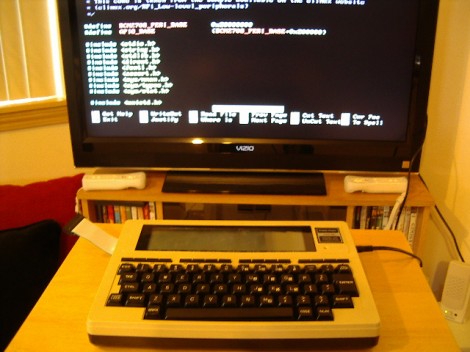
This TRS-80 Model 100 is a lot more powerful than you might think. That’s because [Karl Lunt] is using it as an enclosure for his Raspberry Pi board. Since the ARM-powered device comes sans-enclosure it’s fun to see a retro choice like this one. And having had to go out and buy a USB keyboard to use our own RPi, we appreciate [Karl’s] solution for using the original keyboard as an input device.

Above you can see that he’s using an LCD tv as the display. For now that connection is made using the composite video output, which explains the fuzzy image. To the right of the TRS-80 a standard wall wart connects to the barrel jack to provide power. [Karl] scrapped a USB cellphone charger in order to connect from the barrel jack to the micro-USB jack on the Pi board. The ribbon cable to the left lets him get at the I/O header without opening the case.

In order to use the keyboard he patched into it with a Teensy board. That connects to the USB port on the RPi, sending HID keyboard commands based on what it received from the user. We like this option as it give you the ability to pre-process keystrokes (ie: you can code your own custom macros that the Teensy will listen for). Right now the Model 100’s LCD screen isn’t hooked up but he may add that in the future.